Home Blog Page 403

Microsoft Wireless Mobile Mouse 1850 Review

0

This time we are fulfilling a request of our fan. As per the request we reviewed a very basic mouse for the intention of basic requirements. So a very low budget mouse which will do all the tasks a mouse should do. Let us see the features including the design and the performance of this mouse.
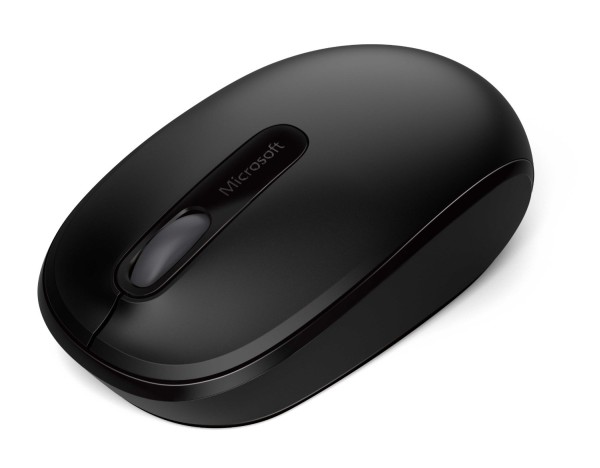
Microsoft Wireless Mobile Mouse 1850

Microsoft Wireless Mobile Mouse 1850 Features

Design

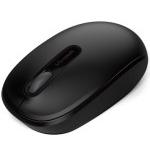
Looks wise it is not that cool. But yes, it will fit in below your palms perfectly. I think that the aesthetic appearance of the mouse could have been improved. Anyways still the mouse is available in other colors which will make you buy it. Also the weight of the mouse is 5.4 ounce. To be precise it is 153.09 grams. So its weight is normal. Gaming is also fun, but for professional gamers, not recommended. The product is 5.5 x 4.9 x2.4 inches in dimensions.

User Interface

It is a wireless mouse, so it is very useful to operate your computer/laptop from a long distance in your living room without any hassles. It is comfortable and easy for portability. The design is constructed in such a way that both right and left handed people will enjoy using it. This mouse does need an AA battery for operation as it is a wireless mouse. The battery lasts for a long time. The scroll wheel will help the user for easy navigation.
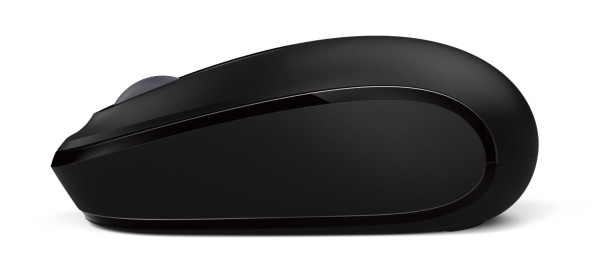
Microsoft Wireless Mobile Mouse 1850

Performance

The mouse is very easy to use. The performance for me is that it just does the work. As I said earlier not good for gaming but a good one for any professional. Even for AutoCAD users it will be beneficial. It has a built-in mini transceiver.

Conclusion

It is an ideal device for all the professionals. So both Right and Left handed users will be able to comfortably use it. The wheel is also quite awesome, so scrolling is smooth while navigating the web pages. I liked the device from a good brand at a surprisingly awesome price. It is only available for $14.95


IPL coverage can be now enjoyed with your UC Browser – Partners with leading Portals

0

Indian Premier League(IPL) is going to start from tomorrow. The excitement is all around India. So why not things get spiced up for you. UC Browser has taken initiative for offering you or rather taking you close to the IPL matches. They have partnered with some of the leading information providers of IPL. So let us have a look of what you can be benefited from it.

IPL coverage

IPL coverage can be now enjoyed using UC Browser

Yes, the so called India`s most popular mobile browser has done co-operation with the mega giants. These include TOI, Cricbuzz, NDTV Cricket, Cricketnext and Yahoo Cricket. So it will help the user to get all the information related to IPL 2014 on their browser. We can expect a special version of the UC Browser which will integrate all the IPL information. So this will help our viewers to easily access the IPL content which includes scores, live commentary, previews, news, stats, interviews, videos, photos, etc.

So all the IPL Action in a single browser. So there will be no need for you to use different apps for scores, news and other stuff. You will all get it in one place. A very nice initiative by UC Browser and all the cricket fans including me will surely take advantage of this application.

IPL coverage

This partnership will also help the partners to get new and huge audience of UC Browser. For your information UC Browser(for mobile) has a 34% market share in India. Which is huge. Now a days people love to access internet from their mobile. So you can now access to IPL content from anywhere all at one place. It is good to see a partnership to provide win-win situation to all, most importantly to benefit cricket fans!

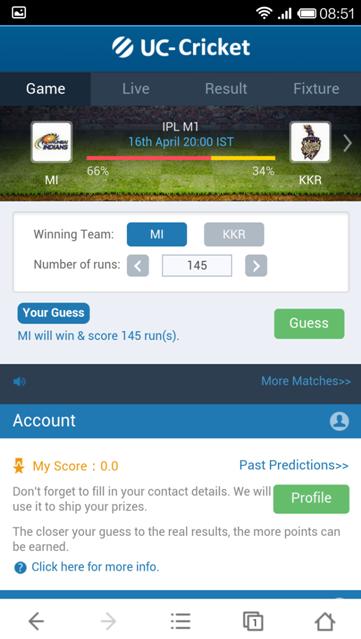
You can access the IPL match scores with ease. A cricket-sport folder will be visible on the homepage of the browser.  So an easy access to the scoreboard will also give you more options like live commentary, news, photos, videos and stats.  A user can also guess the amount of runs a team will score in a particular day. If the guess is correct then the user will be awarded points. Also the more your guess is near the actual score more the points.

So a very user engaging initiative.  There is also an add on which can be used to get the live feeds directly on your home screen of your device. So what are you waiting for download the UC Browser for Android. Yes its free!

Garmin Forerunner 610 watch review

0

It looks like a normal watch but it has a Pandora of usefulness. So are you looking for a trendy watch which will be very useful for you? If yes then this watch offers more than showing correct time. It has many features. So let us start knowing about them.

Garmin Forerunner 610

Garmin Forerunner 610 GPS watch features

Design

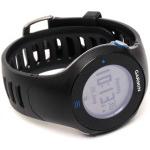
Yes it has a built-in GPS. So this GPS works accurately and stores a lot of useful data. The watch is capable of storing a huge amount of data. The Garmin Forerunner 610 looks like a regular watch. It does look similar to the old fashioned G-shock. The watch is 1.42 cm thick. The metal rear case makes it very comfortable to wear. The 4.6cm wide face of the watch is standard and the LCD has a diameter of 2.5 cm. It is very easy to read the time. The smaller text is difficult to read unless you get the watch closer.

The watch has 3 physical buttons. These include a power/backlight button, start/stop and lap buttons. This is like a stopwatch functionality added into the watch. The touchscreen of the watch is resistive type. So a gentle touch will not help. A soft tap will not workout well. So the user will have to use it with a bit force.

User Interface

There are 4 main screens which are easy to navigate. The man one is while doing an exercise. The normal one of time/date. The other two contain a heart rate read-out screen and a screen with GPS information. The other one is with a page of customizable workout stats. The watch is for fitness freaks plus the ones who love GPS tracking. So a very good combination, I must say.

It is a bit difficult to access the tiny icons, so for that you should use your tiny fingers and not the thumb. I hope that they take some learning from other smartwatches who have large icons which are easy to access. The GPS tracker helps to track your running or cycling performance or speed.

Garmin Forerunner 610

Performance

From the tests it is evidable the that the watch is exciting to use with in the outdoors if you want to make maximum use of the GPS. So if you are in the outdoor the watch easy gets locked with the satellite and tracks your moves. But if you are inside then it is very difficult to do so. So for that go out an run and use this watch. It works fine without any problems. So I believe that this is a fitness tracker+movement tracker+Time depicter gadget.

So just hit the start button and start doing your exercise. And let this gadget do all the work of collecting the data. Just before the interval or during the interval you can hit the lap button. Then atlast the stop button when you want to end your exercise. The gadget can save upto 180 hours of data which is huge. Also you can move the data to your laptop/computer.

The heart rate monitor extracts a huge wealth of data. So very useful for all. There is an app called as Garmin Training Centre which helps you to do some custom workouts. You can also sync it with Google Earth and show off your route via GPS to others.

Battery

The battery of the watch if once charged will make a long 8 hours battery life, if you use all the features extensively. If you do not use the GPS tracker then you can use the once charged battery for a month with daily 1 hour of exercise. So it has a very good battery backup. I liked it! Also who don`t want a rechargeable battery for their watch.

Conclusion

This watch is essential for fitness freaks and for casual workouts. Also the GPS tracker is a state of the art. Apart from it not being waterproof and the touchscreen not that responsive, the watch performs well. The user interface is also friendly. We liked it! Buy it now for $280.99

Plex for Android App review

0

Are you always in stress when you have to keep on moving you media from one phone to another. Or from your desktop to mobile/tablet. There is an app for it to manage your media. You can do a lot of things using this app. Play and manage the media in a very useful manner. So why not see the features of this application.

Plex for Android

 Plex for Android Features

This android app is capable of handling your media on various devices. You can interact with home computer`s Plex Media Server. Yes, so you can access the media of your computer from your mobile. The problem with mobile phones is that they have very little memory to serve your purpose. But on home computer you store a lot of media. So why not access it from mobile. Play your favourite music or stream the videos. Yes, this can be done by Plex.

Plex for Android

You can also view your photos and stream videos. Music library is easy to access. The online content can be fetched through many available Plex Channels. The app basically organizes your personal media. You can keep your media anywhere and you can access it from any device. The Plex media server will help you do so. The Plex app makes your media a new look with artwork, descriptions and many other information. The app converts the media to play on any device. So no compatibility issues.

Also Read: Notepad Pro for Android Review

You can share the media with you beloved ones. Also fling, browsing and controlling you media will be easy. You can sync the media in such a way that you can view it offline too. The best part is that you can sync your media from Drop Box, Google drive and you can stream it offline. You can access many online channels like the Revision3 and TED. The videos can be queued from youtube and vimeo and can be watched offline.

It integrates easily to iTunes and can give you access you your huge music database from anywhere. So what are you waiting for Buy Plex for Android for only $4.99 $0.99.

Seagate FreeAgent GoFlex Desk v2 External hard drive review

0

This is one of the most talked about external hard drive. So why not review it and know about what it is all about. The experience will tell you  a lot about this hard drive. Yes, it is available in sizes from 1 TB to 4TB. We will talk about the higher end model for sure. Now the need to store you data is increasing and also the storage capacity of the external hard drives.

Seagate FreeAgent GoFlex Desk v2

Seagate FreeAgent GoFlex Desk v2 Features

This is a Desktop hard drive. The device is said to be 4TB but it has a total storage space of 3TB+. Also it is a Platter type. The USB 3.0 will be helpful for faster transfer of data which is recommended. Who wants a slow data transfer and waste time? Well surprisingly this hard drive worked brilliantly fine. It has a lot of other features.

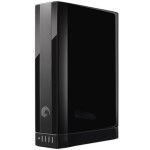
The weight of the hard disk is 2.38 pounds. The dimensions of this hard drive are 6.22 x 4.88 x 1.73 inches. The power source is external and the power adapter is also external. The hard disk is available only in Black color. The gadget is Energy Star compliant as well as RoHS compliant. The drive is fast, compact and quiet.

The LED available space indicator is very useful. So it will indicate the available space. The automatic backup and file encryption software is a plus point for this gadget. Still I do think that the hard disk is heavy, they should had made it a bit lighter. Buy it now for $169.99