Home Blog Page 402

Amazon Kindle Fire HDX 7inch Tablet Review

0

Hey are you looking for a HD Tablet? If yes then you must read this before you take any decision on buying any tablet. Yes it is a gadget from the Famous Amazon Kindle series. So you must be thinking that it is an e-book reader. Yes, it is but it offers more than what you think.
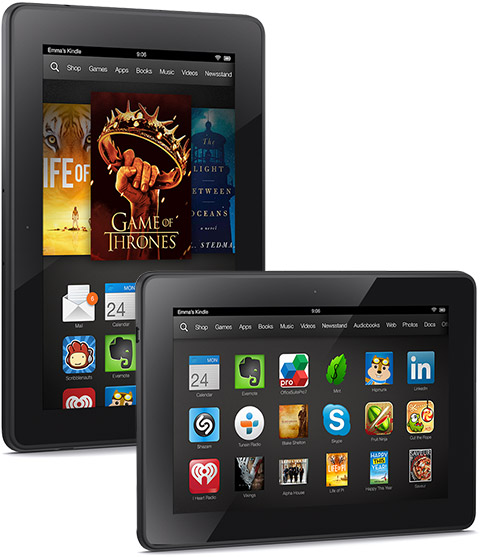
Amazon Kindle

Amazon Kindle Fire HDX 7inch Tablet Features

Design

The tablet looks are very average. It has 186 mm x 128 mm x 9.0 mm dimensions. The weight is 311 grams. So they have not done more improvement in the design as such, but the black colored model looks premium.

Display

This tablet is said to be beyond HD. It has a screen size of 7 inch. Yes that is useful. But a big screen resolution of 1920×1200 pixels which accounts to staggering 323ppi. This is very good. You can enjoy the videos with ease. The color accuracy is almost 100% accurate. A very improved brightness and reduced glare.

Processor

This tablet has a very awesome processor. Yes it is a 2.2 GHz Quad core Snapdragon 800 processor. This is a very good thing for multi-tasking. You can easily do the multi-tasking with this device. The staggering 2GB RAM will help you to make bigger apps run with ease. The Adreno 300 GPU will help you to enjoy the amazing graphics of this gadget.

Battery

Company says that this powerful processor powered tablet is able to have a battery life of 11 hours as per the company. But I do think that if you use heavy apps and games it will last for atleast 7 hours with ease.

Connectivity

The tablet has a dual band Wi-Fi connectivity. So faster streaming is expected. The tablet does not support any ad-hoc or peer-to-peer wi-fi networks. That is the only concern. But it can be useful in flawless 4G connectivity. The tablet has all the connectivity options which a user needs. The USB 2.0 micro B port will be helpful to transfer any useful data.

Productive and other apps

The productive apps are work well. The browsing experience is good. There is an office suite, e-mail, Gmail, Outlook and calendar support. You can enjoy over 100,000 apps and games from the Amazon store. Also the entertainment experience was good. User can enjoy movies and TV on this tablet.

Conclusion

A very penny worth tablet. It is the best HD tablet in the 7 inch category which is available in the market. So Buy now for $229

Freescale intelligent battery sensor launched

0

Today Free scale has introduced an intelligent battery sensor which combines MCU and CAN with flexible three-channel analog front end. This is the first AEC-100 qualified intelligent battery sensor with the CAN protocol. This is basically useful for the mission critical automotive and industrial applications.

Freescale intelligent battery

Freescale Intelligent battery sensor features

  • 16/32 bit MCU, 128K Flash, 8K RAM, 4K EEPROM
  • Integrated CAN protocol module
  • 3x 16-bit ADC for current, voltage and temperature
  • Support for up to four cells and up to 52V inputs
  • Multiple low-power modes
  • Multiple wake-up triggers (current, temperature, etc.)
  • Configurable hardware filters
  • Robust LIN physical layer
  • 7 x 7 mm 48-pin QFN package

This MM9Z1J68 battery sensor measures important battery parameters. These include the SOH – State of Health, SOC – State of Charge and SOF – State of Failure for early failure prediction. The MM9Z1J638 battery sensor is available for a resale price of $3.61 in 10,000 unit quantity.

So a very useful sensor which is advanced and also very cheap. This sensor will surely solve the battery failure issue. So a must use sensor by the automobile manufacturers. We will keep you updated about such innovative products only on Technary.

Flickr releases new version for Android, iPhone and iPod touch – Features include capture video

0

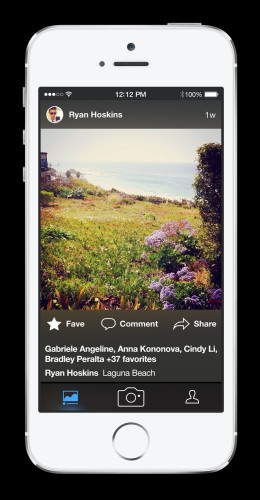
A very good news for the Flickr users. New versions for the Android, iPhone and iPod touch has been released. The features are very much exciting and useful for the user. So let us not waste any further time and start exploring these features.

Flickr releases Flickr releases

Flickr releases new app features

Capturing video

Yes this has been the highlight of the new version for the platforms. They seem to have listened and acted upon the feedback of the users. People now a days love videos and now Flickr is providing this feature to capture the videos. The user can Capture and edit HD videos in the app itself. The user can edit using the same live filters for photos directly from the app.

Fast performance – Easy search

They have used an intelligent search engine. The auto-tagging feature has been improved. User can get what he/she is searching for quickly. The geo location is also taken care of. The search has been improved immensely. Take an example. If it would take 3 seconds for a search in the past now it is reduced to 30 milli seconds. Yes this is revolutionary and Technary congratulates to the development team for this feat.

Flickr releases Flickr releases

Simpler navigation

The user experience is given some uplift for sure. They have kept it simple. It includes three features: feed, camera and photostream. The photostream seems to be redesigned. The user can share the photos directly on Facebook, Twitter or Tumblr.

Photo Data detailed

The details have been improved. The user can store from where was the photo taken. The camera and lens used if needed. It will help the photography skills and also to remember your sweet memories in the future. Well the app is available for free on Android, iPhone and iPod Touch. Enjoy it and let us know about your experience about the new Flickr app in the comments below.

Xerox Wide Format IJP 2000 and Xerox 570 digital printing equipments launched

0

Are you looking out to have a new digital printing equipment to serve your purpose? If yes then read this carefully as Xerox has launched 2 digital printing Equipments in the Print Expo 2014. This conference was held in Chennai.

Xerox Wide Format IJP 2000

Xerox Wide Format IJP 2000 Features

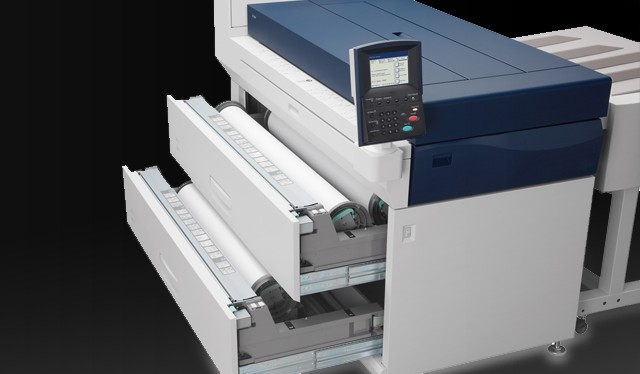
This equipment is catered to print large indoor posters, signages, banners, point-of-purchase graphics and also gives the printers the speed to produce the work in less time. The main feature of this equipment is to have faster print speeds. The company says that it is able to complete jobs 40 times faster than other comparable wide format systems. The speeds can go upto 420 square meters per hour. So very much electrifying. 10 meter banners can be printed in a single minute.

The movement of the print heads is stationery. So less the movement more the speed. It allows the paper to move under five print heads in one single pass. The preciseness of this gadget seems to perfect. Promotional displays and life-size photos can be done with ease. More choices provided to the user including the photo gloss, banner fabric, satin and backlit/spotlight films. The workflow software used in this equipment is Caldera GrandRIP+.

This software is easy to use. Also the user can have a personalized software called Xerox FreeFlow VI Design Express. The Adobe InDesign plugin can be used in it. Step by step instructions are also provided to the user. Now let us have a look at the features of the Xerox 570.

Xerox 570
Xerox 570

Xerox 570 Features

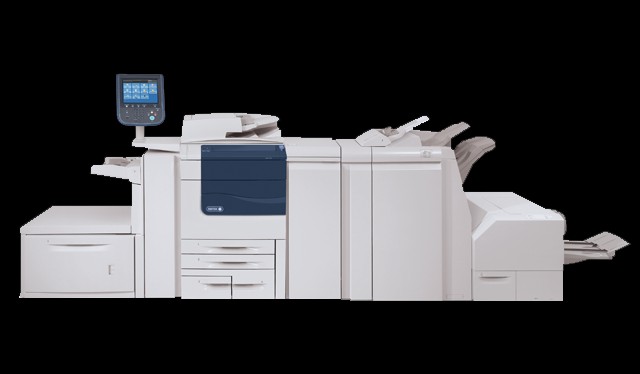
This is like a mega multi-tasking unit. The user can Print, copy, scan, fax or route files at the same moment. So multi-tasking will save a lot of time of the user. The scans previews are made on-screen to verify before print to avoid mistakes. It seems smart as it offers superior scanning with searchable PDF in one step. Xerox ConnectKey for SharePoint can convert the documents into intelligent data on which SharePoint policies can be applied.

Scan to PC Desktop is an easy to use feature where the equipment scans and directly saves a file on yout desktop. You can command print to this device from mobile devices including iOS, Android and BlackBerry OS supported phones.  Stay updated stay tuned on Technary.

QuickBooks Pro 2014 Review

0

Do you want to know about any software which will organize your finances? If yes then this is the right page you have accessed. Well you are now about to go on a ride for knowing more about this software closely and in detail. So let us see the features of this software.

Quickbooks Pro 2014

QuickBooks Pro 2014 Features

The software is useful to organize your business finances. It saves your lot of time by also organizing everyday tasks. So say bye to your personal assistant or tell him/her to use this software.  It tracks how your business is doing and also acting like a financial adviser. So one-click access to all your financial reports. But for that you will have to do a proper data entry work to put in all the figures and details asked by the software from time to time.

So an accountant`s friend I must say. Why do people use softwares? They do it to minimize their work. Yes this will help you to do it. Also it will track the tax and sales reports. The user can create the invoices and also have a keen look on his/her expenses. The software only asks is for the details that is the only concern. The details if entered then the rest of the work is done by the QuickBooks Pro 2014. I must say a very appropriate name for the software.

Quickbooks Pro 2014

You can also get reliable and all the complete records while paying the tax. So very useful while paying the tax. Everything is step by step setup and easy for anyone to use. There will be no accounting knowledge necessary. Just input the data by answering the questions. The best part in this software is that you can import the data from the spreadsheets. If you have loads of data saved in the excel spreadsheet then you can import it in this software with ease.

Also read: H&R Block Tax Software review

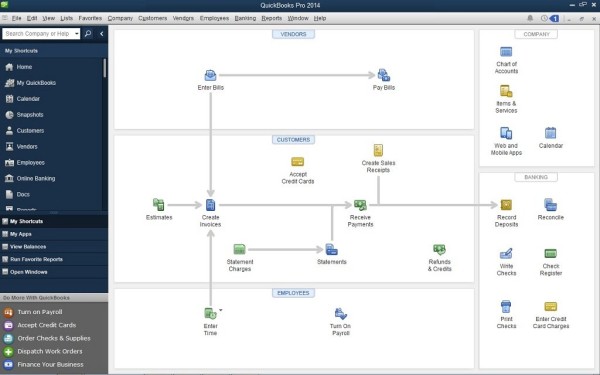
There are tutorials with the software which will teach you to create invoices and record expenses. Well if you are not happy with the software then there is 60 day money back guarantee, which I think you won`t need. You can easily manage the vendors and expenses of your business. It is very simple to enter, track and pay your bills using this software. The user can create statements, estimates and invoices. You can download the online banking transactions directly into the Quickbooks.

Quickbooks Pro 2014

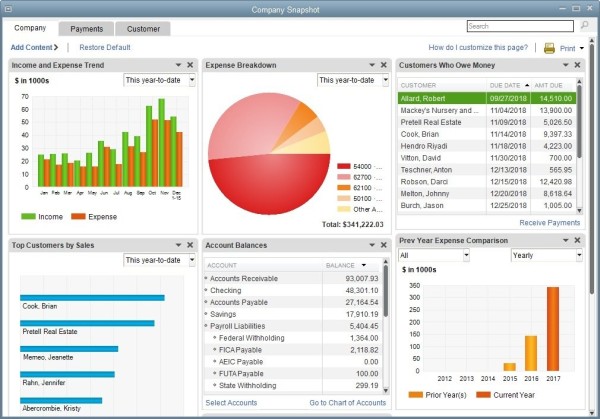
The user can get a real-time snapshot of your business activities with the Company Snapshot. There are various e-mail functionality. These include templates, multiple attachments your customer and job info. The e-mail history can also be seen by the customer. User can also check the banking transactions. Multiple bank accounts can be added to the feed. The user can view and categorize them with ease. The income tracker is very useful to see who has paid you and who hasn’t.

Also read: Turbo Tax Federal Review

You can also remind the customers to pay you if they haven’t. So I do think that this software takes care of your business if you input all the data. I liked the thinking of tracking the bounced checks and also reports in one click and get the customer`s feedback. This can be valuable as it may help in the improvement of your service.

Conclusion

I think all the business owners should buy this software. It is very easy to use and much beneficial in many ways. You should know the ROI(Return On Investment) on this software an I know it will be much more. So buy it for $189.96