
If you own a Flipper Zero and have started exploring its developer and maker capabilities, you may eventually run into one limitation: the standard device is compact, but you cannot expect it to do everything on its own.
That is where a Flipper Zero external module can become interesting.
The particular expansion kit covered in this guide combines an OLED display, Wi-Fi, 433MHz RF functionality, and GPS in one external development board. It also comes with a USB-C cable, silicone protective case, soft PU pouch, and hard carrying case.
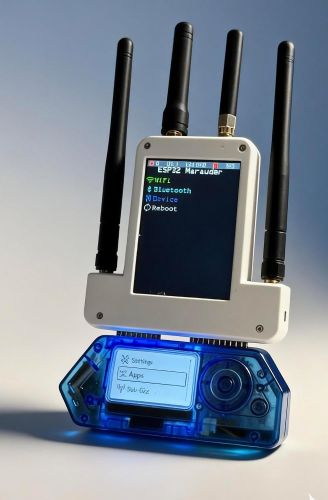
But does adding all these features actually make sense for your setup? Or are you simply paying for functions you may rarely use?
Let’s take a closer look before you decide.
Quick Summary: Flipper Zero External Module
This external expansion board is mainly aimed at developers, makers, tinkerers, and security enthusiasts who want to experiment with additional hardware alongside their Flipper Zero.
The kit includes:
- OLED display
- Wi-Fi functionality
- 433MHz RF functionality
- GPS
- USB Type-C cable
- Silicone protective case
- Soft PU pouch
- Hard carrying case
Best for: Developers, electronics hobbyists, makers, students, and users interested in authorized security research and open-source development.
Important: Wireless and RF features should only be used with equipment, networks, and signals you are authorized to test.
What Is a Flipper Zero External Module?
A Flipper Zero external module is an add-on board designed to expand the capabilities of the Flipper Zero ecosystem.
Instead of replacing the handheld device, an external development board provides additional hardware that can be used for experimentation, programming, and custom projects.
The module covered in this article takes an all-in-one approach.
Rather than purchasing separate accessories for Wi-Fi, GPS, RF experimentation, and additional display functionality, you get several of these features integrated into a single expansion board.
That can be particularly convenient if your interests change from project to project.
One weekend you might be experimenting with a wireless development project. Another time, you could be working with GPS data or exploring RF concepts.
Must Read : Ring Battery Doorbell Plus Review: Is It Worth Buying?
Flipper Zero External Module Features at a Glance
| Feature | What It Adds | Best Suited For |
|---|---|---|
| OLED Display | Additional visual information | Development and portable projects |
| Wi-Fi | Wireless development capabilities | Networking experiments and learning |
| 433MHz RF | RF experimentation | Electronics and authorized testing |
| GPS | Location-related data | Mapping and development projects |
| USB-C | Convenient wired connection | Setup, power, and updates |
| Hard Carrying Case | Additional physical protection | Travel and storage |
1. Integrated OLED Display
An OLED screen may seem like a small addition, but it can be surprisingly useful when working with development hardware.
A dedicated display can provide additional information while you’re testing a project, monitoring data, or experimenting with your own software.
You don’t necessarily need to depend on another screen for every development task.
For beginners, this can also make experimentation more visual. Instead of treating an expansion board as simply a collection of components, the display can become part of the project’s interface.
Why an OLED Screen Is Useful
An additional display can be helpful for:
- Showing project information
- Displaying sensor or development data
- Creating custom interfaces
- Testing software projects
- Building portable electronics projects
If you enjoy making your own hardware projects, having a screen built into the expansion board can be a useful convenience.
2. Wi-Fi for Development Projects
Wi-Fi is one of the more interesting additions for developers because wireless connectivity opens up an entirely different category of projects.
You can use compatible development environments and software to learn about networking concepts, connected devices, and wireless communication.
It can also be useful when building experimental projects that need to communicate with a network.
For beginners, this provides an opportunity to learn how wireless devices communicate in a controlled environment.
However, Wi-Fi capability should not be confused with permission to access networks.
Always work with your own equipment or a test environment where you have explicit authorization.
3. 433MHz RF Capability
The addition of 433MHz RF hardware makes the module particularly interesting for electronics enthusiasts who want to learn more about radio-frequency systems.
Depending on the project and applicable local regulations, the hardware can be useful for studying compatible RF devices, experimenting with signals, and developing educational electronics projects.
For example, electronics hobbyists can explore how compatible RF devices communicate and learn more about the principles behind wireless communication.
There is an important distinction, however.
Having RF hardware does not mean every signal or device is appropriate to interact with.
Responsible experimentation means staying within applicable laws and using equipment you own or have permission to test.
4. GPS Functionality
GPS adds another useful dimension to the expansion board.
Location data can be incorporated into suitable development and mapping projects, making the module interesting for makers who enjoy combining hardware and software.
For example, a developer could explore how location information is collected, displayed, or incorporated into a personal electronics project.
If you enjoy experimenting with sensors and data, GPS can make the Flipper Zero setup feel more like a small portable development platform rather than simply an electronic gadget.
Who Can Benefit From GPS?
GPS functionality may be useful for:
- Mapping experiments
- Location-based electronics projects
- Educational projects
- Data visualization experiments
- Portable development projects
The usefulness ultimately depends on the software and project you intend to build.
5. Complete Accessory Set
One of the strongest advantages of this particular kit is that the expansion board isn’t sold completely on its own.
The bundle includes:
- External expansion module
- USB Type-C cable
- Silicone protective case
- Soft PU pouch
- Durable hard carrying case
This can make the kit more convenient than purchasing several accessories individually.
Small electronics accessories also have a habit of becoming difficult to organize.
Having a dedicated storage case makes it easier to keep your module, cables, and other accessories together.
Must Read : Best AI Writing Tools for Bloggers (2026): Top Picks to Write Better and Faster
Why the Protective Case Matters
If you plan to carry your hardware regularly, protection isn’t just a cosmetic consideration.
A hard carrying case can help protect your equipment during transportation.
The silicone protective case provides another layer of protection against everyday scratches and dust, while the soft PU pouch offers a lighter storage option.
This makes the package more suitable for people who intend to actually carry their development hardware rather than leave it sitting on a desk.
Flipper Zero External Module vs Separate Accessories
There are two basic approaches to expanding a Flipper Zero setup.
You can purchase individual boards and accessories as needed, or choose an all-in-one expansion kit.
| Option | Advantages | Potential Drawback |
|---|---|---|
| All-in-one module kit | Multiple functions and accessories in one purchase | You may pay for features you don’t need |
| Separate expansion boards | Choose only the hardware you require | Can become more complicated over time |
| Standard Flipper Zero only | Simple and compact setup | Fewer expansion possibilities |
The right option depends heavily on how you use your Flipper Zero.
If you already know you want Wi-Fi, GPS, RF experimentation, and an additional display, combining those functions into one kit can be convenient.
On the other hand, if you only need one specific function, buying individual hardware may make more sense.
Real-World Use Cases
Learning Wireless Technology
Students and hobbyists can use compatible hardware and software to understand basic wireless concepts in a controlled environment.
The additional hardware provides more opportunities to experiment and learn through practical projects.
Firmware and Open-Source Development
Developers who enjoy experimenting with firmware can use additional hardware as part of their own projects and testing workflows.
The module can become another platform for learning how software and hardware interact.
Portable Electronics Projects
The combination of an OLED display, wireless hardware, and GPS creates more possibilities for portable prototypes and personal electronics projects.
For makers, this can be more interesting than simply adding a single-purpose accessory.
Maker and Tinkering Projects
If your idea of a good weekend involves testing hardware, modifying software, and learning how different components communicate, an expansion board can provide plenty to explore.
Must Read : Google Fitbit Air Review: Is This Screenless Tracker Worth It?
Pros and Cons of the Flipper Zero External Module
| Pros | Cons |
|---|---|
| Multiple functions integrated into one board | Not every buyer will need every feature |
| Includes useful carrying accessories | Adds some bulk to the setup |
| Interesting for developers and makers | Some features may require compatible software |
| OLED display adds another interface | Compatibility should be verified before purchase |
| Wi-Fi, GPS, and RF in one package | Advanced features may have a learning curve |
| Hard case makes transportation easier | The bundle may cost more than a basic setup |
Who Should Buy This Flipper Zero Expansion?
This module makes the most sense for someone who already owns a Flipper Zero and wants to explore development beyond the standard configuration.
Developers
Developers can use the additional hardware to experiment with software, firmware, wireless connectivity, and custom projects.
Makers
If you enjoy electronics and DIY projects, having several functions available on one board can be convenient.
Students
Students interested in electronics, networking, embedded systems, or wireless technology may find the module useful as a hands-on learning platform.
Security Enthusiasts
Security enthusiasts can use compatible hardware for authorized testing, education, and research.
Frequent Travelers
If you regularly carry your electronics equipment, the included hard carrying case can be a useful addition.
Who Probably Doesn’t Need It?
Not every Flipper Zero owner needs an expansion board.
If you mainly use your Flipper Zero occasionally and have little interest in development, wireless projects, GPS, or electronics experimentation, the additional features may not justify the cost.
This is an important point when evaluating accessories.
More features don’t automatically mean better value.
The best accessory is the one that solves a problem you actually have.
Things to Check Before Buying
1. Confirm Compatibility
Check that the specific expansion board is compatible with your Flipper Zero model, interface, firmware, and intended software setup.
Compatibility can matter more than the feature list.
2. Check What’s Included
If two listings appear similar, compare the complete contents of each package.
A hard case, silicone cover, pouch, and cable can add meaningful value if you would otherwise purchase them separately.
3. Look at Software Support
Hardware specifications only tell part of the story.
Before purchasing, verify that the software, firmware, libraries, or development resources you intend to use support the module.
4. Consider Your Actual Projects
Don’t buy an expansion board simply because the feature list looks impressive.
Think about what you actually want to build.
If you have several projects in mind that could benefit from Wi-Fi, GPS, RF, or an OLED display, an all-in-one module becomes easier to justify.
5. Compare the Current Price
Prices can change, and different sellers may offer different bundles.
Before ordering, compare:
- Current price
- Included accessories
- Compatibility information
- Shipping costs
- Return policy
- Seller reputation
Is an External Module Better Than a Basic Flipper Zero Setup?
For someone completely new to the Flipper Zero ecosystem, starting with the standard device may be the better approach.
Once you become comfortable with the device, an external development board can become more useful.
You’ll have a better understanding of what you actually want to build, which means you’re less likely to spend money on features that remain unused.
That’s why this accessory is best viewed as an expansion for an existing hobby, rather than a mandatory upgrade for every Flipper Zero owner.
Is This All-in-One Module Worth It?
The biggest appeal of this Flipper Zero external module is the combination of features.
Instead of adding one capability at a time, you get an expansion board featuring:
- OLED display
- Wi-Fi
- 433MHz RF
- GPS
You also receive several protective and carrying accessories.
For developers, makers, students, and experienced hobbyists, that combination can make the Flipper Zero more interesting as a portable development platform.
But it isn’t automatically the right purchase for everyone.
If you have no use for the additional features, a simpler setup could be a better investment.
Flipper Zero External Module FAQs
What does a Flipper Zero external module do?
A Flipper Zero external module adds additional hardware capabilities to a Flipper Zero setup.
This particular kit combines an OLED display, Wi-Fi, 433MHz RF functionality, and GPS in one external development board.
Is the Flipper Zero external module suitable for beginners?
It can be suitable for beginners who are interested in electronics, programming, and development.
However, some features may require basic knowledge of hardware, networking, wireless communication, or RF concepts.
Does the module include a protective case?
Yes. The described bundle includes a durable hard carrying case, soft PU pouch, silicone protective case, and USB Type-C cable.
Can the Flipper Zero module be used for Wi-Fi projects?
The included Wi-Fi functionality is intended for compatible development and experimentation.
Always test only on networks and equipment you own or are explicitly authorized to use.
What is the benefit of the GPS feature?
GPS can provide location information for compatible development, mapping, and electronics projects.
Its usefulness depends on the software and project you plan to build.
Is an external module necessary for Flipper Zero?
No.
An external module is an optional expansion. The standard Flipper Zero can be used without this type of accessory.
Should I buy an all-in-one module or separate boards?
An all-in-one kit can be convenient if you want several functions at once.
Separate boards may be more economical if you only need one particular capability.
Compare the total cost, features, compatibility, and accessories before deciding.
Final Verdict: Should You Buy It?
The Flipper Zero external module is an interesting upgrade for users who want to take their hardware experimentation further.
Its main advantage is convenience.
You get an OLED display, Wi-Fi, 433MHz RF, and GPS in one expansion board, while the included hard case, soft pouch, silicone cover, and USB-C cable make the overall package more practical for transportation and storage.
For developers, makers, electronics hobbyists, students, and security enthusiasts working within authorized environments, this type of expansion can provide plenty of room for experimentation.
However, there’s no reason to buy it simply because it has more features.
If you don’t have a practical use for Wi-Fi, GPS, RF experimentation, or the additional display, your existing Flipper Zero setup may be enough.
Our recommendation: Consider this kit if you specifically want several expansion capabilities in one package and value the included protection and carrying accessories.
Before purchasing, verify compatibility, software support, current pricing, and exactly what the seller includes.
I like it’s display functionality. Super useful
I am glad its useful for you
This is a great module. I like to expand my gadgets arsenal with this one
Thank you Makenna
As a developer I love playing with such devices.
Yes its super cool
I have ordered the all in one kit, let’s see how it works
Yes its pretty useful indeed!
I like the accessories it comes with
Yes too much techy, isn’t it?