
If you’ve ever struggled with poor audio quality, background noise, or complicated setups, you already know how frustrating recording can be.
Whether you’re a podcaster, streamer, or remote worker, audio quality can make or break your content. And that’s where the Shure MV7i Smart Microphone enters the conversation.
But is it actually worth your money, or just another overhyped gadget?
Let’s break it down.
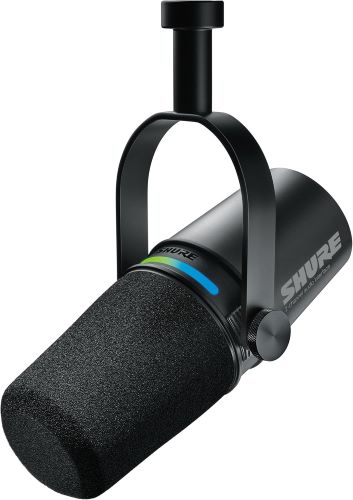
⚡ Quick Summary
- Best for: Podcasters, streamers, content creators
- Standout feature: Built-in audio interface + smart DSP processing
- Sound quality: Broadcast-level clarity with minimal setup
- Connectivity: USB + XLR combo (future-proof)
- Verdict: A powerful all-in-one mic for beginners and pros
👉 Want to skip ahead? Check price or see full features to compare current deals.
Must Read : Nero AI Video Upscaler Review: Best Tool to Upscale Videos to 4K?
🎤 What Is the Shure MV7i Smart Microphone?
The Shure MV7i is a next-generation dynamic microphone designed to simplify professional audio recording.
Unlike traditional mics, it combines:
- A high-quality microphone
- A built-in audio interface
- Smart DSP processing
In simple terms: fewer cables, fewer devices, and better sound.
🧰 Key Features & Benefits
🔊 1. Built-In Audio Interface
Most microphones require an external audio interface. The MV7i eliminates that.
Why it matters:
- Plug directly into your computer
- No extra gear needed
- Cleaner setup
👉 Perfect for beginners who want studio-quality sound without complexity.
🎛️ 2. Smart DSP (Digital Signal Processing)
The mic includes intelligent audio processing like:
- Auto level adjustment
- Noise reduction
- Real-time compression
Result:
You sound polished—even in untreated rooms.
Must Read : How to Edit Videos in One Tool Instead of Using Multiple Apps
🔌 3. Dual Connectivity (USB + XLR)
This is where the MV7i shines.
| Connection | Use Case |
|---|---|
| USB | Easy plug-and-play |
| XLR | Professional studio setups |
👉 You can start simple and upgrade later without replacing your mic.
🎙️ 4. Voice Isolation Technology
If you record in a noisy environment, this feature is a lifesaver.
- Reduces background noise
- Focuses on your voice
- Ideal for home setups
🎚️ 5. Touch Panel Controls
Adjust settings directly on the mic:
- Gain control
- Mute
- Headphone volume
No need to open software every time.
📊 Shure MV7i Specs at a Glance
| Feature | Specification |
|---|---|
| Type | Dynamic Microphone |
| Connectivity | USB + XLR |
| Frequency Response | 50 Hz – 16 kHz |
| DSP Features | Yes (Auto level, EQ, compression) |
| Compatibility | Windows, macOS, mobile |
| Build | Metal (durable) |
🎧 Real-World Performance
🎙️ Audio Quality
The MV7i delivers:
- Warm, rich vocal tones
- Excellent clarity
- Minimal distortion
Compared to typical USB mics, it sounds much closer to broadcast-quality setups.
🔇 Noise Handling
Recording in a fan-filled room or near traffic?
No problem.
The mic:
- Cuts background noise effectively
- Keeps voice front and center
⚡ Ease of Use
Setup takes less than 5 minutes:
- Plug in USB
- Select mic in settings
- Start recording
That’s it.
Must read : How to Create AI Explainer Videos Using Text Prompts
🆚 Shure MV7i vs Alternatives
MV7i vs Standard USB Mics
| Feature | MV7i | Regular USB Mic |
|---|---|---|
| Audio Quality | High | متوسط |
| DSP Processing | Yes | Limited |
| XLR Support | Yes | No |
| Upgrade Path | Excellent | Limited |
MV7i vs Shure MV7
- MV7i includes built-in interface
- More advanced DSP features
- Cleaner setup
👉 If budget allows, MV7i is the smarter long-term choice.
👍 Pros & 👎 Cons
✅ Pros
- All-in-one solution (mic + interface)
- Excellent voice clarity
- Beginner-friendly
- Dual USB/XLR connectivity
- Strong noise isolation
❌ Cons
- Slightly expensive
- Overkill for casual users
- Requires software for full control
🎯 Who Should Buy This Microphone?
👌 Best For:
- Podcasters
- YouTubers
- Streamers
- Remote professionals
- Voice-over artists
❌ Not Ideal For:
- Casual users on a tight budget
- People who only need basic audio
🧠 Real Use Cases
🎧 Podcasting
No need for expensive gear.
Record studio-quality episodes from home.
🎮 Streaming
Clear voice = better engagement.
💼 Work From Home
Stand out in meetings with crisp, professional audio.
🛒 Buying Guide: Things to Consider
Before buying the MV7i, ask yourself:
🔍 1. Do You Need XLR?
If yes → MV7i is perfect
If no → a cheaper USB mic might work
🎯 2. Your Experience Level
- Beginner → great starting point
- Advanced → powerful upgrade
💰 3. Budget
It’s not the cheapest—but it replaces multiple devices.
👉 Tip: Check price during sales for best deals.
❓ FAQs (People Also Ask)
1. Is the Shure MV7i good for beginners?
Yes. It’s plug-and-play with smart features that simplify recording.
2. Does the MV7i need an audio interface?
No. It has a built-in interface, saving cost and setup time.
3. Can I use it for streaming?
Absolutely. It’s one of the best microphones for streaming and gaming.
4. Is USB or XLR better on MV7i?
- USB → convenience
- XLR → professional setups
5. Does it reduce background noise?
Yes. Voice isolation technology helps eliminate unwanted noise.
6. Is it better than Blue Yeti?
For voice clarity and upgrade options—yes.
7. Can I use it with mobile devices?
Yes, with compatible adapters.
🏁 Final Verdict: Should You Buy It?
The Shure MV7i Smart Microphone isn’t just another mic—it’s a complete audio solution.
If you’re serious about:
- Content creation
- Professional audio
- Long-term upgrades
…it’s absolutely worth considering.
👉 Learn more, see full specs, or check price to decide if it fits your setup.
💡 Final Thought
Great audio doesn’t just improve sound—it builds trust, authority, and engagement.
And the MV7i?
It makes that easier than ever.