
Its really important to know what all applications are safe to use in your Windows PC or laptop. Do you need peace of mind if there is a tool which will detect any suspicious application? Well then you must know about this SpyShelter Review for sure.
Most Windows users believe one thing:
“If I have Windows Defender or an antivirus, I’m safe.”
Unfortunately, that’s not always true.
Modern spyware doesn’t behave like old-school viruses. Instead of triggering alerts, it often works silently in the background — logging keystrokes, taking screenshots, installing hidden executables, or launching processes that disappear before Task Manager can even display them.
This is exactly the gap SpyShelter is designed to fill.
In this SpyShelter review 2026, you’ll learn what SpyShelter actually does, how it compares to traditional antivirus software, and whether it’s worth installing as an extra security layer on your Windows PC.
Quick Summary for Busy Readers
- SpyShelter is not an antivirus
- It works alongside Windows Defender or any AV
- Focuses on anti-spyware and application control
- Blocks hidden, unsigned, and suspicious executables
- Includes free features that never expire
Best for: privacy-focused Windows users, power users, and anyone worried about spyware or stalkerware.
What Is SpyShelter?
SpyShelter is a Windows-only anti-spyware and application control tool.
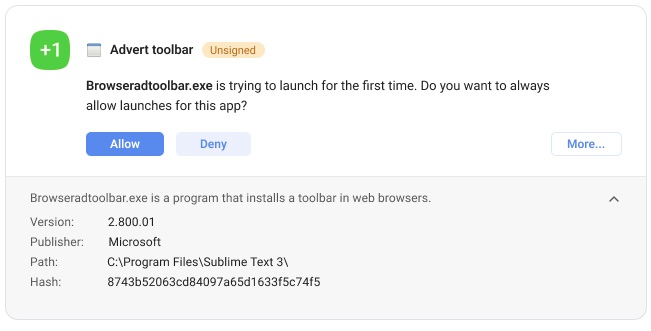
Instead of scanning files only after they exist, SpyShelter focuses on preventing suspicious executables from ever starting.
What SpyShelter Is NOT
SpyShelter is not designed to replace your antivirus.
The developers clearly recommend using it on top of:
- Windows Defender
- Any third-party antivirus
Think of SpyShelter as an extra visibility and control layer rather than a full security suite.
Must Read : Kutools for Excel Review: Is It Worth It for Power Users?
How SpyShelter Works (Beginner-Friendly Explanation)
Traditional antivirus software asks:
“Is this file known to be malicious?”
SpyShelter asks:
“What is this application trying to do right now?”
SpyShelter monitors:
- New executables appearing on your system
- Unsigned or unknown applications
- Background processes that start and stop in milliseconds
- Registry changes
- Driver installations
- Screenshot and keystroke behavior
Instead of silently deciding, SpyShelter lets you choose what runs on your PC.
Core SpyShelter Features Explained
Application Control (SpyShelter’s Main Strength)
Application Control allows you to decide which apps are allowed to launch and under what conditions.
You can choose from several protection levels:
- Easy Mode: SpyShelter decides automatically
- Moderate Mode: Blocks unsigned executables by default
- High Mode: Prompts you for every new or unknown app
- Paranoid Mode: Full zero-trust, manual approval
Most spyware is unsigned, which makes Moderate Mode a solid balance between security and usability.
Real-Time Executable Visibility (Even Hidden Processes)
Many malicious apps:
- Run briefly and disappear
- Never show up in Task Manager
- Hide their background activity
SpyShelter exposes this behavior using:
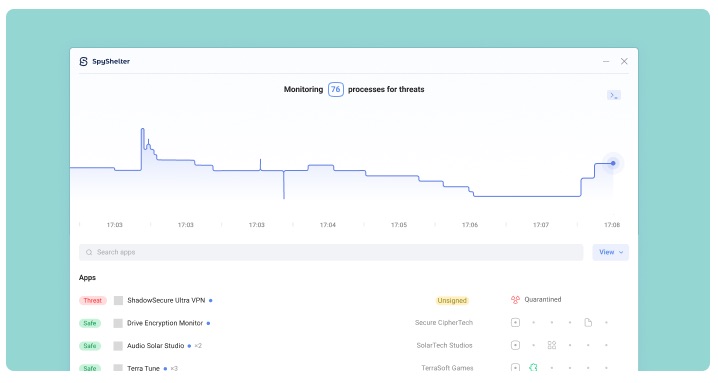
- Activity Tab: Live executable monitoring
- Events Tab: Detailed historical logs
- Rules Tab: Control permissions for every app
This level of transparency is rare, even among paid antivirus tools.
Must Read : Aiarty Image Matting Review: Precision Background Removal Made Simple
Free Anti-Spyware Features That Don’t Expire
One of the most impressive parts of this SpyShelter review is the free version.
Even after the trial ends, SpyShelter still offers:
- Application launch control
- Executable activity monitoring
- Real-time graphs
- Event logging
- Rule-based blocking
These free features are available for non-commercial use and continue working indefinitely.
Paid Version: What Do You Get?
The paid edition adds:
- Known threat detection scanner
- Automatic blocking of recognized spyware
- Real-time safety status for executables
- Detailed insights into what each process does
If you prefer less manual decision-making, the paid version is worth exploring.
Call to Action:
Check price or See full features to compare plans.
Registry, Driver, and System Protection
SpyShelter also monitors:
- Windows Registry modifications
- Driver installation attempts
- Changes to sensitive system files
This protection is especially useful against:
- Persistent spyware
- Rootkits
- Advanced stalkerware
Terminal Control for Advanced Users
Power users and IT professionals can manage SpyShelter directly through:
- Windows Terminal
- Command Prompt
This allows advanced control without relying on the graphical interface.
Real-World Use Cases
Detecting Silent Installers
You install a free app, but a hidden executable tries to launch.
SpyShelter pauses it and asks for your permission — before it can do anything harmful.
Extra Protection for Online Banking
Enable screenshot protection or Paranoid Mode before accessing sensitive accounts for added peace of mind.
Troubleshooting Random PC Crashes
SpyShelter logs background processes that start and stop too quickly for Task Manager to catch.
Must Read : How to Use WhatsApp on Two Phones With the Same Number – Complete Guide
Privacy-Focused Daily Use
SpyShelter gives visibility into what your apps are doing behind the scenes — something most antivirus tools never show.
SpyShelter Pros and Cons
Pros
| Advantage | Why It Matters |
|---|---|
| Works with any antivirus | No conflicts |
| Strong application control | True zero-trust |
| Free features don’t expire | Excellent value |
| Detects hidden executables | Beyond Task Manager |
| Lightweight performance | Minimal system impact |
Cons
| Limitation | Notes |
|---|---|
| Windows-only | No macOS or Linux |
| Learning curve | Especially in strict modes |
| Not a full antivirus | Needs an AV companion |
SpyShelter vs Traditional Antivirus Software
| Feature | SpyShelter | Antivirus |
|---|---|---|
| Signature-based scanning | No | Yes |
| Application control | Yes | Limited |
| Hidden process detection | Yes | Rare |
| Works alongside AV | Yes | No |
| User control level | High | Low |
Best setup: SpyShelter + Windows Defender together.
Who Should Use SpyShelter?
SpyShelter is ideal for:
- Windows users concerned about privacy
- People worried about spyware or stalkerware
- Gamers wanting control over background apps
- IT professionals and advanced users
It may not be ideal if you want:
- A single “install and forget” solution
- Zero pop-ups or decisions
Things to Consider Before Installing
Ask yourself:
- Do I want more visibility into my PC?
- Am I comfortable approving or denying apps?
- Am I already using an antivirus?
If yes, SpyShelter fits perfectly.
Frequently Asked Questions
Is SpyShelter safe with Windows Defender?
Yes. SpyShelter is designed to work alongside Defender and other antivirus tools.
Does SpyShelter slow down your PC?
No. It’s lightweight and optimized for real-time monitoring.
Are SpyShelter’s free features really permanent?
Yes, for non-commercial use.
Can SpyShelter replace antivirus software?
No. It complements antivirus tools instead of replacing them.
Is SpyShelter beginner-friendly?
Yes. Easy and Moderate modes are suitable for beginners.
Is SpyShelter worth it in 2026?
For privacy-focused Windows users, yes.
Internal Linking Suggestions (Anchor Text Only)
- Windows application control explained
- Best anti-spyware tools for Windows
- How to protect your PC from spyware
- Spyware vs malware differences
Final Verdict: Is SpyShelter Worth It?
SpyShelter doesn’t try to be an all-in-one antivirus.
Instead, it gives you something most security tools don’t — visibility and control.
If you’ve ever wondered what’s really running on your PC, SpyShelter provides the answers and the power to stop unwanted activity before it starts.