
Creating modern web animations shouldn’t require advanced coding skills or expensive developer tools—yet many designers, marketers, and educators still struggle with exactly that.
Maybe you’ve tried CSS animations and JavaScript libraries, only to feel overwhelmed.
Or perhaps you’re looking for an HTML5 animation tool that works across devices, loads fast, and doesn’t break Google AdSense rules.
That’s where Saola Animate comes in.
In this in-depth Saola Animate review, I’ll walk you through what it does, how it compares to alternatives, and—most importantly—who it’s actually worth buying for.
Quick Verdict
Saola Animate is worth it if:
- You want to create HTML5 animations without coding
- You design interactive banners, infographics, or web visuals
- You care about responsive, AdSense-safe content
Not ideal if:
- You only need simple GIFs
- You prefer fully code-based animation workflows
What Is Saola Animate?
Saola Animate is a professional HTML5 animation and interactive content builder designed for modern web experiences.
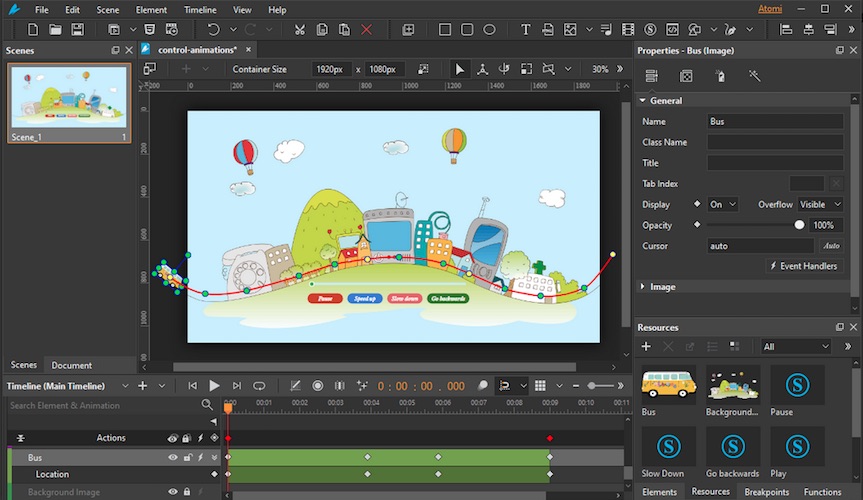
Think of it as a PowerPoint-style animation editor, but built for the web—with timelines, scenes, interactivity, and HTML5 export.
It’s widely used by:
- Web designers
- Digital marketers
- Educators
- Agencies
- Content creators
All without forcing you to write complex code.
Core Features Explained (In Plain English)
🎬 Scenes (Like Slides)
Scenes work just like slides in PowerPoint.
- Control animation flow visually
- Perfect for storytelling and step-by-step visuals
- Reusable elements across scenes
This makes it beginner-friendly while still powerful.
Must Read : Mondly Review – Can This Language Learning App Really Make You Fluent Faster?
⏱️ Timelines (Precise Control)
Each scene can have multiple timelines, allowing you to:
- Stack animations
- Control delays and playback
- Add advanced interactivity
This is where Saola Animate shines compared to basic animation tools.
⚡ Auto-Keyframe (Time Saver)
Auto-Keyframe automatically creates animation keyframes when you change properties.
Why it matters:
- Faster workflow
- Less manual work
- Ideal for complex motion projects
If you’ve ever struggled with keyframes, this feature alone saves hours.
🎨 Shapes, Freeforms & Vector Editing
You can:
- Use built-in shapes
- Draw or import vector graphics
- Edit anchor points with precision
This is excellent for infographics, charts, and explainer animations.
Must Read: Aiarty Image Matting Review: Precision Background Removal Made Simple
🔁 Morph Animations
Morph one shape into another smoothly—no coding required.
Perfect for:
- Data visualization
- Educational animations
- Creative storytelling
✏️ Hand-Drawn & Whiteboard Animations
Using Line Length Keyframes, you can create:
- Hand-drawn effects
- Whiteboard-style animations
- Sketch animations
Great for tutorials and presentations.
🎞️ Preset Effects & Text Animations
- Ready-to-use animation presets
- Animate letters or words individually
- Save custom effects for reuse
This boosts productivity and visual consistency.
🔤 Google & System Fonts
- Access hundreds of Google Fonts
- Embed system fonts in HTML5 output
- Consistent look across devices
Typography matters—and Saola Animate handles it well.
🧩 Sprite Sheets & Symbols
- Create animated characters efficiently
- Reuse elements across scenes
- Keep file sizes small
Perfect for performance-focused web projects.
Must Read : VinCheckup Review: Is This Vehicle History Report Accurate in 2026?
🛤️ Motion Paths & Easing Methods
- Draw complex motion curves
- Choose from 40+ easing methods
- Natural, fluid animations
This is where animations start to feel professional.
📱 Responsive & Flexible Layouts
Saola Animate supports:
- Responsive design
- Flexible layouts
- Cross-device compatibility
Your animations work on desktop, tablet, and mobile without extra work.
🖱️ Interactivity (Clicks, Triggers, Events)
Add actions triggered by:
- Mouse clicks
- Key presses
- Hover events
This is huge for interactive infographics and web presentations.
🧠 JavaScript & Custom Elements (Optional)
Advanced users can:
- Add JavaScript logic
- Import external scripts
- Create custom HTML elements
Beginners can ignore this—pros will love it.
📤 Export Options
| Export Type | Use Case |
|---|---|
| HTML5 | Websites, ads, blogs |
| Video | Demos, presentations |
| Cross-platform | Works on all modern browsers |
Real-World Use Cases
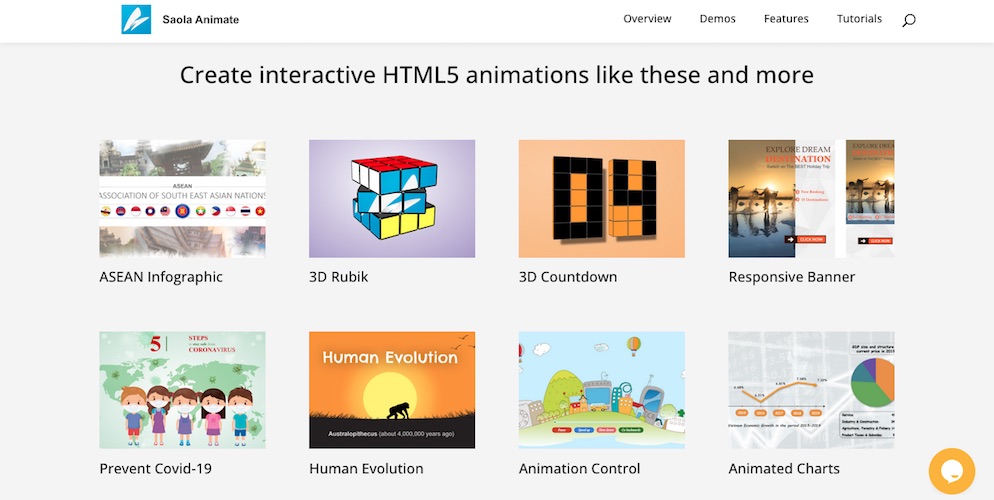
Saola Animate works especially well for:
- Responsive banner ads (AdSense-safe)
- Interactive infographics
- Educational animations
- Landing page visuals
- Product explainers
If your content needs engagement, this tool delivers.
Saola Animate Pros & Cons
✅ Pros
- No coding required
- Professional-grade animations
- HTML5 & responsive output
- Great for AdSense-friendly sites
- One-time license (often available)
❌ Cons
- Desktop software only
- Learning curve for advanced features
- Overkill for simple GIF needs
Saola Animate vs Alternatives
| Tool | Best For | Key Difference |
|---|---|---|
| Saola Animate | Interactive HTML5 animations | No-code + advanced |
| Adobe Animate | Animators | Steeper learning curve |
| After Effects | Video animation | Not web-native |
| CSS/JS Libraries | Developers | Requires coding |
Saola Animate sits perfectly between ease of use and creative control.
Who Should Use Saola Animate?
Highly Recommended For:
- Bloggers wanting interactive content
- Marketers improving engagement
- Educators creating visual lessons
- Agencies delivering HTML5 projects
Not Ideal For:
- Meme or GIF creators
- Hardcore JS animation developers
Buying Considerations
Before buying, ask yourself:
- Do I need HTML5 output?
- Do I want interactivity without coding?
- Will animations improve my engagement or conversions?
If yes, it’s worth exploring further.
👉 Learn more or check current pricing to see available deals.
Internal Linking Suggestions
- Anchor: best HTML5 animation tools
- Anchor: responsive banner design guide
- Anchor: how to reduce bounce rate with visuals
- Anchor: AdSense-friendly interactive content
FAQs (People Also Ask Friendly)
❓ Is Saola Animate beginner-friendly?
Yes. The interface is intuitive, especially for designers and marketers.
❓ Does Saola Animate require coding?
No. Coding is optional and only needed for advanced customization.
❓ Is Saola Animate good for AdSense websites?
Yes. HTML5 animations load fast and comply with AdSense policies.
❓ Can I use Saola Animate for responsive design?
Absolutely. It supports flexible and responsive layouts.
❓ Is Saola Animate better than Adobe Animate?
For web-focused, no-code projects—yes. For traditional animation, Adobe may suit better.
❓ Can I export animations as video?
Yes, with one-click video export.
❓ Does it work on all browsers?
Yes, modern browsers and devices are supported.
Final Verdict: Is Saola Animate Worth It?
Saola Animate is a powerful, well-balanced HTML5 animation tool that bridges the gap between simplicity and professional output.
If you want to:
- Increase engagement
- Improve dwell time
- Add interactive visuals without coding
Then Saola Animate is absolutely worth considering.