
Creating a website, presentation, portfolio, report, landing page, or small web project is only half the job. The next challenge is finding a simple way to put that work online and share it with other people. In this guide, we will look at how to host and share your work online, what to consider before choosing a hosting platform, and how Tiiny can help you publish different types of digital work with less technical hassle.
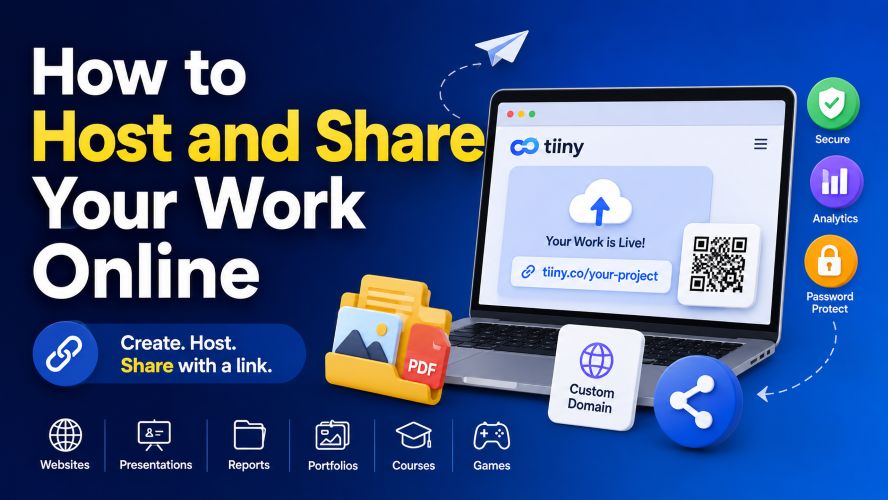
If you have ever emailed a large file, struggled with complicated hosting dashboards, or sent someone a collection of files that was difficult to navigate, you already know the problem.
Sometimes, you do not need a complicated website or expensive server setup. You simply need a professional link that works.
That is where simple online hosting platforms can be useful.
How to Host and Share Your Work Online
Quick Answer: What Is the Easiest Way to Share Work Online?
The easiest approach depends on what you are sharing.
For a simple document, cloud storage may be enough. For a portfolio or website, you may need web hosting. For presentations, reports, landing pages, or small web projects, a lightweight hosting platform can sit somewhere between the two.
Tiiny is designed around a simple idea: upload your work, publish it online, and share it through a link instead of repeatedly sending files.
You can use this type of platform to:
- Host websites and landing pages
- Publish portfolios and personal websites
- Share presentations and pitch decks
- Publish reports, guides, and catalogues
- Host HTML and web projects
- Share educational content and e-books
- Publish interactive projects such as quizzes and games
- Use features such as custom domains, password protection, QR codes, and analytics, depending on the plan
The important question is not simply whether a platform can host a file.
It is whether it makes the entire sharing process easier for both the person creating the work and the person receiving it.
Why Host Your Work Online Instead of Sending Files?
Email attachments are convenient until a project becomes larger or more interactive.
A presentation, portfolio, website, catalogue, or collection of documents can quickly become awkward to send and update.
Hosting the work online changes the workflow.
Instead of sending a new attachment every time something changes, you can share a link to the online version.
1. One Link Is Easier to Share
A single link can be added to an email signature, social profile, proposal, presentation, QR code, or message.
This is particularly useful when your audience may access the material from different devices.
For example, a freelancer can place a portfolio link in an email. A restaurant can place a QR code on its menu. A salesperson can send a presentation link after a meeting.
The same basic idea works across many industries.
2. Updates Become Simpler
If your work changes regularly, online hosting can reduce repetitive file sharing.
You can update the hosted project and continue directing people to the same online destination, depending on the platform and setup you use.
This can be especially useful for portfolios, menus, catalogues, product information, and other content that changes periodically.
3. Your Work Can Look More Professional
There is a noticeable difference between sending several attachments and giving a client a clean, dedicated link to a portfolio, presentation, report, or landing page.
A simple online destination can make it easier for someone to understand what you are showing them.
It also removes some of the friction associated with downloading and opening multiple files.
4. You Can Add More Than Just a Download
A hosted project can potentially include navigation, images, interactive elements, forms, branding, or other web-based features.
That opens up possibilities that a standard email attachment cannot provide.
Instead of simply giving someone a file, you can create an experience around the content.
What Can You Host and Share Online?
One reason lightweight hosting services are interesting is that the use cases extend far beyond traditional websites.
| Type of Work | Useful For |
|---|---|
| Portfolio | Designers, developers, photographers, freelancers |
| Presentation | Sales meetings, proposals, pitches and education |
| Landing page | Products, campaigns, services and events |
| Report | Research, audits, analysis and client work |
| Catalogue | Products, menus, services and information packs |
| Web project | HTML projects, React apps and browser-based projects |
| E-book | Digital publications and downloadable resources |
| Educational content | Courses, guides, quizzes and learning materials |
| Games | Simple browser games and interactive experiments |
This makes online hosting for portfolios and projects especially useful for people who do not want to build a complete website from scratch.
How Tiiny Makes Online Sharing Simpler
Tiiny takes a straightforward approach to hosting.
Instead of positioning itself only as conventional web hosting, it focuses on making different types of digital work easy to publish and share.
For example, a designer could use it for a portfolio, a freelancer could publish a client presentation, a developer could share a web project, and a business could publish a landing page or catalogue.
The platform supports a wide variety of use cases, which is one of its more interesting features.
Must Read : Best Email Marketing Software for Small Businesses (2026)
Websites and Landing Pages
If you already have a static website or landing page, hosting it online can be easier than setting up a complete server environment.
This can be useful for:
- Personal websites
- Campaign pages
- Temporary projects
- Product pages
- Small business websites
- Event pages
- Simple online portfolios
For beginners, the attraction is obvious.
You can focus on the website itself instead of spending most of your time learning server configuration.
Presentations and Pitch Decks
Instead of attaching a large presentation to an email, you can share a dedicated online link.
This can be particularly convenient for:
- Sales teams
- Freelancers
- Consultants
- Students
- Teachers
- Business owners
- Startup teams
A shareable presentation link can also be easier to reuse across emails and messages.
Portfolios and CVs
A portfolio is often more useful when someone can open it immediately.
A shareable portfolio link can make it easier to include your work in:
- Job applications
- Client proposals
- Professional profiles
- Emails
- Social profiles
- Freelance applications
For designers and developers, this can be especially useful because the portfolio itself becomes an example of how they present their work online.
Reports and Client Documents
Consultants, agencies, researchers, and freelancers can publish reports online and share them through a dedicated link.
Depending on the plan and configuration, additional tools such as analytics or password protection can be useful when working with clients.
For example, a consultant could share a project report with a client while keeping other projects separate.
HTML, React and Other Web Projects
Developers can also use lightweight hosting for browser-based projects.
This can be useful when you want someone to test or view a project without asking them to install development tools locally.
A small interactive tool, React application, Three.js experiment, or static web project can be easier to demonstrate through a live link.
That can make portfolio demonstrations much more practical.
Useful Features to Look For in an Online Hosting Platform
Not every project needs every feature.
The best platform is usually the one that solves your particular problem without adding unnecessary complexity.
Custom Domains
A custom domain can make a portfolio, personal website, or business project feel more established.
It can also make the link easier to remember and share.
If you are creating something that you expect to use for a long time, this is a feature worth considering.
Password Protection
Some work should not be completely public.
Client presentations, internal tools, private proposals, and other restricted projects may benefit from password protection.
This can give you another layer of control over who can access the hosted material.
However, password protection should not be treated as a replacement for responsible handling of confidential information.
Analytics
Analytics can answer a simple but useful question:
Did anyone actually open my link?
For marketing materials, sales decks, reports, and client presentations, analytics can provide additional insight into how people interact with your work.
Analytics are not a guarantee of conversions or sales.
They are simply another source of information that can help you understand visitor activity.
QR Codes
QR codes can connect printed material with online content.
Imagine putting a QR code on:
- An event flyer
- Restaurant menu
- Business card
- Brochure
- Product packaging
- Presentation handout
Someone can scan the code and open your online content without typing a long address.
Must Read : Luminar Update 2026: What Photographers Need to Know
SSL and CDN Support
Security and delivery infrastructure matter even for relatively simple projects.
Features such as SSL and content delivery support can make hosted pages more practical for everyday sharing.
For users who are not interested in managing server infrastructure themselves, having these elements handled by the hosting provider can be convenient.
Tiiny vs Traditional Web Hosting
A common mistake is comparing every hosting platform as though they are designed for exactly the same audience.
They are not.
| Consideration | Simple Hosting Platform | Traditional Web Hosting |
|---|---|---|
| Ease of setup | Usually simpler | Can require more configuration |
| Best for | Projects, portfolios and shareable content | Full websites and complex applications |
| Technical knowledge | Beginner-friendly options available | Varies from beginner to advanced |
| Customisation | Depends on the platform | Generally broader |
| Quick sharing | Strong use case | Possible, but not always the primary focus |
| Server-level control | Usually limited | Often greater |
If you are building a large dynamic website with databases, advanced server requirements, or extensive backend functionality, traditional hosting may be more appropriate.
But if your priority is how to host a project and share it with a link, a simpler platform may be more convenient.
That distinction is important.
You are not necessarily choosing between “good hosting” and “bad hosting.”
You are choosing the type of hosting that matches your project.
Pros and Cons of Using Tiiny
Every service has strengths and limitations.
Here is a balanced look at where Tiiny may fit.
| Pros | Cons |
|---|---|
| Simple approach to publishing work online | Not designed to replace every type of advanced hosting |
| Supports many different project types | Features vary by plan |
| Useful for portfolios and presentations | Large or highly complex applications may need specialised infrastructure |
| Custom domain options available on applicable plans | Users should check current limits before choosing a plan |
| Password protection and analytics can help with professional projects | Advanced developers may want more server-level control |
| QR codes can simplify offline-to-online sharing | Not every project requires all available features |
The takeaway is fairly simple.
Tiiny is most interesting when convenience and quick sharing matter more than having complete server-level control.
Who Is This Type of Hosting Best For?
The biggest advantage of a simple hosting service is convenience.
That makes it particularly interesting for people who want to publish work without spending hours managing infrastructure.
Freelancers
Freelancers can use online hosting for portfolios, proposals, CVs and selected client materials.
Instead of sending several files to every potential customer, you can provide a central link.
Designers
Designers can publish visual portfolios, presentations, marketing materials and creative projects.
A live online portfolio can also make it easier to demonstrate how projects look outside a local computer.
Developers
Developers can use hosting to demonstrate websites, static projects, web applications and coding experiments.
A live link can be much easier for a potential client or employer to test than a folder of source files.
Small Businesses
Small businesses can create landing pages, catalogues, menus, promotional pages and information packs.
This can be useful when a business wants a simple online destination without immediately building a large website.
Students
Students can share projects, presentations, educational materials and other digital work.
A single link can be easier for teachers or classmates to access than a collection of attachments.
Marketers
Marketers can distribute campaign pages, sales materials, information packs and other promotional content.
Analytics may also help them understand visitor activity.
Consultants
Consultants can present reports, audits, research and analysis through a convenient link.
For client-facing material, features such as password protection can be worth considering where appropriate.
Authors and Educators
Authors can publish e-books and guides, while educators can share courses, quizzes and learning resources.
This can create a more convenient experience than sending individual files.
Real-World Ways to Use a Shareable Project Link
Sometimes the easiest way to understand a product is to look at practical situations.
Scenario 1: A Freelancer Applying for Projects
Imagine a freelance graphic designer applying for several projects.
Instead of attaching multiple large design samples to every email, the designer could maintain a portfolio containing selected projects, an introduction, and contact information.
The portfolio can then be shared through one link.
This saves repetition and gives potential clients a central place to view the work.
Scenario 2: A Salesperson Sharing a Pitch Deck
A salesperson has just finished a meeting with a potential customer.
Rather than sending a large presentation attachment, they could share an online version.
If analytics are available, they may also gain additional insight into whether the material was viewed.
That does not guarantee a sale, but it can provide useful context for follow-up.
Scenario 3: A Restaurant Sharing a Menu
A restaurant can connect an online menu to a QR code.
The code could be placed on tables, signage, packaging, or promotional materials.
Customers scan the code and open the menu online.
This is a simple example of how a hosted page can connect physical and digital experiences.
Must Read : 10 AI Trends Changing Tech Jobs by 2029
Scenario 4: A Developer Demonstrating a Project
A developer has created an interactive project for a potential employer.
Instead of only sending screenshots, the developer can provide a live project link.
The visitor can experience the project directly.
For web developers, that can make a portfolio considerably more useful.
What Should You Check Before Choosing a Hosting Plan?
Do not choose a hosting plan simply because it has the longest feature list.
Start with your actual requirements.
Check Project Limits
How many active projects do you need?
Someone sharing one personal portfolio has very different requirements from an agency managing multiple client projects.
Check File and Storage Limits
Think about the size of your projects before subscribing.
A lightweight website may require very little storage, while creative projects can require substantially more.
Always check the current limits before uploading important work.
Consider Traffic
A personal portfolio with modest traffic has different requirements from a campaign page that could receive a large number of visitors.
If you expect your project to receive significant traffic, choose a plan that matches your expected usage.
Decide Whether You Need a Custom Domain
If you are sharing work professionally, a custom domain may be worth considering.
If you simply need a temporary project link, the default hosted address may be enough.
There is no reason to pay for a feature you do not actually need.
Think About Privacy
Before uploading client material or private work, understand how visibility and access controls operate.
Password protection can be useful, but you should still be careful about what information you upload and who has permission to access it.
How to Get Started Hosting Your Work Online
The process is generally straightforward, especially for projects that are already prepared for the web.
Step 1: Prepare Your Project
Organise the files, images, documents, or web assets you want to publish.
Remove unnecessary files and make sure everything works correctly before uploading.
Step 2: Choose Your Hosting Method
Decide what you actually need.
Are you hosting a portfolio?
A presentation?
A landing page?
A report?
A web application?
Your answer will help determine which features matter.
Step 3: Upload Your Work
Follow the hosting platform’s upload process and confirm that your project displays correctly.
Do not immediately send the link to everyone.
Test it first.
Step 4: Customise the Link
If appropriate, use a memorable project name or connect a custom domain.
A clear URL can make your project easier to share.
Step 5: Check the Result
Open the link on both desktop and mobile devices.
Check:
- Images
- Text
- Navigation
- Buttons
- Downloads
- Mobile layout
- Permissions
- Contact information
Step 6: Add Protection When Needed
If the project contains material that should not be publicly accessible, use available access controls where appropriate.
Step 7: Share the Link
Once everything works correctly, add the link to your email, proposal, QR code, social profile, presentation, or other relevant channel.
A quick test before sharing can prevent surprisingly common problems.
Tips for Creating a Better Online Portfolio or Project
Hosting is only one part of the experience.
How you organise your content can have an even bigger impact on whether visitors stay and explore.
Here are some practical tips:
- Put your strongest work first.
- Keep navigation simple.
- Use clear project titles.
- Avoid unnecessarily large images.
- Make sure important content works on mobile devices.
- Include a clear contact method when relevant.
- Avoid publishing confidential client information without permission.
- Test every important link before sharing it.
- Keep outdated projects clearly separated or remove them.
- Explain what each project demonstrates.
Think of your online project from the visitor’s perspective.
Can they understand what you do within a few seconds?
Can they find the information they need?
Can they contact you easily?
If the answer is yes, your hosting setup is doing its job.
Is Tiiny Worth Considering?
For someone who simply wants traditional, highly configurable web hosting, Tiiny may not be the first option to investigate.
Advanced websites can require databases, server-side applications, specialised configurations, and greater infrastructure control.
But that is not really the problem Tiiny is trying to solve.
Its appeal is the middle ground between sending files and building a full website.
You can take a portfolio, presentation, report, landing page, e-book, web project, or other supported work and turn it into something that is easier to share online.
The combination of publishing tools, shareable links, custom domains on applicable plans, analytics, QR codes, password protection, and other features can be useful for freelancers, creators, marketers, developers, educators, and small businesses.
If that sounds like the type of workflow you need, it is worth taking a closer look at the available features.
Frequently Asked Questions
Can I host my portfolio online without building a complicated website?
Yes.
Depending on your requirements, you can use a simple hosting platform to publish a portfolio or existing web project without managing a traditional server setup.
Can I share a presentation through a link?
Yes.
A hosted presentation can be shared through a web link, which can be more convenient than repeatedly sending large attachments.
Can I use a custom domain for my online project?
Some hosting plans support custom domains.
If having your own domain is important, check the current plan features before subscribing.
Can I password protect an online project?
Some hosting services provide password protection for applicable projects or plans.
This can be useful for private presentations, internal tools, and selected client materials.
Can developers host HTML or React projects?
Platforms such as Tiiny are designed to support web projects, including static websites and certain browser-based applications.
Developers should check compatibility and current technical limitations for more advanced projects.
Is online hosting better than cloud storage?
Neither is universally better.
Cloud storage is excellent for storing and sharing files, while web hosting is often more suitable when you want visitors to experience a website, portfolio, landing page, or interactive project.
Can I create a QR code for my hosted work?
QR code functionality can be useful when you want people to move from printed material to an online page.
Tiiny offers QR code functionality as part of its available feature set.
Is simple online hosting suitable for businesses?
It can be.
Small businesses can use online hosting for landing pages, catalogues, menus, presentations, information packs, and other digital materials.
The right choice depends on the complexity and requirements of the business website.
Final Verdict: A Simple Way to Put Your Work Online
You do not always need a complicated hosting setup to make your work available online.
If your goal is to host and share a project online with minimal technical friction, a lightweight hosting service can make sense.
It can turn a portfolio, presentation, report, landing page, catalogue, or web project into a link that is easier to send and access.
Tiiny is particularly worth considering if you value simplicity and want one service that can accommodate different kinds of digital work.
Just make sure the storage, project, traffic, privacy, and feature limits match what you actually need.
The best hosting solution is not necessarily the one with the most features.
It is the one that makes your specific workflow easier.
Ready to see whether Tiiny fits your project?
Check the current features and plans, compare them with your requirements, and choose the option that makes sense for the type and amount of work you want to host.
Wow this is exactly what I was looking for. I just wanted to host a pdf and make it easily accessible to my clients. Will try this out for sure!
Glad that it helped you Teresa.
Wow seems to be smart solution. I should try it out. Thanks for sharing.
Yes you must try it out Siloh, thanks for stopping by.
Any Tiiny hist discount coupon codes available? I just want to upload a couple of files
Yes I have sent you the link by email
Thank you for sharing this process. I was using only Google drive. this seems useful
You are welcome Maverick