
In this guide you will get the Probit Equalizer Pro License Key at the best discounted price. No matter how good your headphones or speakers are, Windows audio often sounds underwhelming.
Music feels shallow.
Movies lack impact.
Games don’t sound immersive.
Most apps come with their own audio settings, but adjusting sound one app at a time quickly becomes annoying—and inconsistent. That’s exactly why many users choose to buy the Probit Equalizer Pro license. Instead of tweaking every program separately, this professional audio equalizer improves all sound on your PC at once.
Let’s explore whether it’s worth it for your setup.
⚡ Quick Summary
- System-wide audio enhancement for Windows
- 10-band graphic equalizer with bass boost
- 20+ presets plus custom profiles
- Works with music, movies, games, calls & streaming
- One-time license (no expensive hardware required)
- Includes a 7-day free trial
Best for: Windows users who want noticeably better sound without buying new speakers or headphones.
🔊 What Is Probit Equalizer Pro?
Probit Equalizer Pro is a professional audio equalizer for Windows that enhances sound at the operating system level.
Unlike app-based equalizers, it works universally—so once it’s enabled, every application benefits automatically.
The software is developed by EqualizerPro, a company focused on simple yet powerful PC audio enhancement tools.
Must Read : Best Music Equalizer for Windows: I Tested Them All
🖥️ Why System-Wide Equalization Makes a Difference
Most people don’t realize this:
Your computer processes audio before it reaches individual apps.
That’s why system-wide sound equalizers deliver more consistent results than built-in app settings.
With Probit Equalizer Pro, you get:
- One global sound profile for all programs
- No conflicts between media players
- Consistent audio quality everywhere
Once configured, it quietly runs in the background—no constant adjustments needed.
🎚️ Key Features & Benefits
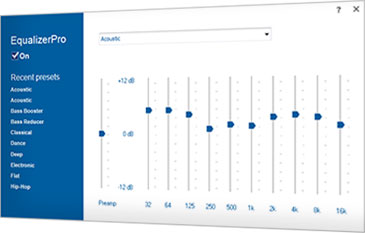
🎛️ 10-Band Graphic Equalizer
Fine-tune your sound across low, mid, and high frequencies.
- Improve clarity
- Reduce harsh treble
- Add warmth to thin audio
Perfect for headphones, laptop speakers, and external sound systems.
🔊 Bass Boost Effect
Weak bass is a common PC audio problem.
Probit Equalizer Pro includes a bass boost that adds depth without distortion, even on basic speakers.
Ideal for:
- Music with heavy low-end
- Action movies
- Immersive gaming sessions
Must Read : Probit EqualizerPro Review – Enhance audio on Windows PC
🎧 20+ Built-In Presets
You don’t need audio expertise to get started.
Popular presets include:
- Rock
- Pop
- Jazz
- Classical
- Bass Boost
- Vocal Enhancer
Switch presets instantly depending on what you’re listening to.
🧠 Custom Presets
For advanced users, customization is where this software shines.
- Create your own sound profiles
- Save presets for different headphones or speakers
- Switch profiles with one click
🔉 Preamp Volume Control
The built-in preamp lets you control overall gain and avoid distortion.
This is especially useful if you:
- Listen at higher volumes
- Use budget audio hardware
- Want cleaner, more balanced sound
🔘 One-Click On/Off Switch
Want to hear unprocessed audio again?
Just toggle Equalizer Pro on or off—no restarts, no hassle.
📊 Pros and Cons
| Pros | Cons |
|---|---|
| Works with all Windows apps | Windows only |
| Easy for beginners | No macOS support |
| System-wide sound enhancement | No mobile version |
| Lightweight & stable | Limited advanced tuning |
| One-time license |
🆚 Equalizer Pro vs Other Audio Equalizers
Equalizer Pro vs App-Based Equalizers
| Feature | Equalizer Pro | App Equalizers |
|---|---|---|
| System-wide sound | Yes | No |
| Works with all programs | Yes | No |
| Easy setup | Yes | Varies |
| Consistent results | Yes | No |
Equalizer Pro vs Hardware Upgrades
- No need to buy DACs or sound cards
- No cables or physical setup
- Costs far less than audio hardware
Tip: Check the software price before spending hundreds on equipment.
🎮 Real-World Use Cases
🎵 Music Lovers
Enjoy richer bass and clearer vocals on Spotify, YouTube, and iTunes.
🎬 Movie & Streaming Fans
Hear dialogue clearly and experience deeper cinematic sound.
🎮 Gamers
Better positional audio, clearer footsteps, and more immersive effects.
🎤 Remote Workers
Improve voice clarity on Zoom, Skype, and online meetings.
Must Read : Luminar Neo Review (2026): Is It Worth It for Photo Editing?
🛒 Buying Guide: Should You Buy Probit Equalizer Pro?
This software is a great choice if you:
- Use Windows daily for audio
- Want better sound without hardware upgrades
- Switch between music, movies, and games
- Prefer simple, reliable tools
You may want to skip it if:
- You use macOS or Linux
- You already own high-end audio hardware with built-in DSP
Suggestion: Try the free trial first and judge the difference yourself.
🔐 License & Trial Information
- 7-day free trial (fully functional)
- One-time license purchase
- No subscriptions or hidden fees
This makes it a low-risk upgrade for improving PC sound quality.
❓ Frequently Asked Questions
Is Probit Equalizer Pro safe?
Yes. It runs locally on your PC and does not alter system files.
Does it work with Spotify and YouTube?
Yes, it enhances sound from all programs.
Will it slow down my computer?
No. It’s lightweight and optimized for performance.
Is it beginner-friendly?
Absolutely. Presets make setup simple.
Does it work on Windows 11?
It works on Windows 10 and is compatible with most Windows 11 systems.
Can I create my own presets?
Yes, unlimited custom presets are supported.
🏁 Final Verdict
If your PC audio sounds flat or uninspiring, buying the Probit Equalizer Pro license is one of the easiest and most affordable upgrades you can make.
It won’t replace studio-grade equipment, but for everyday users, the improvement is immediate and noticeable across music, movies, gaming, and calls.
Recommendation: Try the free trial and hear the difference before committing.