
Have you ever upgraded your headphones or speakers, but the sound still felt… flat? I totally understand your situation. You’re not alone. Windows audio, by default, isn’t optimized for music lovers, movie watchers, or gamers. Even popular apps like Spotify or VLC only apply sound settings inside that single app. You need the Best Music Equalizer for Windows which will solve this problem.
You must be facing:
- Different sound quality across apps
- Constant manual adjustments
- Inconsistent bass and clarity
So I decided to test the best music equalizers for Windows to find out which ones actually improve sound quality across the entire system.
This guide is based on real testing, not marketing claims.
⚡ Quick Summary
If you want a simple, system-wide music equalizer that works with all Windows apps, EqualizerPro is the best overall choice.
- Works with Spotify, YouTube, games, movies, and calls
- Beginner-friendly interface
- Noticeable bass and clarity improvement
- No complicated setup
Free tools exist, but they come with trade-offs.
🎼 What Is a Music Equalizer (And Why You Need One)
A music equalizer lets you adjust audio frequencies like bass, mids, and treble to match your preferences and hardware.
Why Windows Users Need One
- Built-in Windows audio is flat
- Cheap speakers lack depth
- Headphones sound different per app
- Games and movies often lack balance
A system-wide audio equalizer fixes all of this in one place.
🏆 Best Music Equalizers for Windows (Tested & Ranked)
After testing multiple tools, these are the ones worth using.
🥇 EqualizerPro – Best Overall Music Equalizer for Windows
Best for: Music lovers, movie watchers, gamers, beginners
EqualizerPro stands out because it works at the Windows operating system level, not inside a single app.
That means one setup improves sound for:
- Spotify
- YouTube
- Netflix
- Games
- Video calls
- Any audio-producing program
Key Features
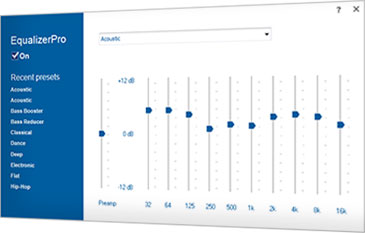
- 10-band graphic equalizer
- Bass boost effect
- 20+ built-in presets
- Custom preset creation
- Preamp volume control
- Easy on/off toggle
- Compatible with Windows 7, 8, 8.1, 10
Real-World Testing Results
- Music sounded fuller without distortion
- Movies had clearer dialogue
- Games felt more immersive
- No noticeable performance slowdown
You don’t need expensive speakers. EqualizerPro makes average hardware sound better.
Pros
- Works with all programs
- Very easy to use
- Clean bass enhancement
- 7-day free trial
Cons
- Paid after trial
- No advanced visual analyzer (not needed for most users)
🥈 FxSound – Best Free Equalizer for Windows
Best for: Casual users on a budget
FxSound is a popular free option and easy to get started with.
Pros
- Free version available
- Simple presets
- Loudness enhancement
Cons
- Limited manual control
- Can distort at high volume
- Not always truly system-wide
Good for basic use, but not as consistent as premium tools.
Must Read : Probit EqualizerPro Review – Enhance audio on Windows PC
🥉 Equalizer APO – Best for Advanced Users
Best for: Audio enthusiasts and power users
Equalizer APO offers deep customization but requires technical knowledge.
Pros
- Fully system-wide
- Extremely customizable
- 100% free
Cons
- Complex installation
- No graphical interface by default
- Easy to misconfigure
Not recommended for beginners.
📊 Comparison Table: Best Music Equalizers for Windows
| Feature | EqualizerPro | FxSound | Equalizer APO |
|---|---|---|---|
| System-Wide Audio | Yes | Partial | Yes |
| Beginner Friendly | Yes | Yes | No |
| Presets Included | 20+ | Limited | No |
| Bass Boost | Clean | Moderate | Custom |
| Free Trial | Yes | Yes | Free |
🎯 Real-World Use Cases
Music Streaming
Perfect for Spotify, Apple Music, YouTube
Richer bass and clearer vocals
Movies & Streaming
Improves dialogue clarity
Less volume adjustment needed
Must Read : Copernic Desktop & Cloud Search Review: Features, Pros & Cons
Gaming
Better footsteps and environmental sound
More immersion
Budget Speakers or Headphones
Fixes flat or tinny sound
No hardware upgrade required
🛒 Buying Guide: How to Choose the Best Equalizer
Ask yourself:
- Do I want system-wide control?
- Do I prefer presets or manual tuning?
- Am I comfortable with advanced settings?
Recommendation
- Beginners: EqualizerPro
- Free-only users: FxSound
- Advanced users: Equalizer APO
Must Read : Mondly Review – Can This Language Learning App Really Make You Fluent Faster?
❓ Frequently Asked Questions
What is the best music equalizer for Windows 10?
EqualizerPro is one of the best because it works across all apps and is easy to use.
Does Windows have a built-in equalizer?
Windows offers basic enhancements but no true system-wide equalizer.
Is EqualizerPro safe to use?
Yes, it’s a legitimate Windows audio enhancement tool.
Can an equalizer improve cheap speakers?
Yes, significantly. Proper tuning can dramatically improve clarity and bass.
Does EqualizerPro work with Spotify and YouTube?
Yes, it works with all audio applications.
Will an equalizer slow down my PC?
No noticeable impact during testing.
🏁 Final Verdict
After testing free and paid tools, EqualizerPro offers the best balance of simplicity, performance, and compatibility.
It doesn’t overwhelm you with technical settings.
It just makes your PC sound better—everywhere.
If you’re tired of flat Windows audio and want an easy upgrade, EqualizerPro is the best place to start.
I was looking for an Equalizer which works with all windows apps. Glad you shared about this Equalizer. Just got it in discounted price. Thanks bro
Glad you found it useful