
Waking up to bright sunlight can be pleasant, unless you have to get out of bed every morning just to open the curtains. The same small inconvenience appears again at night. You are comfortable on the sofa, watching a movie or preparing for sleep, but the curtains are still open. This is where an automatic curtain opener can make everyday life feel a little easier.
The SwitchBot Curtain 3 is designed to automate existing curtains without requiring you to replace your curtain rod or install a completely new motorized curtain system. The updated 2025 version focuses on stronger performance, improved movement over small bumps, quieter operation, and more precise positioning.
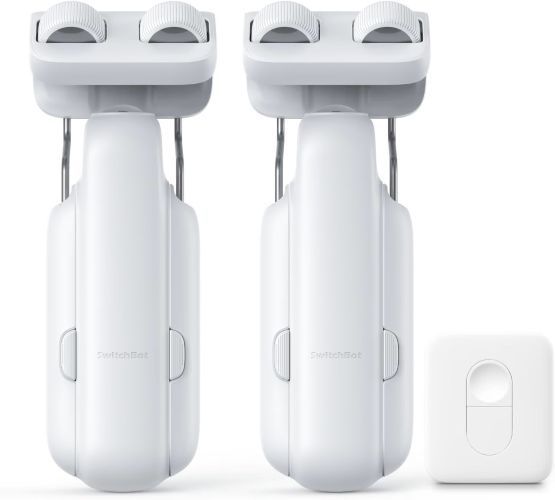
But is it actually worth adding to your smart home?
In this SwitchBot Curtain 3 review, we’ll look at the setup process, performance, smart features, limitations, and the type of buyer who is most likely to benefit from it.
SwitchBot Curtain 3 Review
SwitchBot Curtain 3 at a Glance
The SwitchBot Curtain 3 is a strong option for people who want to automate existing curtains without drilling or replacing their curtain hardware.
Its biggest advantages are the simple installation approach, improved motor performance, quiet operation in Silent Mode, and the ability to expand into a larger smart-home setup with a compatible SwitchBot Hub.
Best for:
- Bedrooms and nurseries
- Living rooms with existing curtain rods
- Renters who want a no-drill solution
- People with heavy curtains
- Smart-home beginners
- Users who want scheduled or app-controlled curtains
Consider before buying:
- Smart assistant and broader home automation features may require a compatible Hub.
- Compatibility with your existing curtain rod is important.
- The manufacturer notes that certain extendable rods below 16 mm in diameter are not compatible.
- Correct positioning magnet installation and app calibration are necessary for proper operation.
Bottom line: If you want an easier way to automate traditional curtains without installing a full motorized track, the SwitchBot Curtain 3 is an interesting upgrade worth considering.
What Is the SwitchBot Curtain 3?
The SwitchBot Curtain 3 is a compact smart curtain motor designed to move curtains automatically along compatible existing rods.
Instead of replacing your curtains with a dedicated motorized system, you attach the device to your existing setup and control the curtain through supported control options.
Depending on your configuration, control can include:
- Bluetooth app control
- Included remote control
- Scheduled automation
- Smart-home integration through a compatible Hub
- Voice control through supported ecosystems
- Integration with other SwitchBot devices
The 2025 version also introduces several hardware improvements aimed at improving movement, load handling, and positioning.
For many buyers, the biggest attraction is simple: you may be able to turn ordinary curtains into smart curtains without drilling holes or installing a new curtain track.
Must Read : Reebok Smart Ring Review: Is It Worth It?
Key Features of the SwitchBot Curtain 3
1. No-Tool Installation
One of the strongest selling points is the installation concept.
According to the product information, the setup can be completed without drilling into walls or using tools. The basic process involves attaching the Curtain 3 to the existing rod, placing the positioning magnets, and completing the setup through the app.
That can be especially useful in situations such as:
- Rental apartments
- Dorm rooms
- Temporary living spaces
- Bedrooms where you do not want to modify the walls
- Homes with existing curtains you do not want to replace
Why this matters
Traditional motorized curtain systems can require new tracks, electrical planning, wall mounting, or professional installation.
The SwitchBot approach is aimed at reducing that barrier.
However, “easy installation” does not mean compatibility can be ignored. Before ordering, measure your curtain rod and check the latest compatibility guidance.
Internal link suggestion: How to Choose the Right Smart Curtain Opener
2. Improved Guide Wheel for Small Bumps
The 2025 upgrade includes an enlarged main guide wheel designed to help the device move over bumps of up to approximately 4 mm.
This may sound like a minor specification, but it can matter in real-world curtain setups.
Curtain rods are not always perfectly smooth. You may have:
- Small joints
- Connectors
- Minor surface irregularities
- Slight transitions between rod sections
A motorized curtain opener that struggles at these points can create inconsistent movement.
The larger guide wheel is intended to make movement more reliable while maintaining a compact design.
According to the supplied product specifications, this system is designed with an approximately 8 kg load capacity for the guide-wheel setup, while the upgraded motor is rated to move heavier curtain loads under the stated conditions.
3. A Stronger Motor for Heavier Curtains
Heavy curtains are often where basic automation products begin to show their limitations.
The 2025 SwitchBot Curtain 3 is advertised with a motor that is twice as strong as the previous version and is designed to handle curtains weighing up to approximately 15 kg or 33 lbs, according to the product specifications.
That potentially makes it more suitable for:
- Blackout curtains
- Thick thermal curtains
- Large living-room curtains
- Double-layer curtain arrangements, where compatible
- Heavier bedroom curtains
Of course, curtain weight is not the only factor affecting performance.
Rod friction, curtain rings, rod condition, and the overall installation can also influence how smoothly an automatic curtain opener performs.
For this reason, buyers with unusually heavy or difficult-to-move curtains should carefully review the current product compatibility information.
4. Positioning Magnets for More Precise Opening and Closing
A common frustration with automated curtains is inconsistent stopping.
You may want the curtains fully closed, but a small gap remains. Or you may want them to stop at a particular point, but the motor finishes slightly early.
The SwitchBot Curtain 3 uses positioning magnets to improve control and positioning.
According to the product information, the magnets help the device:
- Identify the desired curtain position
- Improve opening and closing accuracy
- Reduce unwanted light gaps
- Avoid repeated manual calibration requirements
For bedrooms, this feature can be particularly useful.
A small gap in ordinary curtains may not matter much during the day. But with blackout curtains, even a narrow opening can allow noticeable morning light into the room.
Important setup note
The positioning magnet needs to be installed correctly and successfully calibrated in the app.
This is not a step worth rushing.
Taking a few extra minutes during setup may help avoid inaccurate stopping behavior later.
Is the SwitchBot Curtain 3 Really Quiet?
Silent Mode Is Designed for Bedrooms
Noise can be one of the biggest concerns with an automatic curtain motor.
Nobody wants to schedule the curtains to open in the morning only to be awakened by a loud mechanical sound.
The SwitchBot Curtain 3 includes a Silent Mode rated at less than 25 dB, according to the supplied product information.
In this mode, the curtain movement is slower and designed to operate more quietly.
That makes Silent Mode particularly interesting for:
- Bedrooms
- Nurseries
- Baby rooms
- Home offices
- Shared living spaces
- People who are sensitive to mechanical noise
There is a trade-off, though.
Quiet operation generally means slower movement.
For most people, that is probably a reasonable compromise. Curtains do not usually need to open at maximum speed, especially when the goal is a calm morning routine.
Control Options: Remote, Bluetooth, App, and Smart Home
The SwitchBot Curtain 3 offers multiple ways to control your curtains depending on your setup.
Bluetooth and App Control
Bluetooth and app control are useful for everyday operation.
You can use the app to manage the device and configure supported automation options.
This can be useful when you want to:
- Open curtains without touching them
- Close curtains from another part of the room
- Set routines
- Adjust device settings
- Configure positioning
For beginners, app control may be all that is needed.
Must Read : Acer Predator Helios Neo 16 AI Gaming Laptop Review (2026)
Included Remote Control
The two-pack version described in the product information includes a remote.
A physical remote is useful because not everyone wants to unlock a phone or use voice control every time they adjust the curtains.
It can also be convenient for:
- Guests
- Children
- Family members who prefer simple controls
- Bedside use
A note about pairing behavior
During recognition and pairing with the Curtain 3, the remote may flash and produce audible buzzer signals.
According to the supplied product information, this behavior is part of the normal pairing process and does not necessarily indicate a malfunction.
That is worth knowing because unexpected beeps during setup can easily cause unnecessary concern.
Smart Home Integration: What You Need to Know
The SwitchBot Curtain 3 can become more useful when connected to the wider SwitchBot ecosystem.
However, there is an important point to understand:
A Compatible Hub May Be Required
According to the product information, advanced smart-home and voice-assistant integration requires a compatible SwitchBot Hub, which is sold separately.
Depending on the Hub and ecosystem configuration, supported integrations may include:
- Alexa
- Google Assistant
- Siri Shortcuts
- IFTTT
- SmartThings
- Matter-compatible ecosystems
- HomeKit integration through compatible SwitchBot Hub configurations
This means the Curtain 3 can be a simple Bluetooth curtain opener for some buyers—or part of a larger smart-home automation system for others.
Example automation ideas
Imagine these routines:
Morning routine:
At 7:00 AM, your curtains slowly open while other smart devices begin your morning routine.
Movie routine:
You start a movie scene, and compatible smart-home automation closes the curtains.
Summer routine:
Curtains close during the hottest part of the afternoon to help reduce direct sunlight.
Privacy routine:
Curtains close automatically in the evening.
These scenarios are where smart curtain automation becomes more than a novelty.
SwitchBot Curtain 3 Pros and Cons
| Pros | Cons |
|---|---|
| No-drill, no-tool installation approach | Compatibility must be checked carefully |
| Works with existing compatible curtain rods | Advanced smart-home features may require an additional Hub |
| Improved motor designed for heavier curtains | Silent Mode may move curtains more slowly |
| Positioning magnets aim to improve stopping accuracy | Proper magnet installation and app calibration are important |
| Multiple control options | Some rod types and dimensions may not be supported |
| Quiet Silent Mode for bedrooms and nurseries | Full automation ecosystem can increase the total cost |
| Two-pack option can automate multiple curtains | Performance can depend on curtain and rod conditions |
SwitchBot Curtain 3 vs Traditional Motorized Curtains
The biggest difference is installation philosophy.
| Feature | SwitchBot Curtain 3 | Traditional Motorized Curtain System |
|---|---|---|
| Uses existing compatible rod | Usually yes | Often no |
| Drilling may be required | Typically no for the basic setup | Often yes |
| Installation complexity | Generally simpler | Can be more involved |
| Suitable for renters | Potentially yes | Depends on installation |
| Smart-home expansion | Yes, with compatible ecosystem setup | Depends on brand |
| Hardware replacement | Minimal in compatible setups | Often requires a dedicated track |
Traditional motorized curtain systems may still be the better choice for custom-built homes, very large installations, or situations where you are already planning new curtain tracks.
But for someone who simply wants to automate existing curtains, the SwitchBot approach can be more convenient.
Real-World Use Cases
For Bedrooms
This may be the most obvious use.
You can schedule curtains to open gradually in the morning or close automatically at night.
The Silent Mode is particularly relevant here because bedrooms are where motor noise is most noticeable.
For Nurseries
Parents often want rooms to remain dark during naps or early mornings.
Automated curtains can make it easier to close blackout curtains without disturbing a sleeping child.
Quiet movement is especially valuable in this scenario.
Must Read : HP 14 inch Ultra Thin Laptop Review (2026)
For Home Offices
Working near windows can create screen glare at different times of day.
Automated curtains can potentially help manage direct sunlight as part of a daily routine.
For Living Rooms
Large curtains can be inconvenient to open and close repeatedly.
Automation can make the process easier, particularly if you use curtains for privacy, movie watching, or temperature and sunlight management.
Things to Consider Before Buying
1. Check Your Curtain Rod
This is the most important step.
Measure the diameter and inspect the design of your rod.
The supplied product information specifically notes that the device is not compatible with extendable rods below 5/8 inch (16 mm) in diameter.
Do not assume every rod will work.
2. Consider Curtain Weight
The upgraded motor is designed for heavier curtains, but your actual setup matters.
Consider:
- Curtain fabric weight
- Number of panels
- Friction from rings or hooks
- How easily the curtain moves manually
If the curtain is already difficult to pull by hand, automation may face additional resistance.
3. Decide Whether You Need a Hub
If you only want basic local control, you may not need a larger smart-home setup.
But if your goal is voice control, remote access, Matter ecosystem integration, or broader automation, check whether a compatible SwitchBot Hub is needed.
This can affect your total budget.
4. Think About Your Daily Routine
A smart device is most valuable when it solves a repeated problem.
Ask yourself:
- Do I open and close curtains every day?
- Are my curtains difficult to reach?
- Do I want scheduled privacy?
- Do I use blackout curtains?
- Would voice or app control genuinely be useful?
If the answer is yes to several of these questions, a smart curtain opener may be a worthwhile convenience upgrade.
Who Should Buy the SwitchBot Curtain 3?
The SwitchBot Curtain 3 is likely a good fit for:
- Renters who want to avoid drilling
- Smart-home beginners
- People with compatible existing curtain rods
- Bedroom automation enthusiasts
- Users with heavier curtains within the supported specifications
- Families looking for convenient remote control
- Anyone building a larger SwitchBot-based smart home
Who May Want an Alternative?
You may want to consider another solution if:
- Your curtain rod is incompatible
- You are installing an entirely new curtain system anyway
- Your curtains require a specialized track
- You want a professional built-in motorized curtain installation
- You do not want to purchase additional smart-home hardware for advanced integrations
Frequently Asked Questions
Does SwitchBot Curtain 3 require drilling?
The product is designed around a no-tool installation approach for compatible existing curtain rods, so drilling is generally not required for the basic setup. Always check compatibility with your specific curtain hardware.
Can SwitchBot Curtain 3 control heavy curtains?
According to the supplied product specifications, the upgraded motor is designed to move curtains weighing up to approximately 15 kg (33 lbs). Actual performance can also depend on rod friction and installation conditions.
Is SwitchBot Curtain 3 quiet?
It includes a Silent Mode rated at less than 25 dB according to the product information. Silent Mode is designed for quieter, slower curtain movement.
Does SwitchBot Curtain 3 work with Alexa or Google Home?
Advanced smart-home and voice-assistant integration may require a compatible SwitchBot Hub. Supported functionality can depend on your Hub and ecosystem configuration.
Can I use SwitchBot Curtain 3 without replacing my curtain rod?
That is one of the main purposes of the product. It is designed to work with compatible existing rods, but you should verify your rod’s dimensions and design before purchasing.
Why does the remote flash and beep during pairing?
According to the product information provided for this model, flashing and buzzer signals can be part of the normal remote recognition and pairing process.
Is SwitchBot Curtain 3 suitable for a bedroom?
Yes, it can be particularly suitable for bedrooms because of automated control, scheduling possibilities, positioning features, and the quieter Silent Mode.
Do I need to calibrate the positioning magnets?
The positioning magnet must be installed successfully and calibrated through the app for accurate operation. Following the setup instructions carefully is important.
Final Verdict: Is the SwitchBot Curtain 3 Worth It?
The SwitchBot Curtain 3 makes the most sense for people who want smart curtains without the expense and complexity of replacing their entire curtain system.
Its strongest advantages are the no-tool installation approach, upgraded motor performance, improved guide wheel, positioning magnets, and quieter Silent Mode.
The biggest consideration is compatibility.
Before buying, carefully check your curtain rod dimensions and design. Also consider whether you want simple Bluetooth and remote control or whether you plan to add a compatible Hub for broader smart-home automation.
If your existing setup is compatible, the SwitchBot Curtain 3 can be a practical way to make everyday routines more convenient.
It is not necessarily a replacement for a professionally installed motorized curtain track in every situation. But for renters, smart-home beginners, and homeowners looking for a less invasive upgrade, it offers a compelling alternative.
I am now able to automatically open my curtains using this device. Thanks for sharing
This is great thing! Glad this article helped you
Wow this is inexpensive than paying high amounts to interior designer for automatic curtain opening.
Yes its a smart device. Looks cool when you can automatically open the curtains
This is very inexpensive in terms of automation these days.
Yes technology gets cheaper and cheaper due to more usage and more competition too!
No my curtains are now automated
Congrats for automated curtains!
It feels like there is just a motor inside it, why so costly then?
Can’t comment about the price but its useful indeed