
Traditional radio automation tools often come with a hefty price tag—sometimes thousands of dollars. That’s fine for large broadcast stations, but what if you’re a small internet radio host, a business owner, or just starting out?
Do you really need complex (and expensive) software?
This is where RadioBOSS Advanced steps in promising professional-grade automation at a fraction of the cost.
But does it actually deliver?
Let’s break it down in this detailed, conversion-focused review.
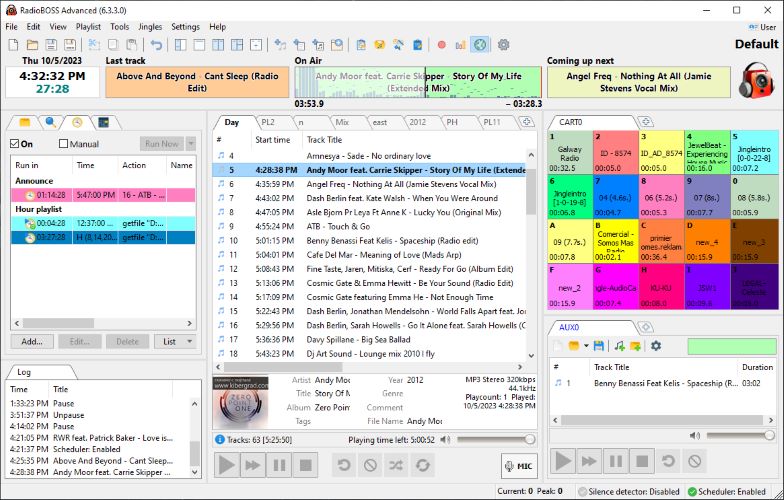
⚡ Quick Summary
- Best for: Internet radio stations, small broadcasters, businesses
- Strength: Affordable + powerful automation features
- Weakness: Windows-only, slightly dated UI
- Verdict: Excellent value-for-money radio automation software
👉 Want to explore pricing or features?
Check price | See full features | Learn more
🎙️ What Is RadioBOSS?
RadioBOSS is a professional radio automation software developed by DJSoft.Net, designed to help you create, schedule, and broadcast audio content.
It’s widely used by:
- Internet radio stations
- Terrestrial broadcasters
- Restaurants & retail stores
- DJs and event organizers
Unlike expensive alternatives, RadioBOSS focuses on simplicity, stability, and affordability.
🚀 Key Features of RadioBOSS Advanced
🎵 1. Powerful Playlist Automation
RadioBOSS lets you create fully automated playlists with advanced logic.
Key capabilities:
- Crossfade between tracks
- Automatic volume leveling
- Timed announcements
- Hourly programming blocks
- Jingle insertion
This means your station can run unattended for days or even weeks.
📡 2. Built-in Internet Streaming Support
One of the biggest advantages is native streaming support.
Supports:
- Shoutcast (v1 & v2)
- Icecast
- Windows Media Services
- RTMP streaming
You don’t need third-party tools—everything is integrated.
📚 3. Smart Music Library Management
Managing audio files is effortless.
Features include:
- Tagging & categorization
- BPM detection
- Silence trimming
- Batch processing
- Usage tracking
This is especially helpful for large audio collections.
Must Read : RadioBOSS Review: A Complete Guide to This Radio Automation Software
📊 4. Advertisement Scheduler (Monetization Ready)
Want to run ads?
RadioBOSS includes:
- Commercial scheduling
- Volume boost for ads
- Start/end date control
- Remote ad management
Perfect for monetizing your radio station.
🎚️ 5. Advanced Audio Processing
Built-in tools improve sound quality instantly:
- 12-band equalizer
- Sound compressor
- VST & Winamp plugin support
- Silence detection
This ensures your broadcast sounds professional and polished.
🧩 6. Playlist Generator & Automation Engine
The playlist generator is surprisingly powerful.
You can:
- Generate playlists automatically
- Use templates
- Create rotations
- Insert jingles and ads
This is where RadioBOSS truly shines.
🔐 7. Multi-User & Remote Control
For teams and advanced setups:
- User access control
- Multiple profiles
- Remote API access
- Network-based ad control
Great for scaling your station.
Must Read : I Tried Mondly for 30 Days — Honest Review & Results
📊 Feature Overview Table
| Feature | Available in RadioBOSS |
|---|---|
| Playlist Automation | ✅ |
| Internet Streaming | ✅ |
| Ad Scheduler | ✅ |
| Audio Processing | ✅ |
| Multi-user Support | ✅ |
| Crossfade & Mixing | ✅ |
👍 Pros and Cons
✅ Pros
- Affordable compared to competitors
- Extremely stable (runs for weeks unattended)
- Built-in streaming support
- Powerful playlist automation
- Great for both beginners and pros
❌ Cons
- Windows-only software
- Interface feels slightly outdated
- Learning curve for advanced features
⚖️ RadioBOSS vs Alternatives
| Feature | RadioBOSS | SAM Broadcaster | Rivendell |
|---|---|---|---|
| Price | 💲 Affordable | 💲💲 Expensive | Free (complex) |
| Ease of Use | Easy | Moderate | Hard |
| Stability | High | Medium | High |
| Streaming Support | Built-in | Built-in | Limited |
| Best For | Small–Medium users | Professionals | Engineers |
👉 Verdict: RadioBOSS offers the best balance of price and performance.
🎯 Real-World Use Cases
📻 1. Internet Radio Stations
Automate 24/7 broadcasting without manual effort.
🏪 2. Retail Stores & Restaurants
Create background music playlists that run all day.
🎤 3. DJs & Event Hosts
Manage live events with scheduled audio playback.
🏨 4. Hotels & Gyms
Maintain consistent ambiance with automated playlists.
🧠 Who Should Use RadioBOSS?
This software is ideal if you:
- Want affordable radio automation software
- Run an internet radio station
- Need background music automation
- Prefer simple yet powerful tools
Must Read : How to Automatically Backup Files on PC, Mac & Cloud (Beginner Guide)
Not ideal if:
- You need macOS support
- You want ultra-modern UI design
🛒 Buying Guide: What to Consider
Before choosing RadioBOSS, think about:
1. Your Use Case
Broadcasting vs background music—your needs matter.
2. Technical Skills
Beginners can use it, but advanced features require learning.
3. Budget
RadioBOSS is significantly cheaper than competitors.
4. System Compatibility
Works only on Windows systems.
💡 Internal Linking Suggestions
- “best audio editing software for beginners”
- “how to start an internet radio station”
- “top music automation tools for DJs”
- “guide to online broadcasting setup”
❓ FAQs (People Also Ask)
1. Is RadioBOSS good for beginners?
Yes, it’s beginner-friendly with a simple interface, though advanced features take time to master.
2. Can RadioBOSS run unattended?
Absolutely. It can run for weeks or months without interruption.
3. Does RadioBOSS support live streaming?
Yes, it supports Shoutcast, Icecast, and other streaming protocols.
4. Is RadioBOSS free?
No, but it’s much cheaper than most professional alternatives.
5. Can I schedule ads in RadioBOSS?
Yes, it includes a built-in advertisement scheduler.
6. Does it support multiple users?
Yes, with role-based access control.
7. What formats does it support?
All major audio formats including MP3, WAV, and more.
🏁 Final Verdict: Is RadioBOSS Worth It?
If you’re looking for a reliable, affordable, and feature-rich radio automation tool, RadioBOSS Advanced is a solid choice.
It delivers:
- Professional-level features
- Stable performance
- Excellent value for money
While it may lack a modern UI and Mac support, its core functionality is hard to beat at this price point.
👉 Ready to get started?
Check price | See full features | Learn more
⭐ Final Rating: 4.5 / 5
✔ Best for affordability
✔ Excellent automation
✔ Strong streaming capabilities