
If your computer or smartphone feels slower than it should, duplicate photos might be the hidden reason. Photos from WhatsApp, screenshots, cloud syncs, burst shots, and backups pile up fast. Over time, they create hundreds, or even thousands of duplicate and similar images. Manually sorting them is time-consuming and risky. That’s exactly where Duplicate Photos Fixer comes in. In this in-depth Duplicate Photos Fixer Review, you’ll learn how it works, what makes it different, and whether it’s truly the best duplicate photo cleaner for everyday users and professionals.
Quick Summary
- Finds exact and similar-looking photos
- Available for Windows, Android, and iOS
- Auto-mark feature saves massive time
- Preview before deleting files
- Ideal for large and cluttered photo libraries
Best for: Users who want a fast, safe, and beginner-friendly way to remove duplicate images.
What Is Duplicate Photos Fixer?
Duplicate Photos Fixer is a specialized duplicate photo finder designed to scan your storage and identify:
- Exact duplicate images
- Similar-looking photos (edited, resized, rotated, or flipped)
Unlike basic file cleaners that rely on filenames or sizes, this tool uses advanced image-matching algorithms, making it far more accurate for real-world photo collections.
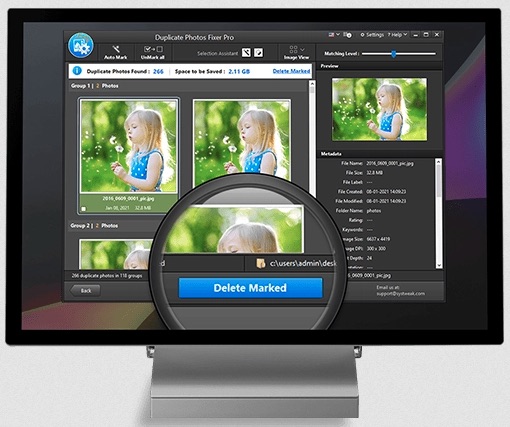
How Duplicate Photos Fixer Works
The process is simple and beginner-friendly:
- Download and install the software or mobile app
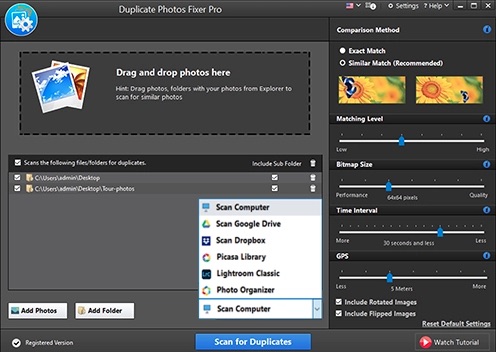
- Select folders, galleries, or libraries to scan
- Click Scan for Duplicates
- Review results grouped visually
- Use Auto-Mark or manual selection
- Delete marked duplicates safely
No technical knowledge required.
Key Features Explained
Auto-Mark Duplicate Photos
Instead of selecting files manually, Duplicate Photos Fixer automatically marks unnecessary duplicates while keeping the best version.
This feature alone can save hours of manual effort.
Must Read : Systweak Advanced Driver Updater Review: Does It Really Fix Driver Issues on Windows?
Detects Similar-Looking Photos
It doesn’t just find exact copies.
The tool detects:
- Cropped images
- Edited photos
- Different resolutions
- Rotated and flipped images
Perfect for burst shots, selfies, and social media edits.
Preview Scan Results Before Deleting
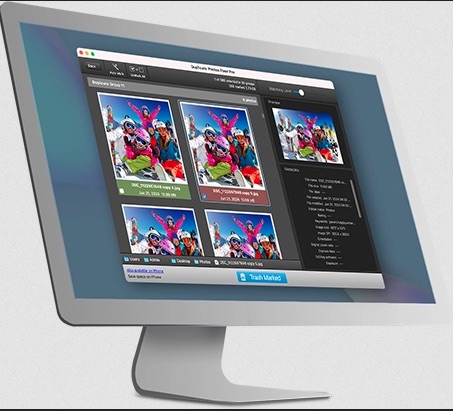
Each detected photo includes a preview.
This ensures:
- No accidental deletions
- Full control over what stays or goes
A must-have feature for safe photo cleanup.
Grouped & Categorized Results
Duplicates are displayed in clear visual groups, making it easy to compare and keep the best image.
This improves accuracy and confidence while deleting.
Recover Valuable Storage Space
Users often recover several gigabytes of space, especially on phones and older computers.
Great for:
- Low-storage devices
- Slower systems
- Cloud backup optimization
Must Read : Aiarty Image Enhancer Review: Features, Performance & Verdict
Duplicate Photos Fixer for Windows (Detailed Review)
The Windows version is the most powerful and feature-rich.
Windows Highlights
- Scan entire drives or selected folders
- Detect rotated and flipped duplicates
- Scan Dropbox images
- Remove duplicates from Lightroom Classic
- Scan Picasa libraries
- Built-in photo organizer using metadata
Performance & Accuracy
- Fast scanning, even with large libraries
- Minimal system resource usage
- Highly accurate grouping with very few false positives
Duplicate Photos Fixer for Android
Android devices are especially prone to photo clutter due to messaging apps and camera usage.
Android Features
- Scan entire phone storage
- Optimized for selfies and camera photos
- Simple and intuitive interface
- Group-wise duplicate results
- One-tap cleanup
Best for:
Users running out of phone storage or managing years of chat images.
Duplicate Photos Fixer for iOS (iPhone & iPad)
iPhone users often struggle with limited storage and photo clutter.
iOS Highlights
- Detects similar photos safely
- Organized and clutter-free gallery
- Beginner-friendly controls
- Preview images before deleting
While iOS has system restrictions, the app works reliably within those limits.
Pros and Cons
Pros
- Very easy to use
- Accurate similar photo detection
- Auto-mark saves time
- Preview before deletion
- Works across multiple platforms
Cons
- Free version has limitations
- Large libraries may take longer to scan
- iOS version has OS-level restrictions
Duplicate Photos Fixer vs Other Duplicate Photo Cleaners
| Feature | Duplicate Photos Fixer | Typical Cleaner Apps |
|---|---|---|
| Similar Photo Detection | Yes | Limited |
| Auto-Mark Feature | Yes | No |
| Preview Before Delete | Yes | Sometimes |
| Multi-Platform Support | Yes | Rare |
| Beginner-Friendly | Very | Mixed |
Who Should Use Duplicate Photos Fixer?
This tool is ideal if you:
- Have thousands of photos
- Want to remove duplicate images safely
- Prefer automation over manual sorting
- Use Windows, Android, or iOS
- Want visible previews before deleting
Not recommended if you have a very small photo collection.
Must Read : 15 Proven Ways to Reduce AWS Costs Without Hurting Performance
Things to Consider Before Buying
- Size of your photo library
- Platform you use most
- Need for similar photo detection
- Preference for automatic vs manual control
Suggested CTA: Check current pricing
Frequently Asked Questions
Is Duplicate Photos Fixer safe to use?
Yes. You can preview files before deleting, and nothing is removed without confirmation.
Does it delete similar photos or only exact duplicates?
It removes both exact and similar-looking photos.
Can it scan cloud storage?
The Windows version supports scanning Dropbox-linked folders.
Will it delete original photos?
No. It keeps one best version and marks duplicates separately.
Is there a free version?
Yes, but advanced features are available in the Pro version.
Does it slow down my device?
No noticeable slowdown during normal scans.
Final Verdict: Is Duplicate Photos Fixer Worth It?
If duplicate photos are eating up your storage and time, Duplicate Photos Fixer is a practical and reliable solution.
It’s simple, accurate, and designed for real users—not just tech experts.
For anyone looking for the best tool to remove duplicate images without risk, it’s absolutely worth considering.
My laptop is always filled with duplicate folders of albums from the past. I am fed up deleting manually on monthly basis it wastes my 3 hours monthly. I am glad that you gave me an automated solution to delete the duplicate photos
Yes you have to delete the duplicate stuff from your PC, mobile or laptop