Home Blog Page 101

WordPress 4.7 Vaughan Features – How to Efficiently use it

0

WordPress is one of the pioneer in content management systems which is free to use and an open platform. Many people use wordpress for their blogs including me. Technary is proudly using WordPress and its latest version for your service. WordPress keeps on evolving and releases their latest versions. This time they have released the WordPress 4.7 Vaughan. Yes they have named this version in honor of legendary jazz vocalist Sarah(Sassy) Vaughan. This is the latest version of wordpress. If you are a wordpress user then you would be able to see a notification on your dashboard to update your wordpress to the latest WordPress 4.7 Vaughan.

Wordpress 4.7 Vaughan Features - How to Efficiently use it

This time they have released the WordPress 4.7 Vaughan. Yes they have named this version in honor of legendary jazz vocalist Sarah(Sassy) Vaughan. This is the latest version of wordpress. If you are a wordpress user then you would be able to see a notification on your dashboard to update your wordpress to the latest WordPress 4.7 Vaughan.

WordPress 4.7 Vaughan Features

Brand New Twenty Seventeen Theme

If you are using free themes for your blog then you must check out the latest theme released by WordPress. This is the Twenty Seventeen Theme. This theme focusses on business websites and is highly customizable with various options. You as a user can personalize it using logo, navigation, social icons, widgets, custom colors, etc. This is a theme which I can say one of the best suited for business, free theme from wordpress themselves. This theme supports various languages and can be flexible on any device for a range of users.

Theme Starter Content

Customizing your theme on wordpress gets more simple. With Live preview on the right hand side, it will show you what changes you make, You can tweak in a lot of settings and customize according to your requirement. You can drag and drop widgets more easily. Changing of fonts, colors according to the need is possible with ease.

Editing of Shortcuts

The user can now see which of the parts of the site can be customized when they see the visible icons. If you click on it you can straight away edit that particular part. This is a simpler process than the previous versions.

Video Headers in Twenty Seventeen Theme

You can easily put in a video in your header to showcase which can be shown as moving header image. This will help you to get the website loaded faster and also showcase some attractive content and grab your visitor’s attention.

Also read : Redirected Status when Fetch as Google – Fixed

Menu Building Process

You must be knowing of how to create Menus. You can also link them to a particular link or to a page. You can create a page from there itself. No need to go back and forth. So they have taken care of the User Experience aspect for sure.

Custom CSS Live Preview

You can add custom CSS in your wordpress. If you are a geek and want to put in your own CSS, you can do that too. In the previous version you used to make the changes and refresh the page. But now when you make changes in the Custom CSS you can see the live changes directly on your screen. So you know if you are going right according to you while making the changes and if you go wrong you can immediately rectify the mistakes. This is a developer friendly indeed.


Query!

I just have one query to the WordPress Developers or who are WordPress Experts. I cannot see any button of “Justify” while writing the post. So there is no such icon of “Justify” indentation. I am not able to do justify indentation my content. I am using MAC OS, tried the shortcut key(Comand+J) after selecting desired content still not happening. Kindly share the solution if you know. Because it happened when I updated to this latest release the Justify icon is gone.


Now showcase PDF Thumbnail Previews when uploaded

This is a great aspect which I liked in this latest version of WordPress. Here you can upload the PDF in your wordpress in an article and it will show a thumbnail preview of the PDF as well. It will be distinguishable as it will show some details of the PDF including an image thumbnail.

Addition of languages in your Dashboard

Well this is certainly improving the Global aspect of working together in a particular wordpress website. If you are familiar with English then you can set it to English for yourself. But if any of your wordpress User is not familiar with your language, you can setup a language which is more friendly to him/her. By doing this the complete dashboard will be converted into the desired language for that particular user. You as an admin can set a particular language for a particular user. So language barrier is removed and there is more collaboration and openness in working together.

Wordpress 4.7 Vaughan Features - How to Efficiently use it

REST API Endpoints

There is something in for the developers in this new release. WordPress 4.7 has released the REST API Endpoints. So these content endpoints provide machine readable external access to the WordPress site. There are some innovative things with which a wordpress site can be interactive, it may be themes, plugins, widgets, apps, etc.

Post Type Template

The developer can play more inside the post functionality and can enjoy more flexibility.

New Theme API Goodies

There are new hooks, behaviors and functions in the latest WordPress.

Custom Bulk Actions

The user is able to make bulk actions in List Tables. It is more easier to do the bulk delete and edit in WordPress.

WP_Hook Function

This is a code which is below the filters and actions. This has fixed bugs.

Registration API Settings

A function register_setting() is made better which includes the description, type and REST API visibility.

Customize Changesets

These help in the autosaving of drafts more efficiently. The starter content of the theme is also an exciting feature which is enhanced in this release.

Conclusion

If you are existing user of WordPress then you will be able to update to the latest release by clicking on “Update Now”. If you have never used WordPress then start using it now for your Blog. Interesting world inside it. Highly customizable and has a strong community.


Affiliate World Asia 2016

0

Affiliate World conferences are amazing for networking, gaining knowledge in the field of affiliate marketing. Recently I attended the Affiliate World Asia 2016 conference. This was my second international conference and I am thrilled to share my experience of this event.

Affiliate World Asia 2016

Affiliate World Asia 2016

This conference took place on 6th and 7th December 2016 in Bangkok, Thailand. This conference was more focussed on the new business opportunities, insights into the Affiliate marketing and the various trends of the big campaigns. Certanly if you are an affiliate marketer then you must attend such conferences.

Affiliate World Asia 2016
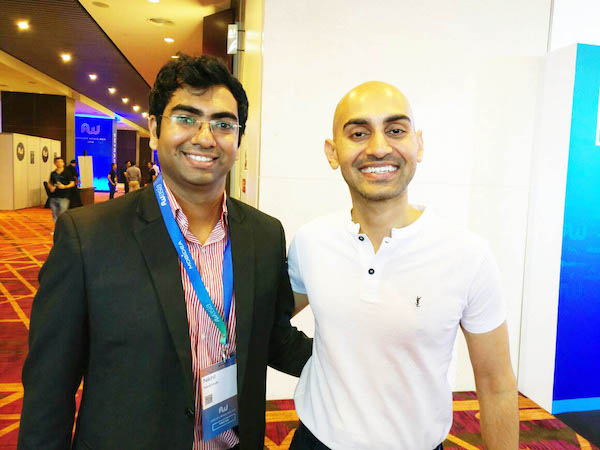
Neil Patel during his session

This event was attended by over 1500 affiliates and experts from all over the world from 60 different countries. This was a premium affiliate marketing event which took place at Hotel Centara Grand in Bangkok. The event was lined up with amazing speakers and all were very much excited for gaining valuable knowledge from these industry experts.

Affiliate World Asia 2016
with Neil Patel

Neil Patel was one of the speaker at the event and his session was just unbelievable. He just not only speaks about a particular topic but shows it statistically which is completely based upon his personal experience and observation. I have learned a lot about content marketing from his blog. The best part is that I had a wonderful conversation with him after his session at the event. So this opporunity of not only gaining knowledge but meeting people you idolize, is just invaluable.

Affiliate World Asia 2016
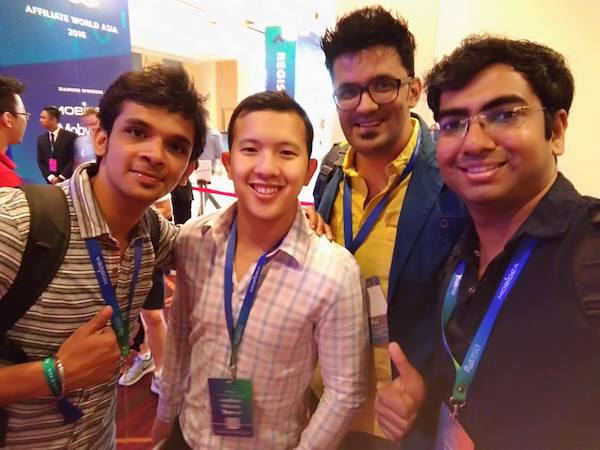
With Saurabh Mukhekar, Charles NGO, Jitendra Vaswani

The two sessions which I liked the most were of Neil Patel and Charles NGO. Neil Patel, one of the most amazing content marketing experts and Charles NGO is a great affiliate marketer. Getting valuable knowledge from such sessions is awesome.

with Matthew Woodward

Many other sessions in the conference were fruitful and full of knowledge. Apart from getting insights of the industry and trends we get to learn from the various companies. So there were many booths at the event of different companies. So it was nice networking with these companies and getting associated with them.

with Matthew Woodward

I am glad that I was interviewed by Mobidea which were the Diamond Sponsor of the event. You can see the full video of the interview. It was fun sharing our knowledge about affiliate marketing. Also the company Mobidea is one of the best companies in CPA Mobile Affiliate networks.

with Saurabh Mukhekar and Luís Garcia

Now a days people spend more time on their smartphones. So if you are a mobile publisher and have good amount of audience then you should try Mobidea and you may get good results. There were many other companies at the event and it was fun networking with the affiliate marketers and media buyers.

with Saurabh Mukhekar and talented Game Affiliates
during After Party
during After Party
with Saurabh Mukhekar and talented Joker from US
with Saurabh Mukhekar and talented Magician from UK

Why should you attend Affiliate World Conferences in future?

Well working alone or with a team remotely is what we do often. There is freedom to work from anywhere and at any time in the feild of internet marketing. Its the offline meets which makes the bond stronger between you and the companies and other prospective clients. You will earn valuable knowledge in the feild of affiliate marketing which gained from industry experts LIVE impacts a lot. You can ask questions directly in the conference to the speakers which are very much polite to answer your queries.

Networking with right people is what you can enjoy in such conferences. If you are an affiliate marketer, advertiser or a content publisher/blogger then you must attend these conferences. The experience will remain with you for a lifetime for sure.

How to make cashless transactions using Paytm

0

After the demonetization there were a lot of questions in people`s mind. Some of them were how to manage the cash and make the bill payments and how the lifestyle may be affected. When demonetization took place many people first thought of getting rid of 500 & 1000 rupee notes which they had. That’s fine that you could had used them in hospitals and Petrol stations till 24th November.

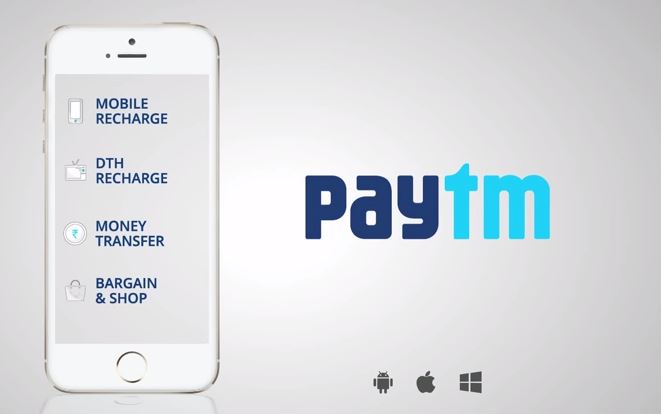
Have you ever tried using cashless transactions in your life? I know many of you might have tried paying by debit/credit card and the payments are done by using the ATM PIN while doing the transaction. What if I tell you that there is more simpler, quicker and hassle free way to make payments by using Paytm. Many of you might have used Paytm to recharge your smartphone and pay bills. Actually you can do much more with it. It acts like an eWallet which can be used extensively for various purposes.

How to make cashless transactions using Paytm

What is an eWallet?

An eWallet is a virtual wallet where in you can keep your money securely and use it digitally across many things. This is a digital money like its in your bank but it is easier to send and receive money with an eWallet. You can add funds in an eWallet using your internet banking, debit/credit card and can use it extensively for many purposes.

Cashless transactions using Paytm

What is Paytm?

Well Paytm acts like your friend which is an online platform (app & website), where in you can use it like an eWallet. You can Add Money, Send Money and even Pay Money with ease. You can do Online Mobile Recharge using Paytm and use it to send payments across the other Paytm users and various merchants. It is one of the fastest Online Payments and Recharge service in India.

If you like online shopping then Paytm also acts like an ecommerce platform which showcases various products from many categories for your needs. It provides many cashbacks and exclusive discounts to its users. You should check out some of their lucrative deals for sure.

How to Download the App?

How to make cashless transactions using PaytmHow to make cashless transactions using Paytm

How to make cashless transactions using Paytm How to make cashless transactions using Paytm

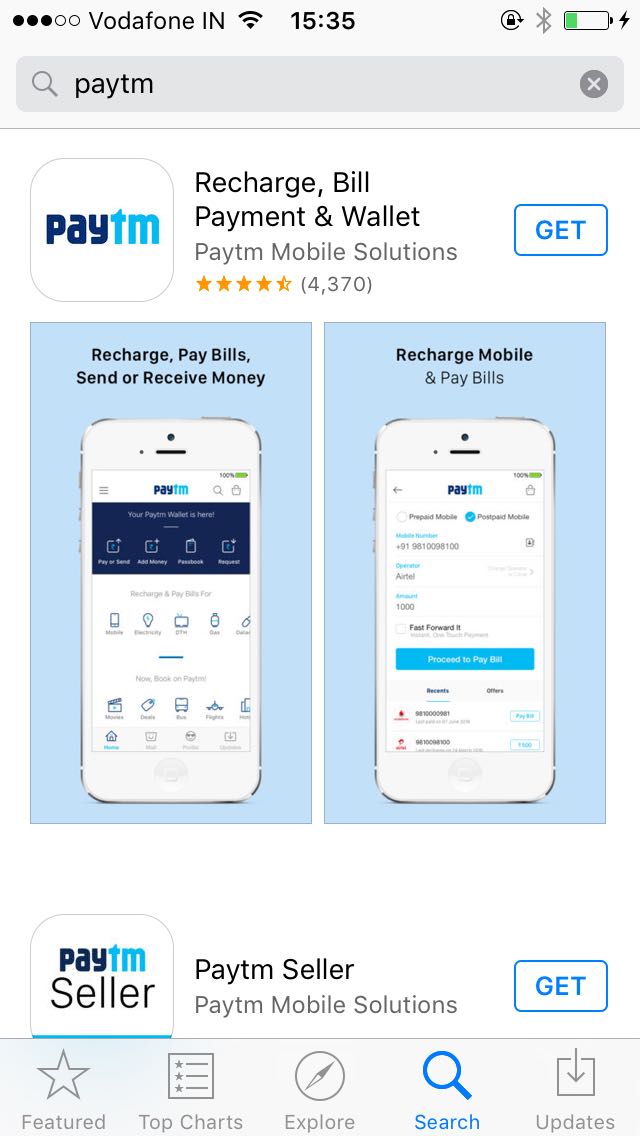
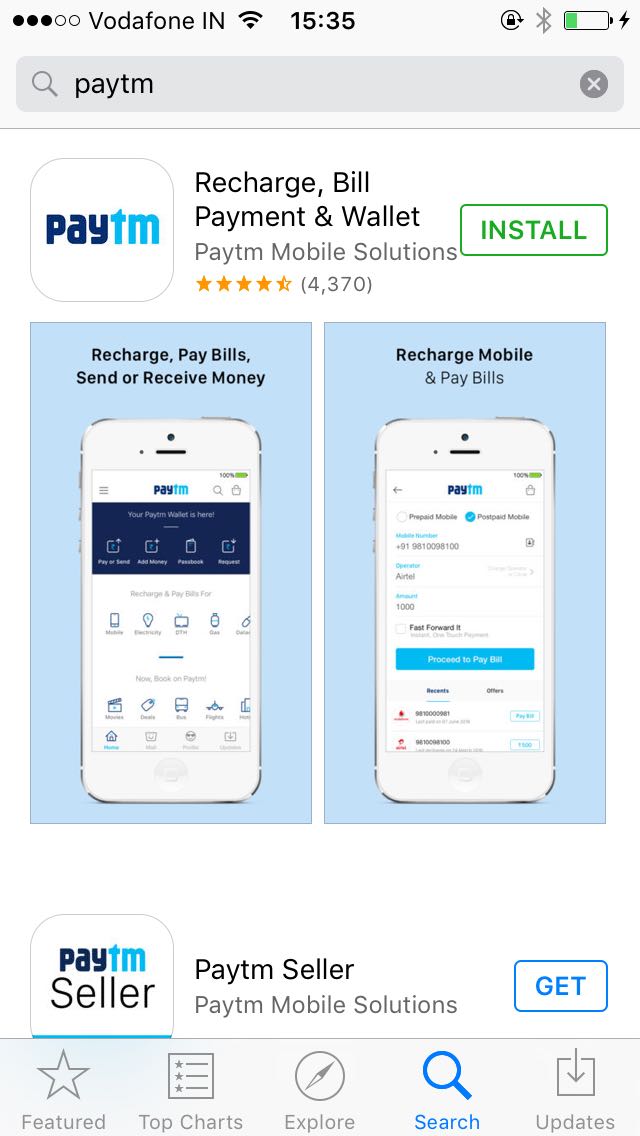
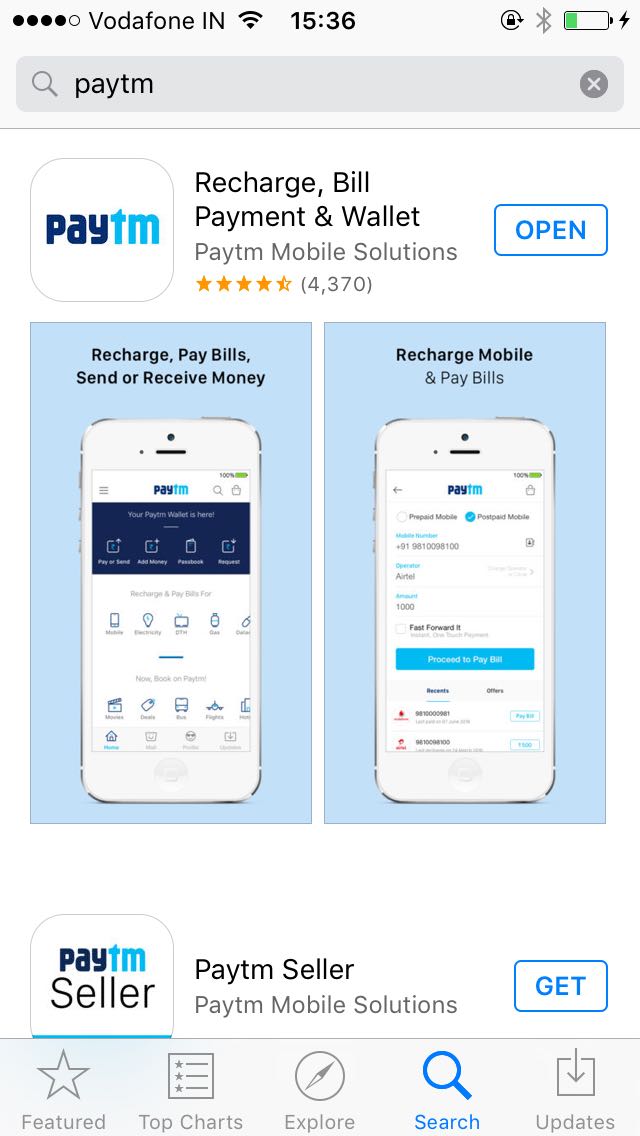
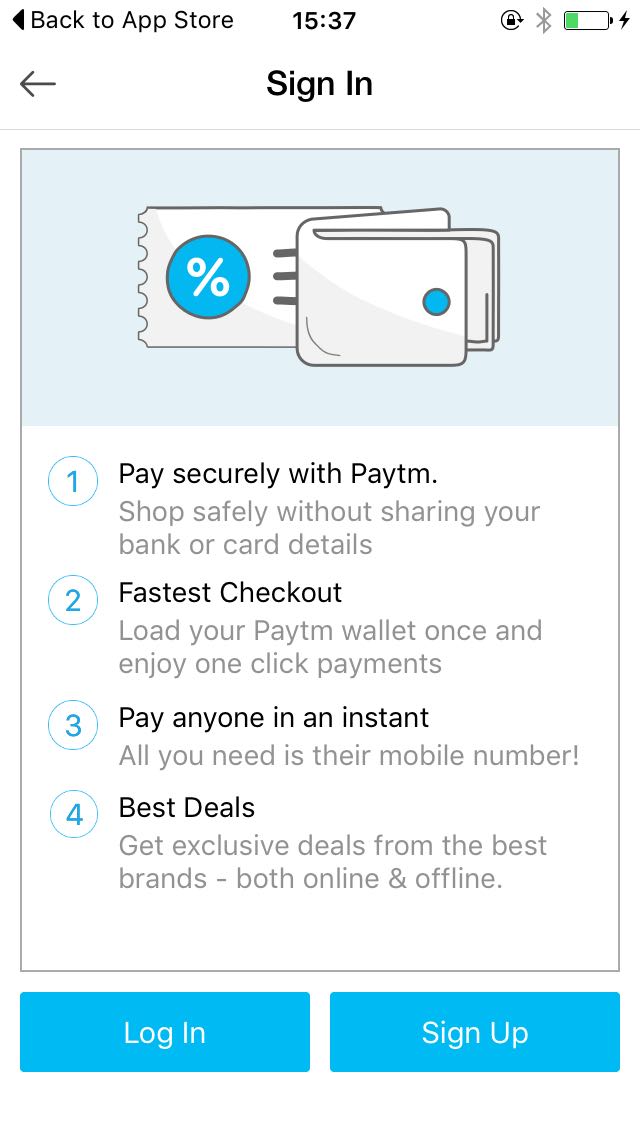
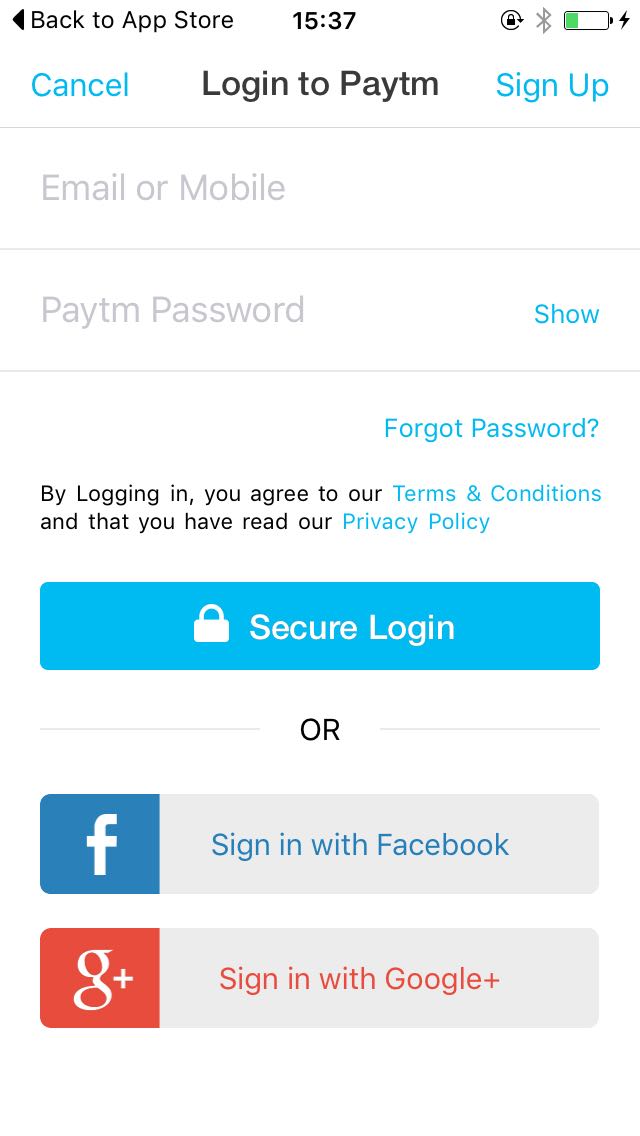
If you are an Android smartphone user then just go to the Google Play Store and search for “Paytm” and then click on Paytm App and click on “Install” button. Within seconds the app will be installed on your smartphone. Similarly if you are an iPhone user then you can go to the Apple Store and search for “Paytm”, and install the app. Once you install the app it will ask you your mobile number and within seconds you can register with ease for free.

How to Register at Paytm?

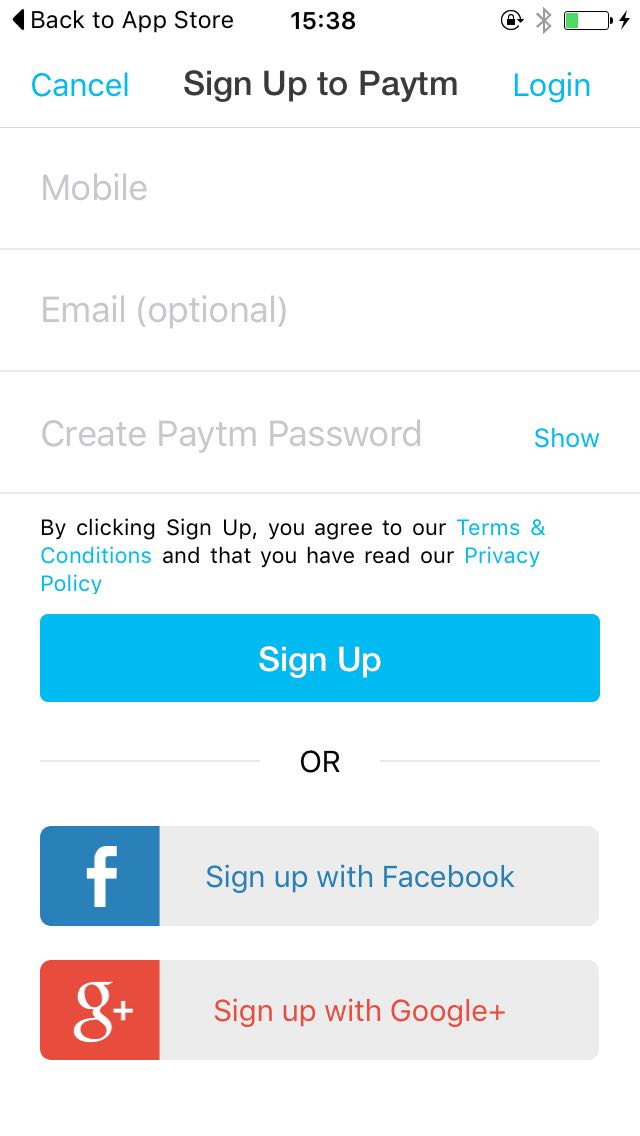
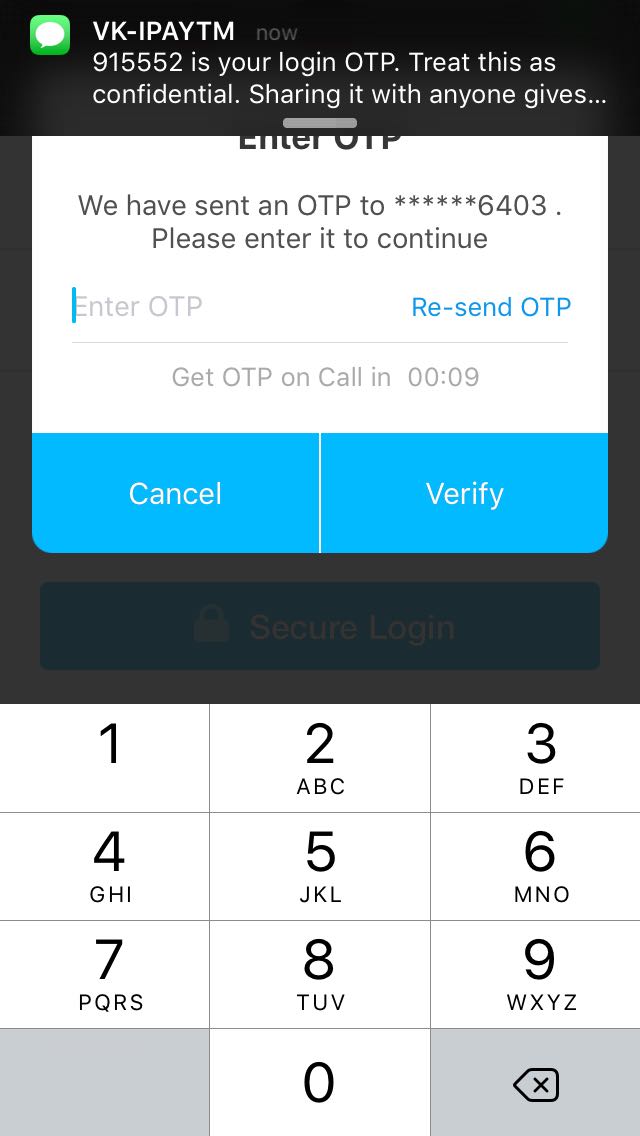
Click on the Sign Up option. There you will have to full up your mobile number, E-mail id(optional) & desired Paytm password and then click on “Create your Paytm wallet”. Thats it, you receive an OTP(One Time Password) to verify that you are the owner  of the mobile number. Once you receive the OTP, put in the OTP and your Paytm wallet is created!

How to make cashless transactions using Paytm How to make cashless transactions using Paytm

How to make cashless transactions using Paytm How to make cashless transactions using Paytm

How to Add Money/Send Money/Pay Money?

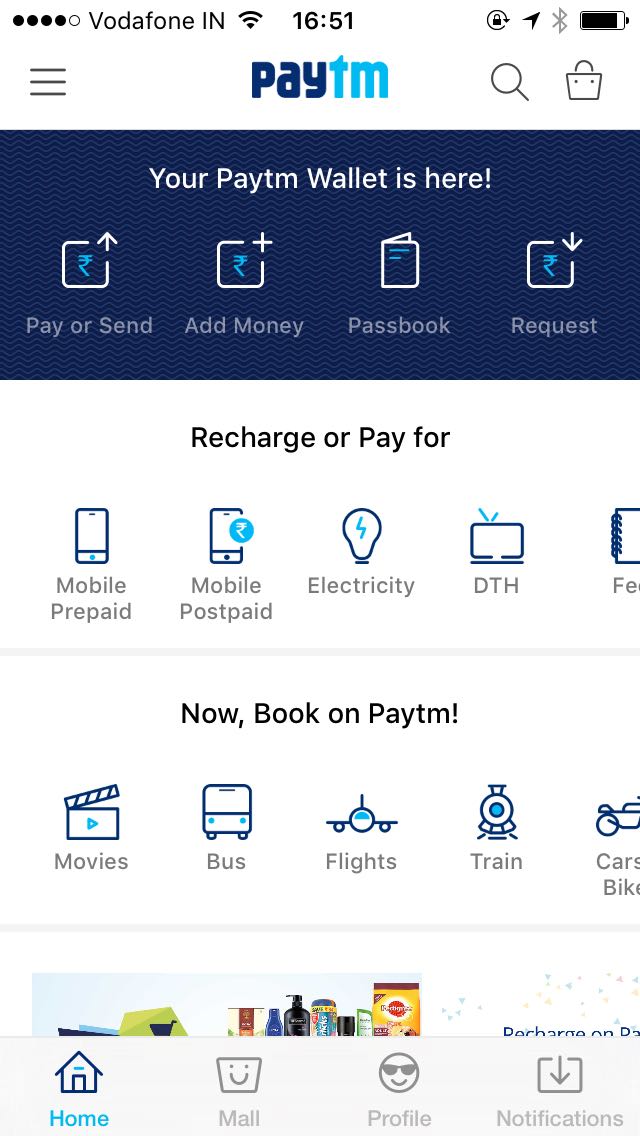
If you want to add money to your Paytm wallet then you can do it easily. When you open the Paytm App you can see the “Add Money” option. Click on it and then enter the amount and click on “Add Money” button. Then you will be asked for the payment option. You can add money to the wallet using Internet Banking/Credit Card/Debit Card/ATM card and click on “Pay Now”. Once the payment is done you can see a successful message in your screen.

How to make cashless transactions using Paytm

How to make cashless transactions using Paytm

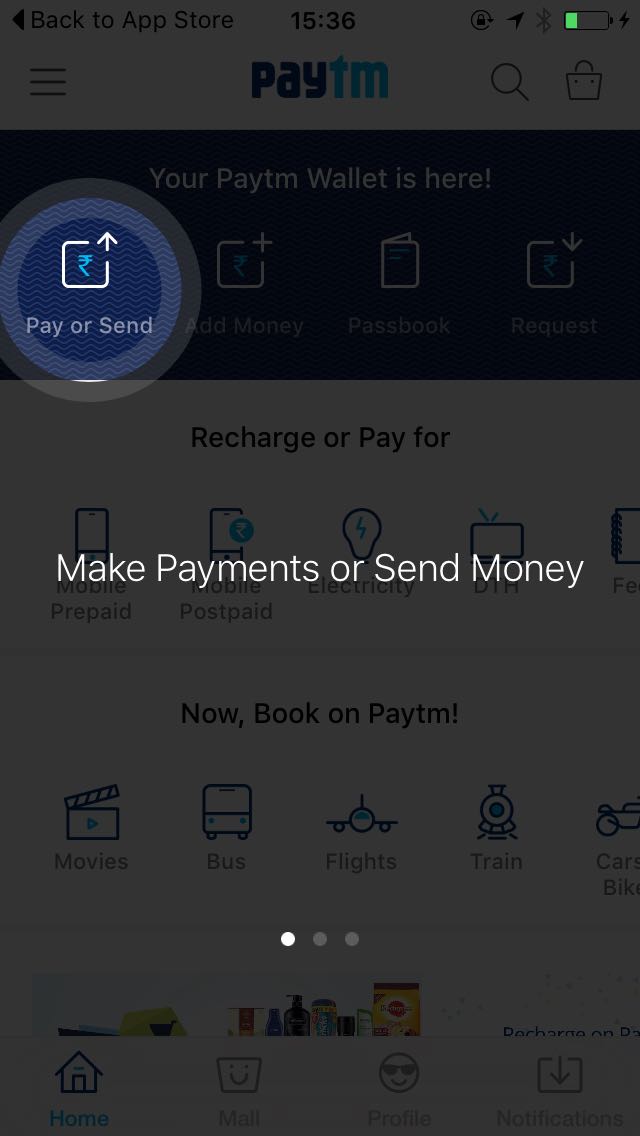
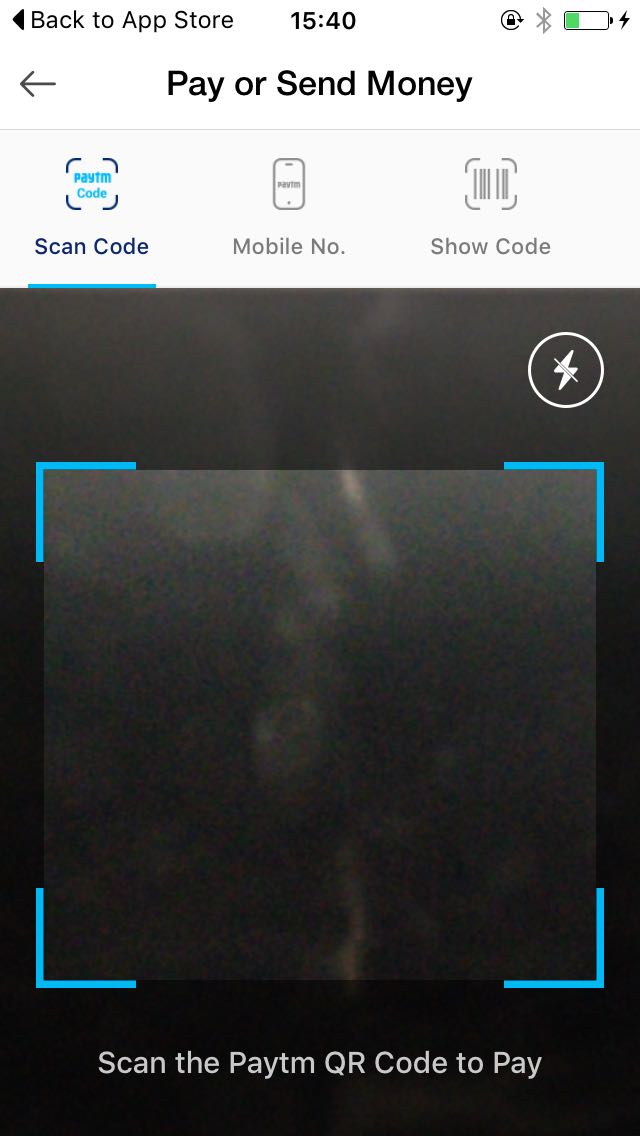
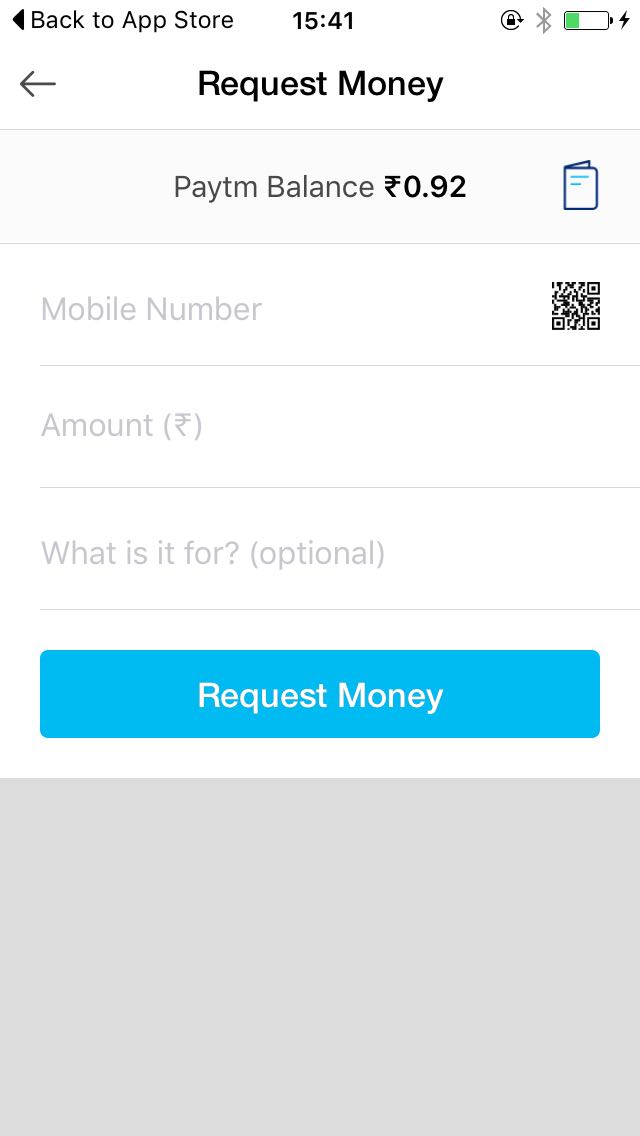
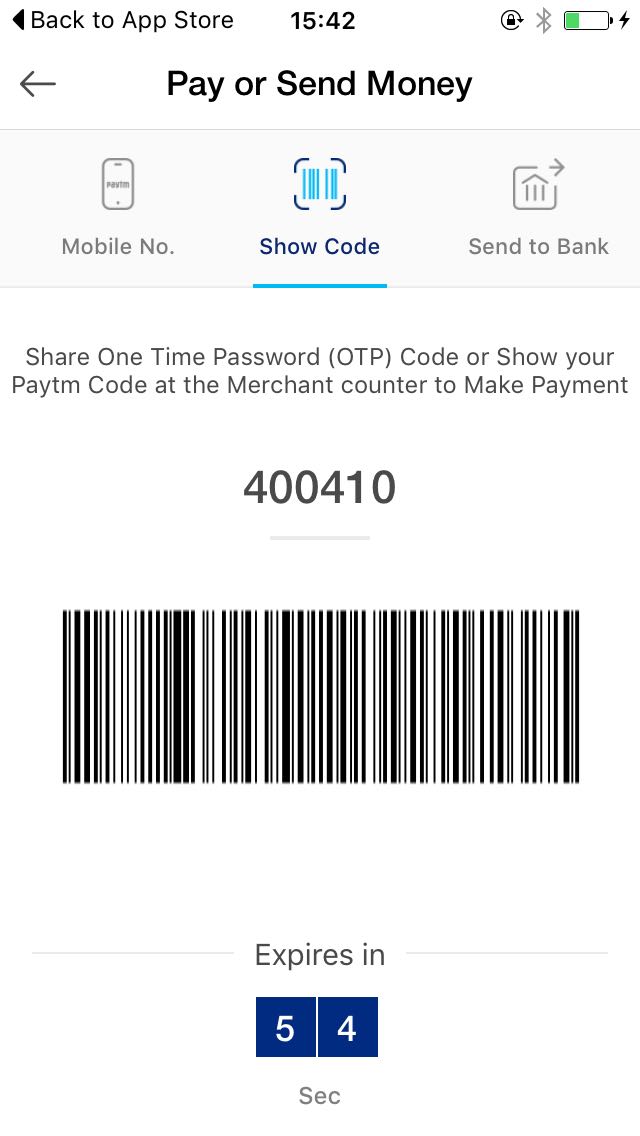
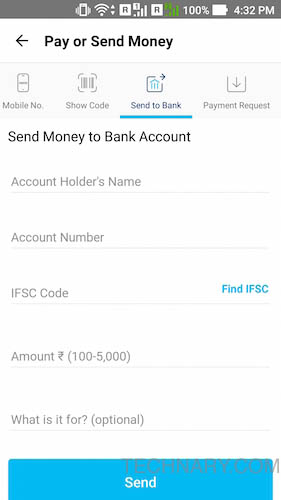
Sending Money to anyone is a quicker process. From the app click on “Pay or Send” option. Then you can see options like: Scan Code, Mobile No., Show Code, Send to Bank. If you know the mobile number of the person to whom you want to send the money then hit that option, enter his/her mobile number, enter the amount and click on “Send Money”. Then you get a successful message. Money sent!

 How to make cashless transactions using Paytm How to make cashless transactions using Paytm

Paying money to anyone is also easily possible. You can also choose the QR code option if you want to scan the QR code of a merchant or any of your friend. So just hit that option, scan the QR code then the app shows you the details of that person, enter the amount and hit on “Pay”, its that simple.

How to make cashless transactions using Paytm How to make cashless transactions using Paytm

What are the different ways in which the users can use Paytm in their daily life?

Just after the demonetization I had a very few 100 notes to spend but I have the paytm wallet which came to my rescue. As soon as I got to know that there will be a problem of people not giving change to currency notes, I decided to use Paytm to the max.

The most important aspect of Paytm is that it can be linked to the Uber app. As I had few meetings to attend and I had made some travel plans, traveling with Uber and paying by Paytm was the best way to make cashless transactions.

Another time I was amazed to see that our nearby Xerox Shop had showed Paytm QR code which means I was able to pay using my Paytm. I had to pay an amount of Rs.37 to him. So instead of me giving him a rare Rs 100 note and expecting Rs.63 back(which he may not have), I just opened my Paytm App. Clicked on send money, scanned his QR code. Immediately the merchant’s name appeared.

I just had to insert the amount which I wanted to pay him. I clicked send and within few seconds the amount was deducted from my wallet and credited to him. Immediately he received an sms and he said thank you. This latest technology and its easy use is the present and future my friends.

I was easily able to do cashless transactions using Paytm. So I made payments at many places including small restaurants, Uber, stationery & grocery stores, etc.

How to return money to your bank account?

The best part of using Paytm is that if you want to use the money from your wallet back to your bank account, then you can do it too. So there is no reason of insecurity, your money stays with you, you can pull back money into your bank account easily whenever needed. From the app, just click on “Pay or Send”, then select “Send to Bank”, put in your bank details and click on “Send”. There you go, money goes to your bank account. In fact you can send money to anyone`s bank account with ease. Also when you add money from your bank to wallet there is a button named “Return”, you can find it in the Passbook.

<p style="text-align: justify;">After the demonetization there were a lot of questions in people`s mind. Some of them were how to manage the cash and make the bill payments and how the lifestyle may be affected. When demonetization took place many people first thought of getting rid of 500 & 1000 rupee notes which they had. That’s fine that you could had used them in hospitals and Petrol stations till 24<sup>th</sup> November.</p> <p style="text-align: justify;">Have you ever tried using cashless transactions in your life? I know many of you might have tried paying by debit/credit card and the payments are done by using the ATM PIN while doing the transaction. What if I tell you that there is more simpler, quicker and hassle free way to make payments by using Paytm. Many of you might have used Paytm to recharge your smartphone and pay bills. Actually you can do much more with it. It acts like an eWallet which can be used extensively for various purposes.</p> <p style="text-align: justify;"><img class="aligncenter size-full wp-image-9511" data-src="https://www.technary.com/wp-content/uploads/2016/12/paytm.jpeg" alt="How to make cashless transactions using Paytm" width="661" height="414" /></p> <h3 style="text-align: justify;">What is an eWallet?</h3> <p style="text-align: justify;">An eWallet is a virtual wallet where in you can keep your money securely and use it digitally across many things. This is a digital money like its in your bank but it is easier to send and receive money with an eWallet. You can add funds in an eWallet using your internet banking, debit/credit card and can use it extensively for many purposes.</p> <h2 style="text-align: justify;">Cashless transactions using Paytm</h2> <h3 style="text-align: justify;">What is Paytm?</h3> <p style="text-align: justify;">Well Paytm acts like your friend which is an online platform (app & website), where in you can use it like an eWallet. You can Add Money, Send Money and even Pay Money with ease. You can do Online Mobile Recharge using Paytm and use it to send payments across the other Paytm users and various merchants. It is one of the fastest Online Payments and Recharge service in India.</p> <p style="text-align: justify;">If you like online shopping then Paytm also acts like an ecommerce platform which showcases various products from many categories for your needs. It provides many cashbacks and exclusive discounts to its users. You should check out some of their lucrative deals for sure.</p> <h3 style="text-align: justify;">How to Download the App?</h3> <img class="aligncenter size-full wp-image-9522" data-src="https://www.technary.com/wp-content/uploads/2016/12/Paytm-install-1.png" alt="How to make cashless transactions using Paytm" width="600" height="496" /> <p style="text-align: justify;">If you are an Android smartphone user then just go to the <a href="https://play.google.com/store/apps/details?id=net.one97.paytm&hl=en" target="_blank">Google Play Store</a> and search for “Paytm” and then click on Paytm App and click on “Install” button. Within seconds the app will be installed on your smartphone. Similarly if you are an iPhone user then you can go to the Apple Store and search for “Paytm”, and install the app. Once you install the app it will ask you your mobile number and within seconds you can register with ease for free.</p> <h3 style="text-align: justify;">How to Register at Paytm?</h3> <p style="text-align: justify;">Click on the Sign Up option. There you will have to full up your mobile number, E-mail id(optional) & desired Paytm password and then click on "Create your Paytm wallet". Thats it, you receive an OTP(One Time Password) to verify that you are the owner of the mobile number. Once you receive the OTP, put in the OTP and your Paytm wallet is created!</p> <h3 style="text-align: justify;">How to Add Money/Send Money/Pay Money?</h3> <p style="text-align: justify;">If you want to add money to your Paytm wallet then you can do it easily. When you open the Paytm App you can see the “Add Money” option. Click on it and then enter the amount and click on “Add Money” button. Then you will be asked for the payment option. You can add money to the wallet using Internet Banking/Credit Card/Debit Card/ATM card and click on “Pay Now”. Once the payment is done you can see a successful message in your screen.</p> <img class="wp-image-9509 alignleft" data-src="https://www.technary.com/wp-content/uploads/2016/12/paytm-1.png" alt="How to make cashless transactions using Paytm" width="250" height="500" /> <p style="text-align: justify;"><img class="aligncenter wp-image-9515" data-src="https://www.technary.com/wp-content/uploads/2016/12/Add-Money-2.png" alt="How to make cashless transactions using Paytm" width="250" height="500" /></p> <p style="text-align: justify;"><img class="wp-image-9516 alignleft" data-src="https://www.technary.com/wp-content/uploads/2016/12/Add-Money-3.png" alt="How to make cashless transactions using Paytm" width="250" height="500" /></p> <p style="text-align: justify;"><img class="aligncenter wp-image-9517" data-src="https://www.technary.com/wp-content/uploads/2016/12/Add-Money-4.png" alt="How to make cashless transactions using Paytm" width="250" height="500" /></p> <p style="text-align: justify;">Sending Money to anyone is a quicker process. From the app click on “Pay or Send” option. Then you can see options like: Scan Code, Mobile No., Show Code, Send to Bank. If you know the mobile number of the person to whom you want to send the money then hit that option, enter his/her mobile number, enter the amount and click on “Send Money”. Then you get a successful message. Money sent!</p> <p style="text-align: justify;"></p> <p style="text-align: justify;"><img class="size-full wp-image-9531 alignleft" data-src="https://www.technary.com/wp-content/uploads/2016/12/send-01.jpg" alt="How to make cashless transactions using Paytm" width="281" height="500" /> <img class="aligncenter size-full wp-image-9532" data-src="https://www.technary.com/wp-content/uploads/2016/12/send-02.jpg" alt="How to make cashless transactions using Paytm" width="281" height="500" /></p> <p style="text-align: justify;"><img class="wp-image-9519 alignleft" data-src="https://www.technary.com/wp-content/uploads/2016/12/send-3.png" alt="How to make cashless transactions using Paytm" width="250" height="500" /></p> <p style="text-align: justify;"><img class="aligncenter wp-image-9520" data-src="https://www.technary.com/wp-content/uploads/2016/12/send-4.png" alt="How to make cashless transactions using Paytm" width="250" height="500" /></p> <p style="text-align: justify;"><img class="aligncenter wp-image-9521" data-src="https://www.technary.com/wp-content/uploads/2016/12/send-5.png" alt="How to make cashless transactions using Paytm" width="250" height="500" /></p> <p style="text-align: justify;">Paying money to anyone is also easily possible. You can also choose the QR code option if you want to scan the QR code of a merchant or any of your friend. So just hit that option, scan the QR code then the app shows you the details of that person, enter the amount and hit on “Pay”, its that simple.</p> <h3 style="text-align: justify;">What are the different ways in which the users can use Paytm in their daily life?</h3> <p style="text-align: justify;">Just after the demonetization I had a very few 100 notes to spend but I have the paytm wallet which came to my rescue. As soon as I got to know that there will be a problem of people not giving change to currency notes, I decided to use Paytm to the max.</p> <p style="text-align: justify;">The most important aspect of Paytm is that it can be linked to the Uber app. As I had few meetings to attend and I had made some travel plans, traveling with Uber and paying by Paytm was the best way to make cashless transactions.</p> <p style="text-align: justify;">Another time I was amazed to see that our nearby Xerox Shop had showed Paytm QR code which means I was able to pay using my Paytm. I had to pay an amount of Rs.37 to him. So instead of me giving him a rare Rs 100 note and expecting Rs.63 back(which he may not have), I just opened my Paytm App. Clicked on send money, scanned his QR code. Immediately the merchant's name appeared.</p> <p style="text-align: justify;">I just had to insert the amount which I wanted to pay him. I clicked send and within few seconds the amount was deducted from my wallet and credited to him. Immediately he received an sms and he said thank you. This latest technology and its easy use is the present and future my friends.</p> <p style="text-align: justify;">I was easily able to do cashless transactions using Paytm. So I made payments at many places including small restaurants, Uber, stationery & grocery stores, etc.</p> <h3 style="text-align: justify;">How to return money to your bank account?</h3> <p style="text-align: justify;">The best part of using Paytm is that if you want to use the money from your wallet back to your bank account, then you can do it too. So there is no reason of insecurity, your money stays with you, you can pull back money into your bank account easily whenever needed. From the app, just click on “Pay or Send”, then select “Send to Bank”, put in your bank details and click on “Send”. There you go, money goes to your bank account. In fact you can send money to anyone`s bank account with ease. Also when you add money from your bank to wallet there is a button named "Return", you can find it in the Passbook.</p> <p style="text-align: justify;"></p> <h3 style="text-align: justify;">Summing it Up</h3> <p style="text-align: justify;">After demonetization, it is high time to go cashless and with my experience Paytm is a best way to do cashless transaction with ease and simplicity. Actually not only mobile recharge you can make a lot of bill payments and bookings. These include Movie bookings, travel bookings ands ofcourse shopping various consumer products online. All this can be done with your <a href="http://p-y.tm/tFHQ" target="_blank">Paytm wallet</a>. Go cashless and have secure transactions.</p>

Summing it Up

After demonetization, it is high time to go cashless and with my experience Paytm is a best way to do cashless transaction with ease and simplicity. Actually not only mobile recharge you can make a lot of bill payments and bookings. These include Movie bookings, travel bookings ands ofcourse shopping various consumer products online. All this can be done with your Paytm wallet. Go cashless and have secure transactions.
House hunt made easy with AR and VR technology

0

If you ever interact with individuals who have bought properties in the recent past, they might share that they were more relieved than happy when they finally sealed the deal. This is because the process of buying property is extremely demanding.

Apart from navigating bad roads and tiresome traffic, a prospective buyer also has the following pain points:

  • Verifying credibility of the builder
  • Various financial options apart from the ones offered by the builder
  • Finding out quality of the locality
  • If it is a project under construction, one would find it difficult to visualize how the society would shape up to be like.

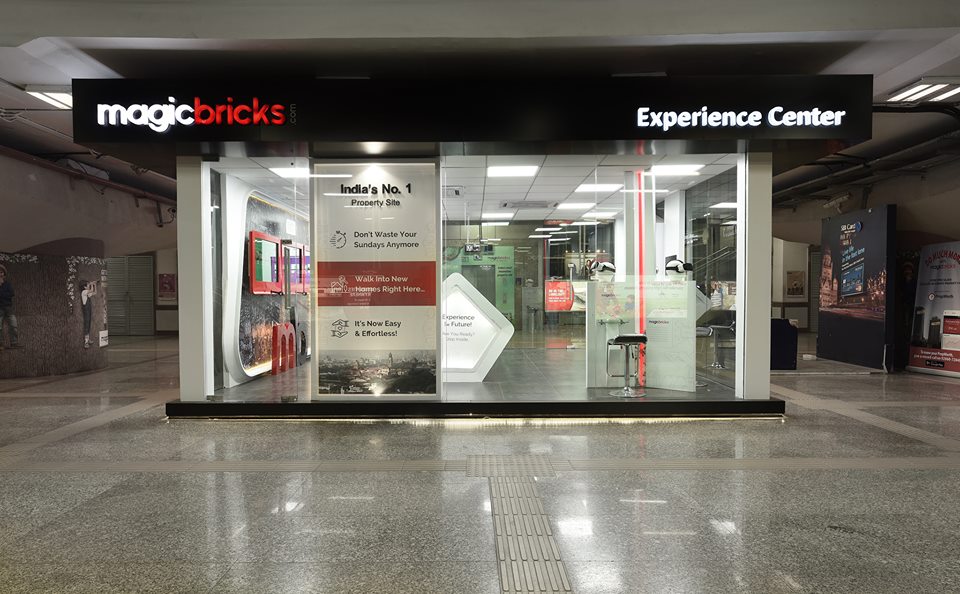
By starting the Real Estate Experiential Centre at the Magicbricks Western Express Highway station on the Ghatkopar-Andheri Monorail route, Magicbricks has launched several innovative initiatives to tackle these problems.

House hunt made easy with AR and VR technology

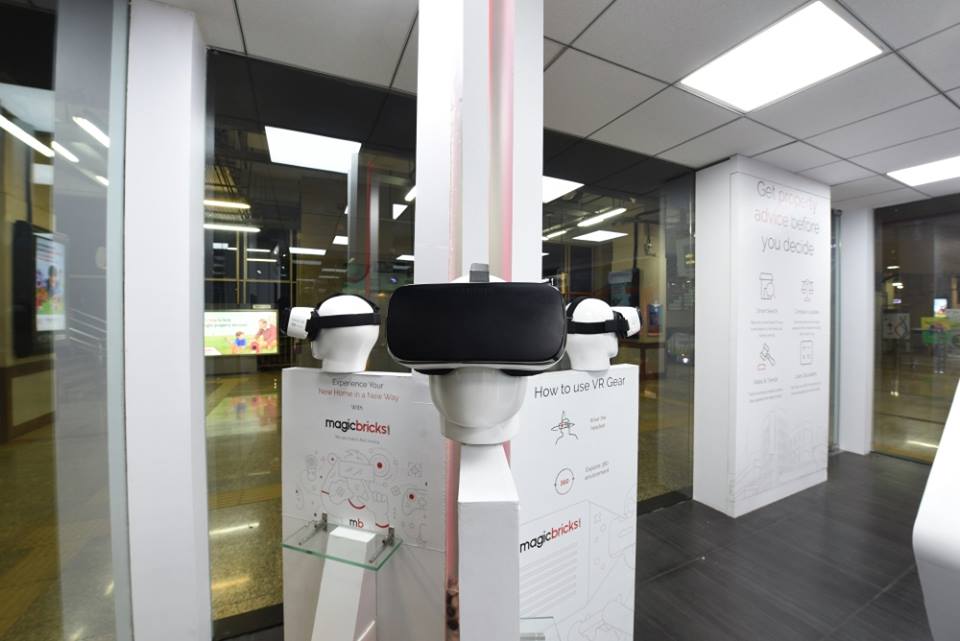
Most of us would have only heard about terms such as virtual reality or augmented reality. Or watched Hollywood films which have explored these concepts. Few of us who have travelled abroad might have experienced this while visiting an amusement park in the US or Europe. However at the Magicbricks Real Estate Experiential Centre one can see these technologies in action.
Let us look at the various futuristic marvels which are going to make your lives easier:

Virtual Reality

House hunt made easy with AR and VR technology

Imagine that the show flat isn’t yet available. But Virtual reality will make you will feel like you have visited the property in person. This is an amazing experience as you get to visit many properties using the Virtual Reality by literally standing at one place.

Augmented Reality

House hunt made easy with AR and VR technology

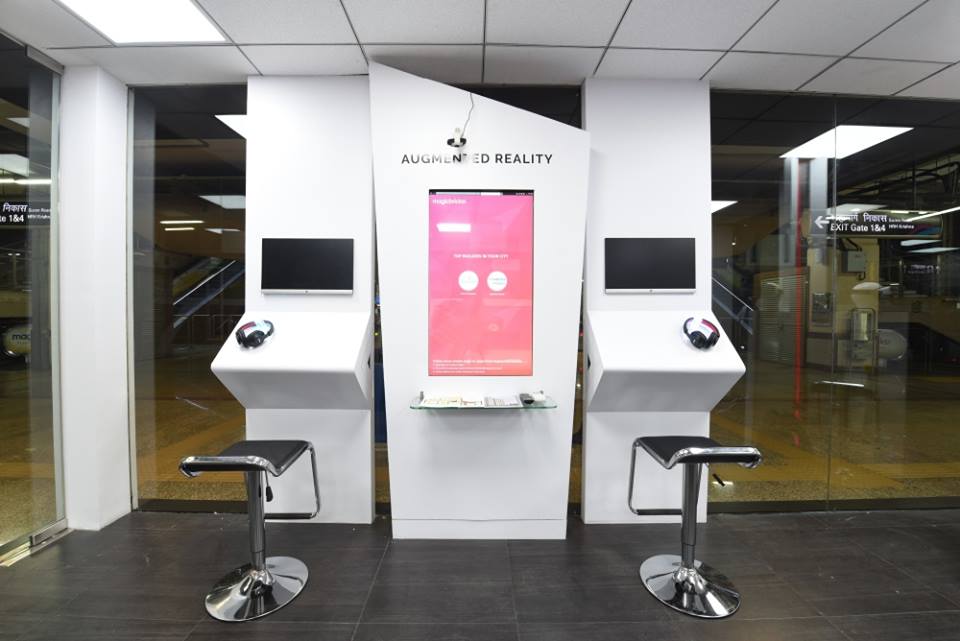
A two dimensional model might not answer all your questions about the property which you wish to purchase. You may wonder whether the flat receives sufficient sun light. Or the view from the window would be important parameter for you. Using augmented reality, one can get to see an aerial view of the entire project.

 Huge Touch Screens

House hunt made easy with AR and VR technology

Magicbricks has a massive database about the Indian real estate marketing which they have been serving since the last 8 years. They have offered to share their insights with the public through sleek touch screen. This can empower the user to:

  • Explore various types of properties
  • Check the rates and seek loan eligibility
  • Investigate localities and search for landmarks on the map
  • Calculate the benefits of buying versus renting
  • Analyse the corridors of Growth

These exciting features enable the user to access all the appropriate information at her fingertips

On Call Assistance with Property Advisors

To seek further assistance about a property, the buyer can easily do a video call and get connected with a Property Advisor from Magicbricks. The buyer can speak with a Magicbricks representative within seconds using the headset which has been provided.

At the launch event Mr.Sudhir Pai (CEO of Magicbricks) said that this is a technology driven offline presence and will provide value to the consumers.

Chief Guest of the event Mr.Niranjan Hiranandani, Founder of Hiranandani Group expressed his views about the demonetisation and the future of Real Estate. He also narrated about how this latest high technology Experience Center from Magicbricks will help the people to search for their desired properties with ease.

So if you are looking to buy property then do visit the the Magicbricks Experience Centre before you begin with site visits. For all you know, you might end up taking your purchasing decision at the centre itself!

Brainwavz Alpha Review – In-Ear headphones

0

Music is needed anywhere and at anytime. It is like meditation and a ritual to most of us. I like using earphones which are in-ear headphones type. Well you can use these earphones over the ear too. These are the earphones which can be easily used for a longer duration of time.

Brainwavz Alpha Review

We have explicitly reviewed many headphones and we are excited to have hands on this device for sure. Let us have a look at our experience with this device.

Brainwavz Alpha

Design

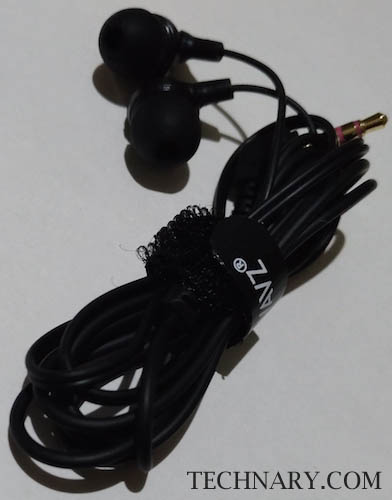
First thing which we observed with these earphones is that these are very light weight. We can easily see the plastic casing which makes it light weight. So even when you gear up these headphones into your ears you don’t feel much weight. Build quality seems to be good but delicate. So handling these headphones with care is advised as the cable is very thin.

Brainwavz Alpha Review

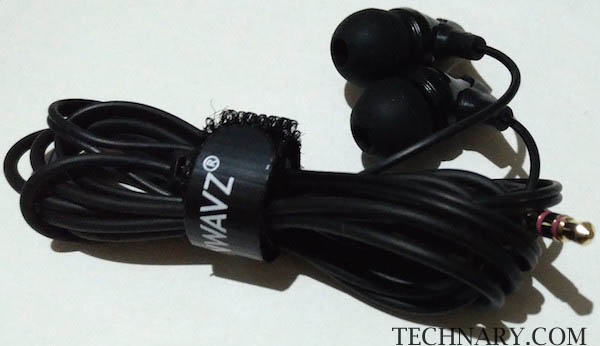
There are Left and Right symbols present near the ear casing. We also see the Brainwavz branding on the plastic casing. Aesthetically the headphones look decent. We liked the fact that the company provides a Velcro band with the headphones, so the user can easily wrap the cable when not in use.

Also read : Brainwavz S0 Review – Comfortable music earphones

Brainwavz Alpha Review

There is no microphone, so just useful to enjoy music or while watching videos on your smartphone, MP3 players, laptop or tablets. With the comply foam tips these earphones seem very much comfortable for the ears.

Brainwavz Alpha ReviewAlso read : Brainwavz M2 Review – Enjoy music with these earphones

Performance

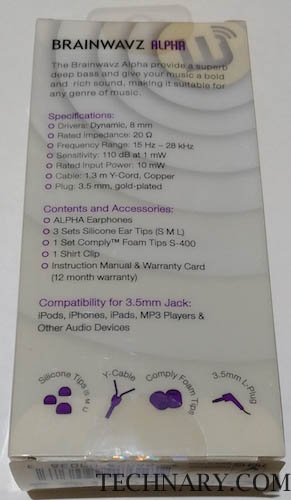
These headphones have a sensitivity rating of 110dB and there is impedance rating of 20Ohms. The device has a frequency response range of 15-28,000Hz. I tried using these headphones on my smartphone and on my Macbook Pro laptop. I played many songs to check how it actually responds.

Brainwavz Alpha Review

The headphones responds well having good treble and the lyrics of the songs can be heard crystal clear. For beat centric musical tracks, surprisingly the bass was impressive. The sound was clean and we enjoyed music for a very long time without any problems. Overall performance of these earphones was great.

Brainwavz Alpha Review

Accessories

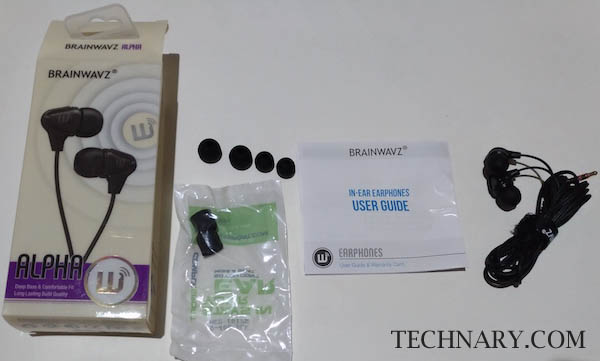
In the box you can find pairs of ear-tips, Comply foam pair, User Guide, Velcro Band & headphones.

Brainwavz Alpha Review

Final Verdict

If you are looking for good quality in ear headphones which are comfortable, light weight and provide great sound. Must have for music lovers having this budget, but not for people talking on smartphones as these lack microphone. These can be your friend while traveling for sure. You can enjoy these for a longer duration without a hitch.

buy now