
Looking for a reliable Android tablet that handles productivity, streaming, gaming, and travel without costing flagship-level money?
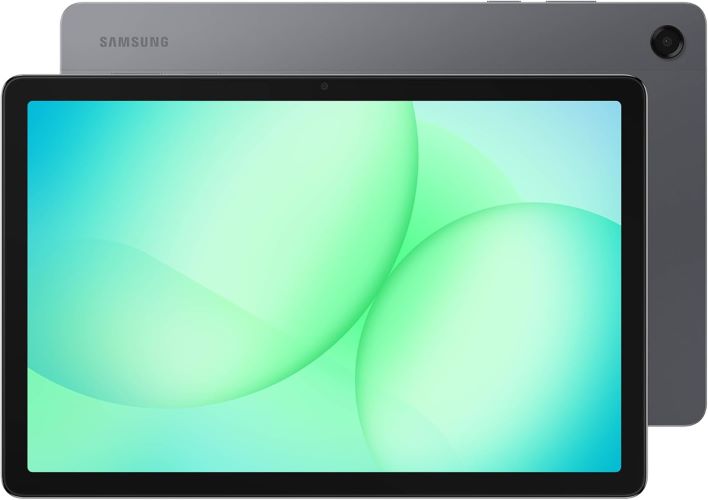
The Samsung Galaxy Tab A11+ 5G aims to hit that sweet spot. It offers an 11-inch 90Hz display, 5G connectivity, upgraded chipset, Dolby Atmos speakers, and long battery life in a slim design.
But here’s the real question:
Can this tablet actually replace your laptop for daily tasks, or is it just another oversized entertainment device?
After digging into the features, real-world usability, and overall value, this review breaks down everything you need to know before buying.
Quick Summary
| Feature | Verdict |
|---|---|
| Display | Bright 11-inch 90Hz screen looks smooth |
| Performance | Fast enough for multitasking and business work |
| Battery Life | Easily lasts a full workday |
| Audio | Quad speakers with Dolby Atmos sound impressive |
| Connectivity | 5G support is excellent for travel and remote work |
| Best For | Students, professionals, casual gamers, travelers |
| Downsides | Not ideal for heavy creative editing or ultra-high-end gaming |
Why the Samsung Galaxy Tab A11+ 5G Stands Out
The Android tablet market is crowded.
Many budget tablets feel slow after a few months, while premium tablets can become unnecessarily expensive for average users.
The Samsung Galaxy Tab A11+ 5G tries to solve both problems by focusing on practical performance instead of flashy gimmicks.
Here’s what immediately stands out:
- Large 11-inch display with 90Hz refresh rate
- 5G support for working on the go
- Improved chipset for smoother multitasking
- Quad speakers with Dolby Atmos
- Slim and lightweight design
- Expandable storage and up to 256GB capacity
For many users, these are the features that actually matter day to day.
Samsung Galaxy Tab A11+ 5G Specifications
| Specification | Details |
|---|---|
| Display | 11-inch LCD |
| Refresh Rate | Up to 90Hz |
| Connectivity | 5G + Wi-Fi |
| Storage | Up to 256GB |
| RAM | Up to 8GB |
| Audio | Quad speakers with Dolby Atmos |
| Front Camera | 5MP |
| Operating System | Android |
| Design | Slim and lightweight |
| Charging | Fast charging supported |
| Model | SM-X238UZAAXAA |
Design and Build Quality
Slim, Lightweight, and Travel-Friendly
One of the biggest strengths of this tablet is portability.
Samsung designed the Galaxy Tab A11+ 5G to be thin enough for commuting and light enough for extended use without fatigue.
Whether you’re:
- attending online meetings,
- reading documents,
- watching Netflix on flights,
- or taking notes in class,
the tablet feels comfortable to hold for long sessions.
The gray finish also gives it a clean professional appearance that works well in business environments.
Real-World Advantage
Many tablets become annoying to carry daily.
This one avoids that problem.
That matters more than most spec sheets suggest.
Must Read : How to Automate Client Follow Ups Using AI Without Writing Any Code
Display Performance
The 11-Inch 90Hz Screen Feels Smooth
The display is one of the highlights here.
Samsung includes:
- an 11-inch panel,
- smooth 90Hz refresh rate,
- and good brightness levels.
Scrolling feels noticeably smoother compared to traditional 60Hz budget tablets.
Great for Everyday Tasks
The screen performs especially well for:
- YouTube streaming
- Video calls
- Web browsing
- Reading PDFs
- Split-screen multitasking
- Online classes
Colors look vibrant enough for entertainment, though creative professionals may still prefer AMOLED panels on premium models.
Performance and Multitasking
Can the Galaxy Tab A11+ Handle Heavy Work?
For most users, yes.
The upgraded chipset keeps the tablet responsive even while multitasking.
You can comfortably:
- open multiple browser tabs,
- use split-screen apps,
- attend Zoom meetings,
- edit documents,
- and stream media simultaneously.
Samsung’s Multi Window feature also improves productivity significantly.
Multi Window Makes a Difference
This feature is underrated.
You can run:
- email beside documents,
- YouTube beside notes,
- or messaging apps while browsing.
That flexibility makes the tablet far more useful than entry-level competitors.
Must Read : How to Fix Phone Overheating While Charging (12 Easy Fixes)
Who Benefits Most?
This tablet works especially well for:
- students,
- remote workers,
- business travelers,
- and casual creators.
5G Connectivity: Surprisingly Useful
Why 5G on a Tablet Actually Matters
At first glance, 5G may seem unnecessary on a tablet.
But in real-world usage, it becomes incredibly convenient.
You can:
- work during travel,
- stream without relying on public Wi-Fi,
- join video calls anywhere,
- and access cloud files instantly.
For remote professionals, this flexibility is a major advantage.
Better Than Mobile Hotspots?
In many cases, yes.
Instead of draining your phone battery with tethering, the tablet stays independently connected.
That’s a huge convenience upgrade.
Battery Life and Charging
All-Day Battery Performance
Battery life is one of the strongest selling points.
Samsung claims long-lasting performance, and based on expected usage patterns, most users should comfortably get:
- a full workday,
- multiple streaming sessions,
- or extended browsing time.
The combination of efficient hardware and Android optimization helps here.
Fast Charging Helps Busy Users
Fast charging is another practical addition.
Even if the battery runs low during travel or work, quick top-ups reduce downtime significantly.
Must Read : Budget Drawing Tablet Review – Huion Inspiroy H640P
Audio Quality
Quad Speakers Deliver Surprisingly Rich Sound
Tablet speakers are often disappointing.
Thankfully, Samsung includes quad speakers with Dolby Atmos support.
The result?
A fuller, louder, more immersive audio experience.
Best Use Cases
The speakers perform especially well for:
- movies,
- video calls,
- gaming,
- and online courses.
Dialogue sounds clearer than many similarly priced tablets.
Camera Performance
5MP Front Camera Focuses on Video Calls
This is not a photography tablet.
And honestly, that’s fine.
The 5MP front camera is designed primarily for:
- Zoom calls,
- Google Meet,
- online classes,
- and virtual meetings.
In good lighting, image clarity is solid enough for professional communication.
Gaming Experience
Casual Gaming Works Well
If you enjoy:
- PUBG Mobile,
- Call of Duty Mobile,
- Roblox,
- or casual Android games,
the Galaxy Tab A11+ performs well for everyday gaming.
The 90Hz display also makes gameplay feel smoother.
Not a Hardcore Gaming Tablet
However, demanding AAA mobile games at max graphics may push the hardware limits.
For casual and mid-level gaming, though, performance is more than acceptable.
Software Features and Smart Tools
Google Gemini and Circle to Search
Samsung includes newer AI-assisted productivity features like:
- Google Gemini support
- Circle to Search
These tools improve workflow efficiency and make quick searches easier.
Practical Benefits
For example:
- circle text or images instantly,
- search products while browsing,
- or get contextual assistance without switching apps.
These features feel genuinely useful rather than gimmicky.
Must Read : Best Smart Gadgets for Daily Use at Home
Samsung Galaxy Tab A11+ Pros and Cons
| Pros | Cons |
|---|---|
| Smooth 90Hz display | LCD instead of AMOLED |
| Reliable multitasking performance | Cameras are basic |
| 5G connectivity | Not ideal for heavy video editing |
| Great battery life | Premium accessories sold separately |
| Quad speakers sound excellent | Hardcore gamers may want stronger GPU |
| Lightweight and portable |
Samsung Galaxy Tab A11+ vs Alternatives
Galaxy Tab A11+ vs Galaxy Tab S Series
| Feature | Tab A11+ | Tab S Series |
|---|---|---|
| Price | More affordable | Premium pricing |
| Performance | Mid-range | Flagship |
| Display | LCD 90Hz | AMOLED 120Hz |
| Best For | Everyday users | Power users |
| Battery | Excellent | Excellent |
Which Should You Buy?
Choose the Galaxy Tab A11+ if you:
- want strong value,
- need 5G connectivity,
- and mainly use productivity or entertainment apps.
Choose the Galaxy Tab S series if:
- you edit videos,
- draw professionally,
- or need flagship-level performance.
Who Should Buy the Samsung Galaxy Tab A11+?
Best For Students
The large display and multitasking features make online learning easier.
Useful for:
- note-taking,
- reading PDFs,
- watching lectures,
- and research work.
Great for Business Users
The 5G support and lightweight design are ideal for professionals who travel frequently.
Good for Families
The screen size and audio quality also make this a strong entertainment tablet for families.
Who Should Skip It?
This tablet may not be ideal if you:
- need advanced video editing,
- play ultra-demanding games,
- or want premium AMOLED visuals.
In those cases, higher-end tablets make more sense.
Buying Guide: Things to Consider Before Purchasing
1. Storage Needs
If you store:
- videos,
- offline movies,
- or large work files,
consider the higher storage configuration.
2. Wi-Fi vs 5G Usage
Frequent travelers will benefit more from the 5G version.
Home users may save money with Wi-Fi-only alternatives.
3. Productivity Accessories
You may also want:
- a Bluetooth keyboard,
- tablet stand,
- or stylus for better workflow.
Real-World Scenarios
Working From Cafés or Airports
The 5G connectivity becomes extremely useful when public Wi-Fi is unreliable.
Entertainment During Travel
The combination of:
- large screen,
- quad speakers,
- and long battery life
makes flights and road trips much more enjoyable.
Split-Screen Productivity
Running notes beside browser tabs genuinely improves workflow efficiency.
This is where Android tablets have improved significantly in recent years.
Frequently Asked Questions
Is the Samsung Galaxy Tab A11+ good for students?
Yes. The large display, multitasking support, and long battery life make it excellent for online classes, research, and note-taking.
Does the Galaxy Tab A11+ support 5G?
Yes. This model supports 5G connectivity, making it useful for remote work and travel.
Is the Samsung Galaxy Tab A11+ good for gaming?
It handles casual and mid-level gaming well, especially with the smooth 90Hz display.
How long does the battery last?
Battery life varies by usage, but most users should comfortably get a full day of mixed use.
Can the Galaxy Tab A11+ replace a laptop?
For light productivity tasks like browsing, video calls, document editing, and streaming, it can replace a laptop for many users.
Does it support multitasking?
Yes. Samsung’s Multi Window feature allows multiple apps to run simultaneously.
Is the display good for watching movies?
Absolutely. The 11-inch screen and Dolby Atmos quad speakers create a strong media experience.
Final Verdict: Is the Samsung Galaxy Tab A11+ Worth Buying?
The Samsung Galaxy Tab A11+ 5G succeeds because it focuses on practical everyday usability.
Instead of chasing ultra-premium specs, it delivers the features most people actually need:
- smooth display,
- reliable battery life,
- portable design,
- solid multitasking,
- and fast 5G connectivity.
For students, business users, travelers, and casual entertainment fans, it offers strong value without entering premium price territory.
It may not replace a high-end laptop or flagship tablet for power users.
But for the majority of buyers?
It strikes an excellent balance between performance, portability, and affordability.