
When it comes to competitive gaming, your keyboard can either hold you back… or give you that extra edge. If you’ve ever felt like your key presses aren’t fast enough, or your movement lacks precision in FPS or racing games, you’re not alone. Traditional mechanical keyboards are great, but they have limitations. That’s exactly where the Razer Huntsman V2 Analog Gaming Keyboard stands out.
It doesn’t just register keystrokes—it understands how you press them.
Let’s break down whether this premium keyboard is actually worth your investment.
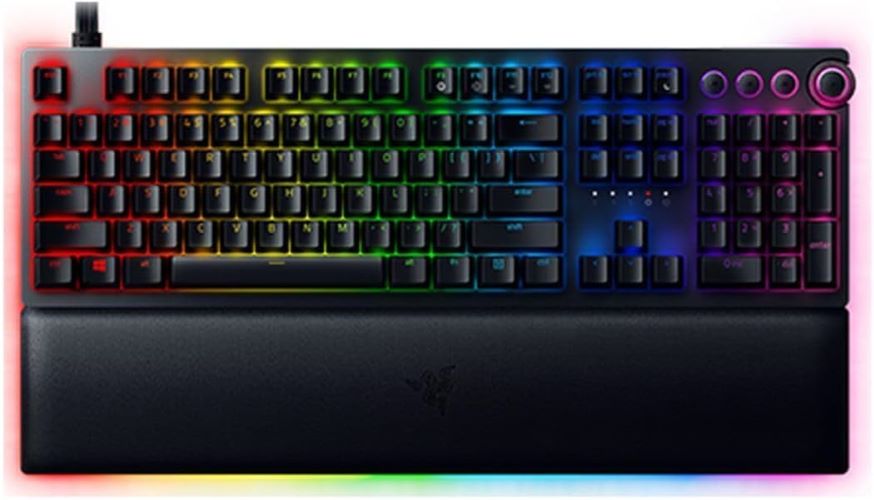
Quick Summary
- Best for: Competitive gamers, streamers, and enthusiasts
- Unique Feature: Adjustable actuation + analog input
- Build Quality: Premium (PBT keycaps + magnetic wrist rest)
- RGB: Fully customizable via Razer Chroma
- Verdict: Expensive but unmatched in control and customization
👉 Check price | See full features | Learn more
🚀 What Makes This Keyboard Different?
Most gaming keyboards register input in a simple way: press or don’t press.
This one? It adds depth.
🧠 Analog Optical Switches Explained
Instead of a fixed actuation point, this keyboard lets you adjust how deep a key needs to be pressed before it activates.
That means:
- Light press = walk slowly in games
- Deep press = run or sprint
- Custom actuation for each key
It’s like combining a controller joystick with a keyboard.
Must Read : Top Free AI Photo Editor for PC
🎯 Key Features & Benefits
1. 🎮 Adjustable Actuation (Game-Changing Control)
You can customize actuation from 1.5mm to 3.6mm.
Why this matters:
- Faster response for FPS games
- Precision control for racing/simulation
- Reduced accidental key presses
2. ⚡ Rapid Trigger Mode
This feature resets keys instantly when released.
Benefits:
- Faster repeated inputs
- Better strafing in FPS games
- Improved reaction time
Perfect for games like Valorant, CS2, or Fortnite.
3. 🧱 Doubleshot PBT Keycaps
Forget shiny, worn-out keys.
- Durable and long-lasting
- Text won’t fade
- Premium textured feel
4. 🌈 Razer Chroma RGB
Powered by Razer Chroma ecosystem:
- 16.8 million colors
- Sync with 150+ games
- Reactive lighting effects
5. 🛋️ Magnetic Wrist Rest (Underrated Comfort)
Long gaming sessions can strain your wrists.
This solves that:
- Plush leatherette cushion
- Magnetic attachment
- RGB underglow for aesthetics
Must Read : Best AI Image Enhancer for RAW Photos (2026 Review)
6. 🎵 Dedicated Media Controls
Quickly adjust:
- Volume dial
- Play/pause
- Skip tracks
No need to leave your game.
📊 Pros and Cons
| Pros ✅ | Cons ❌ |
|---|---|
| Adjustable actuation for precision | Expensive |
| True analog input (rare feature) | Requires software setup |
| Premium build quality | Not beginner-friendly |
| Fast rapid trigger response | Bulky design |
| Comfortable wrist rest |
⚔️ Comparison With Alternatives
Razer Huntsman V2 Analog vs Traditional Mechanical Keyboards
| Feature | Huntsman V2 Analog | Standard Mechanical |
|---|---|---|
| Actuation Control | Adjustable | Fixed |
| Input Type | Analog + Digital | Digital only |
| Speed | Ultra-fast | Fast |
| Customization | High | Moderate |
| Price | Premium | Mid-range |
🆚 vs Razer Huntsman Elite
| Feature | Huntsman V2 Analog | Huntsman Elite |
|---|---|---|
| Switch Type | Analog Optical | Optical Clicky |
| Actuation | Adjustable | Fixed |
| Gaming Precision | Higher | Standard |
| Price | Higher | Slightly lower |
👉 If you want precision → go Analog
👉 If you want simplicity → go Elite
🎮 Real-World Use Cases
🎯 FPS Gaming (Valorant, CS2)
- Faster strafing with rapid trigger
- Adjustable sensitivity for movement
- Improved reaction time
🏎️ Racing Games
- Analog input mimics controller behavior
- Smooth acceleration and braking
🎥 Streaming & Content Creation
- RGB enhances setup aesthetics
- Media controls improve workflow
🧑💻 Daily Use
- Comfortable typing experience
- Custom profiles for productivity
🛒 Buying Guide: Things to Consider
Before you buy, ask yourself:
1. Do You Need Analog Control?
If you mostly type or play casual games, this might be overkill.
2. Budget
This is a premium keyboard.
👉 Worth it if you’re serious about gaming.
3. Learning Curve
You’ll need time to:
- Configure actuation points
- Adjust settings in Razer Synapse
4. Desk Space
It’s slightly bulky due to wrist rest and design.
❓ FAQs (People Also Ask)
1. Is the Razer Huntsman V2 Analog good for FPS games?
Yes, especially due to rapid trigger and adjustable actuation, which improve reaction time and movement precision.
2. What is an analog keyboard?
An analog keyboard detects how deeply a key is pressed, allowing for more nuanced control—similar to a joystick.
Must Read : Aiarty Image Enhancer Review: Features, Performance & Verdict
3. Does it work without software?
Yes, but full customization requires Razer Synapse software.
4. Are the switches loud?
They are quieter than clicky switches but still provide tactile feedback.
5. Is it worth the price?
If you’re a competitive gamer or enthusiast—yes. Casual users may not fully utilize its features.
6. Can I use it for typing?
Absolutely. The adjustable actuation can even improve typing comfort.
7. Does RGB affect performance?
No, but it enhances immersion and aesthetics.
🏁 Final Verdict
The Razer Huntsman V2 Analog Gaming Keyboard isn’t just another RGB keyboard—it’s a precision tool.
It’s built for gamers who want:
- Faster response
- Better control
- Maximum customization
Yes, it’s expensive.
Yes, it has a learning curve.
But once you get used to it… going back feels impossible.
I love analog keyboards this is interesting
love the mechanical keyboards. The sound from it is super addictive
I love the rapid trigger mode of this device
Glad to know Nia
Was looking for a gaming keyboard, glad found this one
Glad you found this