
Finding a powerful gaming PC without the hassle of building one can feel overwhelming. Prices are all over the place, specs are confusing, and not every prebuilt delivers real performance.
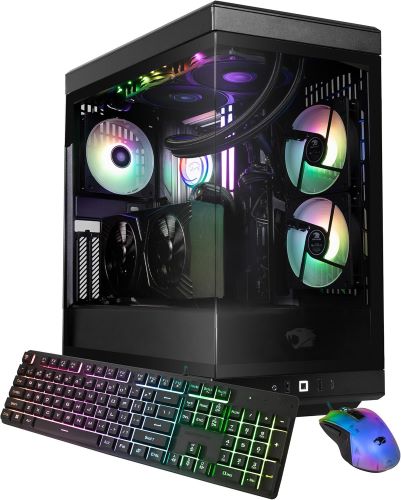
That’s where the iBUYPOWER Y40 Pro Gaming PC comes in—promising high-end gaming with an RTX 5070 Ti, sleek design, and plug-and-play convenience.
But here’s the real question:
👉 Is it actually worth your money, or just another overpriced prebuilt?
Let’s break it down honestly.
⚡ Quick Summary
- ✅ Excellent 1440p & solid 4K gaming performance
- ✅ Clean, premium Y40 case design with great airflow
- ✅ Ideal for gamers who don’t want to build a PC
- ❌ Slightly overpriced vs DIY builds
- ❌ Upgrade flexibility depends on configuration
👉 Best for: Gamers, streamers, and creators who want a powerful, ready-to-use system
👉 Not ideal for: Hardcore DIY builders looking to save every dollar
Must Read : Top Free AI Photo Editor for PC
🖥️ Design & Build Quality
The first thing you’ll notice is the Y40 case design—and honestly, it’s stunning.
✨ What stands out:
- Panoramic tempered glass panels
- Vertical GPU mounting
- Clean cable management
- RGB lighting (tastefully done)
It’s not just about looks either. The airflow design is solid, keeping temps under control during long gaming sessions.
👉 If aesthetics matter to you, this PC delivers.
⚙️ Specs Overview
Here’s what you typically get (may vary slightly by retailer):
| Component | Specification |
|---|---|
| GPU | RTX 5070 Ti |
| CPU | Intel Core i7 / AMD Ryzen 7 |
| RAM | 16GB – 32GB DDR5 |
| Storage | 1TB NVMe SSD |
| Cooling | AIO Liquid Cooling |
| PSU | 750W–850W Gold |
🎮 Gaming Performance (RTX 5070 Ti Tested)
Let’s get to what really matters—gaming performance.
🕹️ 1440p Gaming
- Ultra settings on almost all AAA titles
- Smooth 100+ FPS in games like Warzone, Cyberpunk, Fortnite
🕹️ 4K Gaming
- High to ultra settings with DLSS
- Stable 60–90 FPS depending on the title
🚀 Ray Tracing & DLSS
The RTX 5070 Ti shines with:
- DLSS 3+ frame generation
- Real-time ray tracing
- AI-enhanced visuals
👉 This setup is future-ready for upcoming AAA games.
Must Read : Aiarty Image Enhancer Review: Features, Performance & Verdict
🎥 Streaming & Content Creation
If you’re a streamer or creator, this PC holds up well.
💡 Why it works:
- Strong CPU + GPU combo
- Smooth OBS streaming
- Fast rendering in Premiere Pro / DaVinci Resolve
👉 You can game + stream simultaneously without major slowdowns.
🔊 Bonus Setup Tip: Add Smart Audio Control
To level up your setup, consider pairing it with a smart speaker like Amazon Echo Dot (latest model).
Benefits:
- Voice control for music while gaming
- Set timers for breaks or streams
- Control smart lights for ambient setup
👉 Great for gaming rooms and productivity setups
🌡️ Cooling & Noise Levels
The included AIO liquid cooling system does a solid job.
🌬️ Performance:
- CPU temps stay stable under load
- GPU cooling is efficient (thanks to airflow design)
- Fans are relatively quiet
👉 Not silent, but definitely not distracting.
⚖️ Pros and Cons
✅ Pros
- Powerful RTX 5070 Ti performance
- Premium case design
- Ready out of the box
- Great for gaming + streaming
- Good thermals
❌ Cons
- Slightly expensive vs DIY
- Limited customization (depending on config)
- Preinstalled software may need cleanup
🔄 Prebuilt vs Custom PC: Is It Worth It?
🆚 Comparison Table
| Feature | iBUYPOWER Y40 Pro | Custom Build |
|---|---|---|
| Convenience | ⭐⭐⭐⭐⭐ | ⭐⭐ |
| Cost Efficiency | ⭐⭐⭐ | ⭐⭐⭐⭐ |
| Customization | ⭐⭐ | ⭐⭐⭐⭐⭐ |
| Setup Time | Instant | Time-consuming |
| Warranty | Included | Per part |
👉 If you value time and simplicity, go prebuilt.
👉 If you want maximum control and savings, build your own.
🧑💻 Real-World Use Cases
🎮 For Gamers
- Competitive FPS (Valorant, CS2)
- AAA gaming at high settings
- VR-ready performance
🎥 For Creators
- Video editing
- 3D rendering
- Streaming setups
🏠 For Home Setup Enthusiasts
Pair with smart devices like Echo Dot for:
- Smart lighting control
- Voice assistants
- Multi-room audio
Must Read : Aiarty Image Enhancer Review – Upscale Photos to 32K Naturally
🛒 Buying Guide: What to Check Before You Buy
Before purchasing, consider:
✔️ 1. RAM Upgrade Potential
16GB is fine, but 32GB is better for future-proofing.
✔️ 2. Storage Needs
1TB fills up fast—consider adding another SSD.
✔️ 3. Power Supply Headroom
Ensure PSU supports future GPU upgrades.
✔️ 4. Cooling System
Check if it supports additional fans or upgrades.
❓ FAQs (People Also Ask)
1. Is the iBUYPOWER Y40 Pro good for 4K gaming?
Yes, it handles 4K gaming well with DLSS and optimized settings.
2. Can I upgrade the Y40 Pro later?
Yes, but it depends on motherboard and PSU limitations.
3. Is RTX 5070 Ti better than RTX 4070?
Yes, it offers better performance, especially in ray tracing and AI features.
4. Does it come with Windows preinstalled?
Most configurations include Windows preinstalled and ready to use.
5. Is it worth buying a prebuilt gaming PC?
Yes, if you value convenience and warranty support.
6. How noisy is the system?
It’s relatively quiet under normal gaming loads.
7. Is this PC good for streaming?
Absolutely—it’s powerful enough for gaming + streaming simultaneously.
🏁 Final Verdict: Should You Buy It?
The iBUYPOWER Y40 Pro Gaming PC hits a sweet spot between performance, design, and convenience.
It’s not the cheapest option—but it saves you time, effort, and potential build headaches.
👉 Buy it if:
- You want a powerful plug-and-play gaming PC
- You love clean aesthetics and RGB setups
- You don’t want to build your own system
I love the performance of this gaming PC
Yes its a good gaming PC
I love gaming and I wanted to enjoy gaming to the next level. This is a lovely PC. Thanks for sharing!
You are welcome Todd