
Being a freelancer often means being the salesperson, project manager, customer support team, and accountant all at once. That works when you have a handful of clients. But once inquiries start arriving through email, LinkedIn, your website, and referrals, keeping track of every conversation becomes surprisingly difficult.
This is where a good CRM can make a noticeable difference.
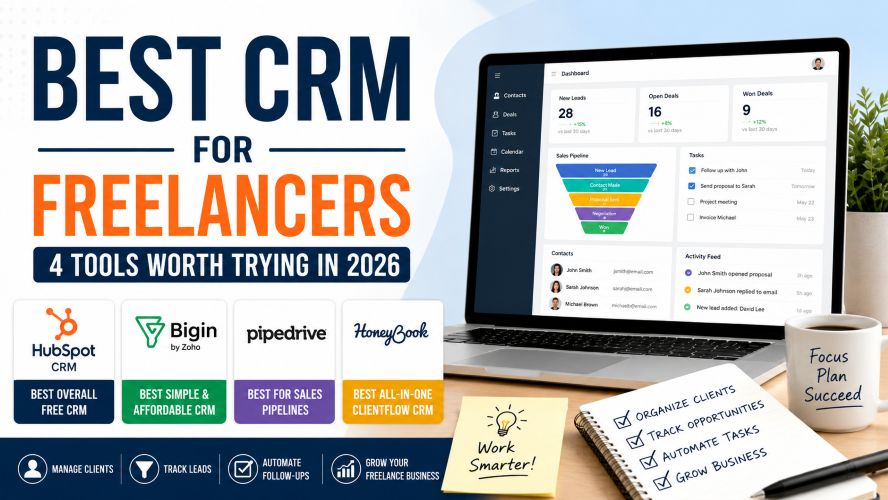
The catch? Most CRM software is designed with larger sales teams in mind. Freelancers usually need something simpler: a place to organize contacts, track leads, remember follow-ups, manage opportunities, and avoid letting a promising client disappear into an inbox.
So, what is the best CRM for freelancers?
There isn’t one universal answer. The right choice depends on whether you primarily need a free CRM, a sales pipeline, an all-in-one client management system, or something that can grow with your business.
Quick Answer: Best CRM for Freelancers
If you want the short version, these are the four CRM tools worth considering:
| CRM | Best For | Starting Point | Our Take |
|---|---|---|---|
| HubSpot CRM | Freelancers wanting a capable free CRM | Free plan available | Best overall free option |
| Bigin by Zoho | Simple pipelines and affordability | Free plan available | Best budget-friendly CRM |
| Pipedrive | Sales pipelines and follow-ups | Paid plans | Best for sales-focused freelancers |
| HoneyBook | Client workflows, proposals, invoices and payments | Paid plans | Best all-in-one clientflow option |
Our overall pick: HubSpot is a strong starting point for freelancers who want to organize contacts and sales opportunities without immediately paying for CRM software. If your freelance business revolves around proposals, contracts, invoices, and payments, HoneyBook may be a better fit.
What Is a CRM for Freelancers?
A CRM, or customer relationship management system, is software that helps you organize information about prospects and clients.
Instead of searching through old emails to remember when you last contacted someone, you can keep contact details, notes, deals, tasks, and follow-ups in one place.
For a freelancer, a CRM can be especially useful for managing:
- New client inquiries
- Potential projects
- Existing clients
- Follow-up reminders
- Sales conversations
- Proposal stages
- Client notes and contact information
- Recurring business opportunities
The goal isn’t to make your freelance business more complicated. A good CRM should actually reduce the amount of information you have to keep in your head.
1. HubSpot CRM — Best Overall Free CRM for Freelancers
For freelancers who want to start with minimal financial commitment, HubSpot CRM is one of the easiest places to begin.
HubSpot’s free CRM includes tools for contact management, deal pipelines, CRM imports, reporting, and other foundational CRM functions. Its free offering is designed to be usable without an expiration date, although feature and usage limits apply.
Why Freelancers May Like HubSpot
- Free CRM option for getting started
- Contact and deal management
- Visual sales pipeline
- Email-related tools
- Meeting scheduling capabilities
- Reporting and dashboard features
- Room to expand into marketing and customer service tools
The biggest advantage is flexibility. You can begin with basic contact and deal management and only consider paid features if your business eventually needs them.
Must Read : Best Open Source AI Models for Your Laptop
HubSpot’s free CRM has limits on users, contacts, and certain features, while paid tiers provide additional functionality. Always check the current plan details before purchasing.
HubSpot CRM Pros and Cons
| Pros | Cons |
|---|---|
| Strong free starting point | Can become more complex as you add features |
| Good contact management | Advanced features require paid plans |
| Useful sales pipeline | May be more than a solo freelancer needs |
| Can grow with a business | Pricing and feature limits vary by product |
Best for: Freelancers who want a capable free CRM and may eventually need more sales, marketing, or service functionality.
2. Bigin by Zoho — Best Simple CRM for Freelancers
If a traditional CRM feels too complicated, Bigin by Zoho is worth putting on your shortlist.
Bigin is positioned as a pipeline-focused CRM designed for small businesses. That makes it interesting for independent consultants, designers, developers, marketers, coaches, and other service providers who primarily need a straightforward way to track prospects and customers.
Bigin offers multiple editions, including a free option and paid plans. Pricing and included features vary by edition and billing cycle, so check the current pricing page before subscribing.
What Makes Bigin Different?
The focus is on keeping the CRM experience relatively simple. For a freelancer, that can be an advantage because you don’t necessarily need dozens of enterprise-level features.
- Pipeline-oriented workflow
- Contact and deal organization
- Multiple editions for different needs
- Low-cost entry point
- Useful option for freelancers who find larger CRMs overwhelming
Bigin Pros and Cons
| Pros | Cons |
|---|---|
| Designed with smaller businesses in mind | Less suitable if you want an all-in-one client finance platform |
| Simple pipeline approach | Some advanced capabilities require upgrades |
| Affordable entry point | May require exploration to find your ideal workflow |
Best for: Freelancers who mainly need an affordable and straightforward sales pipeline rather than a large collection of business tools.
3. Pipedrive — Best CRM for Freelance Sales Pipelines
Some freelancers don’t need a huge CRM. They simply need to know which prospects are new, which ones received a proposal, who needs a follow-up, and which deals are currently active.
That’s where Pipedrive stands out.
Pipedrive is built around visual sales pipelines. Its plans include different levels of sales, automation, reporting, and customization features.
Why Pipedrive Works Well for Freelancers
- Visual deal pipeline
- Lead and contact management
- Follow-up tracking
- Calendar and activity management
- Email synchronization on applicable plans
- Automation capabilities on higher plans
- Numerous integrations
For example, a freelance web designer could create stages such as:
New Inquiry → Discovery Call → Proposal Sent → Negotiation → Won
That simple visual system can make it much easier to see where every potential project stands.
Pipedrive Pros and Cons
| Pros | Cons |
|---|---|
| Excellent visual pipeline | No permanent free plan comparable to some competitors |
| Strong sales-focused features | Can be unnecessary for freelancers with very few leads |
| Many integrations | Useful automation features are higher-tier dependent |
| Scales beyond solo work | Per-seat pricing matters as teams grow |
Best for: Freelancers who regularly pitch for projects and want a dedicated system for managing leads, proposals, follow-ups, and sales opportunities.
4. HoneyBook — Best All-in-One CRM for Freelancers
What if your biggest problem isn’t simply tracking leads?
What if you also need to send proposals, contracts, invoices, payment requests, and client communications?
That’s where HoneyBook becomes particularly interesting.
HoneyBook is designed around client workflows for independent professionals. Its features include lead and project tracking, contracts, invoices, payments, scheduling, templates, and client communication.
Current pricing and available features depend on the plan, so check the official pricing page before making a purchase.
Why HoneyBook Can Be a Good Fit
- Lead and project tracking
- Proposals and contracts
- Invoices and online payments
- Client portal
- Scheduling tools
- Professional templates
- Workflow automation on applicable plans
This makes it particularly attractive for photographers, consultants, designers, coaches, event professionals, and other freelancers who want more than a traditional sales CRM.
HoneyBook Pros and Cons
| Pros | Cons |
|---|---|
| Combines client management with business workflows | More expensive than basic free CRM options |
| Proposals, contracts, invoices and payments | May be excessive for freelancers who only need lead tracking |
| Freelancer-focused templates | Availability of some features depends on plan |
| Client-friendly workflow | Best value comes when you use several features |
Best for: Freelancers who want to manage the client journey from inquiry to proposal, contract, payment, and project.
CRM Comparison for Freelancers
| Feature | HubSpot | Bigin | Pipedrive | HoneyBook |
|---|---|---|---|---|
| Free option | Yes | Yes | Trial | Trial |
| Contact management | Yes | Yes | Yes | Yes |
| Sales pipeline | Yes | Yes | Excellent | Yes |
| Follow-up management | Yes | Yes | Excellent | Yes |
| Proposals/contracts | Plan dependent | Plan dependent | Plan dependent | Strong |
| Invoices/payments | Product dependent | Plan dependent | Plan/add-on dependent | Strong |
| Best suited to | General CRM | Simple CRM | Sales-focused work | Clientflow management |
Note: Features, pricing, limits, free trials, and plan structures can change. Always confirm the current details on the provider’s website before purchasing.
Which CRM Should a Freelancer Choose?
Choose HubSpot If You Want to Start Free
If you’re moving away from spreadsheets for the first time, HubSpot is an easy option to investigate.
Its free CRM provides enough functionality for many solo professionals to begin organizing contacts and opportunities.
Choose Bigin If Simplicity and Price Matter Most
Bigin makes sense when you want a straightforward pipeline without immediately moving into a more elaborate CRM environment.
Choose Pipedrive If Sales Organization Is Your Priority
If you regularly generate leads, send proposals, and follow up with prospects, Pipedrive’s visual pipeline approach is worth considering.
Must Read : AI in Software Engineering 2026
Choose HoneyBook If Your Client Workflow Goes Beyond Sales
If your ideal workflow looks like:
Inquiry → Proposal → Contract → Invoice → Payment → Project
an all-in-one platform such as HoneyBook may save you from stitching together several separate tools.
What Features Should Freelancers Look For in a CRM?
You don’t need every CRM feature available. In fact, buying an overly complicated system can create another administrative task instead of solving one.
1. Contact Management
At minimum, you should be able to store names, emails, companies, notes, previous conversations, and relevant client information.
2. A Simple Sales Pipeline
A visual pipeline makes it easier to understand how many opportunities are currently open and what needs attention.
3. Follow-Up Reminders
This is one of the most useful CRM features for freelancers. A reminder can prevent a promising conversation from becoming a forgotten email thread.
4. Email and Calendar Integrations
If your CRM connects with the tools you already use, keeping information updated becomes much easier.
5. Automation
Automation is useful once repetitive tasks start consuming your time. But don’t automate everything just because you can.
Start with simple reminders and repeatable workflows.
6. Reasonable Pricing
Look beyond the headline monthly price.
Check user limits, contact limits, automation restrictions, add-ons, payment processing costs, and annual billing requirements.
Real-World CRM Use Cases for Freelancers
Freelance Graphic Designer
A designer might use a CRM to track website inquiries, discovery calls, proposals, revisions, and repeat clients.
A clientflow platform can be particularly relevant when proposals, contracts, invoices, and payments are part of the workflow.
Freelance Developer
A developer who gets most work through referrals may benefit from a simpler CRM such as HubSpot or Bigin.
The goal is to record leads and remember when to follow up rather than manage a complicated sales department.
Must Read : Top AI Startups to Watch This Year
Freelance Marketing Consultant
A consultant with a steady flow of prospects may benefit from Pipedrive because a clear pipeline makes it easier to distinguish new inquiries from active proposals and potential projects.
Freelance Photographer
A photographer may need more than contact management.
Inquiry forms, scheduling, contracts, payments, and client communication can make an all-in-one platform more attractive than a traditional sales CRM.
How to Choose the Best CRM for Your Freelance Business
Before signing up, answer these five questions:
- How many active leads do I normally have? If the answer is only a few, a simple CRM may be enough.
- Do I need invoices and payments inside the same platform? If yes, consider a clientflow platform.
- Do I need automation? If your follow-ups are repetitive, automation can become valuable.
- Will I work with a team later? Check user and permission limits before choosing a platform.
- What is my realistic monthly budget? Choose based on the value you will actually use, not the number of features on the pricing page.
A useful rule is to start with the simplest system that solves your current problem. You can always upgrade when your workflow becomes more demanding.
Frequently Asked Questions
What is the best CRM for freelancers?
HubSpot is a strong overall choice for freelancers who want a capable free CRM. Pipedrive is particularly suitable for sales-focused freelancers, while HoneyBook is better suited to freelancers who want client management combined with proposals, contracts, invoices, and payments.
Is a CRM worth it for a solo freelancer?
Yes, if you regularly manage multiple prospects or clients. A CRM can help you keep contact information organized, track opportunities, and remember follow-ups.
If you only have one or two clients and very few leads, a spreadsheet may still be sufficient.
What is the best free CRM for freelancers?
HubSpot is one of the strongest free CRM options to consider. Its free tools include contact and deal management, CRM imports, reporting, and other foundational features, subject to account limits.
Bigin also offers a free edition.
Is Pipedrive good for freelancers?
Pipedrive can be a good choice for freelancers who actively sell services and need a clear visual pipeline.
Its tools are particularly useful for tracking leads, deals, activities, and follow-ups.
Can freelancers use a CRM to track clients?
Yes. CRM software can store contact details, notes, communication history, sales opportunities, tasks, and other client-related information.
Some platforms also extend into contracts, invoicing, payments, scheduling, and project workflows.
What is the easiest CRM for a freelancer?
The easiest CRM depends on your workflow.
Bigin is worth considering if you want a simple pipeline, while HubSpot is a strong starting point for freelancers who want broader CRM functionality without paying immediately.
Should freelancers use CRM software or spreadsheets?
A spreadsheet can work when your client list is small.
CRM software becomes more useful as the number of leads, conversations, follow-ups, and opportunities increases.
If you’re regularly forgetting who needs a response, it may be time to move beyond a spreadsheet.
Final Verdict: Which CRM Is Best for Freelancers?
The best CRM for freelancers isn’t necessarily the CRM with the longest feature list.
It’s the one you’ll actually keep updated.
HubSpot is our first recommendation for freelancers who want a strong free starting point and room to expand.
Bigin by Zoho is worth considering if affordability and a straightforward pipeline are your biggest priorities.
Pipedrive is a strong choice for freelancers who spend significant time finding prospects, sending proposals, and managing sales opportunities.
HoneyBook stands out when your definition of CRM includes the broader client journey, including proposals, contracts, invoices, payments, scheduling, and client communication.
Before committing, take advantage of free plans or trials where available.
Add a few real prospects, create your typical sales stages, and test how easily you can complete your normal workflow.
If the CRM saves you from searching through old emails, forgetting follow-ups, or jumping between multiple systems, you’ve probably found the right fit.
Next step: Pick the CRM that matches your current workflow, not the business you hope to have five years from now. Start simple, build good habits, and upgrade only when you genuinely need more.
I have genuinely used Hubspot for a longer period of time. But I want to try others too. Thank you for the list
Yes you must try others too. I have used hubspot for sales but other CRMs may be best for complete workflows.
Even I have used Hubspot free version only. Must try these other options
Yes indeed you must try other options
This is really an amazing list. I know only one now I know many
Thank you Christopher