 is, how it works, why it matters, and the best MCP tools, servers, and use cases in this complete)
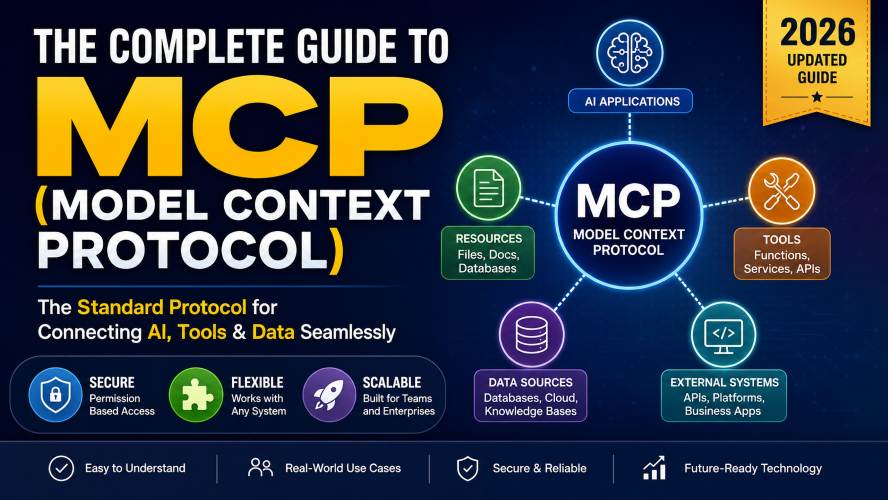
Model Context Protocol (MCP) is an open standard that enables applications to securely connect with external tools, files, databases, and services through a consistent interface. Instead of creating separate integrations for every application, developers can build once and communicate with any MCP-compatible server, reducing complexity while improving scalability and security.
Why Everyone Is Talking About Model Context Protocol
Software has become incredibly connected.
A single project may rely on cloud storage, documentation, databases, project management software, development environments, messaging platforms, and automation tools—all working together.
Unfortunately, connecting these systems has traditionally been difficult.
Every service typically requires:
- A unique API
- Different authentication methods
- Separate documentation
- Custom integration code
- Ongoing maintenance
As the number of tools grows, so does the complexity.
This is where Model Context Protocol (MCP) offers a refreshing alternative.
Instead of building dozens of custom integrations, developers can use one standard protocol that allows compatible applications to communicate consistently.
The result is cleaner architecture, easier maintenance, and greater flexibility.
What Is Model Context Protocol (MCP)?
Model Context Protocol, commonly known as MCP, is an open communication standard designed to let applications securely exchange context, access external resources, and use tools through a common interface.
Think of it as the equivalent of USB-C for software integrations.
Before USB-C, every device required different connectors.
Now, one connector works with many devices.
MCP applies the same philosophy to software.
Rather than creating a unique integration for every service, applications only need to understand the MCP standard.
Once connected, they can communicate with any compatible MCP server.
This dramatically reduces development effort while making software ecosystems more flexible.
Why Was MCP Created?
As businesses adopt more digital tools, integration challenges increase rapidly.
Consider a modern software team.
They might use:
- Documentation platforms
- Version control repositories
- Issue trackers
- Cloud storage
- Internal knowledge bases
- SQL databases
- Messaging platforms
- File systems
- Automation software
Without a common protocol, every connection requires custom engineering.
Over time, this creates:
- Technical debt
- Maintenance overhead
- Security risks
- Duplicate work
- Compatibility issues
MCP addresses these problems by introducing a standard way for applications to discover tools, access resources, and perform actions.
How MCP Simplifies Software Integrations
Imagine building a house.
Traditional APIs are like ordering building materials from different suppliers, each with its own ordering process, paperwork, and delivery schedule.
MCP is like working with a central logistics system that standardises the entire process.
Instead of learning ten different methods, you learn one.
This simplicity becomes increasingly valuable as software ecosystems grow.
How Model Context Protocol Works
At its core, MCP follows a straightforward communication model.
- An application (the client) sends a request.
- An MCP server receives the request.
- The server verifies permissions.
- The requested tool or resource is located.
- The result is returned using a standard format.
This predictable workflow makes integrations easier to build and maintain.
Core Components of MCP
Understanding these building blocks makes the protocol much easier to grasp.
1. MCP Client
The client initiates requests.
Examples include:
- Development environments
- Desktop applications
- Automation software
- Productivity tools
- Business platforms
The client doesn’t need to know how every external service works.
It simply communicates using MCP.
Must Read : Best Claude Prompts for Content Writing (Blogs, SEO, YouTube Scripts)
2. MCP Server
The server provides capabilities.
These capabilities might include:
- Reading files
- Accessing databases
- Retrieving documentation
- Running commands
- Managing projects
- Querying cloud services
Because every MCP server follows the same protocol, clients can interact with them consistently.
3. Resources
Resources are information sources.
Examples include:
- Markdown documents
- PDFs
- Word documents
- Databases
- Configuration files
- Internal knowledge bases
- CSV files
- APIs exposed as resources
Resources are typically read rather than modified.
4. Tools
Tools perform actions.
Examples include:
- Creating files
- Updating databases
- Sending messages
- Running scripts
- Managing repositories
- Searching documents
Unlike resources, tools actively perform operations.
5. Prompts
Prompts are reusable instructions or workflows.
Rather than repeatedly defining the same task, applications can reuse structured prompts to produce consistent outcomes.
This improves productivity while reducing repetitive configuration.
Visual Overview of MCP Architecture
                  +----------------------+
                  |      MCP Client      |
                  +----------+-----------+
                             |
                      Standard MCP Protocol
                             |
            +----------------+----------------+
            |                                 |
    +-------v-------+                 +-------v-------+
    |   MCP Server  |                 |   MCP Server  |
    +-------+-------+                 +-------+-------+
            |                                 |
     +------+-----+                  +--------+-------+
     | Resources  |                  |     Tools      |
     +------------+                  +----------------+
Gutenberg Callout – Key Insight
One of MCP’s biggest strengths is interoperability. Instead of building one-off integrations for every service, developers implement a single protocol that works across multiple compatible tools, reducing complexity and improving long-term maintainability.
Why MCP Is Becoming an Industry Standard
Technology trends increasingly favour open standards over proprietary integrations.
Businesses want systems that are:
- Easier to maintain
- More secure
- Faster to scale
- Compatible with modern workflows
- Less expensive to integrate
MCP aligns well with these goals because it separates communication from implementation.
Developers can focus on building features rather than rewriting integrations every time a new tool is introduced.
For organisations managing dozens—or even hundreds—of connected services, this approach can significantly reduce operational overhead.
Understanding the MCP Architecture in Depth
Now that you’ve learned the core concepts, let’s look under the hood.
One of the biggest reasons Model Context Protocol (MCP) is gaining attention is its clean, modular architecture. Rather than tightly coupling applications to individual services, MCP introduces a standardized communication layer that separates clients from the underlying tools and resources.
This design makes systems easier to extend, maintain, and secure.
The MCP Communication Flow
A typical MCP interaction follows this sequence:
- The client connects to an MCP server.
- The server advertises its available resources, tools, and prompts.
- The client discovers what capabilities are available.
- The client requests a resource or invokes a tool.
- The server validates permissions.
- The server executes the request.
- The response is returned in a standardized format.
This predictable workflow means developers don’t need to learn a new communication pattern for every integration.
MCP Architecture at a Glance
        User Request
             │
             ▼
      MCP-Compatible Client
             │
             ▼
     Model Context Protocol
             │
     ┌───────┴────────┐
     ▼                ▼
Local MCP Server   Remote MCP Server
     │                │
     ▼                ▼
Resources        External Services
Tools            Cloud Platforms
Databases        Business Systems
File Systems     Documentation
The client doesn’t communicate directly with every external service. Instead, it interacts with MCP servers, which expose capabilities in a consistent way.
Local MCP Servers vs Remote MCP Servers
One of the most common questions beginners ask is whether they should use a local or remote MCP server.
The answer depends on your workflow, security requirements, and deployment environment.
Local MCP Servers
A local MCP server runs on your own computer or within your private network.
Advantages
- Faster response times
- Better privacy
- Works with local files
- Reduced internet dependency
- Easier testing during development
Best For
- Personal projects
- Software development
- Internal documentation
- Local databases
- Sensitive business information
Limitations
- Limited remote access
- Individual setup on each machine
- Not ideal for distributed teams
Remote MCP Servers
Remote servers are hosted on cloud infrastructure or centralized company systems.
Advantages
- Team collaboration
- Centralized management
- Accessible from multiple devices
- Easier deployment across organizations
- Simplified updates
Best For
- Businesses
- Enterprise environments
- Cloud applications
- Shared knowledge bases
- Distributed teams
Limitations
- Depends on network availability
- Requires stronger authentication
- Higher emphasis on security monitoring
Which One Should You Choose?
| Requirement | Local Server | Remote Server |
|---|---|---|
| Personal Development | ✅ Excellent | ◯ Possible |
| Team Collaboration | ◯ Limited | ✅ Excellent |
| Offline Access | ✅ Yes | ❌ No |
| Sensitive Files | ✅ Strong Choice | Depends on Security |
| Easy Scaling | ◯ Moderate | ✅ Excellent |
| Enterprise Deployment | ◯ Possible | ✅ Preferred |
For many organisations, a hybrid approach offers the best balance: local servers for development and remote servers for collaboration and production.
Security in Model Context Protocol
Security is one of the reasons many developers appreciate MCP.
Instead of giving every application unrestricted access, MCP is designed around explicit permissions and controlled interactions.
Principle of Least Privilege
A well-designed MCP server should only expose the resources and tools that are genuinely required.
For example:
✔ Read project documentation
✔ Search a knowledge base
✔ Query a specific database
But not:
✖ Full administrator access
✖ Entire file system access
✖ Unrestricted command execution
Restricting access reduces the impact of accidental errors or compromised applications.
Authentication
Before accessing protected resources, clients typically authenticate with the server.
Common authentication methods include:
- API tokens
- OAuth
- Session-based authentication
- Enterprise identity providers
- Local operating system permissions
The exact implementation depends on the MCP server and deployment environment.
Permission-Based Tool Access
Unlike traditional integrations that may expose broad API access, MCP servers can define permissions at a much finer level.
Examples include:
- Read only
- Read and write
- Execute specific tools
- Access selected directories
- Query approved databases
This granular control makes MCP suitable for environments where security and governance are important.
MCP vs REST APIs
Many people wonder whether MCP replaces REST APIs.
The short answer is no.
Instead, MCP provides a standardized layer that often works alongside existing APIs.
REST API Overview
REST APIs expose endpoints that applications call directly.
For example:
/users/documents/projects/tasks
Each service defines its own endpoints, request formats, authentication methods, and documentation.
As the number of services grows, so does integration complexity.
Must Read : Claude Prompts That Actually Work in 2026 (Tested Results)
How MCP Differs
Rather than exposing dozens of unique endpoints, an MCP server advertises capabilities using a common protocol.
Clients don’t need to understand every underlying implementation.
This abstraction simplifies development.
MCP vs REST Comparison
| Feature | MCP | REST API |
| Standard Discovery | ✅ | ❌ |
| Unified Tool Access | ✅ | ❌ |
| Context Sharing | ✅ | Limited |
| Separate Documentation per Service | ❌ | ✅ |
| Built for Extensible Workflows | ✅ | Limited |
REST remains an excellent choice for many web services, while MCP excels at standardising interactions across multiple tools and resources.
MCP vs GraphQL
GraphQL solves a different problem.
It allows clients to request exactly the data they need from a server.
MCP, on the other hand, focuses on discovering and interacting with tools, resources, and workflows.
| Feature | MCP | GraphQL |
| Data Queries | Limited | Excellent |
| Tool Execution | ✅ | ❌ |
| Resource Discovery | ✅ | ❌ |
| Workflow Integration | ✅ | Limited |
| Standard Tool Interface | ✅ | ❌ |
Rather than competing technologies, they can complement each other in modern architectures.
Common Misconceptions About MCP
“MCP Replaces Every API”
Not exactly.
Many MCP servers use APIs internally.
MCP simply standardizes how clients interact with those capabilities.
“Only Large Companies Need MCP”
Small teams can also benefit, especially if they work with multiple services or expect their systems to grow.
“MCP Is Only for Developers”
While developers implement the protocol, project managers, researchers, analysts, technical writers, and operations teams may all benefit from applications that support MCP.
“It’s Too Complicated for Beginners”
The concepts are straightforward once you understand the client-server model.
Many newcomers find MCP easier to understand than managing dozens of independent integrations.
Real-World Example: Documentation Workflow
Imagine a software company with documentation spread across:
- Markdown files
- Internal wiki
- PDF manuals
- Product specifications
- Source code comments
Without MCP, each repository requires separate integration logic.
With MCP:
- Documentation appears through one protocol.
- Applications discover available resources automatically.
- Permissions remain centrally managed.
- Future repositories can be added without redesigning the client.
The result is a cleaner and more scalable workflow.
Real-World Example: Development Teams
A development team may work with:
- Source code repositories
- Issue trackers
- Build systems
- Test reports
- Internal documentation
Instead of maintaining custom connectors for each service, an MCP-compatible client can communicate through standardized servers that expose these resources and tools consistently.
This reduces maintenance effort and improves onboarding for new team members.
Must Read : Website X5 Agency Review: Worth It for Beginners?
“The real strength of Model Context Protocol isn’t replacing existing technologies—it’s reducing the complexity of connecting them.”
Best Practices for Implementing MCP
Whether you’re evaluating MCP for a small project or an enterprise environment, these practices can help you get the most value.
Start Small
Begin with one workflow rather than migrating everything at once.
Expose Only Necessary Resources
Avoid making every file or tool available.
Smaller permission scopes are easier to manage and audit.
Keep Documentation Current
As servers evolve, update resource descriptions and tool definitions so users know exactly what’s available.
Monitor Permissions
Review access regularly to ensure users and applications retain only the permissions they need.
Design for Scalability
Structure your MCP deployment so additional servers, tools, and resources can be added without major redesign.
Best MCP Tools and Servers: How to Choose the Right One
As the Model Context Protocol ecosystem continues to grow, you’ll find an increasing number of servers, connectors, and tools designed for different workflows.
The best choice depends less on popularity and more on how well a solution fits your requirements.
Before selecting an MCP-compatible solution, focus on these questions:
- What resources do you need to access?
- Will multiple team members use it?
- Is your data stored locally or in the cloud?
- Do you need read-only access or the ability to perform actions?
- What security and compliance requirements must you meet?
Starting with your workflow rather than the tool itself usually leads to better long-term results.
Types of MCP Servers
Most MCP servers fall into a few common categories.
1. File System Servers
These servers expose local or shared files as MCP resources.
Typical use cases include:
- Technical documentation
- Markdown notes
- PDFs
- Project folders
- Internal knowledge bases
Best for:
- Developers
- Technical writers
- Researchers
- Small teams
2. Database Servers
Database-focused MCP servers provide structured access to stored information without requiring direct database queries from every client.
Common use cases include:
- Customer records
- Inventory data
- Reporting
- Analytics
- Internal dashboards
Best for:
- Data analysts
- Business applications
- Reporting systems
3. Development Tool Servers
These connect software development workflows.
Examples include exposing:
- Source code repositories
- Build information
- Testing results
- Documentation
- Version history
Best for:
- Engineering teams
- DevOps
- Software companies
4. Cloud Storage Servers
These servers provide access to cloud-hosted documents and shared resources.
Typical examples include:
- Shared documents
- Team folders
- Project assets
- Company knowledge bases
Best for:
- Remote teams
- Hybrid workplaces
- Growing organisations
5. Business Workflow Servers
These connect business applications such as:
- Project management platforms
- Customer relationship management (CRM) systems
- Help desks
- Task management software
- Collaboration platforms
They allow different systems to work together through a common protocol.
Features to Look for in an MCP Server
Not every MCP implementation offers the same capabilities.
When evaluating a solution, prioritise these features.
Strong Security Controls
Look for:
- Authentication support
- Permission management
- Role-based access
- Audit logs
- Encryption
Security should always be considered before convenience.
Active Development
An actively maintained project usually offers:
- Bug fixes
- Better documentation
- Faster security updates
- Improved compatibility
- Growing community support
Projects that receive regular updates are generally safer long-term choices.
Clear Documentation
Good documentation can dramatically reduce setup time.
Look for:
- Installation guides
- Configuration examples
- Troubleshooting sections
- API references
- Sample workflows
Extensibility
Your requirements may change over time.
A flexible MCP server should allow you to:
- Add new tools
- Register additional resources
- Expand workflows
- Integrate future services
Without extensive redesign.
Performance
Large deployments should evaluate:
- Response time
- Concurrent connections
- Resource caching
- Memory usage
- Scalability
These factors become increasingly important as usage grows.
Comparison: Popular Categories of MCP Solutions
| Category | Ideal For | Complexity | Scalability |
|---|---|---|---|
| File System | Personal knowledge | Low | Medium |
| Database | Business reporting | Medium | High |
| Development | Engineering teams | Medium | High |
| Cloud Storage | Remote collaboration | Low | High |
| Workflow Automation | Enterprise | High | Very High |
There is no single “best” option for every organisation. Matching the server type to your workflow is more important than choosing the most feature-rich solution.
How to Evaluate an MCP Solution
Before deploying any MCP server, ask these questions.
Does it support your existing workflow?
Adding another integration layer should simplify your work—not complicate it.
Is it actively maintained?
Regular releases often indicate:
- Better reliability
- Improved security
- Ongoing compatibility
Can it scale?
Today’s small project may become tomorrow’s enterprise deployment.
Choose a solution that can grow with your needs.
Is setup straightforward?
A shorter learning curve helps teams adopt new tools more quickly.
Does it provide good access controls?
Granular permissions reduce risk while allowing teams to collaborate effectively.
Common Mistakes to Avoid
Many first-time users make similar mistakes when adopting MCP.
Avoid these common pitfalls.
Exposing Too Many Resources
Only publish the files, databases, and tools that users genuinely need.
Smaller permission scopes improve security.
Ignoring Documentation
Even experienced teams benefit from documenting:
- Available servers
- Resource descriptions
- Tool behaviour
- Access policies
Documentation reduces confusion later.
Choosing Features Over Simplicity
More features don’t always mean a better solution.
A simpler deployment that’s easy to maintain often delivers better long-term value.
Neglecting Performance Testing
Always evaluate:
- Large file access
- Multiple users
- Concurrent requests
- Peak workloads
Performance problems are much easier to address before production deployment.
Real-World Use Cases
Knowledge Management
A consulting company stores information across:
- Internal documentation
- Client reports
- Research papers
- Shared templates
An MCP server presents these resources through one consistent interface, reducing the time employees spend searching across multiple repositories.
Software Development
A development team connects:
- Source code
- Technical documentation
- Build logs
- Issue tracking
- Test reports
Instead of maintaining separate integrations, one MCP-compatible client can discover and interact with each resource through a common protocol.
Customer Support
Support teams often rely on multiple systems:
- Knowledge bases
- Ticket history
- Product documentation
- Internal procedures
MCP simplifies access by exposing these resources through a unified interface, helping agents locate information more efficiently.
Research and Documentation
Researchers frequently work with:
- PDFs
- Technical papers
- Notes
- Spreadsheets
- Reference materials
Using MCP-compatible resources makes it easier to organise and retrieve information from diverse sources.
Who Should Use MCP?
MCP isn’t limited to one profession.
It can benefit many different users.
Software Developers
For building integrations that are easier to maintain and extend.
DevOps Teams
For connecting deployment, monitoring, and operational workflows.
Technical Writers
For organising documentation and improving access to knowledge bases.
Business Analysts
For accessing structured information from multiple systems without creating custom integrations.
Enterprises
For reducing the complexity of large software ecosystems while improving governance and scalability.
Pros and Cons
| Pros | Cons |
| Standardised communication | Learning curve for new users |
| Easier integrations | Ecosystem still evolving |
| Better scalability | Initial planning required |
| Fine-grained permissions | Some specialised tools may require custom work |
| Cleaner architecture | Migration from legacy systems may take time |
| Reduced maintenance | Not every service supports MCP natively |
Buying Guide: Choosing the Right MCP Solution
If you’re evaluating MCP for your organisation, these criteria can help narrow your options.
1. Compatibility
Confirm that the server works with your operating system, development environment, and existing infrastructure.
2. Security Features
Prioritise solutions offering:
- Authentication
- Role-based permissions
- Secure communication
- Activity logging
3. Ease of Deployment
Look for clear installation instructions and sensible default configurations.
A smooth setup process reduces adoption friction.
4. Community and Documentation
Healthy projects usually have:
- Active contributors
- Community discussions
- Comprehensive guides
- Regular updates
These indicators often translate into better long-term support.
5. Total Cost of Ownership
Consider more than the initial setup.
Evaluate:
- Maintenance effort
- Training requirements
- Infrastructure costs
- Future scalability
The most economical option over time is often the one that’s easiest to maintain.
Soft Recommendations for Readers
Rather than choosing the first MCP solution you find, compare a shortlist based on your specific workflow.
As you evaluate different options, it can be helpful to:
- Compare supported integrations before deployment.
- Check pricing if commercial support or hosted services are available.
- Read the documentation to understand setup and maintenance requirements.
- Review community activity to gauge long-term viability.
- Explore feature lists to ensure the solution meets your current and future needs.
Taking time to compare these factors can prevent costly migrations later.
Advanced Tips for Successfully Implementing MCP
Whether you’re evaluating MCP for a personal project or planning an enterprise rollout, a thoughtful implementation strategy can save significant time and reduce future maintenance.
Rather than attempting to connect every system at once, adopt MCP incrementally and measure results at each stage.
Start with a Single Use Case
One of the most effective ways to introduce MCP is by selecting a single workflow.
For example:
- Connect your documentation repository.
- Expose a project knowledge base.
- Integrate a database used for reporting.
- Add access to shared project files.
Once the team is comfortable with the protocol, you can gradually expand to additional resources and tools.
Organise Resources Logically
As the number of exposed resources grows, structure becomes increasingly important.
Consider grouping resources into categories such as:
- Documentation
- Development
- Operations
- Finance
- Marketing
- Research
A consistent naming convention makes discovery easier and improves long-term maintainability.
Review Permissions Regularly
Security isn’t something you configure once and forget.
Establish a regular review process to verify that:
- Unused resources are removed.
- Access rights remain appropriate.
- Former team members no longer have permissions.
- Sensitive tools are restricted to authorised users.
This practice aligns with the principle of least privilege and reduces unnecessary risk.
Monitor Performance
As adoption grows, keep an eye on:
- Response latency
- Resource usage
- Concurrent requests
- Error rates
- Server uptime
Simple monitoring dashboards can help identify bottlenecks before they affect users.
Future of Model Context Protocol
Although the ecosystem is still evolving, several trends suggest that MCP will become increasingly important for software interoperability.
Broader Tool Support
More software vendors are expected to expose resources and actions through MCP-compatible interfaces, reducing the need for custom integrations.
Improved Enterprise Adoption
Larger organisations often prioritise standards that simplify governance, security, and maintenance. MCP fits well with these objectives.
Better Developer Experience
As tooling matures, setting up and managing MCP servers is likely to become easier through improved documentation, templates, and automation.
Stronger Ecosystem
A healthy ecosystem of compatible servers, connectors, and community contributions typically accelerates adoption and encourages innovation.
Best Practices Checklist
Before deploying MCP in production, verify that you’ve addressed the essentials.
- □ Define clear implementation goals.
- □ Expose only the resources users need.
- □ Configure authentication and permissions.
- □ Document available tools and resources.
- □ Test workflows thoroughly.
- □ Monitor performance after deployment.
- □ Review permissions on a regular schedule.
- □ Keep server software up to date.
- □ Maintain backup and recovery procedures.
- □ Train users on available capabilities.
Frequently Asked Questions
What is Model Context Protocol in simple terms?
Model Context Protocol (MCP) is an open standard that allows software applications to access tools, resources, and services through a consistent communication interface, reducing the need for custom integrations.
Is MCP replacing REST APIs?
No.
REST APIs remain widely used for web services. MCP complements them by providing a standard way for applications to discover and interact with tools and resources, many of which may still rely on APIs internally.
Who should use MCP?
MCP can benefit:
- Software developers
- Engineering teams
- Business analysts
- Technical writers
- Researchers
- Organisations managing multiple connected systems
Are MCP servers secure?
Security depends on the implementation.
Most servers support authentication and permission controls, making it possible to expose only the resources and tools that authorised users require.
Can MCP work with local files?
Yes.
Many MCP servers are designed to expose local directories and documents as secure resources, making them useful for development and knowledge management workflows.
Is MCP suitable for small projects?
Yes.
While larger systems often see the greatest benefits, small teams can also reduce future integration complexity by adopting a standard protocol early.
What’s the difference between an MCP client and an MCP server?
An MCP client requests access to resources or tools.
An MCP server provides those resources and tools while enforcing permissions and returning results in a standardised format.
Does MCP require cloud infrastructure?
No.
MCP can be implemented using local servers, remote servers, or a combination of both, depending on the needs of the organisation.
Final Verdict
Model Context Protocol represents an important step toward simpler, more maintainable software integrations.
Instead of building and maintaining separate connections for every application, MCP provides a common language that helps clients, servers, tools, and resources work together consistently.
For developers, it reduces integration effort.
For organisations, it improves scalability and governance.
For teams, it streamlines access to information while supporting secure collaboration.
Like any emerging standard, successful adoption depends on careful planning, appropriate security controls, and selecting solutions that align with your workflow.
If your projects involve multiple tools, knowledge bases, databases, or business systems, exploring MCP today can position your organisation for a more flexible and maintainable future.
Conclusion
As software ecosystems continue to grow, standards that simplify interoperability become increasingly valuable. Model Context Protocol offers a structured, scalable approach to connecting applications with the tools and information they need, helping reduce integration complexity while supporting secure and maintainable workflows.
Whether you’re just beginning to explore MCP or evaluating it for a larger deployment, understanding its architecture, capabilities, and best practices will help you make informed decisions as the ecosystem continues to evolve.