
Starting or running a radio station sounds exciting, until you realize how complex scheduling, playlists, ads, and live broadcasting can get.
Manually managing everything? That’s a fast track to burnout.
The good news: modern radio automation software can handle all of it, automatically.
But here’s the challenge. Most professional tools are built for large stations with huge budgets. If you’re a small broadcaster, online radio creator, or business owner, those options can feel overwhelming (and overpriced).
So what’s the best solution?
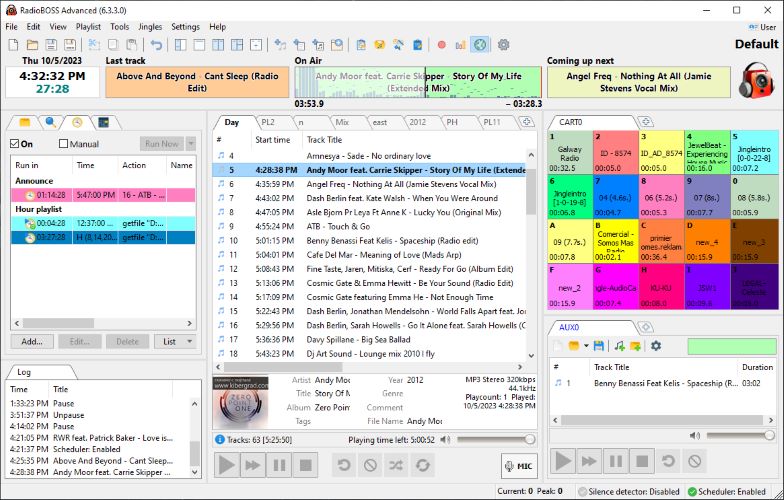
⚡ Quick Summary
- Best Overall: RadioBOSS
- Best for Beginners: Simple UI + automation features
- Best for Internet Radio: Built-in streaming support (Shoutcast, Icecast)
- Best Budget Pick: One-time payment vs expensive subscriptions
👉 If you want a reliable, affordable, and professional solution—RadioBOSS is the top choice.
🤔 What Is Radio Automation Software?
Radio automation software is a tool that helps you:
- Schedule music, ads, and shows automatically
- Manage audio libraries
- Broadcast live or pre-recorded content
- Maintain 24/7 radio operations without manual input
Think of it as your virtual DJ + station manager + scheduler, all in one.
🔍 Why You Need Radio Automation (Even for Small Stations)
If you’re still doing things manually, here’s what you’re missing:
- ⏱️ Save hours of repetitive work
- 🎧 Maintain consistent audio quality
- 📅 Run your station 24/7
- 💰 Monetize with scheduled ads
- 📡 Broadcast globally via internet streaming
Whether you’re running an online station or playing music in a café, automation is no longer optional—it’s essential.
🏆 Best Radio Automation Software: In-Depth Review
🎯 1. RadioBOSS – Best Affordable Professional Solution
If you’re looking for powerful features without the enterprise price tag, RadioBOSS stands out immediately.
Unlike traditional tools that cost thousands, RadioBOSS offers professional-grade automation at a fraction of the cost.
🚀 Key Features
- 🎵 Advanced playlist automation (rotations, hourly blocks)
- 🔊 Automatic volume leveling & crossfading
- 📡 Built-in streaming (Shoutcast, Icecast, RTMP)
- 📢 Advertisement scheduling system
- 🎚️ 12-band equalizer & audio processing
- 🧠 Smart playlist generator
- 🔄 Runs unattended for weeks or months
- 🧩 Plugin support (Winamp, VST)
💡 Why It Stands Out
Most tools force you to adapt to them.
RadioBOSS adapts to your workflow.
You can:
- Use your existing audio files
- Customize playlists your way
- Integrate live streams, podcasts, and jingles
- Automate everything—or control manually when needed
Must Read : RadioBOSS Review: A Complete Guide to This Radio Automation Software
🧾 Core Components Explained
🎛️ Player Engine
The heart of RadioBOSS:
- Schedule events by time or trigger
- Auto-generate playlists
- Insert jingles and ads seamlessly
- Use mic input for live shows
📂 Music Library
- Organize thousands of tracks easily
- Tag, filter, and search instantly
- Track usage statistics
📅 Playlist Generator
- Create hours (or days) of content in seconds
- Use templates for consistency
- Add rotations, ads, and markers
💰 Advertisement Scheduler
- Plan ad breaks automatically
- Set campaign start/end dates
- Adjust ad volume for clarity
📊 Report Generator
- Export reports (PDF, XLS)
- Track what played and when
- Useful for advertisers and analytics
👍 Pros & 👎 Cons
| Pros | Cons |
|---|---|
| Affordable one-time cost | Windows-only |
| Extremely stable | Slight learning curve for beginners |
| Built-in streaming | UI feels traditional |
| Powerful automation tools | Advanced features may take time to master |
👥 Best For
- Internet radio stations
- Small FM broadcasters
- DJs and podcasters
- Businesses (cafés, gyms, retail stores)
- Event organizers
Must Read : Best Philips 24 Inch Monitor in 2026 – Full HD, Affordable & Reliable
🔄 RadioBOSS vs Other Radio Automation Software
| Feature | RadioBOSS | Traditional Pro Software |
|---|---|---|
| Pricing | One-time affordable | Expensive licenses |
| Ease of Use | Beginner-friendly | Complex |
| Automation | Advanced | Advanced |
| Streaming | Built-in | Often extra |
| Stability | High | High |
💭 Key Insight
Most “big-name” tools are overkill for small broadcasters.
RadioBOSS gives you:
✔ The same core features
✔ Easier setup
✔ Much lower cost
🌍 Real-World Use Cases
Still unsure if you need it? Here are practical scenarios:
🎧 1. Online Radio Station
Run a 24/7 internet station with:
- Scheduled playlists
- Automated ads
- Live show integration
☕ 2. Café or Retail Store
Create the perfect ambiance:
- Background music playlists
- Time-based mood changes
- Zero manual effort
🏋️ 3. Gym or Fitness Center
- High-energy playlists
- Scheduled announcements
- Consistent audio quality
🎤 4. Live Events & DJs
- Pre-plan sets
- Trigger sound effects instantly
- Mix live + automated content
🛒 Buying Guide: What to Look For
Before choosing any radio automation software, consider this:
⚙️ 1. Ease of Use
Ask yourself:
Can I set this up without technical skills?
💸 2. Pricing Model
- One-time purchase (best long-term)
- Subscription (can get expensive)
📡 3. Streaming Support
Make sure it supports:
- Shoutcast
- Icecast
- RTMP
🎛️ 4. Automation Capabilities
Look for:
- Playlist scheduling
- Ad insertion
- Crossfading
🔄 5. Reliability
Your station should run:
- 24/7
- Without crashes
- Without manual intervention
Must Read : Useful Gadgets That Make Life Easier at Home (2026 Guide)
🔗 Internal Linking Suggestions
Use these anchor texts in your blog:
- how to start an internet radio station
- best podcast hosting platforms
- audio editing software for beginners
- how to monetize online radio
❓ FAQs (People Also Ask)
1. What is the best radio automation software for beginners?
For beginners, RadioBOSS is a great choice because it balances ease of use with powerful features.
2. Can I run a radio station automatically?
Yes. With automation software, you can run a station 24/7 without manual input.
3. Does radio automation software support live streaming?
Most modern tools—including RadioBOSS—support streaming via Shoutcast, Icecast, and more.
4. Is radio automation software expensive?
It depends. Some tools cost thousands, but affordable options like RadioBOSS offer great value.
5. Can I schedule advertisements?
Yes. Advanced tools allow automated ad scheduling and reporting.
6. Is it suitable for small businesses?
Absolutely. Many cafes, gyms, and stores use it for background music.
7. Do I need technical skills?
Not necessarily. Most modern tools are beginner-friendly.
🏁 Final Verdict
If you’re serious about running a radio station—or even just want professional audio automation without the high cost—there’s a clear winner.
👉 RadioBOSS delivers:
- Powerful automation
- Reliable performance
- Affordable pricing
- Flexibility for any use case
It’s one of the few tools that works equally well for beginners and professionals.
🚀 Final Recommendation
If you want a simple, reliable, and cost-effective radio automation solution, this is the one to start with.
In my college radio also we use RasioBOSS
Glad to know Pedro