
Running a radio station sounds exciting—until you’re juggling playlists, ads, transitions, scheduling, and 24/7 uptime. Most professional radio automation software is built for large broadcasters with big budgets. That’s great if you’re a commercial network. But what if you’re running an internet radio station, a local FM channel, or even in-store audio for your business?
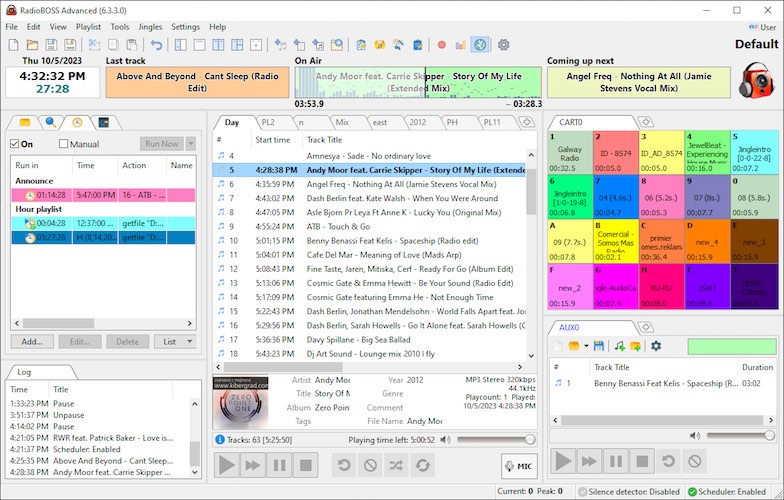
This is where RadioBOSS stands out.
In this detailed RadioBOSS review, we’ll explore its features, pricing, real-world use cases, pros and cons, and whether it’s the right radio automation solution for your needs.
Quick Summary
If you’re short on time, here’s the quick breakdown:
- Software: RadioBOSS
- Category: Radio automation software
- Best for: Internet radio, small FM stations, DJs, retail stores
- Pricing: One-time license (no subscription)
- Key strength: Reliable unattended broadcasting
What Is RadioBOSS?
RadioBOSS is a Windows-based radio automation software designed to manage, schedule, and broadcast audio content automatically.
Instead of manually playing tracks or ads, RadioBOSS allows you to:
- Build intelligent playlists
- Schedule shows, ads, and announcements
- Apply crossfades and volume leveling
- Stream directly to online radio servers
It has been actively developed for over 20 years, making it one of the most stable and trusted tools in radio broadcasting.
Why RadioBOSS Is Different From Traditional Radio Software
Most professional radio programming applications are:
- Expensive
- Overly complex
- Built for large commercial stations
RadioBOSS takes a different approach.
It focuses on simplicity, affordability, and reliability, making professional broadcasting accessible to smaller operators without sacrificing quality.
Key Features of RadioBOSS (In Depth)
Smart Playlist Generator
RadioBOSS allows you to create advanced playlists using flexible rules instead of manual selection.
You can define:
- Artist and track separation rules
- Rotations and categories
- Hourly blocks
- Advertising slots
- Time-based playlists
This makes your station sound professional—even when it’s fully automated.
Automatic Crossfading and Volume Leveling
One of the biggest advantages of RadioBOSS is audio consistency.
It includes:
- Automatic volume normalization
- Custom crossfade timing
- Silence detection
- Intro and outro detection
Your listeners won’t experience sudden volume jumps or awkward pauses.
Built-In Internet Streaming Support
RadioBOSS has native support for popular streaming platforms, including:
- Shoutcast v1 and v2
- Icecast
- Windows Media Services
- RTMP streaming
Metadata is automatically sent to streaming servers, FTP, HTTP requests, or XML/text files—no extra tools required.
This makes it ideal for internet radio automation.
Event Scheduler
The built-in Event Scheduler lets you automate almost everything:
- Start and stop playlists
- Play station IDs hourly
- Run advertisements at scheduled times
- Trigger external programs
Once configured, RadioBOSS can run unattended for weeks or even months.
Segue Editor
The Segue Editor gives you full control over transitions between tracks.
You can:
- Adjust fade-in and fade-out points
- Fine-tune song transitions
- Create seamless mixes
This feature is especially useful for music stations and DJs.
Plugin and Hardware Compatibility
RadioBOSS supports:
- Winamp plugins
- VST audio plugins
- Multi-channel sound cards (4.0, 5.1, 7.1)
- Multiple user profiles with access control
You can customize your workflow without limitations.
Real-World Use Cases
Internet Radio Stations
Run a 24/7 online radio station with scheduled shows, ads, and live streams—without constant supervision.
Local FM and AM Stations
Automate overnight or off-peak programming while maintaining broadcast-quality sound.
Retail Stores and Restaurants
Create the perfect in-store atmosphere with background music, promotions, and timed announcements.
DJs and Podcasters
Schedule pre-recorded shows, rebroadcast content, and maintain a consistent publishing schedule.
RadioBOSS Pros and Cons
Pros
- One-time license (no monthly fees)
- Extremely stable for unattended playback
- Built-in internet streaming encoders
- Beginner-friendly interface
- Powerful playlist automation
- Long development history
Cons
- Windows-only software
- Interface looks dated (functional, not modern)
- No native macOS or Linux version
RadioBOSS Pricing Overview
RadioBOSS uses a one-time payment model, which is a major advantage compared to subscription-based competitors.
Pricing depends on the edition and usage type, but overall it’s far more affordable than enterprise radio automation platforms.
RadioBOSS vs Other Radio Automation Software
| Software | Pricing Model | Best For | Difficulty |
|---|---|---|---|
| RadioBOSS | One-time | Small to mid broadcasters | Easy–Medium |
| SAM Broadcaster | Subscription | Advanced internet radio | High |
| StationPlaylist | One-time | FM/AM stations | Medium |
| Rivendell | Free/Open-source | Large stations with IT teams | Very High |
Summary: RadioBOSS offers the best balance of power, simplicity, and cost.
Who Should Use RadioBOSS?
RadioBOSS is ideal if you:
- Run a Windows-based broadcasting setup
- Need reliable unattended playback
- Want built-in streaming support
- Prefer a one-time license over subscriptions
- Operate an internet or small terrestrial radio station
If you need cloud-based automation or macOS support, you may want to explore alternatives.
Buying Guide: Things to Consider
Before purchasing RadioBOSS, ask yourself:
- Do I need internet streaming support?
- Will my station run unattended for long periods?
- Do I need ad scheduling and metadata automation?
- Am I using Windows-based systems?
If the answer is yes, RadioBOSS is a strong choice.
Frequently Asked Questions
Is RadioBOSS good for beginners?
Yes. It’s easy to learn and works well with default settings.
Can RadioBOSS stream to Shoutcast and Icecast?
Yes. Both are supported natively with metadata handling.
Does RadioBOSS need an internet connection?
Only for streaming. Local playback works offline.
Is RadioBOSS subscription-based?
No. It uses a one-time license model.
Can RadioBOSS run unattended?
Yes. Many broadcasters run it continuously for weeks.
Does it support ads and announcements?
Yes. Ads, promos, and announcements can be scheduled precisely.
Final Verdict: Is RadioBOSS Worth It?
RadioBOSS isn’t flashy—but it’s reliable, affordable, and proven.
If you want professional radio automation without enterprise pricing or unnecessary complexity, RadioBOSS delivers exactly what most broadcasters need.
Sometimes, the best software is the one that simply works—and RadioBOSS does exactly that.