
In the world of streaming platforms and digital downloads, DVDs may feel like relics of the past. Yet for many movie enthusiasts, collectors, educators, and archivists, DVDs still matter. CloneDVD Review will help you to know about the wonders of this software. They represent purchased content, rare editions, director’s cuts, and personal collections that deserve preservation. This is where CloneDVD™ positions itself: as a dedicated DVD copying and backup solution focused on speed, quality, and ease of use.
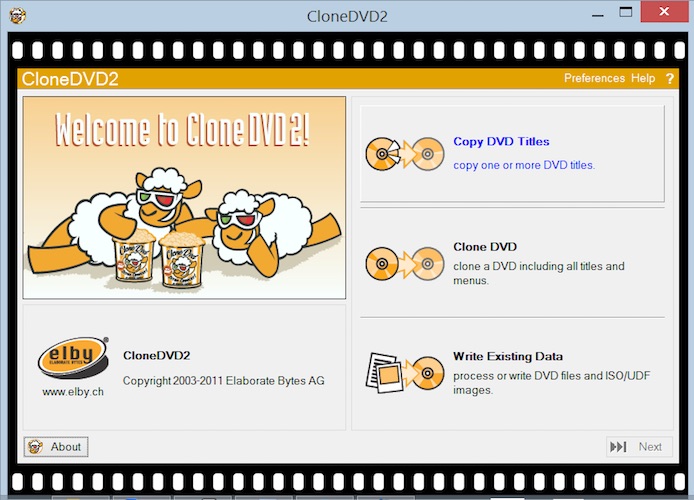
This in-depth CloneDVD review explores what the software does, how it performs, who it’s best for, and whether it still holds up in a modern Windows environment.
What Is CloneDVD?
CloneDVD™ is a DVD copying and backup software designed for Windows PCs. Its primary goal is to duplicate DVD content—either the full disc or just the main movie—while maintaining high picture quality. Using specialized transcoding technology, CloneDVD compresses DVD video efficiently so that large movies can fit onto recordable DVD media or be stored on a hard drive.
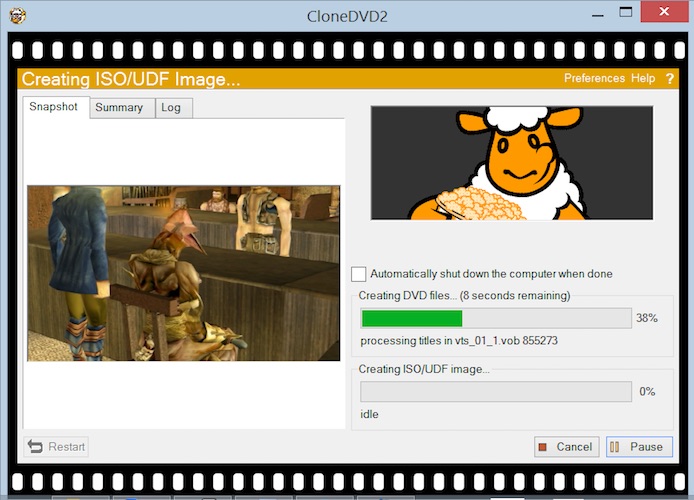
Unlike overly technical disc-authoring tools, CloneDVD focuses on accessibility. Its interface is built around a Filmstrip Assistant, a visual, step-by-step guide that helps users configure their copy without needing in-depth technical knowledge. Whether you are a first-time user or someone experienced with DVD utilities, CloneDVD aims to make the process straightforward and predictable.
Installation and System Requirements
CloneDVD runs on a wide range of Windows operating systems, including:
- Windows XP (64-bit), Vista, Windows 7, 8, 10, and Windows 11 (32-bit and 64-bit)
- Minimum 1 GHz processor
- At least 1 GB of RAM
- DVD reader (DVD writer recommended)
- Around 5 GB of free hard drive space for temporary files
- Administrator rights for installation
From a modern perspective, these requirements are modest. Even entry-level PCs easily exceed them, making CloneDVD accessible on older machines as well as current systems. Installation is quick and uncomplicated, with no additional drivers required—an advantage over older disc utilities that relied on ASPI drivers.
First Impressions and User Interface
One of CloneDVD’s standout qualities is its user interface design. Instead of overwhelming users with complex menus and jargon, the software uses a clean layout supported by visual cues.
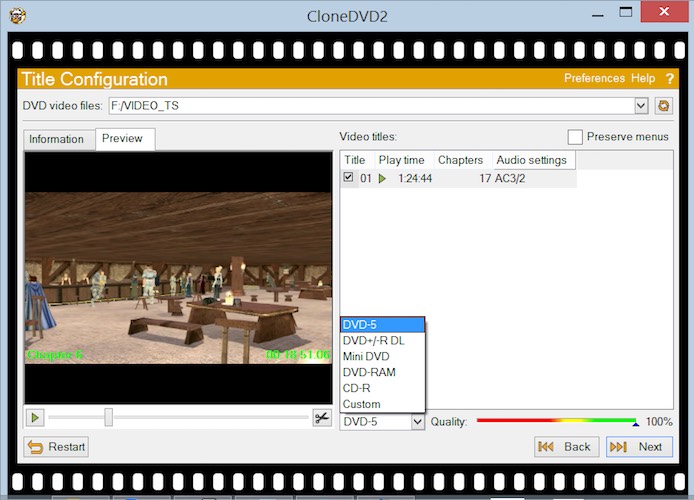
The Filmstrip Assistant is central to the experience. Titles on the DVD are displayed as thumbnails, making it easy to identify the main movie, bonus features, or alternate cuts. Navigation feels intuitive, even for beginners, and most tasks can be completed without consulting a manual.
The interface balances simplicity with depth. Advanced users can fine-tune target size, language tracks, chapters, and compression levels, while novices can rely on defaults and still achieve excellent results.
Must Read : WhatsApp Business Features for Small Businesses
Core Features Explained
1. Copying Options: Full DVD or Main Movie
CloneDVD allows users to copy:
- The entire DVD, including menus, bonus features, and extras
- Only the main movie
- Selected titles or chapters
This flexibility is ideal for users who want to save space by excluding bonus content or keep a complete replica of the original disc. The ability to include or exclude menus further enhances customization.
2. High-Speed Transcoding Technology
At the heart of CloneDVD is its newly improved transcoder, designed to deliver high picture quality even at significant compression levels. This is especially important for long movies exceeding two hours.
During testing, CloneDVD demonstrates impressive speed without excessive quality loss. Motion-heavy scenes, which often expose weaknesses in compression algorithms, remain sharp and watchable. While no transcoder is perfect, CloneDVD’s balance between speed and visual fidelity is one of its strongest points.
Must Read : Step by Step AI Video Maker tutorial
3. Visual Quality Bars
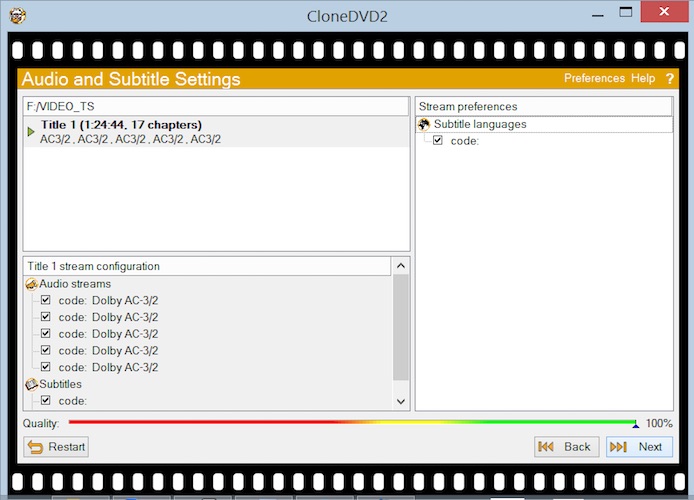
A unique and user-friendly feature is the visual quality bar. As you adjust settings—such as removing audio tracks or shrinking target size—the bar dynamically updates to show how these choices will affect final video quality.
This real-time feedback helps users make informed decisions without needing technical expertise in bitrates or encoding profiles.
4. Audio and Language Selection
CloneDVD allows you to select which:
- Audio tracks
- Subtitle languages
are included in the final copy. This is particularly useful for international DVDs that include multiple language options. Removing unnecessary tracks can free up space and improve video quality.
5. Chapter Trimming and Splitting
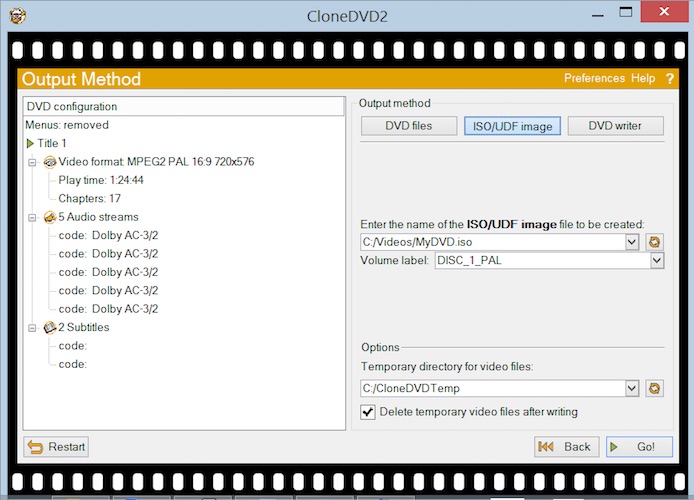
For users who want precise control, CloneDVD offers chapter trimming and splitting. You can remove unwanted scenes or separate long titles into multiple parts. While not a full video editor, this feature adds meaningful customization without complexity.
6. Adjustable Target Size
Whether you’re writing to a single-layer DVD, dual-layer disc, or saving to a hard drive, CloneDVD lets you freely adjust the target size. This ensures compatibility with different media types and storage preferences.
Must Read : How to Recover Deleted WhatsApp Messages Without Backup
Performance and Stability
CloneDVD has earned a reputation for being stable and reliable, and that reputation holds up well. The software runs smoothly on both older and modern Windows systems, with minimal crashes or freezes.
Transcoding performance is efficient. On modern hardware, most DVDs can be processed in a reasonable timeframe without hogging system resources. Real-time bitrate and frame statistics provide transparency for users who want insight into what’s happening behind the scenes.
Another advantage is that CloneDVD works well with a wide range of DVD player hardware and software. Copies created with CloneDVD generally play back without issues on standalone DVD players, software players, and home theater systems.
Preview and Monitoring Tools
CloneDVD includes several helpful monitoring and preview features:
- Video preview of all selectable DVD titles before copying
- Live preview during transcoding and writing
- Picture snapshots while transcoding
- Real-time statistics on bitrate and frames
These tools give users confidence that the final output will match expectations. Being able to preview content during the copying process is especially reassuring when working with long or rare DVDs.
Ease of Use for Beginners
One of CloneDVD’s strongest selling points is how beginner-friendly it is. Many DVD copying tools assume prior knowledge of codecs, compression ratios, or disc structures. CloneDVD avoids this pitfall.
The step-by-step assistant, clear labeling, and visual feedback mean that even novice users can produce a successful copy on their first attempt. Preferences are remembered between sessions, further streamlining repeated use.
Compatibility with DVD Media
CloneDVD supports a wide range of disc formats, including:
- DVD-R / DVD-RW
- DVD+R / DVD+RW
It also allows copying directly to the hard drive, which is useful for users who want digital backups rather than physical discs. This versatility ensures CloneDVD fits into various workflows, from physical archiving to digital storage.
Legal and Ethical Considerations
It’s important to note that DVD copying software should be used responsibly. CloneDVD is designed for creating personal backups of DVDs you legally own, protecting discs from damage or loss, and for legitimate archival purposes.
Users should always comply with local copyright laws and licensing agreements. CloneDVD itself focuses on copying and transcoding functionality rather than promoting misuse.
Strengths of CloneDVD
- Excellent picture quality even at high compression
- Fast and efficient transcoding
- Extremely user-friendly interface
- Visual quality indicators simplify decision-making
- Stable and reliable performance
- Broad compatibility with Windows versions and DVD media
- No need for additional drivers
Limitations and Areas for Improvement
While CloneDVD remains a strong product, it’s not without limitations:
- DVD-only focus (no native Blu-ray support)
- Interface design, while functional, may feel dated to some users
- Lacks advanced video editing or authoring tools
- Relies on Windows platform only
For users seeking Blu-ray or 4K disc support, CloneDVD may feel limited. However, for standard DVD workflows, it remains highly capable.
Who Should Use CloneDVD?
CloneDVD is ideal for:
- DVD collectors preserving their libraries
- Families backing up home movie discs
- Educators archiving instructional DVDs
- Users who value simplicity and reliability over advanced editing
- Anyone needing quick, high-quality DVD backups
If your primary need is DVD copying with minimal fuss and strong results, CloneDVD fits the bill.
Overall Verdict: Is CloneDVD Worth It?
Despite the shift toward digital media, DVDs still hold value for many users, and CloneDVD continues to deliver where it matters most: quality, speed, and usability. Its intuitive Filmstrip Assistant, robust transcoder, and thoughtful visual tools make it one of the more accessible DVD copying solutions available.
While it may not cater to users looking for cutting-edge formats or deep editing capabilities, CloneDVD excels at its core mission—creating reliable, high-quality DVD backups with minimal effort.
For anyone seeking a dependable, beginner-friendly DVD copying tool that has stood the test of time, CloneDVD remains a solid and trustworthy choice.


Nikhil Narkhede
Latest posts by Nikhil Narkhede (see all)
- Smartwatch Battery Life: How to Choose a Watch That Lasts - December 28, 2025
- How to update your drivers in Windows automatically - December 27, 2025
- Laptop Cooling Pads: Do They Really Work? - December 26, 2025