 is no longer enough.This Chatbot App Review will help you to make a wise)
Having access to just one large language model (LLM) is no longer enough. That’s where Chatbot App steps in — an all-in-one AI platform that combines the best LLMs into a single, seamless interface. This Chatbot App Review will help you to know more about this platform and will help you to make a wise decision. Whether you’re a content creator, developer, business owner, or simply someone who loves experimenting with AI, the Chatbot App offers a powerful suite of tools, all at an incredibly affordable price.
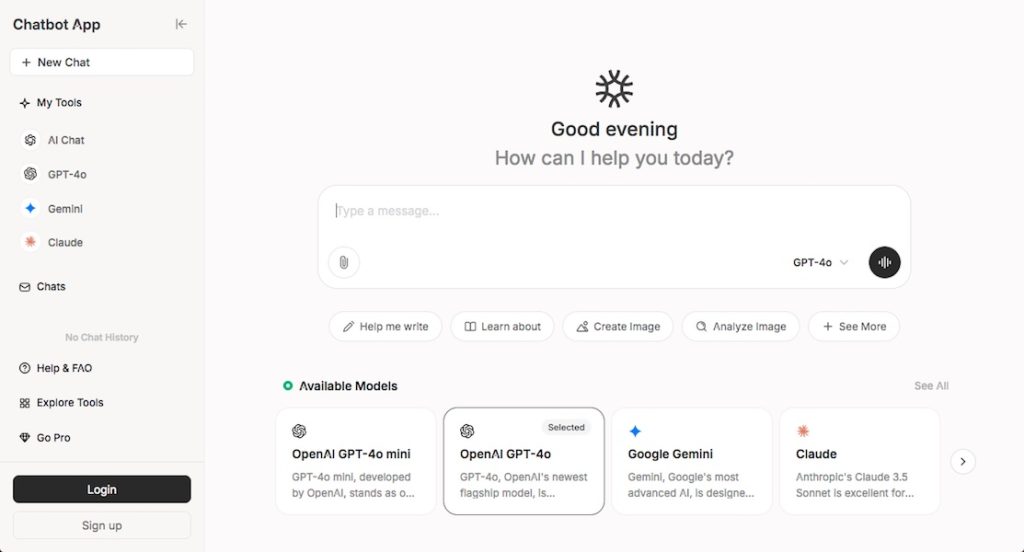
In this in-depth Chatbot App review, we’ll explore its key features, supported models, pricing plans, use cases, and why it’s quickly becoming the go-to solution for AI enthusiasts around the world.
What Is Chatbot App?
The Chatbot App is a revolutionary AI chatbot platform that unifies access to over 10+ leading AI models, including:
- OpenAI’s GPT-4o
- Claude 3.5 Sonnet by Anthropic
- Google Gemini
- Grok (from xAI)
- DeepSeek
Unlike many standalone platforms that limit users to a single model, Chatbot App allows seamless switching between models within one intuitive interface. It’s designed to give users the power of choice, helping reduce hallucinations, increase accuracy, and drive better insights through direct model comparisons.
Must Read : How to check if the Content is Plagiarized
Top Features of Chatbot App
1. Multiple AI Models in One Chat
The standout feature of Chatbot App is the ability to access and compare responses from multiple top-tier LLMs. For example, you can ask a question and receive answers from GPT-4o, Claude 3.5, and Gemini side-by-side — making fact-checking and decision-making faster and more reliable.
2. Affordable, Transparent Pricing
At just $59.99/year, Chatbot App provides unmatched value compared to purchasing access to each model separately. You can save over 70% while getting more capabilities, including tools that are typically gated behind expensive subscriptions on other platforms.
3. Cross-Platform Compatibility
Whether you’re using a web browser, iOS, or Android, the Chatbot App ensures a consistent, mobile-friendly experience. There’s no need to download bulky apps — simply log in and chat from any device.
4. Advanced Web Search
Need real-time information? The integrated web search feature pulls the latest data from across the internet, enhancing the AI’s ability to answer with up-to-date knowledge.
Must Read : The Rise of AI-Powered Development Tools
5. Voice Interaction with Speech-to-Text
Enjoy hands-free interaction through the app’s speech-to-text function. Perfect for multitasking or using on the go.
6. Multilingual Capabilities
With support for over 100 languages, Chatbot App is truly global. You can interact with the chatbot in your native language, and it will respond accurately and contextually.
7. Chat with PDF and Document Support
Upload PDFs or other document types (over 10 supported file types), and the AI can summarize, extract information, answer questions, and even converse about the contents.
8. Image Generation and Design Tools
Use built-in AI image generation tools tailored for graphic design, marketing, and visual storytelling. With support for 14,000 images per month on higher plans, creators have endless possibilities.
9. Custom Bots and Branding
Businesses can create custom AI bots tailored for specific tasks, complete with custom branding and domain customization.
10. Private and Secure
User privacy is a priority. Your data is not used for training, and you retain full control over what’s shared or stored.
Must Read : Smodin Review – AI Writing Assistant
AI Models Included
Here’s a closer look at the models you can use within the Chatbot App:
- GPT-4o (OpenAI): Offers a perfect balance of speed, reasoning, and creative content generation.
- Claude 3.5 Sonnet (Anthropic): Known for contextual memory and ethical response generation.
- Gemini (Google): Excellent for data-based tasks and integration with Google tools.
- Grok (xAI): A conversational, witty model designed for natural dialogue.
- DeepSeek: Ideal for coding, research, and technical breakdowns.
You can switch effortlessly between these models — whether you’re drafting an article, solving a math problem, or designing a graphic.
Plans and Pricing Breakdown
Chatbot App offers a clear, tiered pricing structure with no hidden fees:
Free Plan – $0/month
- Access to GPT-4o Mini
- Basic chat features
- Limited access to AI models
- Good for casual exploration
Pro Plan – $19.99/month ($0.67/day)
- Full access to all major models
- Unlimited file uploads
- Text-to-speech support
- Web search capabilities
- Chat with PDFs
- 3,600 image generations per month
- Advanced data analysis tools
Ultra Pro Plan – $39.99/month ($1.33/day)
- Everything in Pro Plan
- Extended limits for files, chat history, and image generation
- 14,000 image generations per month
- Enhanced Chat with Document features
- Deeper AI integrations
If you’re looking for value and performance, the annual plan at $59.99/year is an unbeatable offer.
Who Should Use Chatbot App?
Chatbot App caters to a wide range of users:
✅ Writers and Content Creators
Generate blogs, scripts, emails, and SEO-optimized content with multiple AI perspectives to choose from.
✅ Students and Researchers
Ask complex questions, summarize academic papers, and use real-time web data for accurate citations.
✅ Businesses
From customer support automation to internal document management, Chatbot App simplifies workflows.
✅ Designers
Leverage AI image generation and design tools to bring visual ideas to life with ease.
✅ Educators
Use multilingual support, PDF analysis, and model comparisons to enhance learning experiences.
User Experience: Interface and Usability
One of the most impressive aspects of the Chatbot App is its clean and modern interface. Switching between models takes just one click. Conversations are easy to navigate, and the UI is responsive across all devices.
Key UX highlights:
- Model switcher: Toggle between LLMs without losing your chat history.
- Document upload: Drag-and-drop files to instantly begin chatting with PDFs.
- Customization: Change chat themes, fonts, and even host under your own domain for enterprise use.
- Collaboration: Invite team members and assign roles or tags for project management.
Standout Use Cases
Let’s take a look at how users are benefiting from Chatbot App in real-world scenarios:
- Marketing Teams: Creating 5x more social media content by generating ideas and posts using GPT-4o and Gemini together.
- Legal Professionals: Uploading long contracts as PDFs and using Claude for detailed summaries and compliance checks.
- Developers: Using DeepSeek and Grok to review code, debug, and generate documentation across projects.
- E-commerce: Automating customer queries, order lookups, and multilingual support for global sales.
Pros and Cons
✅ Pros
- Unparalleled model access in one place
- Budget-friendly pricing options
- Advanced tools like image generation, speech-to-text, and PDF chat
- User-friendly across all platforms
- Real-time data via web search
- Custom bots and branding support
❌ Cons
- Advanced features require Pro or Ultra Pro plans
- New users may need time to explore all models effectively
- No offline mode (browser-dependent)
Final Verdict: Is Chatbot App Worth It?
If you’re serious about exploring what AI can do — without being locked into one provider or spending a fortune — the Chatbot App is absolutely worth it. The sheer convenience of accessing multiple top-tier LLMs in one chat window, along with custom tools for image generation, file handling, and multilingual conversation, make it a standout choice.
Whether you’re a business looking for productivity, a student diving into research, or a creator exploring the future of content, Chatbot App gives you more power, more versatility, and more results — for less money.
FAQs: Chatbot App Review
Q1: Can I use Chatbot App for free?
Yes! The Free Plan offers limited access to GPT-4o Mini and basic features. You can upgrade anytime.
Q2: Is Chatbot App good for teams?
Absolutely. Team management, member roles, and collaboration tools are built in, making it ideal for businesses.
Q3: How is Chatbot App different from ChatGPT or Claude’s platform?
Chatbot App lets you use all of those models in one platform, allowing cross-model comparison and greater flexibility.
Q4: Are my chats and files private?
Yes. Your data is not used for training purposes, and you have full control over data sharing and storage.
Conclusion
The Chatbot App sets a new standard for what users should expect from AI tools in 2025. It’s flexible, affordable, and future-ready. Whether you’re looking to generate content, chat with documents, perform research, design images, or simply have intelligent conversations — this is your all-in-one AI companion.
Ready to level up your AI experience? Try Chatbot App today — the future of AI is here, and it’s all in one place.