Home Blog Page 2

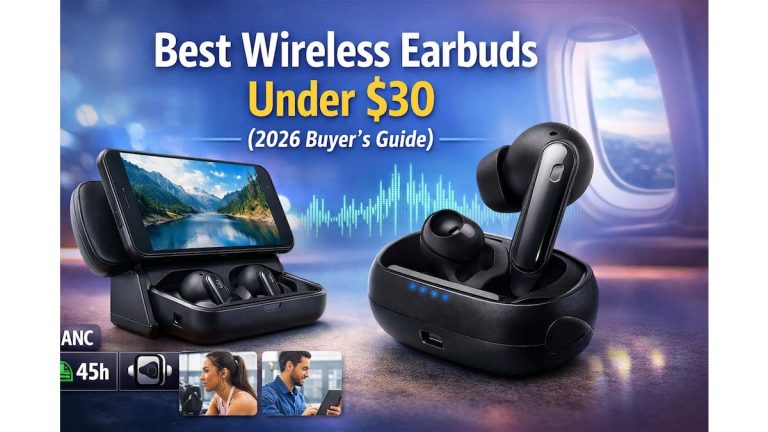
Wireless earbuds under $30 (2026 Buyer’s Guide)

0

Finding good wireless earbuds under $30 used to feel impossible. You’d either sacrifice sound quality, battery life, or call clarity—or all three.

But things have changed.
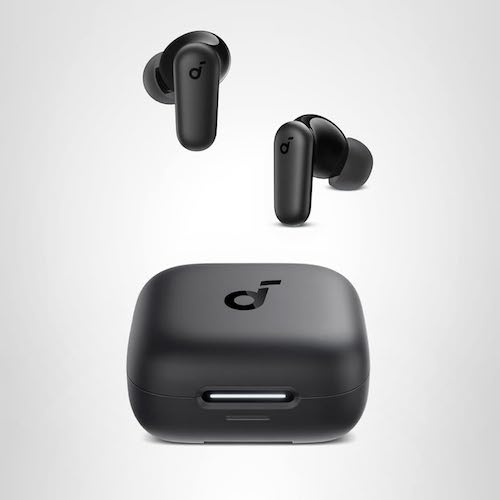
Wireless earbuds under $30

Thanks to smarter chipsets, better drivers, and aggressive competition, budget earbuds now offer features that were once limited to premium models: active noise cancelling, deep bass, long playtime, and stable Bluetooth connectivity.

If you’re tired of overpaying and just want reliable, great-sounding earbuds without breaking the bank, this guide is for you.


Quick Summary

  • ✔️ Yes, you can get quality wireless earbuds under $30
  • ✔️ Look for ANC, battery life, mic quality, and comfort
  • Top Pick: Soundcore P30i by Anker
  • Best for: commuting, calls, workouts, casual music, and travel
  • Avoid ultra-cheap no-name earbuds with fake specs

Must Read : Fast Charging Phones : The Ultimate Guide for 2026 Buyers


Why Wireless Earbuds Under $30 Are Worth Buying in 2026

Budget earbuds today aren’t just “cheap alternatives.” Many are:

  • Built by trusted brands
  • Tuned for everyday listening
  • Designed for real-world use (calls, workouts, commuting)

Who Should Buy Budget Wireless Earbuds?

  • Students on a budget
  • Casual listeners
  • Backup earbuds for travel
  • Gym & outdoor users
  • Remote workers needing clear calls

If you don’t need studio-grade sound or luxury materials, budget earbuds make a lot of sense.


Best Overall Wireless Earbuds Under $30

Soundcore P30i by Anker (Editor’s Choice)

If there’s one model that consistently punches above its price, it’s the Soundcore P30i.

This is not “cheap earbuds pretending to be premium.” These are smartly engineered budget earbuds with features that genuinely improve daily use.


Key Features of Soundcore P30i

🔇 Strong & Smart Noise Cancelling (Up to 42dB)

Most earbuds under $30 skip ANC—or do it poorly.

The P30i stands out with:

  • Advanced active noise cancelling
  • Adaptive technology that adjusts based on surroundings
  • Noticeable reduction in traffic, chatter, and background hum

Perfect for commuting, study sessions, or working in noisy spaces.
Wireless earbuds under $30

🎤 4-Mic AI-Enhanced Call Quality

Calls are where cheap earbuds usually fail.

Soundcore solves this with:

  • 4 built-in microphones
  • AI-powered voice isolation
  • Clear voice pickup even outdoors

Ideal for Zoom calls, voice notes, and hands-free conversations.


🔊 Powerful Bass with 10mm Drivers

Bass lovers won’t be disappointed.

  • Large 10mm dynamic drivers
  • Soundcore’s BassUp technology
  • Deep, punchy low-end without muddy mids

Great for hip-hop, EDM, podcasts, and movies.


👂 Transparency Mode

Need to hear your surroundings?

Transparency mode lets in ambient sound so you can:

  • Hear announcements
  • Talk without removing earbuds
  • Stay aware while walking

A feature rarely done well at this price.


📱 2-in-1 Charging Case + Phone Stand

This is where P30i gets clever.

The charging case doubles as a phone stand, perfect for:

  • Watching videos on trains
  • Video calls on the go
  • Hands-free streaming

Small detail—big usability win.

Must Read : Why Is My Phone Screen Pressing Itself? Causes, Fixes, and Long-Term Solutions


🔗 Bluetooth 5.4 & One-Step Pairing

  • Fast, stable connection
  • Auto-connects when removed from case
  • Low latency for videos & casual gaming

No random dropouts or pairing headaches.


🔋 Battery Life That Lasts

UsagePlaytime
Earbuds (No ANC)Up to 10 hours
Earbuds (With ANC)~6 hours
With Charging CaseUp to 45 hours
Quick Charge10 min = 2 hours

This is excellent battery performance for the price.


💧 IP54 Water & Dust Resistance

  • Sweat-resistant
  • Splash-resistant
  • Safe for workouts and outdoor use

Not for swimming—but perfect for everyday life.


Pros & Cons: Soundcore P30i

✅ Pros

  • Strong ANC for the price
  • Excellent battery life
  • Clear call quality
  • Bass-rich sound profile
  • Unique phone stand case
  • Trusted Anker build quality

❌ Cons

  • ANC not as powerful as $100+ earbuds
  • No wireless charging
  • App customization is basic

Comparison: Best Wireless Earbuds Under $30

FeatureSoundcore P30iTypical Budget Earbuds
Active Noise Cancelling✔️ Yes (42dB)❌ Rare or weak
Call Quality4 Mic AI1–2 basic mics
Battery LifeUp to 45h20–30h
Bass PerformanceStrong & punchyOften flat
Brand ReliabilityAnkerUnknown
Extra FeaturesPhone stand caseNone

👉 See full features & current price


Real-World Use Cases

🎧 Daily Commuting

Noise cancelling helps reduce engine noise and chatter.

💻 Work From Home

Clear mic quality makes meetings easier.

🏋️ Gym & Workouts

Secure fit + IP54 rating = worry-free use.

✈️ Travel

Long battery life and ANC are perfect for flights and trains.

🎬 Entertainment

The phone stand case makes streaming surprisingly convenient.

Must Read : Aiarty Image Matting Review: Precision Background Removal Made Simple


How to Choose the Best Wireless Earbuds Under $30

1️⃣ Sound Quality

Look for driver size (10mm is ideal) and balanced tuning.

2️⃣ Battery Life

Anything under 20 hours total is outdated.

3️⃣ Call Performance

At least dual-mic, ideally AI-enhanced.

4️⃣ Comfort & Fit

Lightweight earbuds with multiple ear tips matter.

5️⃣ Brand Reputation

Stick to brands known for audio reliability.


Common Mistakes to Avoid

  • Falling for fake ANC claims
  • Choosing unknown brands with no warranty
  • Ignoring mic quality
  • Buying based on looks alone

People Also Ask (FAQs)

Are wireless earbuds under $30 actually good?

Yes. While they won’t match premium models, many offer excellent value for everyday use.

Do budget earbuds have real noise cancelling?

Some do. Models like Soundcore P30i offer genuine ANC, not just passive isolation.

Are cheap earbuds safe for workouts?

As long as they have an IPX4 or IP54 rating, they’re fine for sweat and light rain.

Can I use budget earbuds for calls and meetings?

Absolutely—just choose earbuds with multi-mic setups and AI noise reduction.

How long do budget earbuds last?

With proper care, 1.5–2 years is realistic.

Do these earbuds work with iPhone and Android?

Yes, Bluetooth earbuds are platform-independent.


Internal Linking Suggestions

  • Best Bluetooth headphones for workouts
  • Wireless earbuds buying guide
  • Noise cancelling headphones under $50
  • Best tech accessories for travel

Final Verdict: Are Wireless Earbuds Under $30 Worth It?

If you choose wisely—100% yes.

The Soundcore P30i proves that budget earbuds can:

  • Sound good
  • Block noise
  • Handle calls
  • Last all day

Without gimmicks or inflated promises.

Our Recommendation

If you want maximum value, reliable performance, and modern features under $30, the Soundcore P30i is one of the safest and smartest picks right now.

CloneBD Review: Easily Copy Blu-ray Discs to Your Hard Drive

0

Blu-ray discs offer amazing video quality, but they come with real-world problems.

Discs get scratched.
Blu-ray players become outdated.
And carrying a physical collection everywhere just isn’t practical anymore.

If you’ve ever wished you could copy your Blu-ray discs to your hard drive, keep backups, or convert them into device-friendly formats, you’re not alone.

That’s where CloneBD comes in.

In this in-depth CloneBD review, I’ll break down what it does, how it works, who it’s best for, and whether it’s worth your money — all in simple, honest terms.

CloneBD Review

Quick CloneBD Summary

  • Best for: Copying unprotected Blu-ray discs to hard drive or blank discs
  • Supports: 1:1 Blu-ray copy, compression, and video conversion
  • Formats: MP4, MKV, AVI, and more
  • Speed: Fast with multi-core CPU & hardware acceleration
  • Regions: Supports Blu-ray regions A, B, and C
  • Platforms: Windows only

👉 Ideal if you want an easy, no-driver Blu-ray copy solution


What Is CloneBD?

CloneBD is a Windows-based Blu-ray copy and conversion software designed to help you:

  • Copy Blu-ray discs to your hard drive
  • Create 1:1 Blu-ray backups
  • Compress large Blu-ray discs
  • Convert Blu-ray movies into digital formats

Unlike overly complex ripping tools, CloneBD focuses on simplicity, speed, and flexibility — without requiring third-party drivers.

Must Read : AVS4You Review – Is This All-in-One Multimedia Suite Worth It?


Key Features of CloneBD (Explained Simply)

1. Copy Blu-ray Disc 1:1 or Partial

CloneBD allows you to choose how much control you want.

You can:

  • Make a full 1:1 Blu-ray copy
  • Copy only selected titles
  • Remove unwanted audio or subtitle tracks

This is perfect if you want to save storage space or keep only what you actually watch.


2. Compress BD-50 to Smaller Sizes

Large Blu-ray discs take up serious space.

CloneBD can compress:

  • BD-50 → BD-25
  • BD-50 → BD-9 or BD-5

This is useful if you want backups that fit on smaller blank discs or portable storage.

CloneBD Review

3. Convert Blu-ray to Popular Video Formats

One of CloneBD’s biggest strengths is format flexibility.

Supported output formats include:

  • MP4
  • MKV
  • AVI

You can also convert Blu-ray movies for:

  • Android phones
  • iPhone & iPad
  • Smart TVs
  • Tablets
  • Media players

This makes CloneBD a practical Blu-ray to MP4 converter for everyday use.


4. Supports All Blu-ray Regions (A, B, C)

Region locks can be frustrating.

CloneBD supports:

  • Region A
  • Region B
  • Region C

So you can copy Blu-rays purchased internationally without worrying about compatibility.

Must Read : How to update your drivers in Windows automatically


5. Built-In Blu-ray Preview Player

Before copying, CloneBD includes a preview player that lets you:

  • Preview titles
  • Identify the main movie
  • Avoid copying unnecessary extras

This saves time and storage space.

CloneBD Review

6. No Third-Party Drivers Needed

Many Blu-ray tools require extra drivers that can:

  • Slow down your system
  • Cause conflicts
  • Break after Windows updates

CloneBD avoids this by using an internal UDF 2.50 parser, making installation clean and hassle-free.


7. Fast Performance with Hardware Acceleration

CloneBD supports:

  • Multi-core CPUs
  • NVIDIA CUDA hardware acceleration

Result?

  • Faster copy times
  • Lower CPU usage
  • Smoother performance on modern PCs

8. 3D and UHD Blu-ray Support

Advanced users will appreciate:

  • 3D Blu-ray conversion to MKV
  • H.265 / HEVC compression
  • Ultra HD (UHD) Blu-ray support

These features help preserve quality while reducing file size.


System Requirements (What You’ll Need)

Before installing CloneBD, make sure your system meets these requirements:

  • Windows Vista / 7 / 8 / 10 / 11 (32 & 64-bit)
  • Minimum 2 GHz processor
  • At least 2 GB RAM
  • Blu-ray reader or writer
  • 50–100 GB free disk space
  • Administrator rights for installation

Pros and Cons of CloneBD

ProsCons
Easy-to-use interfaceWindows-only
No third-party driversDoes not handle protected discs
Supports many formatsRequires large temp storage
Hardware accelerationNo built-in editing tools
Region-free copying

How CloneBD Compares to Alternatives

CloneBD vs Other Blu-ray Copy Software

CloneBD stands out for:

  • Simplicity
  • Clean installation
  • Reliable 1:1 copies

Other tools may offer:

  • More advanced editing
  • Built-in decryption (not always legal or stable)

If your goal is clean, fast, and legal Blu-ray backups, CloneBD keeps things straightforward.

Must Read : Why Is My Phone Screen Pressing Itself? Causes, Fixes, and Long-Term Solutions


Real-World Use Cases

Who Is CloneBD Best For?

CloneBD is ideal if you:

  • Want to back up your Blu-ray collection
  • Need to convert Blu-ray movies for mobile devices
  • Prefer simple software over complex tools
  • Have unprotected Blu-ray discs
  • Want region-free copying

Who Should Skip It?

You may want to look elsewhere if:

  • You need built-in video editing
  • You use macOS or Linux
  • You want automatic handling of copy-protected discs

Things to Consider Before Buying CloneBD

Before clicking “Buy,” ask yourself:

  • Do I want full disc backups or just the main movie?
  • How much storage space do I have?
  • Will I convert videos for mobile devices?
  • Do I prefer fast performance over advanced editing?

Answering these will help you decide if CloneBD fits your workflow.

CloneBD Review

Frequently Asked Questions (FAQs)

1. Is CloneBD legal to use?

CloneBD is legal when used to copy unprotected Blu-ray discs for personal use. Always follow local copyright laws.

2. Can CloneBD copy protected Blu-ray discs?

No. CloneBD works with unprotected Blu-ray discs only.

3. Does CloneBD work on Windows 11?

Yes, CloneBD is fully compatible with Windows 11.

4. Can I convert Blu-ray to MP4 using CloneBD?

Yes, CloneBD supports MP4, MKV, AVI, and more.

5. Does CloneBD reduce video quality?

You control compression settings. With H.265/HEVC, quality loss is minimal.

6. Is CloneBD beginner-friendly?

Yes. The interface is clean and easy to understand.

7. Does CloneBD support external hard drives?

Yes, you can copy Blu-rays directly to external storage.


Internal Linking Suggestions (Anchor Text Only)

  • Best Blu-ray copy software for Windows
  • How to back up Blu-ray discs safely
  • Blu-ray vs digital formats explained
  • External hard drive storage guide

Final Verdict: Is CloneBD Worth It?

CloneBD delivers exactly what it promises — a reliable, easy-to-use Blu-ray copy and conversion tool without unnecessary complications.

It’s not overloaded with features, and that’s a good thing.

If your goal is to:

  • Copy Blu-ray discs to your hard drive
  • Create clean 1:1 backups
  • Convert Blu-rays for everyday devices
  • Avoid driver issues and complex setups

👉 CloneBD is a solid, dependable choice.

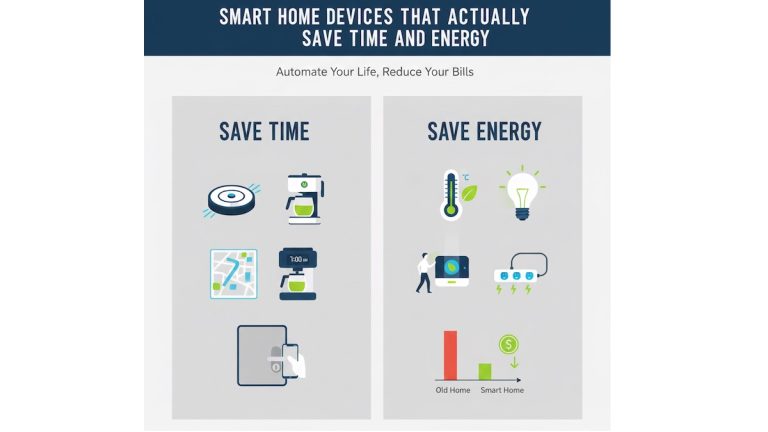
Smart Home Devices That Actually Save Time and Energy

0

Smart home devices promise convenience, lower bills, and more free time.
But let’s be honest — many gadgets sound impressive and end up unused after a week.

So which smart home devices actually save time and energy instead of creating more work?

This guide cuts through the hype.
You’ll find proven, practical smart devices that solve real problems, reduce daily effort, and help control energy usage — without turning your home into a tech headache.

Smart Home Devices That Actually Save Time and Energy

Whether you’re a beginner or already own a few smart gadgets, this article focuses on what works in real homes, not marketing slogans.


Quick Summary

If you’re short on time, start here:

  • Smart thermostats reduce heating and cooling costs automatically
  • Smart lighting systems cut energy waste and save daily effort
  • Smart plugs eliminate phantom power drain
  • Robot vacuums save hours of cleaning time
  • Smart home hubs simplify control and automation

These devices offer the best balance of time savings, energy efficiency, and ease of use.


Why Smart Home Devices Matter in 2026

Rising energy costs and busy lifestyles make automation more than a luxury.

The right smart home setup helps you:

  • Reduce unnecessary energy usage
  • Automate repetitive daily tasks
  • Monitor and control devices remotely
  • Improve comfort without constant manual control

The key is choosing devices with real-world benefits, not gimmicks.


1. Smart Thermostats: The Biggest Energy Saver

Why Smart Thermostats Work

Heating and cooling account for a large portion of household energy use.
Smart thermostats optimize this automatically — something most people forget to do manually.

They learn your schedule, adjust temperatures intelligently, and prevent energy waste when no one is home.

Key Benefits

  • Automatic temperature adjustments
  • Remote control via smartphone
  • Energy usage reports
  • Geofencing (adjusts when you leave or return)

Real-World Example

Instead of running the AC all day, a smart thermostat reduces cooling when you’re out and restores comfort before you return — without touching a button.

Pros & Cons

ProsCons
Significant energy savingsHigher upfront cost
Set-and-forget convenienceNeeds compatible HVAC
Smart schedulingWi-Fi dependent

Best for: Homeowners, renters with HVAC access, families with predictable schedules


2. Smart Lighting Systems: Small Change, Big Impact

How Smart Lighting Saves Time and Energy

Lights are often left on unintentionally. Smart lighting solves this quietly in the background.

You can automate lights based on schedules, motion, or ambient light — reducing waste without thinking about it.

Useful Features

  • Motion sensors
  • Scheduling and timers
  • Dimming for energy efficiency
  • Voice and app control

Time-Saving Scenarios

  • Lights turn off automatically when rooms are empty
  • Wake-up routines with gradual lighting
  • Nighttime motion lights without switches

Pros & Cons

ProsCons
Easy installationSmart bulbs cost more
Reduces wasted electricityRequires app setup
Custom automationWi-Fi or hub needed

Best for: Apartments, families, energy-conscious users


3. Smart Plugs: The Hidden Energy-Saving Heroes

What Are Smart Plugs?

Smart plugs turn regular devices into smart ones.
They cut power when devices aren’t in use, stopping “phantom energy drain.”

Why This Matters

Many electronics draw power even when off — TVs, chargers, coffee machines.

Smart plugs help you:

  • Monitor energy usage
  • Set automatic shut-off schedules
  • Control devices remotely

Best Use Cases

  • Entertainment systems
  • Kitchen appliances
  • Office equipment
  • Holiday lights

Pros & Cons

ProsCons
Very affordableLimited to on/off control
Easy setupNo advanced automation alone
Works with many devicesNeeds Wi-Fi

Best for: Beginners, renters, budget-conscious users


4. Robot Vacuums: Time-Saving Automation That Actually Works

Do Robot Vacuums Really Save Time?

Yes — when chosen correctly.

Modern robot vacuums handle daily dust and debris automatically, reducing how often you need to clean manually.

Smart Features That Matter

  • Scheduled cleaning
  • Room mapping
  • Automatic docking and charging
  • App control and reports

Real-Life Benefit

Set it to clean while you’re at work.
Come home to cleaner floors without lifting a finger.

Pros & Cons

ProsCons
Saves hours weeklyNot a deep-clean replacement
Hands-free cleaningHigher price for advanced models
Ideal for daily upkeepNeeds maintenance

Best for: Busy professionals, pet owners, families


5. Smart Home Hubs: One Control Center

Why a Smart Home Hub Matters

As your smart home grows, managing multiple apps becomes frustrating.

A smart home hub connects devices into one ecosystem — enabling automation across brands.

What It Does

  • Centralizes control
  • Enables advanced routines
  • Reduces app clutter
  • Improves device compatibility

Example Routine

“Good Night” routine:

  • Lights off
  • Thermostat adjusted
  • Smart plugs powered down

All triggered with one command.

Pros & Cons

ProsCons
Simplifies controlInitial setup time
Scalable automationExtra cost
Reduces complexityLearning curve

Best for: Multi-device users, tech enthusiasts


Comparison Table: Best Time & Energy Saving Devices

Device TypeTime SavedEnergy SavedEase of Use
Smart ThermostatMediumHighMedium
Smart LightingLowMediumHigh
Smart PlugsLowMediumVery High
Robot VacuumHighLowHigh
Smart HubMediumIndirectMedium

Buying Guide: How to Choose the Right Smart Home Devices

Before buying, consider:

1. Compatibility

  • Works with your phone and Wi-Fi
  • Supports existing devices

2. Ease of Use

  • Simple app interface
  • Reliable automation

3. Real Benefits

  • Solves a daily problem
  • Saves time or energy consistently

4. Scalability

  • Can grow with your setup
  • Supports future devices

Common Mistakes to Avoid

  • Buying too many devices at once
  • Ignoring compatibility
  • Over-automating simple tasks
  • Choosing cheap devices with poor app support

FAQs – Smart Home Devices & Energy Savings

1. Do smart home devices really save energy?

Yes, when used correctly. Devices like smart thermostats and lighting reduce unnecessary usage automatically.

2. Are smart devices expensive to maintain?

Most have minimal ongoing costs beyond electricity and internet access.

3. Can renters use smart home devices?

Absolutely. Smart plugs, bulbs, and robot vacuums are renter-friendly.

4. Do I need a smart home hub?

Not initially. A hub becomes useful as you add more devices.

5. Are smart devices safe to use?

Reputable brands follow strong security standards. Always update firmware regularly.

6. Will smart devices increase my electricity bill?

Typically no — most reduce overall energy usage.


Internal Linking Suggestions

  • Best energy-efficient home gadgets
  • Smart home setup for beginners
  • How to reduce electricity bills with technology
  • Wi-Fi devices for home automation

Final Verdict: Are Smart Home Devices Worth It?

Smart home devices do save time and energy — when chosen wisely.

Start small.
Focus on devices that solve real problems.
Avoid gimmicks.

If your goal is a calmer, more efficient home, the devices in this guide offer real value without complexity.

👉 Ready to upgrade smarter?
Check price, compare features, and learn more before choosing what fits your lifestyle.

WebSite X5 Pro Review: Build a Professional Website Without Coding

0

Building a website sounds simple—until you actually try. In this WebSite X5 Pro Review you will get to know about an online tool which will help you to make website without coding.

Many beginners and small business owners quickly run into problems like:

  • Complicated hosting and FTP setups
  • Monthly subscription fees that never end
  • Website builders that feel bloated or confusing
  • Hiring developers that cost more than the website itself

This is where WebSite X5 Pro stands out.

WebSite X5 Pro Review

It’s a desktop website builder designed to help you create professional websites and online shops without coding, without subscriptions, and without relying on cloud platforms.

In this in-depth WebSite X5 Pro review, you’ll discover whether it’s the right solution for your website goals.


Quick Summary: Is WebSite X5 Pro Worth It?

If you’re short on time, here’s the short version:

  • Best for: Small businesses, freelancers, bloggers, and offline users
  • Pricing: One-time purchase (no monthly fees)
  • Skill level: Beginner-friendly, scalable for advanced users
  • Website types: Business sites, blogs, portfolios, online stores
  • Standout feature: Offline desktop software with full file ownership

👉 If you want full control and zero recurring fees, WebSite X5 Pro is worth a closer look.


What Is WebSite X5 Pro?

WebSite X5 Pro is a professional desktop-based website builder that allows you to design, manage, and publish websites directly from your computer.

Unlike browser-based builders, it works offline, and you publish your site using the built-in FTP tool to any hosting provider you choose.

One Software. No Fees. Endless Possibilities.

You buy the software once and keep full ownership of your website files—no vendor lock-in.

Must Read : AVS4You Review – Is This All-in-One Multimedia Suite Worth It?


WebSite X5 Pro Review

Drag & Drop Website Builder (No Coding Required)

WebSite X5 Pro uses a visual editor that lets you:

  • Drag and drop elements into place
  • Customize layouts using grids and rows
  • Adjust fonts, colors, spacing, and styles visually

No HTML, CSS, or programming knowledge needed.


150+ Customizable Website Templates

You get access to 150 professionally designed templates, suitable for:

  • Business websites
  • Freelancers and agencies
  • Personal blogs
  • Portfolios
  • Online stores

Every template is fully customizable, so your website doesn’t look generic.


Unlimited Pages with Responsive Design

There are no page limits.

You can create as many pages as you need, including:

  • Home
  • About
  • Services
  • Blog
  • Contact
  • Product pages

All websites are mobile-responsive by default and adapt automatically to different screen sizes.


Built-In Blog System

WebSite X5 Pro includes a native blogging feature, allowing you to:

  • Publish blog posts easily
  • Organize content with categories
  • Improve SEO with content marketing
  • Enable user engagement

This makes it a solid choice for long-term organic traffic growth.

WebSite X5 Pro

eCommerce & Shopping Cart Features

You can create a full online store without extra plugins.

Supported features include:

  • Physical and digital product sales
  • Shopping cart system
  • Discount codes and coupons
  • Customer registration
  • Secure digital downloads

Ideal for small to medium-sized online businesses.


Advanced SEO & Website Analytics

Search engine optimization tools are built directly into the software:

  • Custom meta titles and descriptions
  • SEO-friendly URLs
  • Automatic sitemap generation
  • Analytics and performance tracking

These features help beginners avoid common SEO mistakes while giving advanced users full control.


AI-Based Text Assistance (Optional)

When you need help drafting content, the optional text assistant can speed up the writing process—especially useful for landing pages and product descriptions.

WebSite X5 Pro

Integrated FTP & Hosting Freedom

You’re never locked into a specific platform.

  • Publish to any hosting provider
  • Manage uploads using the built-in FTP
  • Keep full ownership of all files

This is a major advantage over many cloud-based builders.


Project Management, Backups & Updates

Professional-grade tools include:

  • Advanced project backups
  • Version management
  • Online control panel
  • Automatic browser language detection
  • Screen resolution optimization

You also receive 12 months of updates and new versions.

Must Read : How to update your drivers in Windows automatically


What’s Included in the WebSite X5 Pro License?

FeatureIncluded
Website Templates150
PagesUnlimited
Web Space250GB
Email Accounts5
Workstations2
Users1
Updates12 Months
SupportPriority Assistance
Refund Policy30-Day Money Back Guarantee

WebSite X5 Pro

Real-World Use Cases

Small Business Websites

Create professional business websites without hiring developers.

Freelancers & Agencies

Build and manage multiple client websites efficiently.

Bloggers & Content Creators

Publish SEO-optimized content with full control.

Online Stores

Sell physical or digital products without monthly platform fees.

Offline or Low-Connectivity Users

Design websites offline and publish when ready.


Pros and Cons of WebSite X5 Pro

Pros

  • One-time payment (no subscriptions)
  • Beginner-friendly interface
  • Built-in eCommerce features
  • Unlimited pages
  • Offline website creation
  • Hosting flexibility
  • Strong SEO tools

Cons

  • Desktop-only software
  • Fewer third-party integrations
  • Advanced layouts may take time to master

WebSite X5 Pro vs Cloud-Based Website Builders

FeatureWebSite X5 ProCloud Builders
Monthly FeesNoYes
Offline EditingYesNo
File OwnershipFullLimited
Hosting ChoiceAnyRestricted
Long-Term CostLowHigh

If ownership and long-term savings matter to you, WebSite X5 Pro offers clear advantages.


Buying Guide: Who Should Use WebSite X5 Pro?

WebSite X5 Pro is ideal if you:

  • Want to build a website without coding
  • Prefer one-time software ownership
  • Avoid monthly subscription costs
  • Need built-in SEO and eCommerce tools
  • Value offline flexibility

It may not be ideal if you need heavy cloud-based collaboration or advanced integrations.

Must Read : Why Is My Phone Screen Pressing Itself? Causes, Fixes, and Long-Term Solutions


WebSite X5 Pro Review

Frequently Asked Questions (FAQs)

Is WebSite X5 Pro beginner-friendly?
Yes. The interface is intuitive and designed for non-technical users.

Do I need hosting?
Yes, but you can use any hosting provider you want.

Can I build an online store?
Yes. It includes a complete shopping cart system.

Are there recurring fees?
No. It’s a one-time purchase with 12 months of updates.

Is it SEO-friendly?
Yes. SEO tools are built into every page.

Can I install it on more than one computer?
Yes. The license allows up to two workstations.

Is there a refund policy?
Yes. A 30-day money-back guarantee is included.


Internal Linking Opportunities

  • Best website builders for small businesses
  • How to build a website without coding
  • Desktop vs cloud website builders
  • SEO tools for beginner websites

Final Verdict: Should You Buy WebSite X5 Pro?

WebSite X5 Pro is an excellent choice for users who want professional websites without technical complexity or recurring fees.

It’s especially valuable for small businesses, freelancers, and creators who want full control, offline flexibility, and predictable costs.

If subscriptions frustrate you and ownership matters, this software is absolutely worth considering.

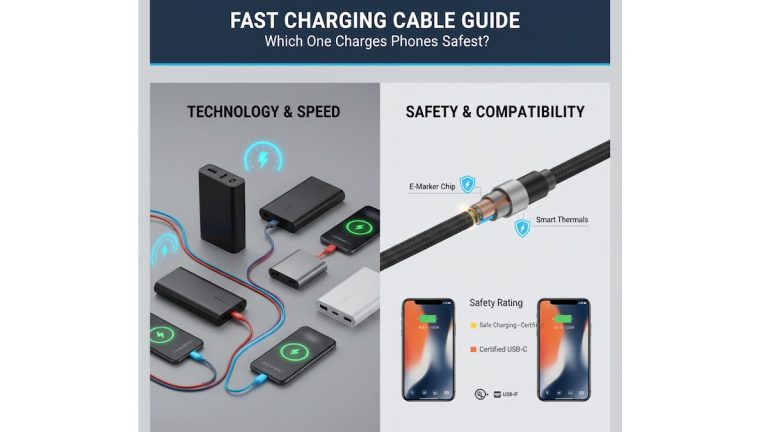
Fast Charging Cable Guide: Which One Charges Phones Safest?

0

Have you ever felt your phone getting unusually warm while charging?
Or noticed your battery health dropping faster than expected?

Most users blame the charger or the phone itself.
But in reality, the charging cable plays a critical role in charging speed, safety, and long-term battery health.

Fast Charging Cable Guide: Which One Charges Phones Safest?

With so many fast charging cables on the market—USB-C, Lightning, braided, budget, premium—it’s easy to pick the wrong one.

This guide explains which fast charging cable is safest, how cable quality affects your phone, and what to look for before buying. Whether you’re a beginner or a tech-savvy user, this article will help you charge faster without damaging your device.


Quick Summary

  • Not all fast charging cables are safe
  • Cable quality affects heat, charging speed, and battery lifespan
  • Certified cables (USB-IF, MFi) are the safest
  • Cheap cables may fast charge but damage batteries over time
  • Safe fast charging cables regulate power and reduce heat

👉 If you care about battery health, your cable choice matters as much as the charger.


What Is a Fast Charging Cable?

A fast charging cable is designed to handle higher power output compared to standard cables.

Standard cables usually support:

  • 5W to 10W charging

Fast charging cables support:

  • 18W
  • 30W
  • 60W
  • Up to 100W (USB-C Power Delivery)

They achieve this through:

  • Thicker internal copper wires
  • Better insulation
  • Built-in power management chips

Without these features, fast charging can become unsafe and unstable.


Why Cable Safety Is More Important Than Speed

Fast charging is convenient, but speed without control causes problems.

Risks of Unsafe Fast Charging Cables

  • Overheating
  • Faster battery degradation
  • Power surges
  • Reduced battery lifespan
  • Short circuits in extreme cases

A safe fast charging cable doesn’t just deliver power—it controls how that power flows.


Types of Fast Charging Cables (And Their Safety Levels)

USB-A to USB-C Fast Charging Cable

Safety level: Medium
Best for: Older chargers and budget setups

Pros

  • Widely available
  • Affordable

Cons

  • Limited power handling
  • Less efficient power regulation

Best used only with certified chargers.


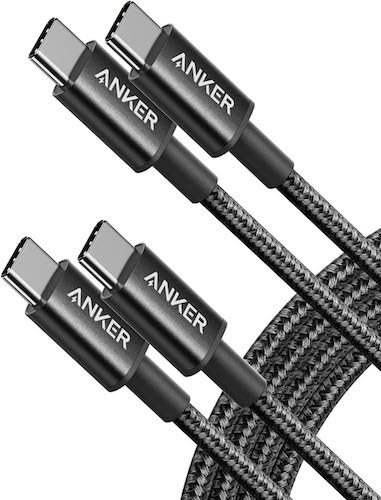
USB-C to USB-C Fast Charging Cable (Safest Option)

Safety level: High
Best for: Android phones, iPhone 15+, tablets, laptops

Why it’s safer

  • Supports USB Power Delivery (PD)
  • Smart power negotiation
  • Lower heat generation

This is currently the safest fast charging cable type for modern devices.


Lightning Fast Charging Cables (iPhone Users)

Safety level: High (only if certified)

Always choose MFi-certified Lightning cables.
Cheap, uncertified Lightning cables are a common cause of battery damage and charging issues on iPhones.

Must Read : Best Type C Charger with Long Wire (Fast & Reliable)


What Makes a Fast Charging Cable Safe?

1. Built-In Power Management Chip

High-quality fast charging cables include a smart chip (E-Marker) that:

  • Communicates with the charger
  • Regulates voltage and current
  • Prevents overheating and overcharging

No chip = unstable power delivery.


2. Cable Thickness (Wire Gauge)

Thicker wires carry power more efficiently and stay cooler.

Recommended:

  • 22–24 AWG for power lines

Thin cables create resistance, leading to excess heat.


3. Certification Is Non-Negotiable

Always look for:

  • USB-IF certification (USB-C cables)
  • MFi certification (Apple Lightning cables)

Certified cables are tested for:

  • Heat control
  • Power stability
  • Long-term safety

4. Heat Resistance and Shielding

Safe fast charging cables use:

  • Multi-layer insulation
  • Heat-resistant materials
  • EMI shielding

This protects your phone, charger, and power source.


Safest Fast Charging Cable Comparison

Cable TypeSafety LevelMax PowerBest For
USB-A to USB-CMediumUp to 18WOlder devices
USB-C to USB-CHighUp to 100WModern phones & laptops
MFi LightningHighUp to 20WiPhones
Uncertified cablesLowUnstableNot recommended

Are Expensive Fast Charging Cables Worth It?

Short answer: Yes—if they are certified

You don’t need the most expensive cable, but extremely cheap cables often cut corners.

What You’re Paying For

  • Safer power delivery
  • Better internal materials
  • Longer lifespan
  • Reduced battery wear

A good cable lasts years.
A bad cable may cost you a battery replacement.


Braided vs Rubber Fast Charging Cables

Braided Cables

Pros

  • More durable
  • Better heat dissipation
  • Resistant to bending damage

Cons

  • Slightly thicker

Usually the safer option for fast charging.

Must Read : Best Budget Earbuds in 2026


Rubber (PVC) Cables

Pros

  • Lightweight
  • Flexible

Cons

  • Wears out faster
  • Higher risk of internal damage

For frequent fast charging, braided cables are more reliable.


Real-World Use Cases

Home Charging:
USB-C to USB-C PD cable provides stable overnight charging.

Car Charging:
Short, certified cables reduce voltage fluctuation.

Power Banks:
High-quality cables ensure consistent output.

Travel:
Braided cables handle unstable power sources better.


Common Fast Charging Cable Myths

“All cables are the same”
False. Cable quality directly affects safety.

“Fast charging always damages batteries”
False. Unsafe fast charging damages batteries.

“Long cables are dangerous”
Only if they’re low-quality or uncertified.


Buying Guide: How to Choose the Safest Fast Charging Cable

Before buying, check:

  • USB-IF or MFi certification
  • Power Delivery (PD) support
  • Thick, durable build
  • Smart power chip
  • Compatibility with your phone and charger

👉 Check price | See full features | Learn more


Internal Linking Suggestions

  • Best Fast Chargers for Android Phones
  • How Fast Charging Affects Battery Health
  • USB-C vs Lightning Charging Explained
  • Common Phone Charging Mistakes to Avoid

Frequently Asked Questions

Which fast charging cable is safest for phones?
USB-C to USB-C cables with Power Delivery and certification.

Can a bad cable damage my phone battery?
Yes. Poor cables cause overheating and unstable power flow.

Is fast charging safe overnight?
Yes, when using certified chargers and cables.

Are braided cables safer?
They don’t charge faster but stay cooler and last longer.

Are cheap fast charging cables risky?
Many are, especially uncertified ones.

Does cable length affect safety?
Only low-quality long cables cause problems.

Is USB-C safer than Lightning?
Both are safe when certified. USB-C offers higher power control.

Must Read: CloneDVD Review – A Deep Dive into Features, Performance, and Real-World Use


Final Verdict: Which Fast Charging Cable Is Safest?

If safety and battery health matter to you:

  • Choose USB-C to USB-C fast charging cables
  • Always buy certified cables
  • Avoid ultra-cheap, no-brand options
  • Invest once and protect your battery long-term

A fast charging cable isn’t just an accessory—it’s battery protection.

👉 Check price