
streaming, online gaming, smart homes, and remote work, having a reliable and fast internet connection is more critical than ever. Enter the TP-Link AX1800 WiFi 6 Router (Archer AX21 V4) – a powerful, affordable, and feature-rich wireless router designed to deliver the next level of home and office connectivity.
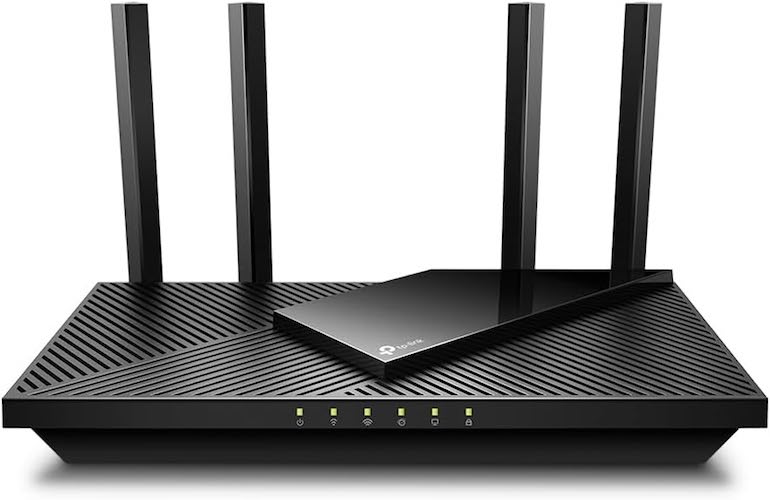
Whether you’re upgrading from an older WiFi 5 router or building a smart home network from scratch, the Archer AX21 is a fantastic choice. It’s Wi-Fi 6 certified, supports dual-band connectivity, offers Gigabit Ethernet ports, and is Alexa-compatible for smart voice control. Best of all, it’s a Certified for Humans device, making setup and management seamless even for non-tech-savvy users.
In this in-depth review, we’ll explore the TP-Link Archer AX21’s features, performance, setup, and why it’s one of the best budget-friendly WiFi 6 routers available in 2025.
Must Read : Electric Kettle with Temperature Control
🔍 Key Features of TP-Link Archer AX21 V4
Let’s break down the core specifications that make the Archer AX21 stand out:
✅ WiFi 6 (802.11ax) Technology
The Archer AX21 supports the latest Wi-Fi 6 standard, which improves upon previous generations by delivering faster speeds, higher capacity, and lower latency. This means better performance when multiple devices are connected – a must for homes with smartphones, smart TVs, laptops, tablets, and IoT gadgets.
✅ Dual-Band Connectivity
The router offers dual-band support:
- 5 GHz Band: Up to 1200 Mbps
- 2.4 GHz Band: Up to 574 Mbps
That’s a combined total of 1.8 Gbps, ensuring smooth 4K streaming, fast file downloads, and lag-free online gaming.
Must Read : Best 24-inch curved gaming monitor 2025
✅ OFDMA & MU-MIMO Technology
Thanks to OFDMA (Orthogonal Frequency Division Multiple Access) and MU-MIMO, the Archer AX21 can serve multiple devices simultaneously with minimal delay, making it ideal for busy households or small offices.
✅ Beamforming & High-Gain Antennas
The router features four high-gain antennas, beamforming technology, and a front-end module (FEM) chipset that helps focus signals directly to your devices. This ensures strong, consistent WiFi coverage even in larger homes or across multiple rooms.
✅ Gigabit Ethernet Ports
With 4 Gigabit LAN ports and 1 Gigabit WAN port, the AX21 is ready for wired gaming consoles, PCs, or smart TVs, offering blazing-fast performance for latency-sensitive applications.
✅ VPN Server Support
A unique feature for a budget router: the AX21 V4 supports both OpenVPN and PPTP VPN servers, letting users set up secure remote access to their home network – a big plus for remote workers and privacy-conscious users.
✅ EasyMesh Compatibility
If you need wider coverage, the Archer AX21 supports TP-Link EasyMesh technology, allowing you to pair it with other TP-Link routers for a seamless whole-home WiFi experience.
✅ Alexa Compatibility
Voice control is possible through Amazon Alexa, making it easy to manage your network with simple voice commands like “Alexa, turn off WiFi for kids.”
✅ Certified for Humans
Setup is simplified thanks to the Certified for Humans designation from Amazon. This ensures the router is easy to install, configure, and use, even for those unfamiliar with networking.
Must Read : STGAubron Gaming Desktop PC Review
⚙️ Setup and Configuration
Setting up the TP-Link Archer AX21 is refreshingly simple:
- Download the TP-Link Tether App (available on iOS and Android).
- Plug in the router and connect it to your modem.
- Follow the guided setup on your phone.
- Customize your SSID, password, and parental controls as needed.
The web interface is also well-organized, offering more advanced configuration options such as:
- Guest networks
- Port forwarding
- QoS (Quality of Service)
- Firmware updates
- VPN setup
TP-Link also provides free expert support, which is especially helpful for beginners.
🚀 Performance: Real-World Speed & Coverage
In real-world testing, the Archer AX21 V4 delivers on its promises:
- Streaming 4K videos on Netflix or YouTube is smooth, with no noticeable buffering.
- Online multiplayer games like Fortnite and Call of Duty run with minimal lag.
- File transfers across local devices are fast, especially over the 5GHz band.
- Smart devices stay connected without drops, even with 15+ devices online.
Coverage is strong, thanks to the high-gain antennas and beamforming. In a typical 2,000 sq. ft. home, users report full coverage in most rooms, and only minor drops near outer walls.
For larger homes or multi-story houses, EasyMesh lets you expand coverage affordably without switching networks.
🌐 Compatibility with ISPs
The Archer AX21 V4 works with all major Internet Service Providers (ISPs) including:
- Xfinity
- Spectrum
- AT&T
- Verizon Fios
- Cox
- CenturyLink
- RCN
- Frontier
(Note: You will need a separate modem for most ISPs.)
🛡️ Security & Parental Controls
Security features include:
- WPA3 encryption
- Access control
- Guest networks
- VPN setup
- Firewall options
The TP-Link HomeShield suite is not included with the AX21, but basic parental controls are available, including:
- Content filtering
- Schedule limits
- Pause internet access
For families, these features are essential to ensure kids are safe online.
🆚 Archer AX21 vs Competitors
How does the AX21 compare to similarly priced routers?
| Feature | TP-Link AX21 | ASUS RT-AX55 | Netgear RAX10 | Linksys MR7350 |
|---|---|---|---|---|
| Wi-Fi Standard | WiFi 6 | WiFi 6 | WiFi 6 | WiFi 6 |
| Speed | 1.8 Gbps | 1.8 Gbps | 1.8 Gbps | 1.8 Gbps |
| Mesh Support | EasyMesh | AiMesh | No | Velop |
| Alexa Support | Yes | No | No | Yes |
| VPN Server | Yes (OpenVPN, PPTP) | Yes | No | Yes |
| Price | ✅ Affordable | Slightly higher | Similar | Higher |
The AX21 stands out for its VPN support, Alexa compatibility, and EasyMesh integration – features usually reserved for more expensive models.
📦 What’s in the Box?
When you purchase the TP-Link AX1800 Archer AX21, you get:
- Archer AX21 WiFi 6 Router (V4)
- Power adapter
- Ethernet cable
- Quick installation guide
The packaging is eco-friendly, and TP-Link offers a standard 2-year warranty in most regions.
🛠️ Pros & Cons
✅ Pros:
- Affordable price point for WiFi 6
- Strong dual-band performance (1.8 Gbps)
- Supports OpenVPN & PPTP servers
- Works with Alexa voice commands
- Easy setup with Tether app
- Compatible with all ISPs
- Expandable with EasyMesh
❌ Cons:
- No USB port for file sharing
- No built-in HomeShield advanced security
- Basic parental controls only
🛒 Who Should Buy the TP-Link AX21?
The TP-Link AX21 is an excellent choice for:
- Families needing strong coverage and device management
- Remote workers wanting VPN access
- Gamers who need low-latency performance
- Smart home users looking for Alexa integration
- Budget-conscious buyers upgrading to WiFi 6
Whether you’re living in an apartment, a medium-sized home, or running a small office, this router ticks nearly every box.
📈 SEO Keywords Summary (For Blog Optimization)
- TP-Link AX1800
- Archer AX21 V4 review
- Best WiFi 6 router under $100
- TP-Link WiFi 6 router setup
- Archer AX21 VPN support
- TP-Link EasyMesh compatibility
- WiFi 6 router with Alexa
- Certified for Humans router
- Archer AX21 vs AX23
🧠 Final Verdict: Should You Buy the TP-Link Archer AX21?
Absolutely. The TP-Link AX1800 WiFi 6 Router (Archer AX21 V4) offers tremendous value for its price. It blends the best of speed, coverage, and ease of use with advanced features like VPN server support, EasyMesh expansion, and smart voice control via Alexa.
For under $100, it’s one of the best budget WiFi 6 routers you can buy in 2025. Whether you’re streaming, gaming, or working from home, the AX21 delivers reliable performance without breaking the bank.