
Students today rely on technology more than ever. From attending online classes and taking digital notes to reading textbooks, watching lectures, and relaxing with entertainment—having the right tablet for students can make a real difference.
But here’s the challenge:
- Laptops can be bulky and expensive
- Smartphones are too small for serious studying
- Many tablets are overpriced for what students actually need
So how do you choose a tablet that’s affordable, reliable, durable, and student-friendly?
In this guide, we’ll explore one of the best budget tablets for students that balances performance, battery life, entertainment, and learning tools—without breaking the bank.
Quick Summary
- Best for: School, college, online learning, reading, entertainment
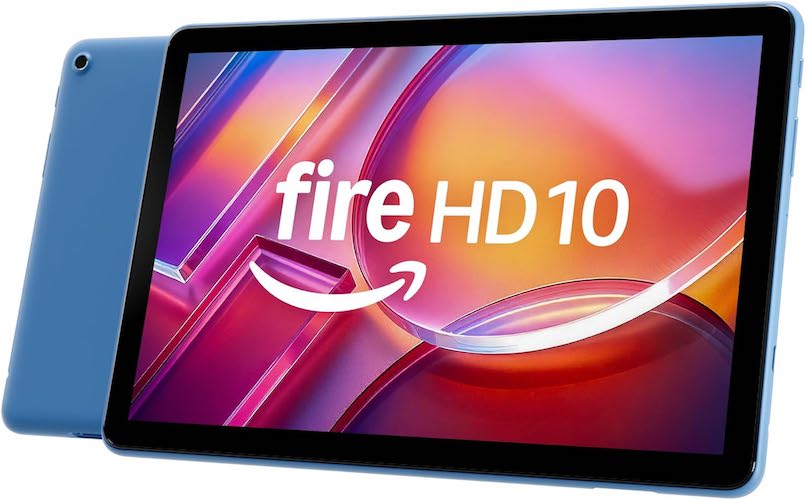
- Top Pick: Amazon Fire HD 10 (Newest Model)
- Why it stands out: Large Full HD display, long battery life, student-friendly price
- Ideal for: Students who want an all-in-one tablet for study + fun
Why Tablets Are Perfect for Students
Before diving into the product, let’s look at why tablets are becoming essential for students:
Key Benefits
- Lightweight and portable
- Long battery life for all-day classes
- Ideal for reading PDFs, eBooks, and notes
- Supports educational apps and productivity tools
- Often more affordable than laptops
For many students, a tablet fills the gap between a phone and a laptop.
Featured Pick: Amazon Fire HD 10 Tablet (Newest Model)
Overview
The Amazon Fire HD 10 is designed for users who want smooth performance, a large screen, and long battery life at a reasonable price. For students, this combination is especially appealing.
Display & Design: Perfect for Reading and Online Classes
10.1” Full HD Display
- 1080p resolution
- Sharp text and vibrant colors
- Comfortable for reading textbooks and PDFs
- Great for video lectures and streaming
This screen size hits the sweet spot—not too big, not too small.
Lightweight Yet Durable
- Thin and easy to carry in a backpack
- Strengthened aluminosilicate glass
- Proven to be more durable than many competing tablets
Perfect for students who travel between classes or study on the go.
Must Read : Fast Charging Phones : The Ultimate Guide for 2026 Buyers
Performance: Smooth Enough for Daily Student Tasks
Faster Octa-Core Processor
- 25% faster than previous generation
- Handles multitasking with ease
3 GB RAM
- Smooth app switching
- No lag during online classes
- Stable performance for note-taking apps
This isn’t a gaming powerhouse—but for schoolwork, research, streaming, and light gaming, it performs reliably.
Battery Life: Study All Day Without Charging
One of the biggest concerns students have is battery life.
Up to 13 Hours on a Single Charge
- Attend online classes
- Read and take notes
- Watch videos and relax
You won’t need to carry your charger everywhere, which is a huge plus for students.
Storage: Enough Space for Notes, Apps, and Media
Built-In Storage Options
- 32 GB or 64 GB internal storage
Expandable Up to 1 TB
- Supports microSD card (sold separately)
- Store PDFs, lecture recordings, movies, and books
This flexibility makes it a great tablet for students with heavy study materials.
Note-Taking & Creativity: Stylus Support
Stylus-Compatible (Sold Separately)
- 4,096 levels of pressure sensitivity
- Natural handwriting experience
Use Cases
- Handwritten notes in OneNote
- Sketching diagrams
- Annotating PDFs
For students who prefer writing over typing, this is a major advantage.
Cameras & Online Learning
5 MP Front Camera
- Ideal for Zoom and Google Meet
- Clear enough for virtual classes
Rear Camera
- Scan documents
- Take photos for projects
Not flagship-level cameras—but perfectly functional for student needs.
Entertainment Meets Education
Studying isn’t everything. Downtime matters too.
What You Can Do
- Stream Netflix, Prime Video, Hulu
- Read Kindle books and PDFs
- Listen to Audible podcasts
- Play casual games like Roblox and Candy Crush
This balance helps students avoid switching between multiple devices.
Alexa & Smart Tools: Extra Productivity Boost
Voice Commands
- “Alexa, read my last book”
- Set reminders
- Ask questions during study
Smart Tools
- Summarize webpages
- Draft polished emails
- Create custom wallpapers
These features subtly enhance productivity without overwhelming beginners.
Must Read : Aiarty Image Enhancer Review – Upscale Photos to 32K Naturally
Family-Friendly & Student-Safe
For younger students:
- Built-in parental controls
- Amazon Kids support
- Optional Amazon Kids+ subscription
This makes it suitable for school students and college learners alike.
Sustainability: A Thoughtful Bonus
- Made with 12% recycled materials
- Eco-friendly packaging
Not a deal-breaker—but a nice bonus for environmentally conscious users.
Pros and Cons
Pros
- Affordable student-friendly price
- Large Full HD display
- Long battery life
- Expandable storage
- Durable build
- Great for reading and online classes
Cons
- Google Play Store not native
- Not ideal for heavy professional apps
- Stylus sold separately
Comparison: Fire HD 10 vs Typical Student Tablets
| Feature | Fire HD 10 | Average Budget Tablet |
|---|---|---|
| Display | 10.1” Full HD | HD or lower |
| Battery | Up to 13 hours | 7–9 hours |
| Durability | High | Average |
| Price | Budget-friendly | Often higher |
| Storage | Expandable to 1 TB | Limited |
Who Is This Tablet Best For?
This tablet for students is ideal if you:
- Attend online classes
- Read eBooks and PDFs regularly
- Want long battery life
- Need a budget-friendly device
- Want entertainment + study in one tablet
👉 Check price and full features before it sells out.
Buying Guide: What Students Should Consider
1. Screen Size
10 inches is ideal for reading and multitasking.
2. Battery Life
Look for 10+ hours for full-day use.
3. Storage
Expandable storage saves money long-term.
4. Durability
Important for backpacks and travel.
5. App Ecosystem
Ensure it supports your study apps.
Must Read : Why Is My Phone Screen Pressing Itself? Causes, Fixes, and Long-Term Solutions
FAQs: Tablet for Students
1. Is the Fire HD 10 good for online classes?
Yes, it handles Zoom, streaming, and educational apps smoothly.
2. Can students take notes on it?
Yes, with a compatible stylus and note-taking apps.
3. Is it good for college students?
Absolutely, especially for reading, research, and media consumption.
4. Does it support external storage?
Yes, up to 1 TB via microSD card.
5. Is it better than a laptop?
For basic study tasks—yes. For heavy software—not really.
6. Can kids use it safely?
Yes, with built-in parental controls.
7. Is it good for exams and PDFs?
Yes, the large screen makes reading documents easy.
Internal Linking Suggestions
- Best budget gadgets for students
- Laptop vs tablet for online classes
- Study apps every student should use
- How to choose tech for remote learning
Final Verdict: Is This the Best Tablet for Students?
If you’re searching for a reliable, affordable, and student-friendly tablet, the Amazon Fire HD 10 is a strong contender.
It may not replace a high-end laptop, but for:
- Studying
- Reading
- Online classes
- Entertainment
…it delivers excellent value for students on a budget.