
Choosing a note-taking app sounds simple, until you actually start comparing the available options. Two names consistently appear at the top of the list: Notion and Obsidian. While both help you organize information, manage projects, and build a personal knowledge base, they take completely different approaches.
One focuses on collaboration, databases, and cloud-based productivity. The other emphasizes local storage, privacy, speed, and powerful knowledge management through linked notes.
That difference makes choosing between them more important than many people realize.
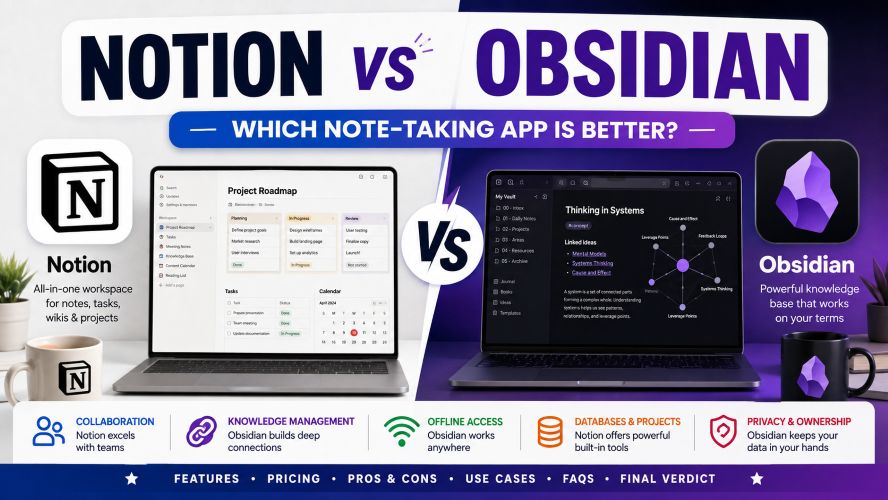
If you’re a student trying to organize study notes, a freelancer managing multiple projects, or a content creator building a research library, picking the wrong app can slow down your workflow and make your information harder to manage.
In this guide, we’ll compare Notion and Obsidian across the features that matter most, including:
- Ease of use
- Pricing
- Offline access
- Collaboration
- Performance
- Privacy
- Customization
- Knowledge management
- Best use cases
By the end, you’ll know which app is the better fit for your specific workflow rather than simply choosing the most popular option.
Quick Summary
| Feature | Notion | Obsidian |
|---|---|---|
| Best For | Teams, project management, documentation | Personal knowledge management and research |
| Offline Access | Limited | Excellent |
| Collaboration | Excellent | Basic (requires additional setup) |
| Learning Curve | Easy to moderate | Moderate to advanced |
| Customization | Good | Excellent |
| Database Features | Excellent | Limited without plugins |
| Privacy | Cloud-based | Local-first |
| Speed | Good | Excellent |
| Free Plan | Very generous | Very generous |
Who Should Choose Notion?
Choose Notion if you want:
- An all-in-one workspace
- Team collaboration
- Project management
- Databases and dashboards
- Simple sharing with clients or coworkers
Who Should Choose Obsidian?
Choose Obsidian if you prefer:
- Complete ownership of your notes
- Offline-first productivity
- Fast performance
- Advanced linking between ideas
- Building a long-term personal knowledge base
What Are Notion and Obsidian?
At first glance, Notion and Obsidian look like they solve the same problem: helping you capture and organize information. In reality, they’re built around very different philosophies.
Understanding those differences is the key to choosing the right tool.
What Is Notion?
Notion is an all-in-one productivity workspace that combines note-taking, project management, databases, task tracking, calendars, and team collaboration in a single platform.
Instead of switching between multiple apps, you can create pages for almost anything, including:
- Meeting notes
- Project plans
- Knowledge bases
- Content calendars
- To-do lists
- Company wikis
- Client dashboards
Everything is stored in the cloud, making it easy to access your workspace from multiple devices and collaborate with others in real time.
Best suited for:
- Teams
- Freelancers
- Small businesses
- Content creators
- Students who need organized workspaces
Must Read : Aiarty Video Enhancer Review: Worth It in 2026?
What Is Obsidian?
Obsidian is a markdown-based note-taking application designed for building a personal knowledge base.
Unlike traditional cloud-first apps, Obsidian stores your notes as plain text files on your device by default. This gives you full ownership of your data while allowing you to organize ideas through powerful internal links.
One of its standout features is the ability to connect related notes, making it ideal for research, learning, and long-term knowledge management.
Popular uses include:
- Research notes
- Study materials
- Daily journals
- Writing projects
- Documentation
- Second-brain systems
Because your notes remain standard Markdown files, they’re portable and can be accessed with many other editors.
Best suited for:
- Researchers
- Writers
- Developers
- Students
- Privacy-conscious users
- Lifelong learners
Notion vs Obsidian: Core Philosophy
Although both applications let you create notes, they encourage different ways of working.
| Area | Notion | Obsidian |
|---|---|---|
| Primary Focus | Productivity workspace | Personal knowledge management |
| Storage | Cloud-first | Local-first |
| Collaboration | Built-in | Limited without extra setup |
| Organization | Pages, databases, folders | Linked notes, tags, folders |
| Flexibility | Structured | Highly customizable |
| Offline Experience | Available with limitations | Excellent |
A simple way to think about it is:
- Notion helps you organize projects and workflows.
- Obsidian helps you organize ideas and knowledge.
This distinction becomes even more important as your collection of notes grows.
User Interface and Ease of Use
One of the biggest differences between Notion and Obsidian is how quickly you can become productive.
Notion: Beginner-Friendly Interface
Notion offers a polished, modern interface with drag-and-drop editing.
You can quickly add:
- Text
- Images
- Tables
- Checklists
- Kanban boards
- Calendars
- Databases
- Embeds
Even first-time users can create attractive pages without much learning.
Pros
- Clean interface
- Minimal setup
- Large template library
- Easy navigation
- Great for visual organization
Must Read : Best Notion Alternatives in 2026 (Free & Paid)
Potential drawbacks
- Large workspaces can become cluttered without a consistent structure.
- Advanced database features may take time to master.
Obsidian: Simple at First, Powerful Over Time
Obsidian starts with a minimalist interface, but its true strength comes from features such as backlinks, graph view, tags, plugins, and customizable workflows.
New users may initially feel overwhelmed because many advanced capabilities are optional and unlocked through settings or community plugins.
Once you understand concepts like linked notes and Markdown, the app becomes remarkably flexible.
Pros
- Lightweight and fast
- Highly customizable
- Keyboard-friendly
- Excellent for focused writing
Potential drawbacks
- Steeper learning curve
- Fewer built-in visual templates
- Requires some time to tailor the workspace to your needs
Which Is Easier to Learn?
If you want an application that’s ready to use immediately with minimal setup, Notion is generally the easier choice.
If you’re willing to invest a little time learning a different way of organizing information, Obsidian offers greater flexibility for long-term knowledge management.
Key takeaway: Choose Notion for ease of use and collaborative workspaces. Choose Obsidian if you value speed, local control, and building an interconnected library of knowledge.
Features Comparison: Notion vs Obsidian
Features are where Notion and Obsidian begin to separate. While both can store notes and organize information, they excel in different areas.
Let’s compare the features that matter most in day-to-day use.
Note-Taking Experience
Good note-taking isn’t just about typing text. It should make it easy to organize, revisit, and expand your ideas over time.
Notion
Notion uses a block-based editor where every piece of content is a separate block. You can easily rearrange text, images, tables, code snippets, checklists, and embeds with drag-and-drop.
Highlights
- Rich text formatting
- Toggle lists
- Callout boxes
- Code blocks
- Media embedding
- Pre-built templates
Best for
- Meeting notes
- Project documentation
- Class notes
- Team documentation
Obsidian
Obsidian uses Markdown, a lightweight formatting language that’s fast and distraction-free. It may look simple at first, but it’s incredibly efficient once you learn the basics.
Highlights
- Markdown editor
- Backlinks
- Wikilinks
- Daily notes
- Canvas for visual brainstorming
- Graph View for connected ideas
Best for
- Research
- Long-form writing
- Knowledge management
- Journaling
Winner
🏆 Draw
- Choose Notion for visually rich notes.
- Choose Obsidian for writing-focused workflows and interconnected knowledge.
Organization & Knowledge Management
How well can each app help you find information months—or even years—later?
Notion
Notion organizes content using:
- Pages
- Sub-pages
- Databases
- Filters
- Views
- Tags
- Relations
It works exceptionally well for structured information.
For example:
Workspace
 ├── Marketing
 ├── Personal
 ├── Projects
 ├── Finance
 └── Study Notes
If you enjoy keeping everything neatly categorized, Notion feels intuitive.
Obsidian
Obsidian encourages a network-based approach rather than a folder-first structure.
Features include:
- Internal links
- Backlinks
- Tags
- Graph View
- Local Graph
- Linked mentions
Instead of asking, “Which folder should this note go in?” you simply connect related ideas.
Over time, this creates a searchable web of knowledge.
Winner
🏆 Obsidian
For building a long-term “second brain,” Obsidian is difficult to beat.
Databases and Project Management
This is where Notion has a significant advantage.
Notion
Notion databases are among its strongest features.
You can create:
- Content calendars
- CRM systems
- Reading lists
- Budget trackers
- Task managers
- Editorial workflows
- Client dashboards
Each database can be viewed as:
- Table
- Board (Kanban)
- Calendar
- Gallery
- Timeline
- List
This flexibility makes Notion an excellent all-in-one productivity tool.
Obsidian
Obsidian doesn’t include traditional databases.
However, community plugins can add features like:
- Task tracking
- Data queries
- Dynamic tables
- Custom dashboards
These solutions are powerful but require more setup and technical knowledge.
Winner
🏆 Notion
If your workflow relies on structured data and project tracking, Notion is the clear choice.
Collaboration
Working alone and working with a team require different tools.
Notion
Collaboration is built into the platform.
You can:
- Share pages instantly
- Invite teammates
- Leave comments
- Assign tasks
- Track edits
- Manage permissions
- Collaborate in real time
This makes Notion ideal for businesses, remote teams, and agencies.
Obsidian
Obsidian is designed primarily for personal use.
Although syncing and shared vaults are possible through official or third-party solutions, collaboration isn’t as seamless as in Notion.
Winner
🏆 Notion
For teamwork, Notion offers a much smoother experience.
Offline Access
Reliable offline access is essential if you travel frequently or work in areas with unstable internet.
Notion
Notion has improved its offline capabilities, but some features still depend on an internet connection, especially when syncing large workspaces or accessing content that hasn’t been cached.
Obsidian
Obsidian is local-first.
Your notes are stored directly on your device, so you can:
- Read notes offline
- Edit without internet
- Search instantly
- Access files anytime
Synchronization is optional rather than required.
Winner
🏆 Obsidian
Its offline-first design makes it a dependable choice for users who prioritize uninterrupted access.
Customization and Extensions
Every user’s workflow is different. The ability to customize your workspace can make a big difference.
Notion
Notion provides:
- Templates
- Icons
- Covers
- Database views
- Widgets (via third-party tools)
- Integrations with popular apps
It strikes a good balance between simplicity and flexibility.
Obsidian
Customization is one of Obsidian’s biggest strengths.
You can personalize nearly every aspect of the app with:
- Community plugins
- Custom themes
- CSS snippets
- Keyboard shortcuts
- Automation tools
Whether you’re a student, writer, or developer, you can build a workspace tailored to your needs.
Winner
🏆 Obsidian
For users who enjoy tweaking and extending their tools, Obsidian offers far greater flexibility.
Feature Comparison Table
| Feature | Notion | Obsidian | Winner |
|---|---|---|---|
| Note-taking | ⭐⭐⭐⭐⭐ | ⭐⭐⭐⭐⭐ | Tie |
| Knowledge Management | ⭐⭐⭐⭐☆ | ⭐⭐⭐⭐⭐ | Obsidian |
| Databases | ⭐⭐⭐⭐⭐ | ⭐⭐☆☆☆ | Notion |
| Project Management | ⭐⭐⭐⭐⭐ | ⭐⭐☆☆☆ | Notion |
| Collaboration | ⭐⭐⭐⭐⭐ | ⭐⭐☆☆☆ | Notion |
| Offline Access | ⭐⭐⭐☆☆ | ⭐⭐⭐⭐⭐ | Obsidian |
| Customization | ⭐⭐⭐⭐☆ | ⭐⭐⭐⭐⭐ | Obsidian |
| Performance | ⭐⭐⭐⭐☆ | ⭐⭐⭐⭐⭐ | Obsidian |
| Beginner Friendly | ⭐⭐⭐⭐⭐ | ⭐⭐⭐☆☆ | Notion |
Pricing, Performance, Privacy & Real-World Use Cases
Features are only part of the story. The right note-taking app should also fit your budget, work smoothly on your devices, and match the way you prefer to manage your information.
Let’s compare these practical aspects.
Pricing Comparison
Both Notion and Obsidian offer generous free plans, but their paid options target different needs.
| Plan | Notion | Obsidian |
|---|---|---|
| Free Plan | ✔ Yes | ✔ Yes |
| Personal Use | Excellent | Excellent |
| Team Collaboration | ✔ Available | Limited |
| Paid Upgrades | More storage, collaboration, advanced features | Optional Sync and Publish services |
| Best Value For | Teams and businesses | Individual users |
Notion Pricing Highlights
The free plan is sufficient for most individuals and students. Paid plans unlock features such as:
- Increased collaboration tools
- Advanced permissions
- Team management
- Larger file uploads
- Administrative controls
Best for: Businesses, startups, agencies, and collaborative teams.
Obsidian Pricing Highlights
The core application is free for personal use, making it one of the most generous note-taking tools available.
Optional paid services include:
- Secure cloud synchronization across devices
- Website publishing for your notes
Since your notes are stored locally, you can also choose alternative syncing methods if they suit your workflow.
Best for: Individuals who want full control over their data without paying for unnecessary extras.
Must Read : How to Self-Host a Notion Alternative on a $5 VPS (Step-by-Step Guide)
Performance and Speed
A note-taking app should stay responsive, even as your collection of notes grows.
Notion Performance
Notion performs well for most everyday tasks. However, large databases, media-rich pages, or extensive workspaces may take longer to load, especially on slower internet connections.
Strengths
- Smooth editing experience
- Reliable cloud synchronization
- Responsive mobile apps
Limitations
- Dependent on internet connectivity for the best experience
- Large databases can occasionally feel slower
Obsidian Performance
Because Obsidian stores notes locally, it is known for its speed.
Even vaults containing thousands of Markdown files generally remain quick to search and navigate.
Strengths
- Fast startup time
- Instant search
- Excellent performance with large note collections
- Works efficiently on modest hardware
Winner
🏆 Obsidian
Its local-first architecture gives it an advantage for users with extensive knowledge libraries.
Privacy and Security
For many users, privacy is just as important as features.
Notion
Notion stores your workspace in the cloud, allowing seamless access from multiple devices and easy collaboration.
Benefits include:
- Automatic backups
- Cross-device synchronization
- Easy sharing
- Access from anywhere with an internet connection
If your work depends on frequent collaboration, this cloud-based approach is highly convenient.
Obsidian
Obsidian stores notes on your own device by default.
This means:
- You own your files
- Your notes remain accessible without an internet connection
- You choose how and where your data is backed up or synchronized
For users who prioritize data ownership and privacy, this approach offers greater control.
Winner
🏆 Obsidian
If privacy and local data ownership are top priorities, Obsidian has the edge.
Mobile Experience
Many users switch between desktop and mobile throughout the day.
Notion Mobile App
The mobile app provides access to almost every feature available on desktop.
It’s ideal for:
- Viewing documents
- Updating tasks
- Editing notes
- Collaborating with teammates
The interface can feel busy on smaller screens, especially when working with large databases.
Obsidian Mobile App
Obsidian’s mobile app focuses on speed and note editing.
It’s well suited for:
- Capturing ideas quickly
- Reviewing research
- Writing daily journals
- Editing Markdown files
Users who rely heavily on plugins may find that some desktop workflows require adjustment on mobile.
Winner
🏆 Tie
- Notion offers a richer collaborative experience.
- Obsidian provides a cleaner, faster writing environment.
Real-World Use Cases
Different users have different priorities. Here’s which app is better suited to common scenarios.
For Students
Choose Notion if you:
- Manage multiple subjects
- Track assignments
- Build study planners
- Collaborate on group projects
Choose Obsidian if you:
- Take detailed lecture notes
- Connect concepts across subjects
- Build long-term study resources
- Prepare for research-intensive courses
For Writers and Bloggers
Notion
Great for:
- Editorial calendars
- Content planning
- Client management
- Publishing workflows
Obsidian
Excellent for:
- Research
- Drafting articles
- Organizing references
- Developing interconnected ideas
Recommendation: Many writers use Notion for planning and Obsidian for research and drafting.
For Developers
Obsidian is often preferred because it offers:
- Native Markdown support
- Code-friendly formatting
- Local file storage
- Extensive customization through plugins
Notion is still useful for:
- Team documentation
- Product roadmaps
- Sprint planning
- Internal knowledge bases
For Businesses and Teams
Notion is the stronger choice for organizations that need:
- Shared workspaces
- Task management
- Company wikis
- Project tracking
- Team collaboration
Its built-in collaboration tools reduce the need for multiple separate applications.
For Researchers
Obsidian shines when managing large volumes of interconnected information.
Its ability to link notes, visualize relationships, and keep everything searchable makes it an excellent companion for long-term research projects.
Things to Consider Before Choosing
Before making your decision, ask yourself these questions:
- Do you mainly work alone or with a team?
- Is offline access essential?
- Do you prefer visual organization or linked knowledge?
- Will you manage projects, ideas, or both?
- How important is data ownership?
- Do you enjoy customizing your tools?
Your answers will point naturally toward the platform that fits your workflow best.
Transition
By now, you should have a clear understanding of how Notion and Obsidian compare in terms of pricing, speed, privacy, and practical use. In the final section, we’ll look at the pros and cons of each app, answer frequently asked questions, and provide a balanced recommendation to help you make the right choice.
I love notion as the database features are excellent and are better than Obsidian
Yes you said that right!
Best must be notion but I like evernote as it’s old and I am used to it now
Yes it depends on your need and usage.
i didn’t know both of these
Now you know them Hank!
This is pretty interesting as I work remotely I like the offline feature a lot
Thanks Haley
I feel Notion is expensive and I should now explore options
If you feel so then Yes you must look for options