
If you’ve ever waited forever for footage to transfer, experienced lag while editing 4K videos, or dealt with storage running out mid project, you’re not alone. Video editing demands fast, reliable, and portable storage. Traditional hard drives just can’t keep up anymore. This Portable SSD for Video Editing Review will help you to know about the best portable SSD for video editing.
That’s where portable SSDs come in.
But here’s the real question:
👉 Is this Amazon Basics Portable SSD actually good enough for video editing?
Let’s break it down in a practical way.
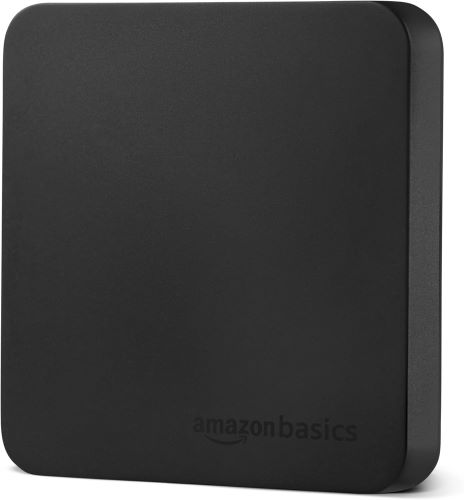
⚡ Quick Summary
- Best for: Beginners, YouTubers, freelance editors
- Speed: Up to 2000MB/s (fast enough for 4K editing)
- Durability: IP65 water & dust resistant
- Storage: 1TB (real usable ~930GB)
- Compatibility: Works with Mac, Windows, cameras
👉 Verdict: A budget-friendly, reliable portable SSD for most video editors.
What Makes a Portable SSD Good for Video Editing?
Before diving into the review, here’s what actually matters:
1. Speed (Most Important)
Video editing requires:
- Fast read/write speeds
- Smooth playback of large files
- Quick exports and backups
2. Reliability
Losing footage = disaster.
You need:
- Heat control
- Strong build quality
- Stable performance
3. Portability
Editors often work:
- On the go
- Between systems
- On tight deadlines
Amazon Basics Portable SSD – Key Features
🚀 1. Ultra-Fast Transfer Speeds
- Up to 2000MB/s read & write speeds
- Ideal for:
- 4K video editing
- Large file transfers
- Real-time playback
👉 No more waiting minutes for files to copy.
Must Read : How to Self-Host a Notion Alternative on a $5 VPS (Step-by-Step Guide)
🧊 2. Advanced Thermal Protection
Heavy editing = heat.
This SSD includes:
- Built-in thermal control
- Keeps temperature below 50°C
👉 This means no throttling during long editing sessions.
🛡️ 3. Durable & Travel-Friendly Design
- Metal casing for durability
- Scratch-resistant bottom
- IP65 water & dust resistance
👉 Perfect for outdoor shoots and travel editors.
🔌 4. Wide Compatibility
- Pre-formatted in exFAT
- Works with:
- Windows laptops
- MacBooks
- Cameras
- Gaming consoles
Includes:
- USB-C to C cable
- USB-C to A cable
- Storage case
👉 Plug-and-play convenience.
🎒 5. Truly Portable
- Compact and lightweight
- Easy to carry in a pocket or bag
👉 Ideal for editors working on multiple setups.
Real-World Performance for Video Editing
Let’s talk practical use.
Editing 4K Footage
- Smooth timeline playback
- Minimal lag in Premiere Pro & DaVinci Resolve
- Fast scrubbing
File Transfers
- 10GB file transfers in seconds
- Huge time saver for client work
Backup Speed
- Quick project backups
- Reduces risk of data loss
👉 Overall: Reliable performance for most editing workflows
Pros and Cons
✅ Pros
- Fast 2000MB/s speeds
- Affordable compared to premium brands
- Durable, water-resistant build
- Great for beginners & intermediates
- Plug-and-play compatibility
❌ Cons
- Not the absolute fastest SSD on the market
- Real storage slightly less than 1TB
- May not suit heavy 8K workflows
Comparison: Portable SSD vs External HDD
| Feature | Portable SSD | External HDD |
|---|---|---|
| Speed | Very fast (2000MB/s) | Slow (100–150MB/s) |
| Editing Performance | Smooth | Laggy |
| Durability | High | Medium |
| Portability | Compact | Bulky |
| Price | Higher | Lower |
👉 Conclusion: SSDs are essential for modern video editing.
Who Should Buy This SSD?
🎥 Perfect For:
- YouTubers editing 1080p/4K videos
- Freelancers handling client projects
- Students learning video editing
- Travel vloggers
🚫 Not Ideal For:
- Professional studios working with 8K RAW footage
- Users needing 4TB+ storage
- Extreme high-end workflows
Use Case Scenarios
1. YouTube Creator
Editing weekly videos?
👉 This SSD:
- Speeds up editing
- Makes file transfers painless
- Keeps workflow smooth
Must Read : How to Find YouTube Content Ideas and Draft Scripts Fast with My Go-To Tool
2. Freelance Video Editor
Working with clients?
👉 You’ll benefit from:
- Fast project delivery
- Portable storage between clients
- Reliable backups
3. Travel Filmmaker
Shooting outdoors?
👉 The IP65 rating helps protect:
- Against dust
- Against light water exposure
Must Read : How to Speed Up Old Android Phone (2026 Guide)
Buying Guide: What to Look for in a Portable SSD
Before buying, consider these factors:
🔍 1. Speed Requirements
- 1000MB/s → Basic editing
- 2000MB/s → Ideal for 4K
- 3000MB/s+ → Professional workflows
💾 2. Storage Size
- 500GB → Light editing
- 1TB → Balanced (recommended)
- 2TB+ → Heavy users
🔌 3. Connectivity
- USB 3.2 Gen 2 = fast and reliable
- USB-C support is a must
🛡️ 4. Build Quality
Look for:
- Metal casing
- Water/dust resistance
- Heat management
FAQs (People Also Ask)
1. Is a portable SSD good for video editing?
Yes. Portable SSDs offer fast speeds, making them ideal for smooth editing and quick file transfers.
2. How much SSD do I need for video editing?
At least 1TB is recommended for regular video editing projects.
3. Can I edit videos directly from an external SSD?
Yes, especially with high-speed SSDs like this one. You can edit without transferring files to your laptop.
4. Is 2000MB/s fast enough for 4K editing?
Absolutely. It’s more than sufficient for most 4K workflows.
5. Does SSD improve video editing performance?
Yes. Faster storage reduces lag, improves playback, and speeds up exports.
6. Is this SSD compatible with Mac and Windows?
Yes. The exFAT format ensures compatibility across both systems.
7. Is it safe to store important video files on this SSD?
Yes, but always keep backups for critical projects.
Final Verdict: Should You Buy It?
If you’re looking for a budget-friendly, reliable portable SSD for video editing, this is a solid choice.
It hits the sweet spot between:
- Performance
- Price
- Portability
Is it the fastest SSD available? No.
Is it good enough for 90% of video editors? Absolutely.
👉 Recommended for beginners and intermediate creators.
Ready to Upgrade Your Editing Setup?
If slow storage is holding you back, this SSD can make a noticeable difference.