
Have you ever tried watching an old video on a modern 4K screen? Instead of sharp visuals, you see blurry faces, pixelated backgrounds, and washed-out colors. This happens because older videos were recorded in low resolutions like 480p or 720p, which simply don’t match today’s high-resolution displays. In this Nero AI Video Upscaler Review you will get to know how you can upscale videos to 4K.
But here’s the interesting part.
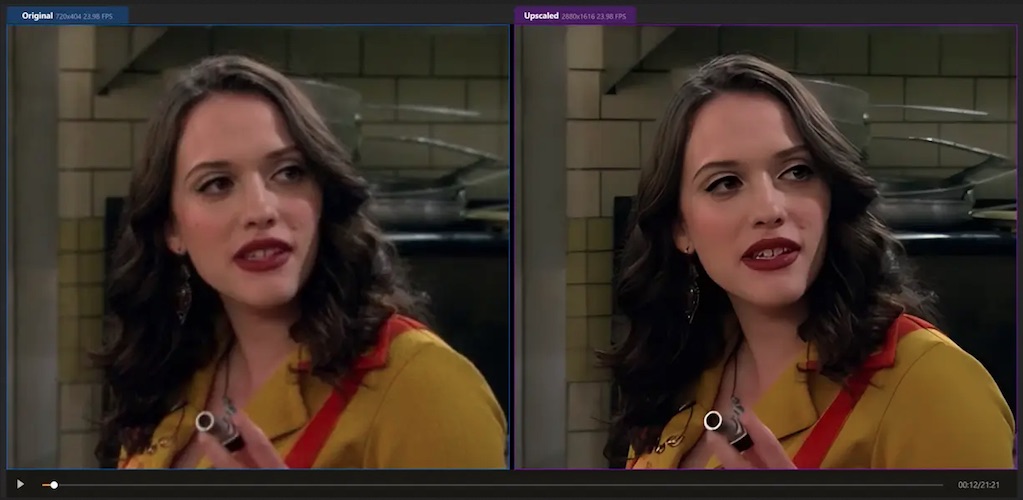
Modern video enhancement tools claim they can restore and upscale those videos to near-4K quality using smart algorithms.
One of the tools getting attention lately is Nero AI Video Upscaler.
It promises to:
- Improve video resolution
- Remove noise and compression artifacts
- Sharpen details automatically
- Upscale footage up to 4K resolution
But does it actually work? And more importantly—is it worth your money?
In this detailed review, we’ll break down everything you need to know.
Quick Summary
If you’re short on time, here’s a quick overview.
| Feature | Details |
|---|---|
| Tool Name | Nero AI Video Upscaler |
| Best For | Improving old or low-resolution videos |
| Output Resolution | Up to 4K |
| Supported Platforms | Windows |
| Ease of Use | Beginner-friendly |
| Key Strength | One-click AI video enhancement |
| Free Trial | Yes |
Nero AI Video Upscaler Review
Nero AI Video Upscaler is a video enhancement software designed to increase the resolution and clarity of low-quality videos.
Instead of simply stretching pixels like traditional upscaling software, this tool analyzes each frame and reconstructs missing details to produce sharper visuals.
That means you can convert:
- 480p → 1080p
- 720p → 4K
- Old camcorder footage → modern HD quality
This makes it useful for:
- Content creators
- YouTubers
- Video editors
- Archivists restoring old footage
- Anyone upgrading personal videos
Key Features of Nero AI Video Upscaler
Let’s explore what makes this tool stand out.
1. AI-Powered Video Enhancement
Unlike traditional tools that simply stretch resolution, this software rebuilds image details using trained enhancement models.
Benefits include:
- Sharper edges
- Better textures
- Improved facial clarity
- Reduced pixelation
This is especially helpful for old recordings or compressed videos.
Must Read : Tansee iOS Music & Video Transfer for Windows: An In-Depth Review
2. Upscale Videos to 4K Resolution
One of the biggest selling points is the ability to upscale videos to 4K resolution.
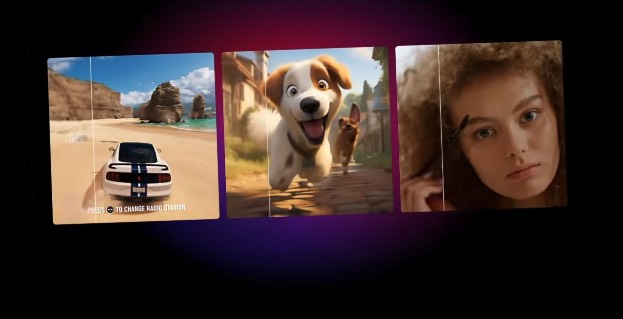
Supported improvements include:
| Original Video | Enhanced Output |
|---|---|
| 480p | 1080p |
| 720p | 4K |
| 1080p | 4K |
This makes your videos look significantly better on large screens and modern TVs.
3. One-Click Video Processing
Many editing tools require complex settings.
Nero simplifies the process with automated enhancement modes.
Basic workflow:
- Import your video
- Choose an enhancement model
- Select output resolution
- Click Start
That’s it.
Even beginners can upscale videos without editing experience.
4. Noise Reduction & Detail Recovery
Low-quality videos often suffer from:
- Grain
- Compression artifacts
- Blurry textures
Nero’s enhancement engine attempts to remove noise while recovering details, which helps produce clearer visuals.
5. GPU Acceleration for Faster Processing
Video upscaling can be time-consuming.
The software supports GPU acceleration, which speeds up rendering significantly on compatible systems.
This means faster processing for:
- Long videos
- High resolutions
- Batch conversions
Nero AI Video Upscaler Pros and Cons
Here’s a balanced look.
| Pros | Cons |
|---|---|
| Very beginner friendly | Windows only |
| One-click enhancement | Processing can be slow on weak PCs |
| Supports 4K output | Limited advanced controls |
| Good noise reduction | Free version has limits |
| Simple interface | Not ideal for professional film restoration |
Real-World Use Cases
Who actually benefits from this software?
Let’s explore some practical scenarios.
Must Read : How to Edit Videos in One Tool Instead of Using Multiple Apps
1. Restoring Old Family Videos
Many people have old camcorder recordings or DVDs.
Upscaling can help:
- Improve clarity
- Reduce blur
- Make videos look better on modern TVs
2. Improving YouTube Content
Creators often have older uploads recorded in 720p or early smartphones.
Upscaling allows them to:
- Repurpose old footage
- Improve visual quality
- Reuse content in new videos
Suggested internal link: how to improve video quality for YouTube
3. Enhancing Social Media Videos
If you post on platforms like Instagram or TikTok, better resolution helps your videos:
- Look more professional
- Stand out in feeds
- Perform better on larger screens
4. Upscaling Downloaded or Archived Videos
Some downloaded videos are compressed heavily.
This tool helps recover lost details and reduce artifacts.
Nero AI Video Upscaler vs Other Tools
Let’s compare it with popular alternatives.
| Feature | Nero AI Video Upscaler | Topaz Video AI | AVCLabs Video Enhancer |
|---|---|---|---|
| Ease of Use | Very Easy | Moderate | Easy |
| Output Quality | Good | Excellent | Very Good |
| Price | Affordable | Expensive | Mid-range |
| Hardware Requirement | Moderate | High | Moderate |
| Best For | Beginners | Professionals | Creators |
Conclusion:
- Nero: Best for beginners and casual users
- Topaz: Best for professional video editors
- AVCLabs: Balanced middle option
Must read : How to Create AI Explainer Videos Using Text Prompts
Performance Test: Does Nero Actually Improve Video Quality?
In most cases, the tool successfully improves:
- Edge sharpness
- Overall clarity
- Noise reduction
However, it’s important to set realistic expectations.
Upscaling cannot fully recreate details that were never recorded.
But it does make low-resolution videos look significantly better, especially when viewed on modern displays.
System Requirements
Before installing, check if your system can handle it.
| Component | Minimum Requirement |
|---|---|
| OS | Windows 10 / 11 |
| RAM | 8GB |
| GPU | Recommended for faster processing |
| Storage | 2GB free space |
For best results, a dedicated graphics card is recommended.
Pricing and Free Trial
Nero offers a free trial version so you can test the software before purchasing.
Typical pricing includes:
- Free trial (limited export)
- One-time license or subscription
Prices may vary depending on promotions.
Things to Consider Before Buying
Before choosing any video upscaler, consider these factors.
1. Processing Time
Upscaling is computationally heavy.
A 10-minute video could take 20–60 minutes depending on your PC.
2. Hardware Capability
Better GPUs produce:
- Faster results
- Higher-quality output
3. Your Intended Use
Ask yourself:
- Are you restoring old footage?
- Improving YouTube videos?
- Enhancing movies or archives?
Different tools suit different needs.
FAQs
1. Does Nero AI Video Upscaler really improve video quality?
Yes. It improves sharpness, resolution, and noise reduction, especially for low-resolution videos.
However, it cannot perfectly recreate missing details.
2. Can Nero upscale videos to 4K?
Yes. The software supports upscaling videos up to 4K resolution, depending on the original quality.
3. Is Nero AI Video Upscaler free?
It offers a free trial, but exporting full videos usually requires a paid license.
4. Is it beginner friendly?
Yes. The interface is simple and designed for users with no editing experience.
5. How long does video upscaling take?
Processing time depends on:
- Video length
- Resolution
- Hardware performance
Short clips may process in minutes, while longer videos can take longer.
6. Does it work on Mac?
Currently, the tool is primarily designed for Windows systems.
7. Is it good for YouTube creators?
Yes. Many creators use it to improve old footage or repurpose low-resolution clips.
Final Verdict: Is Nero AI Video Upscaler Worth It?
If you want a simple, beginner-friendly way to improve low-quality videos, Nero AI Video Upscaler is a solid option.
It may not match high-end professional tools, but it offers a great balance of:
- Ease of use
- Good quality enhancement
- Affordable pricing
It’s especially useful for:
- Restoring old videos
- Enhancing social media clips
- Improving archived footage
- Repurposing older YouTube content
For casual users and creators, it’s definitely worth considering. Let me know in comments how is this Nero AI Video Upscaler Review. Get the best discount from below!