
If you’ve ever tried to retouch portraits manually, you already know the pain. In this PT Portrait 6 Review you will get to know how you can easily do the portrait retouching.
Hours spent fixing skin imperfections.
Over-smoothed faces that don’t look real.
Complicated tools that slow down your workflow instead of helping it.
That’s exactly the problem PT Portrait 6 aims to solve.
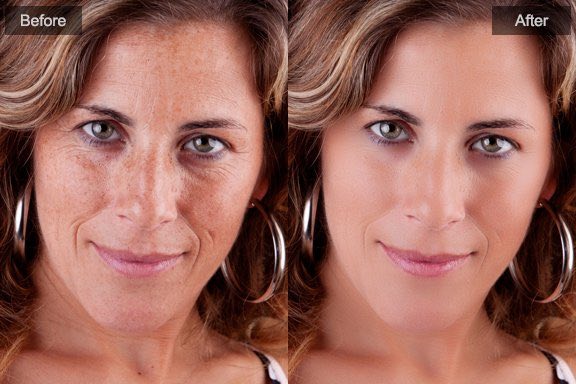
This portrait retouching software promises natural-looking results, high-quality processing, and massive time savings—without requiring advanced photo editing skills.
So, does it actually deliver?
In this in-depth PT Portrait 6 review, we’ll break down features, performance, real-world use cases, pros and cons, and how it compares to alternatives—so you can decide if it’s the right tool for your workflow.
Quick Summary
- Best for: Photographers, designers, studios, and content creators
- Strengths: Natural skin retouching, facial enhancement, batch processing
- Workflow: Standalone app or Photoshop plugin
- Quality: Full-time 16/32-bit processing for professional results
- Learning curve: Beginner-friendly with advanced control
👉 Bottom line: PT Portrait 6 is a powerful yet easy portrait retouching tool that delivers realistic results without over-editing.
What Is PT Portrait 6?
PT Portrait 6 is an easy-to-use portrait retouching software designed to help users quickly improve facial features, skin tone, and overall appearance—without making portraits look fake or “plastic.”
Unlike traditional editors that require manual masking and layering, PT Portrait uses intelligent sliders and targeted tools to automate the most time-consuming retouching tasks.
You can use it as:
- A standalone portrait editor
- A plugin for Adobe Photoshop
This flexibility makes it ideal for both beginners and professionals.
Must Read : Ad Group Manager Web Review: Features, Pricing, and Is It Worth Using?
Key Features of PT Portrait 6 (Explained Simply)
1. Fix Skin Imperfections (Fast & Natural)
This is where PT Portrait 6 really shines.
With a few sliders, you can:
- Remove skin blemishes
- Reduce wrinkles and fine lines
- Shrink visible pores
- Reduce oily shine
- Improve overall skin texture
What stands out:
The skin still looks real. Texture is preserved, avoiding that “blurred face” effect common in many retouching tools.
2. Remove Eye Bags & Dark Circles
Tired-looking eyes can ruin an otherwise great portrait.
PT Portrait 6 lets you:
- Remove eye bags
- Reduce crow’s feet
- Brighten dark circles
- Refresh tired eyes instantly
This is especially useful for:
- Corporate headshots
- Event photography
- Lifestyle portraits
3. Smooth Skin & Improve Skin Tone
Instead of aggressive smoothing, PT Portrait 6 focuses on balanced skin correction.
You can:
- Smooth uneven skin
- Improve color consistency
- Maintain natural skin texture
- Adjust skin brightness and warmth
Perfect for photographers who want polished results without over-editing.
4. Facial Feature Enhancements
Small adjustments can make a big difference.
PT Portrait 6 includes tools to:
- Brighten and sharpen eyes
- Enhance eyebrows naturally
- Whiten teeth
- Retouch or recolor lips
- Remove red-eye effects
Each adjustment is subtle and adjustable—so you stay in control.
5. Face Reshaping Tools (Tastefully Done)
Face reshaping is risky when overused, but PT Portrait 6 handles it well.
You can:
- Slim the face
- Enlarge eyes slightly
- Lift eye corners
- Adjust nose size
- Improve smile symmetry
These tools are ideal for minor corrections, not extreme transformations.
Must Read : How to Learn a New Language Without Going to Classes
6. Full-Body Skin Perfection
Unlike many portrait editors, PT Portrait 6 isn’t limited to faces.
With the Skin Brush, you can:
- Retouch arms, legs, neck, and hands
- Perfect visible skin areas
- Maintain consistency across the entire image
This is great for fashion, wedding, and lifestyle photography.
7. Batch Processing (Huge Time Saver)
If you work with multiple photos, this feature alone can justify the software.
Batch processing allows you to:
- Apply the same retouching settings to multiple images
- Save custom presets (Studio Edition)
- Process entire photo sessions in minutes
Ideal for studios, events, and school photography.
Must Read : Best Image Enhancer for Mac: I Tested the Top Tools
8. Professional-Grade Image Processing
PT Portrait 6 supports:
- Full-time 16/32-bit processing
- Advanced color management
- Accurate color reproduction across workflows
This ensures:
- Rich, vibrant colors
- No banding or quality loss
- Compatibility with professional editing pipelines
Workflow Compatibility & Ease of Use
One of the biggest advantages of PT Portrait 6 is how easily it fits into existing workflows.
Use It As:
- Standalone application
- Photoshop plugin
- Preset-based one-click editor
Even beginners can get great results in minutes, while advanced users can fine-tune every detail.
Pros and Cons
✅ Pros
- Very easy to use
- Natural, realistic results
- Saves massive editing time
- Supports Photoshop integration
- Batch processing available
- High-quality 16/32-bit processing
- Works for beginners and professionals
❌ Cons
- Limited creative effects (focused on realism)
- Advanced presets require Studio Edition
- Not meant for extreme face manipulation
PT Portrait 6 vs Other Portrait Retouching Tools
| Feature | PT Portrait 6 | Manual Photoshop | Generic Editors |
|---|---|---|---|
| Ease of use | ⭐⭐⭐⭐⭐ | ⭐⭐ | ⭐⭐⭐ |
| Natural results | ⭐⭐⭐⭐⭐ | ⭐⭐⭐⭐ | ⭐⭐ |
| Batch processing | ✅ | ❌ | ❌ |
| Learning curve | Low | High | Medium |
| Time-saving | Excellent | Poor | Average |
Conclusion:
PT Portrait 6 is ideal for users who want professional results fast—without mastering complex editing techniques.
Real-World Use Cases
📸 Portrait & Wedding Photographers
- Retouch entire shoots quickly
- Maintain consistent skin tones
- Save hours per session
🧑💼 Corporate & LinkedIn Headshots
- Clean, professional look
- Natural enhancements
- Perfect for client delivery
🎨 Designers & Creators
- Fast portrait cleanup for marketing visuals
- Non-destructive workflow
- High-quality output
🏫 Studios & Schools
- Batch process hundreds of portraits
- Create reusable presets
- Maintain consistent quality
Buying Guide: Is PT Portrait 6 Right for You?
Ask yourself:
- Do you retouch portraits regularly?
- Do you want natural results without heavy editing?
- Do you value speed and efficiency?
- Do you need batch processing?
If you answered yes, PT Portrait 6 is worth considering.
FAQs (People Also Ask)
1. Is PT Portrait 6 beginner-friendly?
Yes. The interface is simple, and most tools work with intuitive sliders.
2. Does PT Portrait 6 work with Photoshop?
Yes, it can be used as a Photoshop plugin or as a standalone app.
3. Does it over-smooth skin?
No. The software is designed to preserve natural skin texture.
4. Can I retouch full-body portraits?
Yes, the skin brush allows retouching beyond the face.
5. Is batch processing available?
Yes, batch processing is supported, especially useful for studios.
6. Does it support high-quality image formats?
Yes, it supports full-time 16/32-bit processing for professional output.
7. Is it suitable for professionals?
Absolutely. It’s widely used by photographers and studios.
Final Verdict: Should You Use PT Portrait 6?
PT Portrait 6 strikes an excellent balance between simplicity and professional quality.
It doesn’t try to replace full photo editors—but it does eliminate the most frustrating parts of portrait retouching.
If your goal is:
- Faster editing
- Natural-looking portraits
- Consistent, high-quality results
Then PT Portrait 6 is a smart, time-saving investment.