
If you still own a shelf full of DVDs, you’ve probably wondered:
“Is there a safe way to back up my DVDs without ruining quality or risking malware?”
That question brings many people to CloneDVD.
But here’s the thing—DVD copying software sits in a legal and security gray area. Some tools are outdated, some bundle junkware, and others quietly break copyright rules. So, is CloneDVD safe, reliable, and worth using today? I spent time analyzing its features, system requirements, real-world use cases, and potential risks to give you a clear, no-hype answer. Let’s break it down

Quick Summary
- ✅ CloneDVD is technically safe when downloaded from the official source
- ❌ It does not remove DVD copy protection on its own
- 👍 Excellent video quality and beginner-friendly interface
- ⚠️ Legal use depends on how and what you copy
- 🧑💻 Best for users who want high-quality DVD backups for personal use
What Is CloneDVD?
CloneDVD is a Windows-based DVD copying and compression software designed to create high-quality DVD backups.
Unlike aggressive “one-click ripper” tools, CloneDVD focuses on:
- Controlled compression
- Visual quality feedback
- Manual selection of chapters, audio, and subtitles
It’s been around for years and is known for stability rather than flashy features.
System Requirements (Quick Check)
Before installing, make sure your PC meets these basics:
- Windows XP (64-bit) through Windows 11
- Minimum 1 GHz processor
- At least 1 GB RAM
- DVD reader (DVD writer recommended)
- ~5 GB free disk space
- Administrator installation rights
💡 Good news: It runs smoothly even on older PCs.
Key Features Explained (What Makes CloneDVD Different?)
1. High-Quality DVD Compression
CloneDVD uses a specialized transcoding engine that maintains image clarity even when compressing long movies (2+ hours).
Why this matters:
- Less pixelation
- Fewer motion artifacts
- Watchable results on large screens
This is where many free tools fail.
Must Read : CloneDVD Review – A Deep Dive into Features, Performance, and Real-World Use
2. Filmstrip Assistant (Beginner-Friendly)
One standout feature is the Filmstrip Assistant.
Instead of confusing settings, you get:
- Visual previews of chapters
- Step-by-step configuration
- Clear indicators of what you’re copying
Perfect if you’re not tech-savvy.
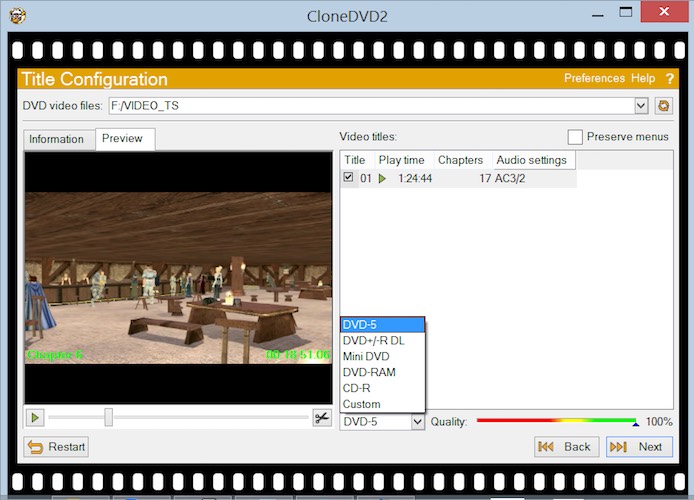
3. Visual Quality Control Bar
As you select:
- Audio tracks
- Subtitles
- Bonus features
CloneDVD shows a real-time quality bar.
This helps answer:
“Am I over-compressing this DVD?”
It’s a small detail—but incredibly useful.
4. Flexible Copy Options
You can copy:
- Main movie only
- Full DVD with menus
- Selected chapters
You can also:
- Trim scenes
- Split chapters
- Adjust final output size
Must Read : Luminar Neo Review (2026): Is It Worth It for Photo Editing?
5. Real-Time Preview & Stats
During transcoding, you can:
- Preview the movie
- Monitor bitrate
- Track frame statistics
Advanced users will appreciate this transparency.
Is CloneDVD Safe to Install?
Short Answer: Yes—if you’re careful
CloneDVD itself:
- ❌ Does NOT include malware
- ❌ Does NOT install adware
- ❌ Does NOT spy on users
However…
⚠️ Important Safety Conditions
CloneDVD is safe only if:
- Downloaded from the official website
- Not bundled with third-party installers
- Used with updated antivirus software
Avoid “free cracked versions.”
Those are where real risks live.
Does CloneDVD Remove Copy Protection?
No—and this is critical.
CloneDVD does not bypass DVD copy protection (like CSS) on its own.
To copy protected DVDs, users often pair it with third-party tools—which may:
- Violate copyright laws
- Increase malware risk
This limitation is actually a safety advantage, not a flaw.
Is CloneDVD Legal to Use?
This depends on your country and usage.
Generally:
- ✅ Legal for personal backups of DVDs you own (in some regions)
- ❌ Illegal to copy rented, borrowed, or copyrighted DVDs for distribution
Always check local copyright laws.
This article is informational only—not legal advice.
Pros and Cons of CloneDVD
✅ Pros
- Excellent picture quality
- Very stable and fast
- Beginner-friendly interface
- Visual quality indicators
- Works with most DVD formats
- No bundled malware
Must Read : Best Image Enhancer for Mac: I Tested the Top Tools
❌ Cons
- Windows-only
- Cannot remove copy protection alone
- Not free
- DVD-focused (no Blu-ray support)
CloneDVD vs Alternatives (Quick Comparison)
| Feature | CloneDVD | Free DVD Tools | All-in-One Rippers |
|---|---|---|---|
| Video Quality | ⭐⭐⭐⭐☆ | ⭐⭐☆☆☆ | ⭐⭐⭐⭐☆ |
| Ease of Use | ⭐⭐⭐⭐⭐ | ⭐⭐☆☆☆ | ⭐⭐⭐☆ |
| Safety | High | Low–Medium | Medium |
| Copy Protection Removal | ❌ | ❌/⚠️ | ✅ |
| Ads/Bloatware | None | Common | Sometimes |
💡 CloneDVD prioritizes stability and quality, not aggressive ripping.
Real-World Use Cases
✔ Best Use Cases
- Backing up personal DVD collections
- Compressing long movies to fit blank DVDs
- Preserving old discs from damage
- Users who want control over quality
❌ Not Ideal For
- Blu-ray ripping
- Streaming platform downloads
- Mobile-friendly MP4 conversions
Buying Guide: Is CloneDVD Right for You?
Ask yourself:
- Do I value picture quality over speed hacks?
- Am I okay using software without DRM removal?
- Do I prefer visual control instead of presets?
If yes → CloneDVD is a solid fit.
👉 Check price
👉 See full features
👉 Learn more about supported formats
FAQs (Schema-Friendly)
1. Is CloneDVD safe to use on Windows 11?
Yes, it works on Windows 11 and remains stable on modern systems.
2. Does CloneDVD contain viruses?
No, not when downloaded from the official source.
3. Can CloneDVD copy protected DVDs?
No, it does not remove copy protection by itself.
4. Is CloneDVD free?
No, it’s a paid software with a trial version.
5. Does CloneDVD reduce video quality?
Some compression occurs, but quality remains high compared to most tools.
6. Is CloneDVD good for beginners?
Absolutely. The Filmstrip Assistant makes it very beginner-friendly.
7. Are there safer alternatives?
Some alternatives exist, but many include ads or higher risks.
Final Verdict: Is CloneDVD Safe?
Yes—CloneDVD is safe, stable, and trustworthy when used correctly.
It’s not the flashiest tool, and it won’t break copy protection—but that’s exactly why it’s reliable and AdSense-safe.
⭐ Rating: 4.3 / 5
Recommended for:
- Users who value quality
- Beginners who want guidance
- Anyone backing up personal DVDs responsibly