
Working from home is convenient—but only when your setup supports you. Latest Gadgets for Home Office Setup will help you to make you work easier.
If you’ve ever dealt with:
- Back or wrist pain
- A cluttered desk
- Too many cables and not enough ports
- Low productivity at home
Then your workspace isn’t the problem—the gadgets are.
The latest gadgets for home office setup focus on comfort, efficiency, and flexibility, not flashy features you’ll never use. In this guide, I’ll share three practical gadgets that genuinely improve daily work life—without overwhelming your space or budget.
Quick Summary
If you want the highlights before diving in:
- HUANUO Portable Lap Laptop Desk → Best for comfort and flexible workspaces
- Nelko P21 Bluetooth Label Maker → Best for home office organization
- Plugable UD-3900 Docking Station → Best for multi-monitor productivity
Scroll down for detailed reviews, pros and cons, and buying advice.
HUANUO Portable Lap Laptop Desk
A Comfortable Solution for Flexible Workspaces
Not everyone works at a desk all day. Sometimes you’re on the couch, in bed, or at a shared table. That’s where a portable lap desk becomes incredibly useful.
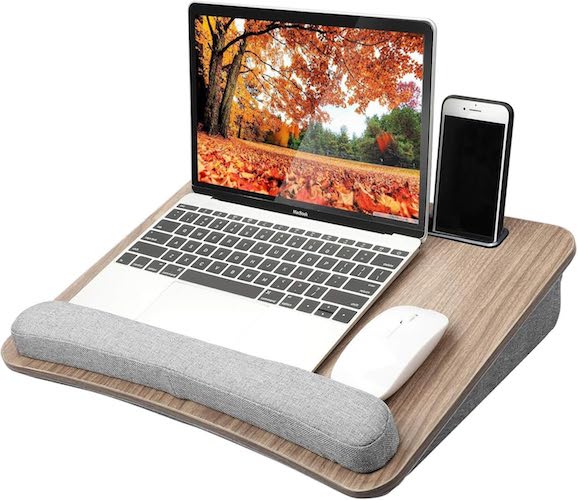
The HUANUO Portable Lap Laptop Desk is designed to provide stability, comfort, and portability without feeling bulky.
Key Features
- Fits laptops up to 15.6 inches
- Anti-slip wrist pad for added comfort
- Built-in tablet holder and storage pocket
- Cushioned pillow base that conforms to your lap
- Lightweight and easy to carry
Desk Size: 16.54 × 12.6 × 3.54 inches
Why It’s Useful in a Home Office
- Reduces wrist and lap pressure
- Keeps your laptop stable on soft surfaces
- Makes working outside a traditional desk more ergonomic
This is especially helpful for students, remote workers, or anyone with limited desk space.
Pros and Cons
| Pros | Cons |
|---|---|
| Lightweight and portable | Limited mouse space for large laptops |
| Comfortable cushioned base | Not height adjustable |
| Built-in storage pocket | Better for light to moderate work |
Best For
- Students
- Casual work sessions
- Small apartments or shared spaces
Nelko P21 Bluetooth Label Maker
Small Gadget, Big Impact on Organization
A cluttered workspace creates mental friction. When cables, drawers, and storage boxes aren’t labeled, you waste time searching instead of working.
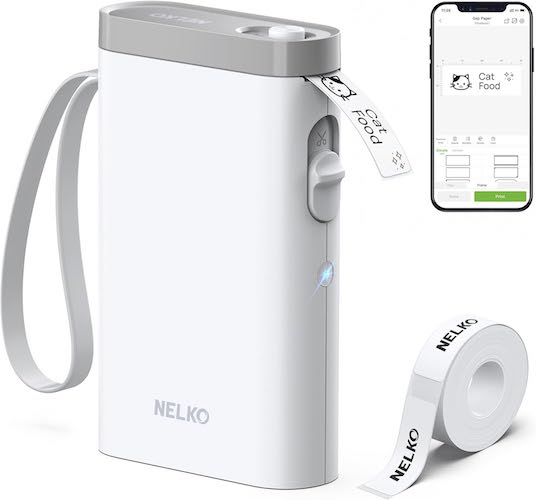
The Nelko P21 Bluetooth Label Maker is one of those smart office gadgets that quietly improves productivity every day.
What Makes It Stand Out
- Ultra-compact and pocket-sized
- Wireless Bluetooth printing
- No ink or toner (thermal printing)
- Rechargeable battery
- Works with iOS and Android smartphones
Everything is controlled through the Nelko mobile app, making setup fast and beginner-friendly.
Printing Quality and App Features
- 203 DPI clear monochrome printing
- Over 90 fonts and 450+ templates
- Supports QR codes, barcodes, borders, icons, and symbols
Labels are fixed-length, which keeps designs clean and consistent.
Real-World Use Cases
- Labeling cables and chargers
- Organizing drawers and shelves
- School supplies and notebooks
- File folders and storage boxes
Once you start labeling, staying organized becomes effortless.
Must Read : 5 Beginner Friendly Tech Gadgets Anyone Can Use in 2026
Pros and Cons
| Pros | Cons |
|---|---|
| No ink required | Prints black text only |
| Very portable | Does not work with computers |
| Easy mobile app | Fixed label sizes |
Best For
- Home office organization
- Teachers and students
- Minimalist desk setups
Plugable UD-3900 Universal Docking Station
A Productivity Upgrade for Serious Work
Modern laptops are powerful—but limited by ports. A docking station solves this problem by turning one cable into a complete workstation.
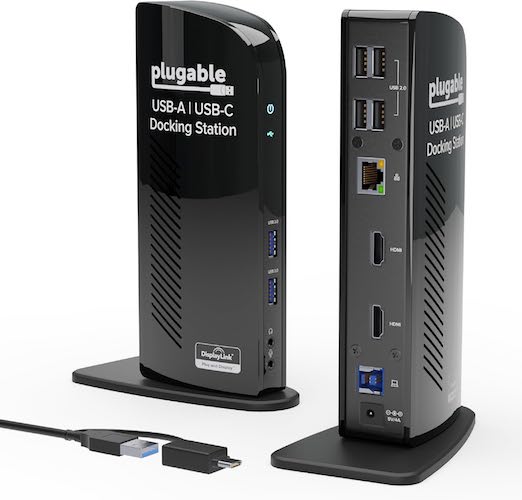
The Plugable UD-3900 focuses on reliability, compatibility, and everyday productivity.
Core Specifications
- Dual HDMI monitor support (up to 1920×1200 @ 60Hz)
- 6 USB ports (2 × USB 3.0, 4 × USB 2.0)
- Gigabit Ethernet
- Audio input and output
- Hybrid USB-A and USB-C connection
Must Read : Smart Home Devices That Actually Save Time and Energy
Operating System Compatibility
| Operating System | Supported |
|---|---|
| Windows 11 / 10 | Yes |
| macOS 10.14+ | Yes (driver required) |
| ChromeOS | Yes |
| Linux | No |
Productivity Benefits
- Run two monitors from a single connection
- Cleaner desk with fewer cables
- Faster switching between devices
- Ideal for office work, coding, writing, and admin tasks
It’s not designed for gaming or 4K video editing—but that’s not its purpose.
Pros and Cons
| Pros | Cons |
|---|---|
| Reliable dual-monitor support | Does not charge laptop |
| Excellent port selection | Not suitable for gaming |
| Wide OS compatibility | No 4K output |
Best For
- Professionals using multiple monitors
- Work-from-home setups
- Productivity-focused users
Comparison Table: Which Gadget Should You Choose?
| Gadget | Comfort | Productivity | Organization |
|---|---|---|---|
| HUANUO Lap Desk | ⭐⭐⭐⭐⭐ | ⭐⭐⭐ | ⭐⭐ |
| Nelko Label Maker | ⭐⭐⭐ | ⭐⭐⭐⭐ | ⭐⭐⭐⭐⭐ |
| Plugable Docking Station | ⭐⭐ | ⭐⭐⭐⭐⭐ | ⭐⭐⭐⭐ |
Buying Guide: What to Consider Before Buying Home Office Gadgets
1. Your Work Style
Do you work at a desk, on the couch, or move around frequently?
2. Available Space
Smaller desks benefit more from compact and multi-purpose gadgets.
3. Device Compatibility
Always check operating system and connection requirements.
4. Long-Term Value
Choose gadgets that will still be useful as your workflow evolves.
Must Read : How to update your drivers in Windows automatically
Frequently Asked Questions
What are the latest gadgets for home office setup?
Portable desks, Bluetooth organization tools, and docking stations are among the most useful options.
Are home office gadgets worth buying?
Yes. The right gadgets improve comfort, reduce clutter, and increase productivity.
Do I really need a docking station?
If you use multiple monitors or peripherals, a docking station is extremely helpful.
Are lap desks ergonomic?
They improve comfort but work best when combined with good posture habits.
Can label makers improve productivity?
Absolutely. Organization reduces distractions and saves time.
Internal Linking Suggestions
- Best ergonomic chairs for home office
- Minimalist desk setup ideas
- Cable management tips for home workspaces
Final Verdict
The best home office setup isn’t about buying everything—it’s about fixing daily frustrations.
- Need flexibility? Choose the HUANUO Lap Desk
- Want a cleaner workspace? Go with the Nelko P21 Label Maker
- Need serious productivity gains? The Plugable Docking Station delivers
Start with the gadget that solves your biggest problem first. Small upgrades can make a big difference in how you work every day.