
Buying a drawing tablet for the first time can feel overwhelming. There are dozens of models, confusing technical specs, and prices that jump from very cheap to surprisingly expensive. That often leads beginners to ask a simple question: is a budget drawing tablet actually worth buying? This budget drawing tablet review focuses on the Huion Inspiroy H640P, one of the most popular entry-level drawing tablets for beginners, students, and online teachers.
Instead of hype, this review looks at real-world usage, strengths, limitations, and who this tablet is best for—so you can decide with confidence.
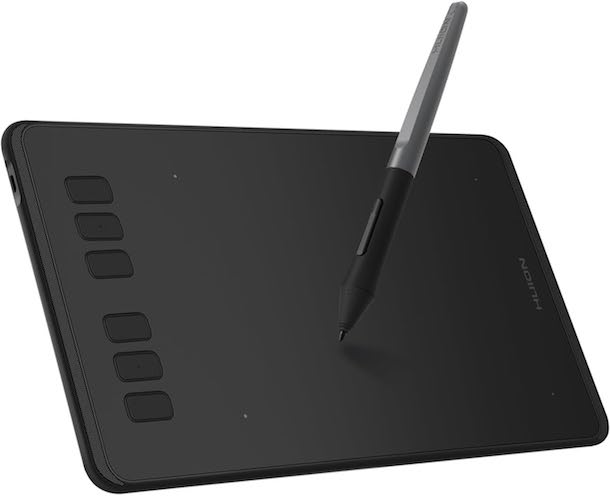
Quick Summary
Short on time? Here’s the quick version:
- Affordable and beginner-friendly
- Battery-free pen with 8192 pressure levels
- Compact, lightweight, and portable
- Works with Windows, Mac, Linux, and Android
- Suitable for drawing, teaching, note-taking, and basic design
Best for: beginners, students, teachers, budget users
Not ideal for: large canvases or professional studio work
What Is the Huion Inspiroy H640P?
The Huion Inspiroy H640P is a compact graphics tablet that lets you draw, write, and design using a pen instead of a mouse.
It does not have a built-in screen. You draw on the tablet while looking at your computer or mobile screen. This keeps the price low while still offering a natural pen experience.
Common use cases include:
- Digital drawing and sketching
- Online teaching and whiteboard explanations
- Writing, signing, and note-taking
- Photo editing and light graphic design
For beginners, it offers a simple and practical starting point.
Huion Inspiroy H640P Specifications
| Feature | Details |
|---|---|
| Active Area | 6 × 4 inches |
| Pen Pressure | 8192 levels |
| Stylus | Battery-free PW100 |
| Shortcut Keys | 6 customizable keys |
| Thickness | 0.3 inches |
| Weight | 1.41 lbs |
| OS Support | Windows, macOS, Linux, Android |
| iOS Support | ❌ No |
Design and Portability
One of the strongest points of the Huion H640P is its compact design.
It takes very little desk space and fits easily into a laptop bag. This makes it ideal for students, teachers, and anyone who works from multiple locations.
Despite being lightweight, the tablet feels solid and well-built for its price range. The drawing surface has a subtle texture that adds control without feeling rough.
Pen Experience and Drawing Feel
The included PW100 stylus is completely battery-free.
That means no charging, no batteries, and no added weight. The pen feels light and balanced, making longer drawing or writing sessions more comfortable.
With 8192 levels of pressure sensitivity, strokes respond naturally. Light pressure creates thin lines, while firmer pressure produces darker and thicker strokes.
The stylus also includes two customizable side buttons, commonly used for erasing or undoing actions, which speeds up workflow.
Must Read : Best Smart Gadgets for Daily Use at Home
Shortcut Keys and Workflow Customization
The Huion Inspiroy H640P includes six programmable shortcut keys on the tablet.
Using the Huion driver, you can customize these keys per application. For example, Photoshop can have different shortcuts than OneNote or Zoom.
Popular shortcut assignments include:
- Undo and redo
- Zoom in and out
- Brush size adjustment
- Tool switching
For a budget drawing tablet, this level of customization is genuinely useful.
Performance for Digital Art and Design
For beginner-level digital art, the H640P performs reliably.
It works smoothly with popular creative software such as:
- Photoshop
- Krita
- Medibang Paint
- Paint Tool SAI
The drawing experience feels responsive with minimal lag. While the 6 × 4-inch active area may feel small at first, most beginners adjust quickly using zoom and pan features.
For photo editing tasks like masking and retouching, it offers far better precision than a standard mouse.
Online Teaching and Remote Work Use
The Huion H640P is widely used by teachers and tutors.
It works well for:
- Writing equations
- Drawing diagrams
- Explaining concepts live
It’s compatible with tools like OneNote, Microsoft Whiteboard, and Zoom, making online lessons more interactive and natural.
Using the H640P as a Mouse Replacement
Many users also use the tablet as a mouse alternative.
Compared to a mouse, the pen offers:
- Better precision
- Reduced wrist strain
- More natural hand movement
For signing documents, annotating PDFs, and detailed navigation, it performs surprisingly well.
Compatibility and Setup
The Huion Inspiroy H640P works with multiple operating systems:
- Windows (7 or later)
- macOS (10.12 or later)
- Linux (Ubuntu)
- Android devices (6.0 or later with OTG)
Note: iOS is not supported.
Setup is simple:
- Plug the tablet into your device
- Download and install the Huion driver
- Restart and customize pen and shortcut settings
Most users are ready to go within minutes.
Must Read : Best Type C Charger with Long Wire (Fast & Reliable)
Left-Handed User Support
Left-handed users are fully supported.
You can rotate the tablet through the driver settings and flip the orientation to match your preference—no separate model required.
Pros and Cons
Pros
- Affordable price
- Battery-free stylus
- Lightweight and portable
- Wide software compatibility
- Easy setup for beginners
Cons
- Small active drawing area
- No iOS support
- Not designed for advanced professional work
Huion H640P vs Other Budget Drawing Tablets
| Tablet | Active Area | Pressure | Best For |
|---|---|---|---|
| Huion H640P | 6 × 4 | 8192 | Beginners, students, teachers |
| XP-Pen G640 | 6 × 4 | 8192 | Entry-level artists |
| Wacom One Small | Smaller | 2048 | Brand-focused users |
Overall, the Huion H640P delivers one of the best value-for-money ratios in the budget category.
Who Should Buy This Tablet?
This tablet is a great choice if you are:
- New to digital drawing
- A student attending online classes
- A teacher creating digital lessons
- A budget-conscious creator
- Looking for a mouse alternative
Who Should Consider Other Options?
You may want to look elsewhere if:
- You need a large drawing surface
- You want a screen-based drawing tablet
- You are a full-time professional illustrator
Buying Guide: What to Consider Before Buying a Budget Drawing Tablet
Before choosing any affordable drawing tablet, consider:
- Available desk space
- Your experience level
- Software compatibility
- Whether mobile support matters
For most beginners, the Huion H640P covers all essential needs.
Must Read : How to Edit Videos in One Tool Instead of Using Multiple Apps
Frequently Asked Questions
Is the Huion H640P good for beginners?
Yes, it’s designed specifically for beginners and first-time users.
Can I use it for online teaching?
Yes, it works well with Zoom and digital whiteboard tools.
Does the pen need charging?
No, the stylus is completely battery-free.
Is it compatible with Photoshop?
Yes, it works smoothly with Photoshop and similar software.
Does it work with smartphones?
It supports select Android devices, not iPhones or iPads.
Is the small drawing area a problem?
Most beginners adapt quickly using zoom and shortcut keys.
Internal Linking Suggestions
- Best free digital art software for beginners
- Drawing tablet vs mouse for designers
- How to set up a graphics tablet on Windows
Final Verdict: Is the Huion Inspiroy H640P Worth It?
If you’re looking for a reliable budget drawing tablet that delivers solid performance without unnecessary extras, the Huion Inspiroy H640P is a smart choice.
It’s not built for professional studios, but for beginners, students, teachers, and casual creators, it offers excellent value.
Natural pen feel, easy setup, wide compatibility, and an affordable price make it one of the safest entry-level drawing tablets available today.