
Just imagine, you join a Zoom meeting, say “Hi everyone,” and instantly hear:
“Sorry, can you repeat that?”
If you work from home, attend online classes, or handle client calls, poor audio can quietly damage your confidence and professionalism.
The good news?
You don’t need an expensive headset.
In this guide, we’ll explore the best earbuds for Zoom calls, focusing on what actually matters for meetings—not hype, not gimmicks.
You’ll learn:
- What makes earbuds good for Zoom
- Which features improve voice clarity
- A reliable, budget-friendly option that works surprisingly well
Quick Summary
If you’re short on time, here’s the takeaway:
- Best overall earbuds for Zoom calls: Soundcore by Anker P20i
- Best for work-from-home users: Lightweight earbuds with AI mic enhancement
- Best budget-friendly choice: Soundcore P20i offers strong call clarity without overspending
Scroll down to see why this model works so well for meetings.
What Makes Earbuds Good for Zoom Calls?
Not all earbuds are designed with video calls in mind. Here’s what truly matters.
Microphone Quality Is Priority #1
For Zoom calls, your microphone matters more than sound output.
Look for:
- Dual microphones
- AI-enhanced voice pickup
- Background noise reduction
These features help your voice stay clear even if your environment isn’t silent.
Must Read : Tired of Background Noise? AirPods Pro 2nd Gen ANC Review
Comfort for Long Meetings
Zoom fatigue is real.
Good earbuds should be:
- Lightweight
- Ergonomically shaped
- Comfortable for 1–3 hour sessions
If earbuds hurt after 30 minutes, they’re not meeting-ready.
Stable Bluetooth Connection
Audio drops are distracting and unprofessional.
Bluetooth 5.2 or 5.3 ensures:
- Faster pairing
- Fewer disconnects
- Stable Zoom calls
Battery Life That Matches Your Workday
Ideally, earbuds should last:
- At least 8–10 hours per charge
- Longer with a charging case
Fast charging is a big bonus.
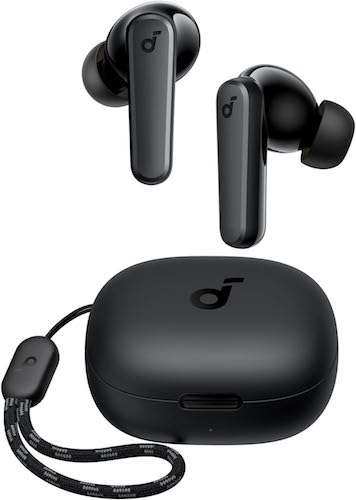
Best Earbuds for Zoom Calls: Soundcore by Anker P20i
If you want clear calls, strong comfort, and excellent value, the Soundcore P20i stands out.
It’s not marketed as a business headset, but in real Zoom use, it performs surprisingly well.
Why Soundcore P20i Works So Well for Zoom Calls
The P20i focuses on practical features that actually help during meetings.
Key highlights include:
- Dual microphones with AI-enhanced voice pickup
- Lightweight, comfortable fit
- Bluetooth 5.3 for stable connections
- Long battery life with fast charging
This combination makes it a solid option for daily Zoom use.
Must Read : Portable Power Station: A Smart Backup for Home, Travel & Outdoors
Soundcore P20i: Call & Audio Performance
Microphone Quality in Real Use
During Zoom meetings:
- Voices sound clear and natural
- Background noise like fans or typing is reduced
- You don’t need to raise your voice
For home offices or shared spaces, this makes a noticeable difference.
Comfort and Fit
The Soundcore P20i earbuds are:
- Feather-light
- Ergonomically shaped
- Comfortable for long listening sessions
You can wear them through back-to-back meetings without ear fatigue.
Key Features That Matter for Zoom Calls
AI-Enhanced Clear Calls
- Two built-in microphones
- Smart AI algorithm focuses on your voice
- Helps reduce environmental noise
Long Battery Life with Fast Charging
- 10 hours on a single charge
- Up to 30 hours with charging case
- 10-minute charge gives 2 hours of use
Perfect for full workdays or travel.
Bluetooth 5.3 Stability
- Faster pairing
- More stable connection
- Fewer call interruptions
App-Based Customization
Using the Soundcore app, you can:
- Choose from 22 EQ presets
- Customize tap controls
- Use “Find My Earbuds” if misplaced
You can even tune sound specifically for voice clarity.
Must Read : Laptop Cooling Pads: Do They Really Work?
Pros and Cons of Soundcore P20i
Pros
- Clear microphone quality for Zoom calls
- Comfortable for long meetings
- Stable Bluetooth 5.3 connection
- Long battery life with fast charging
- Affordable and good value
Cons
- No active noise cancellation
- Default sound is bass-heavy (can be adjusted via app)
Comparison: Soundcore P20i vs Typical Budget Earbuds
| Feature | Soundcore P20i | Generic Budget Earbuds |
|---|---|---|
| Microphone | Dual mics with AI enhancement | Single basic mic |
| Bluetooth | Version 5.3 | Older versions |
| Comfort | Lightweight & ergonomic | Often bulky |
| Battery Life | Up to 30 hours | 12–20 hours |
| App Support | Yes | Usually none |
Who Should Use These Earbuds?
Work-From-Home Professionals
Great for:
- Daily Zoom meetings
- Client calls
- Presentations
Clear audio helps you sound confident and professional.
Online Students
Useful for:
- Virtual classes
- Group discussions
- Recorded lectures
Comfort and battery life matter during long sessions.
Remote Workers & Travelers
Features like:
- Single earbud mode
- Compact charging case
- Fast charging
Make them practical on the go.
Buying Guide: Choosing the Right Earbuds for Zoom Calls
Before buying, ask yourself:
- Does it have a good microphone?
- Is it comfortable for long use?
- Does it support modern Bluetooth versions?
- Will the battery last my workday?
Marketing buzzwords matter less than real call performance.
Frequently Asked Questions
Are earbuds good for Zoom calls?
Yes. Earbuds with good microphones and noise reduction work very well for Zoom meetings.
What earbuds have good microphones for Zoom?
Models with dual microphones and AI voice enhancement perform best.
Are wireless earbuds better than wired headsets?
Wireless earbuds offer more comfort and mobility while maintaining clear call quality.
Do I need active noise cancellation for Zoom?
Not necessarily. Microphone noise reduction is more important than ANC for calls.
Can I use one earbud for Zoom calls?
Yes. Many earbuds support single-earbud mode for awareness.
Are budget earbuds suitable for professional meetings?
Some are. Focus on mic quality, not price alone.
Internal Linking Suggestions (Anchor Text Only)
- Best headphones for work from home
- Zoom meeting setup checklist
- Bluetooth audio tips for video calls
Final Verdict: Are Soundcore P20i Worth It for Zoom Calls?
If your main goal is clear, reliable Zoom audio without overspending, the Soundcore by Anker P20i is a smart choice.
They offer:
- Clear voice pickup
- Comfortable all-day wear
- Stable Bluetooth connection
- Strong value for money