
If you shoot in RAW, you already value image quality. RAW files preserve more detail, better colors, and wider dynamic range than JPEGs.
But here’s the reality…
RAW photos often look flat, noisy, or slightly soft straight out of the camera.
Low light, high ISO, older lenses, or fast shooting conditions can all affect clarity.
That’s why using a dedicated AI image enhancer for RAW photos can dramatically improve results—without spending hours tweaking sliders manually.
In this guide, you’ll discover what actually works, what to avoid, and which tool currently delivers the best balance of detail, realism, and ease of use.
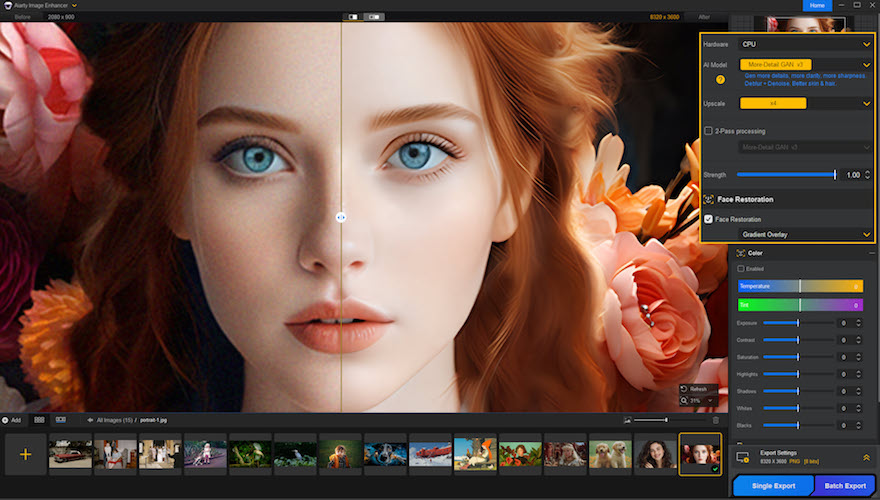
Quick Summary
- Best overall AI image enhancer for RAW photos: Aiarty Image Enhancer
- Supports RAW, DNG, TIFF, and high-bit-depth formats
- Excellent for denoising, deblurring, and upscaling up to 32K
- Works 100% offline for privacy and security
- Ideal for photographers, designers, and restoration projects
👉 Recommended if you want clean, sharp RAW photos without over-processing
What Is an AI Image Enhancer for RAW Photos?
An AI image enhancer is software that analyzes image content and improves quality automatically using advanced image models.
For RAW photos, this means it can:
- Remove high-ISO noise while preserving texture
- Restore sharpness without halos
- Generate missing details during upscaling
- Improve tonal balance and color depth
- Fix softness, blur, and compression artifacts
Unlike traditional tools that simply stretch pixels, AI-based enhancement reconstructs detail intelligently.
Why Traditional RAW Editing Tools Fall Short
Classic editors like Lightroom and Photoshop are powerful—but they have limits.
Common issues include:
- Noise reduction that removes fine detail
- Upscaling that causes softness or artifacts
- Sharpening that introduces halos
- Time-consuming manual workflows
AI enhancement tools fill this gap by doing heavy processing automatically—either before or after your regular editing workflow.
Best AI Image Enhancer for RAW Photos: Aiarty Image Enhancer
After testing multiple tools on real-world RAW files, Aiarty Image Enhancer stands out for one key reason:
It enhances RAW photos while keeping them natural and realistic.
Instead of over-sharpening or smoothing textures, it intelligently restores missing details based on image content.
Key Features That Matter for RAW Photos
High-Quality RAW & Pro Format Support
Aiarty supports:
- RAW and DNG files
- TIFF and high-bit-depth images
- Scanned photos and old archives
This makes it suitable for both modern digital cameras and legacy photo restoration projects.
AI Upscaling to 4K, 8K, and 32K
You can upscale images by:
- 2×, 4×, or 8×
- Fixed resolutions like 2K, 4K, or 8K
- Up to 32K maximum resolution (Windows version)
Unlike traditional upscaling, Aiarty:
- Preserves natural textures
- Generates realistic details
- Avoids jagged edges and blur
Perfect for large prints, stock photography, and commercial use.
Must Read : Aiarty Image Matting Review: Precision Background Removal Made Simple
Advanced AI Denoising for High-ISO RAW Photos
RAW photos taken in low light often suffer from visible noise.
Aiarty removes:
- Color noise
- Luminance grain
- Compression artifacts
While keeping:
- Skin texture
- Fine lines
- Smooth gradients
The result looks clean—not plastic or overly smoothed.
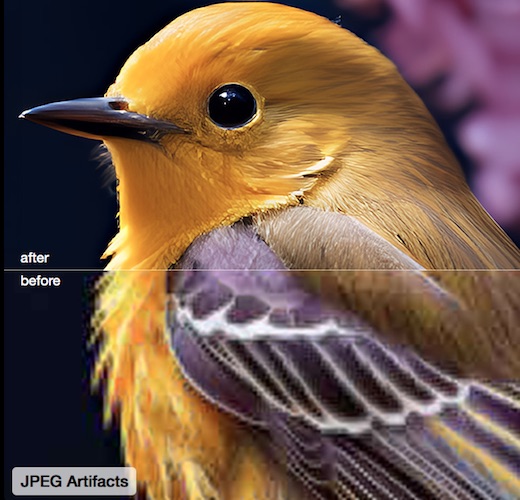
Deblur and Soft Image Correction
If your RAW image looks slightly soft or unfocused:
- Aiarty improves edge clarity
- Enhances sharpness naturally
- Reduces motion blur and softness
This is especially helpful for wildlife, event, and handheld photography.
Face Restoration and Detail Generation
Portrait RAW photos benefit from:
- Natural skin refinement
- Clear facial features
- Preserved identity and realism
The Gen-detail GAN v3 model enhances hair, skin texture, eyes, and fine facial details without over-processing.
100% Offline Processing (Privacy-Friendly)
Unlike online image enhancers:
- No uploads required
- No cloud processing
- No data collection
Your RAW files stay completely private on your own system.
AI Models Explained (Simple Overview)
Aiarty offers multiple enhancement models optimized for different image types:
| AI Model | Best Use Case |
|---|---|
| More-Detail GAN | Maximum texture and realism |
| Real-Photo | Natural enhancement for camera photos |
| AIGC Smooth | AI-generated or stylized images |
| Face Restoration | Portraits and close-ups |
Switching models lets you fine-tune results depending on the image.
Real-World Use Cases
Photography
- Clean up high-ISO RAW shots
- Upscale photos for large prints
- Restore underexposed images
Designers & Creators
- Enhance assets without quality loss
- Fix low-resolution source files
- Prepare images for commercial projects
Photo Restoration
- Improve scanned photos
- Revive faded or soft images
- Preserve historical details
Pros and Cons
Pros
- Excellent RAW and DNG support
- Natural-looking enhancement results
- Powerful upscaling without artifacts
- Offline processing for privacy
- GPU acceleration for faster performance
Cons
- Desktop-only software
- Best results require choosing the right AI model
How It Compares to Other Image Enhancers
| Feature | Aiarty | Typical Online Tools |
|---|---|---|
| RAW Support | Yes | Limited |
| Offline Processing | Yes | No |
| Detail Generation | Advanced | Basic |
| Max Resolution | Up to 32K | Usually under 8K |
| Privacy | High | Low |
How to Use Aiarty Image Enhancer
- Import your RAW photos or folders
- Choose the appropriate AI model
- Select enhancement or upscaling options
- Export the enhanced images
The interface is beginner-friendly and requires no technical experience.
Buying Guide: Who Is This Best For?
Aiarty Image Enhancer is ideal if you:
- Shoot in RAW regularly
- Want faster results than manual editing
- Need high-resolution, clean outputs
- Prefer offline, privacy-focused tools
If you only edit casual phone photos, it may be more than you need.
For serious image quality work, it’s a strong long-term solution.
👉 Check price
👉 See full features
Frequently Asked Questions
Is AI image enhancement better than manual editing?
AI excels at speed and consistency. Manual editing still offers precision, but AI saves significant time.
Can RAW photos be enhanced without quality loss?
Yes, when proper AI models are used to reconstruct detail instead of stretching pixels.
Is offline image enhancement safer?
Yes. Offline tools keep images private and secure.
Can enhanced images be used commercially?
Generally yes, depending on the software license terms.
Does this replace Lightroom or Photoshop?
No. It works best alongside traditional editors.
What’s the maximum upscaling resolution?
Up to 32K, depending on system and software version.
Internal Linking Suggestions (Anchor Text Only)
- AI photo upscaling software
- RAW vs JPEG image quality
- Best photo editing tools for photographers
- How to reduce noise in photos
Final Verdict
If you’re looking for the best AI image enhancer for RAW photos, Aiarty Image Enhancer delivers where it matters most:
- Real detail instead of fake sharpness
- Powerful upscaling with minimal artifacts
- Clean denoising for challenging images
- Offline processing for privacy and control
It’s an excellent choice for photographers and creators who want professional-quality results without excessive manual editing.