
Have you ever noticed how some videos instantly grab your attention, while others get skipped within seconds?
That’s the power of explainer videos.
In today’s crowded digital space, people don’t want long explanations. They want clarity, visuals, and quick understanding. This is why explainer videos consistently outperform plain text when it comes to engagement, watch time, and conversions.
The problem?
Until recently, creating professional explainer videos required expensive tools, animation studios, or complex software that most beginners simply couldn’t handle.
Now, things have changed.
You can create studio-quality explainer videos using simple text prompts—even with zero video editing experience.
Let’s break down exactly how it works.
Quick Summary
If you’re short on time, here’s the key takeaway:
• Explainer videos boost engagement and conversions
• Text-prompt video tools remove technical barriers
• You can create doodle-style explainer videos in minutes
• Perfect for YouTube, Instagram, TikTok, ads, and sales pages
• No freelancers, no learning curve, no heavy software
What Are AI Explainer Videos?
Explainer videos are short visual videos designed to explain a product, service, or idea in a simple and engaging way.
Text-prompt explainer videos take this one step further.
Instead of manually designing scenes or animations, you simply describe what you want to show. The platform automatically generates visuals, doodle characters, and animations based on your text input.
This makes video creation accessible to:
• Beginners
• Marketers
• Educators
• Business owners
You focus on the message. The visuals take care of themselves.

Why Explainer Videos Convert So Well
Explainer videos aren’t just popular—they’re effective.
Here’s why they work so well:
• People process visuals faster than text
• Step-by-step animations improve understanding
• Visual storytelling builds trust
• Short videos keep attention longer
Studies consistently show that explainer videos can increase conversion rates by up to 80% when used on landing pages, ads, or product pages.
That’s why they’re widely used in affiliate marketing, online education, and business promotion.
The Old Ways of Creating Explainer Videos (And Why They Fail)
Before text-prompt tools existed, creators had limited options.
1. Using Traditional Video Software
This usually meant spending weeks learning complex tools.
Common issues:
• Steep learning curve
• Time-consuming workflow
• Basic or amateur-looking videos
2. Hiring Freelancers or Agencies
This option removes the workload—but creates new problems.
Common issues:
• High costs
• Long turnaround times
• Difficult revisions
3. Template-Only Video Tools
These are easy but often produce generic results.
Common issues:
• Repetitive designs
• Limited customization
• Poor brand uniqueness
This is exactly where text-prompt explainer video tools stand out.
Must Read : QnE Companion Review: Free Windows Utilities to Boost Productivity
How to Create Explainer Videos Using Text Prompts (Step-by-Step)
Here’s how the process works from start to finish.
Step 1: Write a Simple Text Prompt
You don’t need a professional script.
Just describe:
• What the scene should show
• The message you want to explain
• Any characters or actions
Example prompt:
“A business owner explaining how online marketing works using a whiteboard animation.”
Step 2: Generate the Visuals Automatically
The system instantly creates:
• Doodle characters
• Scene elements
• Animated transitions
No drawing. No timeline editing.
Step 3: Customize If Needed
Optional customization includes:
• Switching between black & white or color videos
• Adding your own voiceover
• Adding background music
• Choosing animation styles
Step 4: Render and Publish
Choose your video format:
• 16:9 for YouTube
• 9:16 for Instagram Reels and TikTok
• Square for Facebook and ads
Click render, download, and publish.
Why InstaDoodle Is Ideal for Text-Based Explainer Videos
If you’re specifically looking for a tool designed for doodle-style explainer videos, InstaDoodle is worth serious attention.
It removes almost every technical obstacle from video creation.
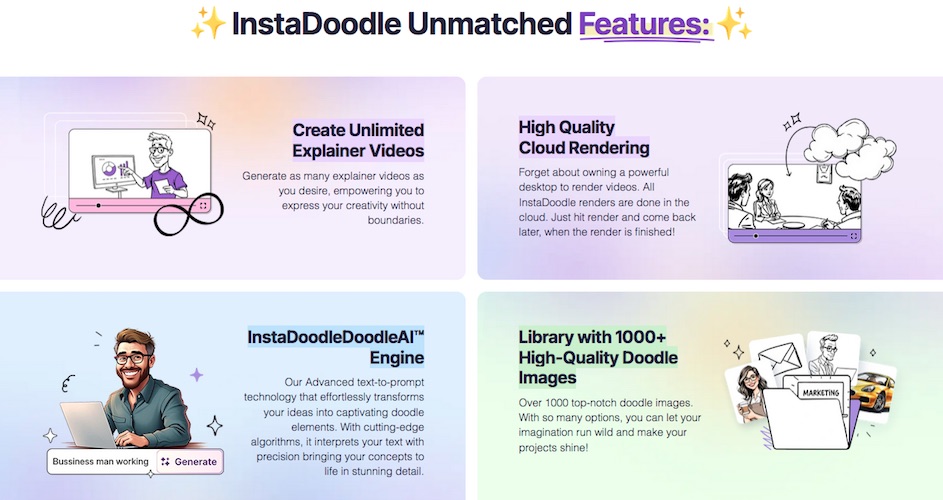
You don’t install anything. You don’t need a powerful computer. Everything runs in the cloud.
Many users report that viewers assume their videos were made by professional animation studios—when in reality, they were created in minutes.
Key Features That Actually Matter
Here are the features that make a real difference.
Text-to-Doodle Video Engine
Simply write what you want to show, and the system generates matching doodle elements automatically.
1000+ Doodle Characters and Elements
You can create videos for:
• Business presentations
• Educational content
• Marketing campaigns
• Local services
Color and Black-and-White Videos
Choose the style that fits your brand or platform.
Built-In Image Editor
Includes:
• Background removal
• Free draw tools
• Color fill options
No need for external image editing apps.
Multiple Aspect Ratios
Create videos optimized for:
• YouTube
• Instagram
• TikTok
• Facebook
• Sales pages
Must Read : Aiarty Image Enhancer Review – Upscale Photos to 32K Naturally
What Can You Create With Text-Prompt Explainer Videos?
Here are some practical examples:
• Product promotion videos
• Affiliate review videos
• Amazon product explainers
• Offline business promotion videos
• Express video sales letters
• Logo intros and stingers
• Photo slideshows
• Videos from blog articles
This flexibility makes explainer videos useful across many industries.
Pros and Cons Overview
Pros
• Extremely beginner-friendly
• No editing or design skills required
• Saves time and money
• Professional-looking results
• Works in multiple languages
Cons
• Requires an internet connection
• Clear prompts produce better results
InstaDoodle vs Traditional Video Tools
Feature
InstaDoodle
Traditional Video Software
Learning Curve
Very low
High
Cost
One-time option
Monthly subscriptions
Creation Speed
Minutes
Hours or days
Freelancers Needed
No
Often yes
Cloud Rendering
Yes
No
Who Should Use Text-Prompt Explainer Videos?
This approach is perfect for:
• Affiliate marketers
• YouTube creators
• Educators and coaches
• Small business owners
• Social media marketers
If you want professional videos without a production crew, this is one of the easiest solutions available.
Buying Guide: What to Look for in a Text-to-Video Tool
Before choosing any platform, consider these factors:
• Prompt accuracy
• Visual quality
• Rendering speed
• Customization options
• Supported video formats
• Pricing model (one-time vs subscription)
These elements directly impact long-term usability and value.
Must Read : Step by Step AI Video Maker tutorial
Frequently Asked Questions
Can beginners create explainer videos using text prompts?
Yes. No technical or design experience is required.
Do these videos work on social media platforms?
Yes. You can create videos optimized for YouTube, Instagram, TikTok, and Facebook.
Are explainer videos effective for affiliate marketing?
Yes. They simplify complex offers and improve trust and conversions.
Can I use my own images or logos?
Yes. You can import images and convert them into doodle-style visuals.
Do I need a powerful computer?
No. All video rendering is done in the cloud.
Are color explainer videos supported?
Yes. Full-color video creation is available.
Final Verdict: Is Text-Prompt Explainer Video Creation Worth It?
If your goal is to save time, reduce costs, and increase engagement, text-prompt explainer videos are absolutely worth it.
Tools like InstaDoodle make professional-quality explainer videos accessible to anyone—without technical frustration or high expenses.