
Have you ever zoomed into an old photo, product image, or AI-generated artwork—only to see blur, noise, or ugly pixels?
You’re not alone.
Low-resolution images are still a common pain point for photographers, designers, marketers, and even casual users. Traditional photo editors often stretch pixels instead of restoring real details, which leads to artificial-looking results.
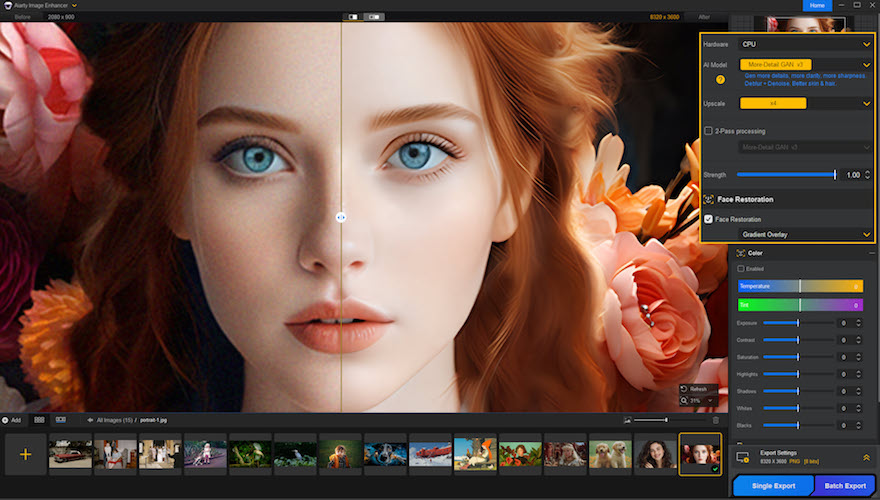
That’s where Aiarty Image Enhancer positions itself differently.
This review takes a hands-on, practical look at Aiarty Image Enhancer—what it does well, where it falls short, who it’s best for, and whether it’s worth your money.
⚡ Quick Summary
- Best for: Upscaling, denoising, deblurring, and restoring images up to 32K resolution
- Key strength: Generates natural-looking details, not just bigger images
- Platform: Desktop software for Windows & Mac
- Privacy-friendly: 100% offline processing
- Performance: Fast with GPU acceleration
- Verdict: A solid all-in-one image enhancement tool for creators who care about realism
🔍 What Is Aiarty Image Enhancer?
Aiarty Image Enhancer is a desktop-based image enhancement software designed to:
- Upscale images up to 4K, 8K, or even 32K
- Remove noise from low-light or compressed photos
- Fix blur and pixelation
- Restore faces with realistic skin texture
- Generate missing details instead of guessing pixels
Unlike many online image enhancers, Aiarty works offline, which means your photos never leave your computer.
This alone makes it attractive for professionals dealing with sensitive or private images.
🚀 Core Features Explained in Detail
🖼️ 1. High-Resolution Image Upscaling (Up to 32K)
One of Aiarty’s standout features is its ability to upscale images far beyond standard limits.
Supported scaling options:
- 2× / 4× / 8×
- Presets for 2K, 4K, 8K
- Maximum resolution: 32,000 pixels (Windows)
Instead of simply enlarging pixels, Aiarty reconstructs missing details—textures, edges, and patterns—making images suitable for:
- Large prints
- Posters & billboards
- Wallpapers
- High-resolution presentations
✨ 2. Detail Generation That Looks Natural
Many tools over-sharpen images, causing halos and plastic textures.
Aiarty avoids this by letting you control enhancement strength, which is a big deal.
- Lower strength = subtle, realistic results
- Higher strength = stronger detail recovery for very poor images
This makes it suitable for both old scanned photos and modern digital images.
🌙 3. Advanced Denoising for Low-Light Photos
Noise is a common issue in:
- Night photography
- Old camera images
- Compressed JPEGs
- Web downloads
Aiarty’s denoising engine removes grain while preserving edges and textures, which is something many editors struggle with.
Works well for:
- City night shots
- Indoor photos
- Smartphone images
Must Read : Aiarty Image Matting Review: Precision Background Removal Made Simple
🔍 4. Deblurring & Artifact Removal
Blur and compression artifacts can ruin otherwise usable images.
Aiarty helps with:
- Motion blur
- Soft focus
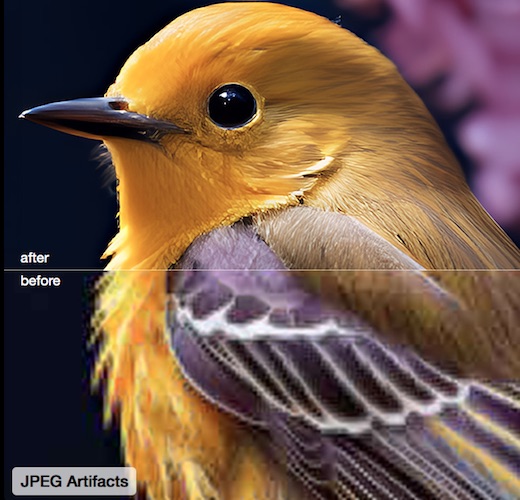
- JPEG artifacts
- Pixelated images
This is especially useful for:
- Downloaded web images
- Old backups
- AI-generated art with softness issues
🙂 5. Face Restoration for Portraits
Faces are tricky. Over-processing can make people look unnatural.
Aiarty’s Face Restoration model focuses on:
- Eyes, skin texture, hair
- Smoothing imperfections without losing realism
- Correcting distortions from blur or compression
This feature is particularly useful for:
- Old family photos
- Portrait photographers
- Profile images
🤖 6. Multiple AI Models for Different Image Types
Aiarty isn’t a one-size-fits-all tool. It includes specialized enhancement models:
| Model Name | Best For |
|---|---|
| More-detail GAN v3 | Skin, hair, textures |
| AIGCsmooth v3 | AI art, anime, line art |
| Real-Photo | Photography & product images |
| Face Restoration | Close-up portraits |
This flexibility gives you more control over the final look.
⚡ 7. Batch Processing & GPU Acceleration
If you work with lots of images, this matters.
- Process up to 3000 images per hour
- Supports NVIDIA, AMD, Intel GPUs
- CPU-only mode available
Performance depends on your hardware, but on a mid-range GPU, results are impressively fast.
🖥️ Supported Platforms & File Formats
- Windows: Full features (up to 32K)
- Mac: Stable performance (up to 16K)
Supported formats include:
- JPG, PNG, TIFF
- DNG
- HEIC (newer versions)
💰 Pricing & Licensing (Worth It?)
Aiarty Image Enhancer offers:
- Free trial (limited output)
- Lifetime license (one-time payment)
- Lifetime free upgrades
For users who hate subscriptions, this is a big plus.
Must Read : Why Is My Phone Screen Pressing Itself? Causes, Fixes, and Long-Term Solutions
✅ Pros & Cons
👍 Pros
- Excellent detail recovery
- Natural-looking results
- Offline & privacy-friendly
- Multiple AI models
- GPU acceleration
- Lifetime upgrades
👎 Cons
- Desktop-only (no web version)
- High-resolution output requires decent hardware
- Learning curve for choosing the best model
🔄 Aiarty vs Other Image Enhancers
| Feature | Aiarty | Typical Online Tools |
|---|---|---|
| Max Resolution | Up to 32K | Usually 4K |
| Offline Use | ✅ Yes | ❌ No |
| Face Restoration | ✅ Advanced | ⚠️ Basic |
| Privacy | High | Low |
| Batch Processing | ✅ Yes | ❌ Limited |
Aiarty clearly targets serious users, not quick one-click fixes.
🎯 Who Should Use Aiarty Image Enhancer?
This tool is ideal for:
- 📸 Photographers restoring old photos
- 🛒 E-commerce sellers improving product images
- 🎨 Designers & digital artists
- 🧑💻 Content creators & marketers
- 🖼️ Print designers needing large formats
If you just need quick social media edits, simpler tools may be enough. But for quality-focused work, Aiarty stands out.
🛒 Things to Consider Before Buying
- Do you need high-resolution outputs?
- Is offline processing important to you?
- Do you work with faces, old photos, or AI art?
- Does your computer have a decent GPU?
If you answered “yes” to most of these, Aiarty is a strong option.
❓ FAQs (People Also Ask)
1. Is Aiarty Image Enhancer safe to use?
Yes. It works completely offline, so your images are never uploaded.
2. Can it really upscale images to 32K?
Yes, on Windows systems. Mac supports up to 16K.
3. Does it work on old or damaged photos?
Yes, especially with denoise and face restoration features.
4. Is GPU required?
No, but GPU acceleration significantly improves speed.
5. Can beginners use it?
Yes. The interface is simple, with presets for common tasks.
6. Does it support batch processing?
Yes, up to thousands of images per hour depending on hardware.
7. Is it a one-time purchase?
Yes. It offers a lifetime license with free upgrades.
Must Read : How to Recover Deleted WhatsApp Messages Without Backup
🧠 Internal Linking Suggestions
- best image upscaling software for photographers
- photo restoration tools for old images
- AI photo enhancer desktop software
🏁 Final Verdict: Is Aiarty Image Enhancer Worth It?
Aiarty Image Enhancer delivers where many tools fall short—realistic enhancement without over-processing.
It’s fast, privacy-friendly, and powerful enough for professional workflows, yet accessible for beginners.
If image quality matters to your work—and you want control, not gimmicks—this software is absolutely worth considering.
👉 Learn more about Aiarty Image Enhancer
👉 Check current price & offers
Have you tried Aiarty Image Enhancer yet? What kind of images are you planning to enhance?