
Latest laptops and gadgets have different ports, some try to be universal but connectivity needs a hub. Multi-Port USB-C Hub with HDMI is an essential. To achieve minimal designs, manufacturers have steadily removed traditional ports like HDMI, USB-A, Ethernet, and SD card readers. What we’re left with is the all-purpose USB-C port: compact, powerful, and incredibly versatile.
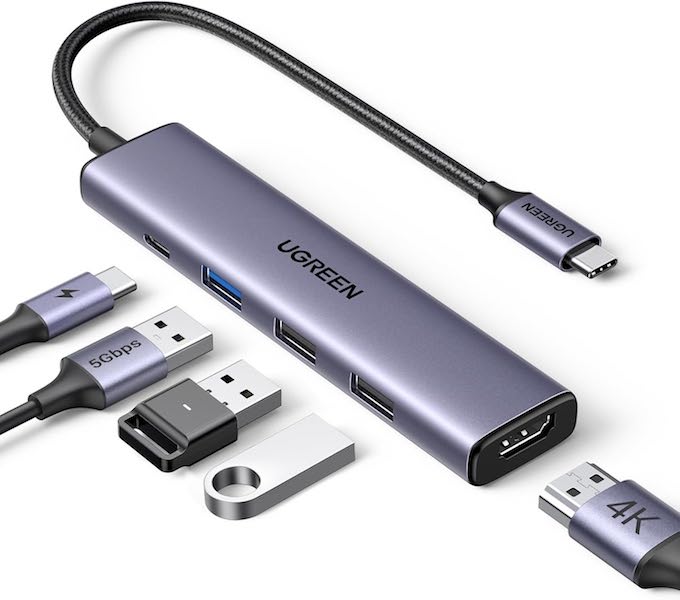
While USB-C can handle charging, data transfer, and video output, relying on a single port isn’t practical for real-world use. Professionals, students, creators, and everyday users often need to connect external displays, keyboards, mice, storage devices, and power—sometimes all at once. This is where a multi-port USB-C hub with HDMI becomes essential.
Among the many options available, the UGREEN USB-C Hub 5-in-1 Multiport Adapter Revodok 105 stands out as a thoughtfully designed, reliable, and performance-focused solution. This article explores the broader importance of USB-C hubs while taking an in-depth look at how the Revodok 105 meets modern connectivity demands.
Understanding Multi-Port USB-C Hubs
A multi-port USB-C hub acts as a central expansion point for your device. Plugged into a single USB-C port, it instantly provides access to multiple interfaces—HDMI for displays, USB-A for peripherals, and USB-C Power Delivery for charging.
The real value of a good USB-C hub lies in three areas:
- Port Expansion – Restore lost ports without bulky docks
- Workflow Efficiency – Connect everything at once without constant plugging and unplugging
- Device Longevity – Use modern devices with older accessories seamlessly
The UGREEN Revodok 105 embraces all three principles while remaining compact and easy to carry.
Must Read : Best Budget Smartwatches for Android in India
Overview of the UGREEN Revodok 105 5-in-1 USB-C Hub
The Revodok 105 is a 5-in-1 USB-C multiport adapter designed for users who want simplicity without sacrificing performance. It includes:
- 1 × 4K HDMI port (30Hz)
- 1 × USB-C Power Delivery port (up to 100W input, 95W output)
- 1 × USB-A 3.0 port (5 Gbps data transfer)
- 2 × USB-A 2.0 ports (480 Mbps)
This combination targets the most common daily needs: charging your device, connecting to an external display, and using multiple USB peripherals.
5-in-1 Connectivity: Practical, Not Overcrowded
One of the most appealing aspects of the Revodok 105 is its balanced port selection. Instead of overwhelming users with rarely used interfaces, UGREEN focuses on what people actually rely on.
HDMI for Visual Expansion
The built-in HDMI port supports 4K resolution at 30Hz, making it ideal for:
- Office presentations
- Watching movies or streaming content
- Extending or mirroring displays
- Casual photo and video editing
This level of resolution ensures crisp text, vibrant colors, and clear details, especially when paired with modern 4K monitors or TVs.
USB-C Power Delivery
The USB-C PD port supports up to 100W input, delivering 95W pass-through charging to your device while reserving 5W to power the hub itself. This ensures stable performance even when multiple peripherals are connected.
USB-A Ports for Everyday Accessories
The inclusion of three USB-A ports acknowledges a simple truth: many accessories still rely on USB-A. From keyboards and mice to flash drives and external hard disks, USB-A remains deeply relevant.
Must Read : Blockchain Wallet Guide: How to Choose and Use the Best Wallet in 2025
Power Delivery: Keeping Your Device Charged Under Pressure
Battery anxiety is a real concern for professionals on the go. Whether you’re working remotely, editing content, or presenting in meetings, running out of power isn’t an option.
The Revodok 105 supports USB-C Power Delivery up to 100W, making it suitable for high-performance devices such as:
- MacBook Pro and MacBook Air (including M1, M2, and M3 models)
- Dell XPS series
- Lenovo ThinkPad laptops
- Microsoft Surface devices
- iPad Pro
With up to 95W delivered to your laptop, you can confidently run demanding applications while charging at near-native speeds.
Important usage note: For stability, it’s recommended not to plug or unplug the PD charger during screen casting or file transfers. This avoids interruptions, image loss, or data errors.
4K HDMI Output: A Clear and Immersive Viewing Experience
External displays are no longer optional—they’re essential for productivity. The Revodok 105’s HDMI port supports up to 4K at 30Hz, offering a visually rich experience for most everyday scenarios.
What 4K 30Hz Means in Real Life
- Sharp text for documents and spreadsheets
- Smooth playback for movies and streaming platforms
- Excellent clarity for presentations and web browsing
While gamers or professional video editors may prefer 60Hz, 30Hz is more than sufficient for office work, education, and entertainment.
Compatibility reminder: Your host device’s USB-C port must support video output (DisplayPort Alt Mode) for HDMI to function.
Fast and Reliable Data Transfer
Data transfer speed can significantly impact productivity. The Revodok 105 addresses this by offering both high-speed and standard USB-A ports.
USB-A 3.0 Port (5 Gbps)
This port is perfect for:
- Transferring large files
- Connecting external SSDs or hard drives
- Backing up data quickly
- Moving photos and videos from flash drives
With speeds up to 5 Gbps, file transfers that once took minutes can now be completed in seconds.
USB-A 2.0 Ports (480 Mbps)
The two USB-A 2.0 ports are ideal for low-bandwidth peripherals such as:
- Keyboards
- Mice
- Printers
- USB receivers
By separating high-speed and low-speed ports, the hub ensures stable performance without unnecessary bandwidth congestion.
Note: These ports are designed primarily for data transmission. Charging devices through them is not recommended.
Must Read : 4K Streaming Stick Ultra Fast
Design and Build Quality: Compact, Durable, and Travel-Friendly
UGREEN is known for its attention to build quality, and the Revodok 105 reflects that reputation.
- Compact form factor makes it easy to slip into a laptop bag or pocket
- Sturdy housing offers durability for daily use
- Short integrated cable reduces strain on your device’s USB-C port
The minimalist design complements modern laptops and tablets without looking bulky or outdated.
Broad Compatibility Across Devices and Operating Systems
One of the strongest advantages of the Revodok 105 is its wide compatibility. It’s truly plug-and-play, requiring no drivers or additional software.
Compatible Operating Systems
- Windows
- macOS
- Linux
Compatible Devices Include
- MacBook Pro / MacBook Air (Intel & Apple Silicon)
- iMac
- iPad Pro
- Chromebooks
- Microsoft Surface
- Dell XPS
- Lenovo ThinkPad
- Samsung Galaxy S23
- iPhone 15, iPhone 16 Pro, and iPhone 16 Pro Max (with USB-C)
This makes the hub a versatile accessory whether you’re switching between work and personal devices or sharing peripherals among family members.
Ideal Use Cases for the UGREEN Revodok 105
For Professionals
- Dual-screen setups for multitasking
- Reliable charging during long work sessions
- Quick access to storage devices
For Students
- Presentations via HDMI
- Connecting keyboards and mice
- Lightweight and portable for campus life
For Creators
- External displays for editing timelines
- Fast file transfers from storage drives
- Stable power during creative work
For Everyday Users
- Home office setups
- Streaming content on larger screens
- Simplified desk organization
Safety, Stability, and User Experience
UGREEN prioritizes safe operation with built-in protections against:
- Over-voltage
- Over-current
- Short circuits
- Overheating
These safeguards help protect both the hub and connected devices, ensuring long-term reliability.
The user experience is straightforward: plug it in, connect your accessories, and start working—no configuration required.
How the Revodok 105 Compares to Bulkier Docks
While large docking stations offer more ports, they often come with downsides:
- Higher cost
- Larger size
- External power requirements
The Revodok 105 strikes a balance by offering essential ports in a compact design, making it ideal for users who value portability and simplicity over maximum expansion.
Future-Ready with USB-C
As USB-C becomes the universal standard across laptops, tablets, and smartphones, investing in a reliable USB-C hub is a smart long-term decision. The Revodok 105 is designed to grow with your device ecosystem, supporting both current and upcoming USB-C products.
Final Thoughts: A Smart Investment in Connectivity
The UGREEN USB-C Hub 5-in-1 Multiport Adapter Revodok 105 is more than just a dongle—it’s a practical solution to modern connectivity challenges. By combining 4K HDMI output, powerful pass-through charging, fast data transfer, and broad compatibility in a compact form, it delivers exceptional value for a wide range of users.
Whether you’re a professional seeking efficiency, a student managing multiple devices, or a casual user wanting fewer cables and more convenience, this multi-port USB-C hub with HDMI is a dependable companion for everyday digital life.
In an era where one port must do it all, the Revodok 105 proves that smart design and reliable performance can make a single USB-C connection feel limitless.


Nikhil Narkhede
Latest posts by Nikhil Narkhede (see all)
- Smartwatch Battery Life: How to Choose a Watch That Lasts - December 28, 2025
- How to update your drivers in Windows automatically - December 27, 2025
- Laptop Cooling Pads: Do They Really Work? - December 26, 2025