
You must have used a lot of batteries. They keep discharging all the time. Though you are unaware of the fact that are they fully discharged. Well mainly it happens with us all the time. It can be your wall clock when suddenly it shows incorrect time.
The best example is the TV remote control. It becomes difficult to switch the channels and you unnecessarily tap the remote’s back by your hand. When such things happen, its time to change your batteries.
Many times you feel that you have recently changed them, then are they fully discharged? You still think in your mind whether the battery has more juice in it or not. Well to solve this dilemma its important to check the power levels of your batteries. For this you need a battery tester.
Battery Tester Review
Design
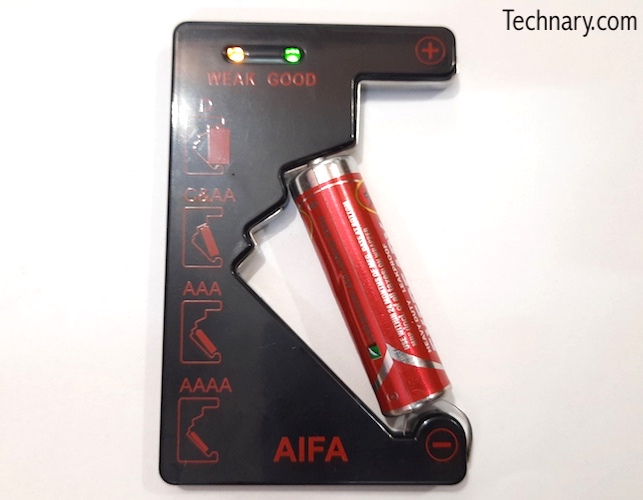
We can see the black color of this device. It does look neat and in one moment you get to know after looking at the aesthetics that this is a Battery tester. On the front side itself, you can see that, it has + and – symbols showcased. There are also 2 LED indicators of Weak and Good.
Dimensions of this tester are 5.7 x 8.8 x 0.7 cm. Weight of the tester is only 15.5g. It is portable and you can carry it with you anywhere. The device is battery free and is environment friendly too. We liked the design as it is very much compact and precise.
Also Read : Artis AR-60W-MG1 60 Watts Laptop Adapter Review
How to use the Battery Tester?
Well you can easily check the battery levels using this tester. You can easily check battery levels of B, C&AA, AAA and AAAA batteries with this tester. Just place the battery properly. The negative side should be kept on negative side(Down) and positive side should be kept on the positive side(Up). You got to match up the positive and negative sides of the batteries. Immediately you can see the LED indicators lit up.
Yellow & Green : Full/Good. It indicates batter is full or in good condition
Yellow only : Weak/Low Tester indicates that the battery is weak or has low battery.
No Light : No Light. If there is no light even after placing the batteries properly, then there is no power at all left in the battery.
Also Read : Samsung Galaxy M21 Review
User Experience
It is very simple to use this Battery tester. We have extensively used this battery tester since long time. Best part is that it shows the battery levels precisely. At least you get to know if the battery is in good condition or not. It will indicate whether battery is low. This is a very important solution to test if the battery is low or not. Atleast you get to the battery condition in 3 stages. You get to know if the battery is weak, no power or in good condition.
Final Verdict
If you want to check the battery level before throwing or switching your batteries, then you must surely check them. We highly recommend this product if at all you are using dry batteries. Perfect tester as it does not need any battery, it uses external battery to check/test.