


If your Windows PC feels slower than it should, randomly crashes, or shows strange hardware errors, outdated drivers are often the hidden culprit. Manually updating drivers sounds simple, until you try it. You jump between manufacturer websites, guess which version fits your system, and hope nothing breaks after installation. One wrong driver can cause blue screens, audio failure, or gaming stutters. That’s where automated tools step in. In this review, we’ll take a deep, honest look at Systweak Advanced Driver Updater, a popular Windows utility from Systweak Software and answer the real question:
Does it actually fix driver issues, or is it just another PC optimization tool with big promises?
Let’s find out. You need to be smart to save your valuable time and download and update all the necessary windows drivers automatically.

Quick Verdict
Advanced Driver Updater is a solid choice for Windows users who want a safe, beginner-friendly way to keep drivers updated without manual effort.
✔ Large driver database
✔ WHQL-certified, malware-checked drivers
✔ Backup & restore safety net
✔ Good for fixing audio, graphics, printer, and gaming issues
❌ Free version is limited
❌ No lifetime license option
Best for: Non-technical users, gamers, home PCs, and aging systems
Not ideal for: IT admins managing multiple machines
What Is Systweak Advanced Driver Updater?
Advanced Driver Updater is a Windows driver management tool designed to:
- Scan your PC for outdated, missing, or faulty drivers
- Download the latest compatible versions automatically
- Install them safely with rollback protection
Instead of hunting drivers manually, the software does the heavy lifting in just a few clicks.
It supports:
- Windows 11, 10, 8.1, 8, and 7
- Both 32-bit and 64-bit systems
Why Driver Updates Matter More Than You Think
Drivers are the bridge between Windows and your hardware.
When they’re outdated or corrupted, you may face:
- Laggy games and FPS drops
- Audio crackling or missing sound
- Printer not detected
- Wi-Fi disconnects
- Random system crashes
Updating drivers isn’t about “speed hacks”—it’s about stability, compatibility, and security.
Core Features Explained (In Plain English)
1. One-Click Automatic Driver Scan
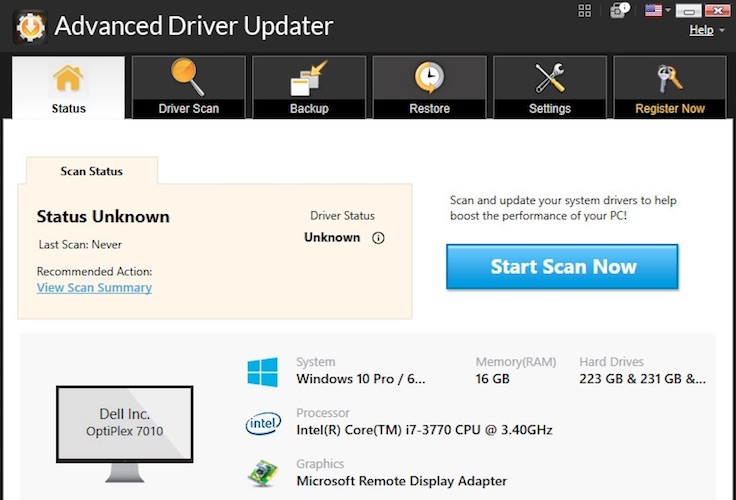
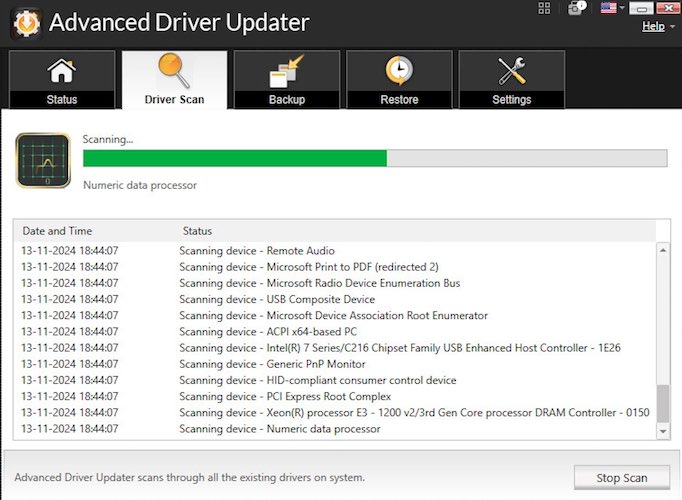
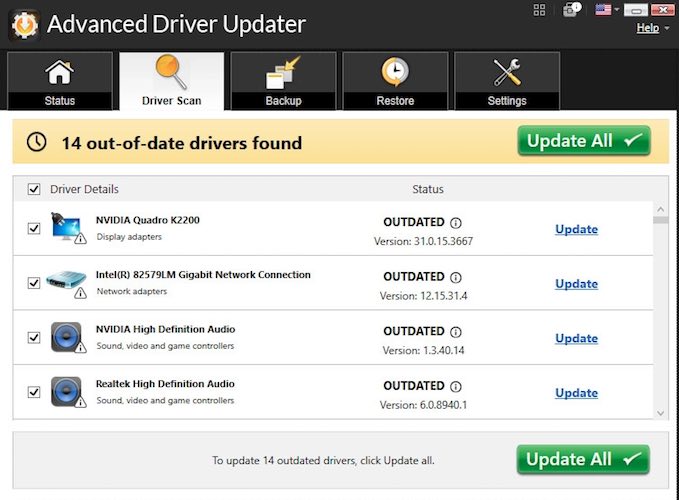
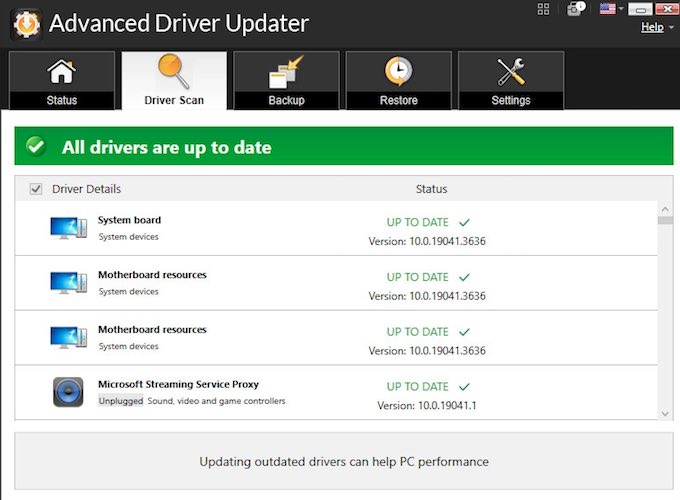
Once installed, Advanced Driver Updater scans your system and shows:
- Outdated drivers
- Missing drivers
- Faulty or incompatible drivers
Everything is listed in one clean dashboard—no technical jargon.
Why this matters:
You don’t need to know what a chipset or INF file is.

2. Massive Driver Database (14M+ Drivers)
The registered version unlocks access to over 14 million drivers, covering:
- Graphics cards (NVIDIA, AMD, Intel)
- Audio devices
- Network adapters
- Printers & scanners
- USB, Bluetooth, motherboard components
This is where many free tools fall short.
Must Read : How to update your drivers in Windows automatically
3. WHQL-Certified & Secure Updates
All drivers are:
- Digitally signed
- WHQL-tested
- Scanned for malware
Translation: You’re not installing risky or unofficial files.
4. Backup & Restore (Underrated but Critical)
Before updating, the software can backup existing drivers.
If something goes wrong?
➡ Restore the previous version in one click.
This alone makes it safer than manual updates.
5. Driver Exclusion List
Not every driver needs updating.
You can exclude:
- Stable legacy hardware
- Custom OEM drivers
- Devices you don’t use
Perfect for cautious users.

6. Scheduled Scans (Set & Forget)
You can schedule automatic scans:
- Daily
- Weekly
- Monthly
No reminders. No effort.
7. Faster Cloud Downloads
Drivers are downloaded from cloud servers, with:
- Resume support
- Faster speeds (paid version)
Helpful if your connection drops mid-download.
Must Read : QnE Companion Review: Free Windows Utilities to Boost Productivity
Real-World Use Cases (Where It Actually Helps)
🎧 Fixing Audio Problems
Missing sound, channel imbalance, or crackling audio is often driver-related. Updated audio drivers usually fix it instantly.
🖨 Printer Not Working
If Windows suddenly “can’t find” your printer, outdated drivers are a common reason.
🎮 Gaming Performance Issues
Updated GPU drivers can:
- Improve FPS
- Reduce stuttering
- Fix game launch crashes
Especially useful for 4K or high-refresh gaming.
💻 Older PCs
On aging systems, manufacturers stop pushing updates. Driver updater tools help fill that gap.
Free vs Paid Version Comparison
| Feature | Free Version | Registered Version |
|---|---|---|
| Automatic Scan | ✅ | ✅ |
| One-Click Update | ❌ | ✅ |
| Driver Database | Limited | 14M+ Drivers |
| Backup & Restore | ✅ | ✅ |
| Scheduled Scan | ✅ | ✅ |
| Download Speed | Basic | Up to 100× Faster |
| Priority Support | ❌ | ✅ |
Important:
The free version updates one driver at a time, which is fine for testing but not practical long-term.
Pros and Cons (Honest Breakdown)
✅ Pros
- Beginner-friendly interface
- Large, reliable driver database
- Safe updates with rollback
- Helps fix real hardware issues
- Compatible with all major Windows versions
❌ Cons
- Free version is very limited
- No lifetime license
- Not designed for enterprise use
Must Read : ABBYY FineReader PDF for Windows Review: Is It Worth the Price?

How Does It Compare With Other Driver Updaters?
Compared to generic driver tools, Advanced Driver Updater focuses more on:
- Safety (WHQL-only drivers)
- Simplicity (no confusing options)
- Stability over aggressive updates
It’s not trying to be an all-in-one “PC booster”—and that’s actually a good thing.
Is Advanced Driver Updater Safe?
Yes—when used as intended.
Safety features include:
- Malware-checked driver sources
- WHQL-certified updates
- Backup & restore option
- Exclusion list
As always, avoid running multiple driver tools at once.
Buying Guide: Is It Worth Paying For?
Ask yourself:
- Do you update drivers manually right now?
- Have you had unexplained hardware issues recently?
- Do you want a set-and-forget solution?
If yes, the paid version saves time and reduces risk.
👉 Check price if you want a stress-free solution
👉 See full features before deciding
FAQs (People Also Ask)
1. Does Advanced Driver Updater really improve PC performance?
Indirectly, yes. Updated drivers improve stability, compatibility, and hardware efficiency.
2. Can it break my system?
Unlikely, thanks to driver backups and WHQL-certified updates.
3. Is it better than Windows Update?
Windows Update doesn’t always deliver the latest or device-specific drivers.
4. Is the free version enough?
Only for testing. Regular users will find it limiting.
5. Does it support Windows 11?
Yes, fully compatible.
6. Is it good for gaming PCs?
Yes, especially for keeping graphics drivers updated.
7. Can I restore drivers if something goes wrong?
Yes, with the built-in restore feature.
Final Verdict: Should You Use Systweak Advanced Driver Updater?
If you want a safe, easy, and reliable way to manage Windows drivers without technical headaches, Advanced Driver Updater is worth considering.
It doesn’t promise miracles—but it does exactly what it claims:
✔ Find outdated drivers
✔ Update them safely
✔ Reduce hardware-related issues
For everyday Windows users, gamers, and older PCs, it’s a practical tool that saves time and frustration.