


If you’re using a modern Mac, chances are you no longer have a built-in DVD drive. Yet many of us still own shelves of DVDs—movies, home videos, family recordings, and old collections that were never released digitally.
Common problems Mac users face include:
- DVDs getting scratched, damaged, or lost
- New Macs not supporting physical discs
- Re-buying movies digitally costing more than expected
- Video formats that won’t play smoothly on Apple devices
This is where Mac DVD Ripper Pro, now rebranded as MDRP, comes in.

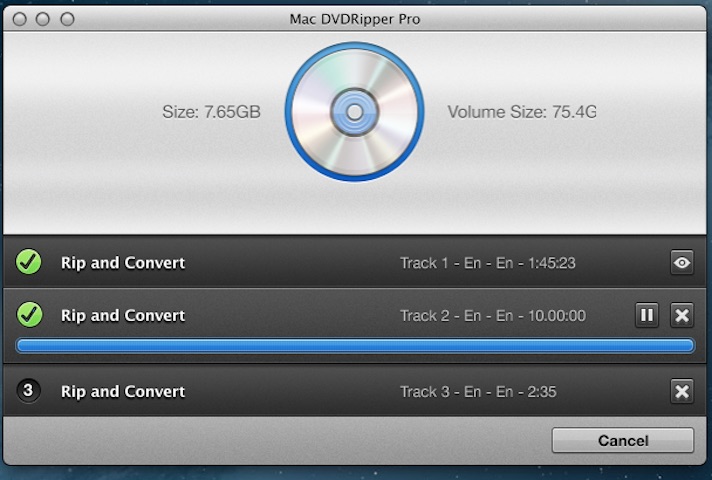
In this Mac DVD Ripper Pro review, I’ll walk you through what it does, how it performs on modern macOS systems, and whether it’s actually worth using in 2026.
Quick Summary
Mac DVD Ripper Pro (MDRP) is a fast, Mac-optimized DVD ripping and video conversion tool. It supports over 100 formats, runs smoothly on Apple Silicon Macs, preserves video quality, and includes advanced features like subtitle OCR, AI upscaling, and battery-efficient playback.
Best for:
Mac users who want reliable DVD backups, Apple-device compatibility, and easy-to-use video tools without technical headaches.
What Is Mac DVD Ripper Pro (MDRP)?
Mac DVD Ripper Pro is a dedicated DVD ripping software for macOS designed to convert physical DVDs into high-quality digital files.
With MDRP, you can:
- Rip DVDs into MP4, MOV, and other popular formats
- Convert incompatible video files like MKV or AVI
- Optimize videos for iPhone, iPad, Apple TV, and Mac
- Restore and enhance old videos
- Create long-term DVD backups
The software has a long, trusted history on macOS and is now being rebranded as MDRP, while keeping the same core features and performance.
Must Read : Apple Macbook Pro M4 Chip 2024 Laptop
Mac DVD Ripper Pro Key Features
Fast DVD Ripping Optimized for macOS
MDRP analyzes your DVD structure and uses efficient algorithms to ensure clean, accurate rips.
On Apple Silicon Macs (M1, M2, M3), it takes advantage of hardware acceleration, resulting in:
- Faster ripping speeds
- Lower CPU usage
- More stable performance
This makes it noticeably smoother than many generic DVD rippers.
Supports Over 100 Video Formats
Mac DVD Ripper Pro isn’t limited to DVDs.
It supports formats such as:
- MP4
- MOV
- MKV
- AVI
- MPEG
- Digitized VHS recordings
This makes it useful as a full video converter for Mac, not just a DVD tool.
Apple Device Presets (Huge Time Saver)
One of the strongest points of MDRP is how well it integrates with Apple devices.

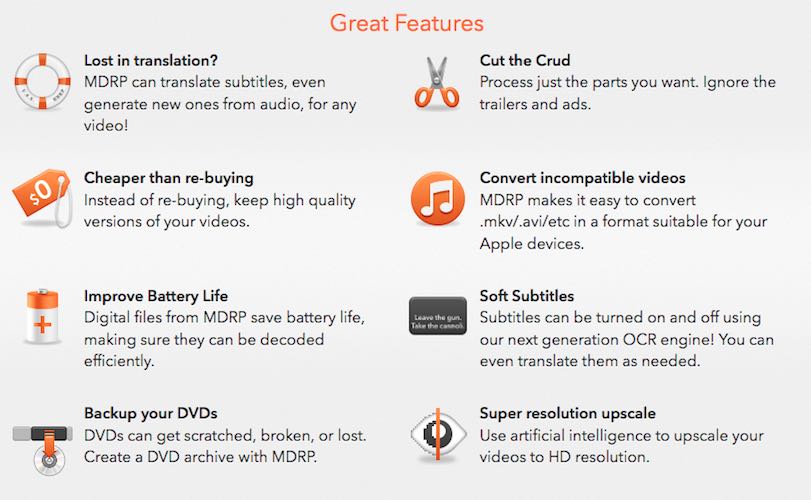
Built-in presets are available for:
- iPhone
- iPad
- Apple TV
- macOS playback
These presets ensure smooth playback, proper resolution, and optimized encoding—without manual tweaking.
Battery-Efficient Video Encoding
MDRP processes video files so they decode efficiently during playback.
For MacBook users, this means:
- Improved battery life
- Less heat and fan noise
- Better performance on older Macs
This is especially useful if you watch videos while traveling or working remotely.
Must Read : Aiarty Image Matting Review: Precision Background Removal Made Simple
Subtitle OCR and Translation
This is one feature that truly sets MDRP apart.
Using its next-generation OCR engine, you can:
- Extract subtitles from DVDs
- Convert hardcoded subtitles into soft subtitles
- Translate subtitles into other languages
- Turn subtitles on or off during playback
This is ideal for foreign films, accessibility needs, or family videos.
AI Super Resolution Upscaling
Mac DVD Ripper Pro includes AI-powered video upscaling designed to improve older footage.
It helps:
- Reduce noise
- Improve sharpness
- Enhance overall clarity
While it won’t magically turn VHS into cinema-quality video, the improvement is noticeable—especially on older DVDs and home recordings.
Built-In Video Enhancement Tools
MDRP includes professional-grade adjustment tools that allow you to:
- Correct colors
- Adjust brightness and contrast
- Apply denoising
- Improve aging footage
These features are especially helpful for VHS tape restoration and old family videos.
Rip Only What You Want
You don’t have to rip an entire disc if you don’t want to.
MDRP allows you to:
- Select specific chapters
- Skip trailers and ads
- Process only the main content
This saves time and storage space.
Must Read : AI Video Maker for E-Commerce Product Videos
Real-World Use Cases
Backing Up Your DVD Collection
DVDs can degrade over time. Creating digital backups ensures your collection stays safe and accessible.
Watching DVDs on Apple Devices
Convert once and watch on iPhone, iPad, or Apple TV without external drives.
Restoring Old VHS Memories
Enhance digitized VHS tapes and preserve family memories in better quality.
Accessibility for Family Videos
Add clear, synchronized subtitles for family members with hearing difficulties.
Pros and Cons of Mac DVD Ripper Pro
Pros
- Fully optimized for macOS
- Excellent Apple Silicon support
- Easy-to-use interface
- Subtitle OCR and translation
- AI upscaling and restoration tools
- Battery-efficient playback
Cons
- macOS only
- Not free
- Advanced features may be unnecessary for one-time users
Mac DVD Ripper Pro vs Alternatives
| Feature | MDRP | HandBrake | WinX DVD Ripper |
|---|---|---|---|
| macOS Optimization | Excellent | Moderate | Moderate |
| Apple Silicon Support | Yes | Partial | Partial |
| Subtitle OCR | Yes | No | No |
| AI Upscaling | Yes | No | No |
| Beginner Friendly | Very | Average | Average |
Takeaway:
MDRP is clearly built with Mac users in mind, while most alternatives feel more generic.
Who Should Use Mac DVD Ripper Pro?
Best for:
- Mac users with large DVD collections
- Apple device owners
- Beginners who want simplicity
- Users restoring old videos
- Anyone who wants reliable long-term backups
Not ideal if:
- You only need a one-time rip
- You’re on Windows
Things to Consider Before Buying
Before you decide, think about:
- How often you’ll rip DVDs
- Whether Apple device compatibility matters to you
- If subtitle tools or video restoration are useful
For regular use, MDRP can easily save money compared to re-buying digital versions of your movies.
Frequently Asked Questions
Is Mac DVD Ripper Pro safe to use?
Yes. It’s a trusted macOS application used by thousands of Mac users.
Does it work on M1, M2, and M3 Macs?
Yes. It’s fully optimized for Apple Silicon.
Can it handle scratched DVDs?
It handles most discs well, though severely damaged DVDs may still fail.
Does MDRP include editing tools?
It includes trimming and enhancement tools, not full video editing.
Can I add subtitles to home videos?
Yes, including subtitle generation and translation.
Final Verdict: Is Mac DVD Ripper Pro Worth It?
Mac DVD Ripper Pro (MDRP) is more than just a DVD ripper. It’s a Mac-focused video processing solution built for people who actually want to preserve and enjoy their content across Apple devices.
If you value ease of use, quality output, and macOS-optimized performance, this is one of the best DVD ripping tools for macOS available right now.