


Whether you’re creating YouTube tutorials, recording online classes, building SaaS demos, or sharing quick how-to guides with your team, screen recording software for Windows has become an everyday tool in 2026. But here’s the problem. Most tools are either too expensive, watermark-heavy, or overwhelming for beginners. So how do you choose the best screen recording software for Windows that’s reliable, beginner-friendly, and doesn’t break your workflow?

That’s exactly what this guide solves.
I’ve tested, compared, and analyzed the best free and paid screen recorders for Windows 10 & 11, focusing on:
- Real-world usability
- Audio + webcam quality
- Editing features
- Performance on low-end PCs
- Value for money
Let’s dive in 👇
Quick Summary
| Tool | Best For | Free Version | Key Highlight |
|---|---|---|---|
| Flashback Express | Beginners & tutorials | ✅ Yes | No watermark, easy editing |
| OBS Studio | Advanced users & streaming | ✅ Yes | Fully customizable |
| Camtasia | Professionals & marketers | ❌ Trial | Powerful editor |
| Bandicam | Gaming & performance | ❌ Limited | Lightweight & fast |
| ShareX | Tech-savvy users | ✅ Yes | Open-source & flexible |
👉 Short on time? If you want a free, beginner-friendly screen recorder, start with Flashback Express.
🏆 Best Screen Recording Software for Windows in 2026
🥇 Flashback Express (Best Free Screen Recorder Overall)
If you’re searching for the best free screen recorder for Windows in 2026, Flashback Express easily takes the top spot.
It strikes the perfect balance between simplicity and power, making it ideal for beginners, educators, and marketers.
🔑 Key Features
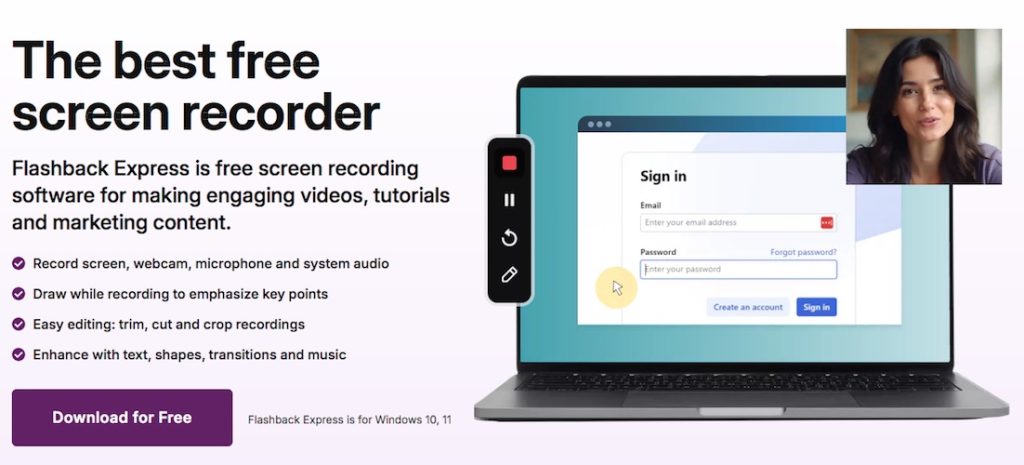
- Record screen, webcam, microphone, and system audio simultaneously
- Capture full screen, window, or custom area
- Draw and annotate while recording
- Built-in editor: trim, cut, crop, resize
- Add text, shapes, transitions, music, and effects
- Cursor tracking for tutorials
- Schedule recordings in advance
No watermarks. No time limits. No stress.
Must Read : Aiarty Image Matting Review: Precision Background Removal Made Simple
✅ Pros
- 100% free for core features
- Beginner-friendly interface
- Excellent audio capture quality
- Great for tutorials and explainer videos
❌ Cons
- Advanced features locked behind paid plans
- Not ideal for live streaming
🎯 Best For
- Tutorials & how-to videos
- Educational content
- Marketing demos
- Beginners and non-tech users
🥈 OBS Studio (Best for Power Users & Streamers)
OBS Studio is a favorite among streamers and advanced creators.
It’s completely free and insanely powerful—but there’s a learning curve.
Features
- Unlimited recording & streaming
- Scene-based recording
- Audio mixing & filters
- Plugin support
Pros
- Free & open-source
- No watermarks
- Highly customizable
Cons
- Not beginner-friendly
- No built-in editor
Best for: Streamers, gamers, advanced users
Must Read : Luminar Neo Review (2026): Is It Worth It for Photo Editing?
🥉 Camtasia (Best Premium Screen Recorder)
If budget isn’t a concern and you want professional-quality videos, Camtasia is hard to beat.
Features
- Advanced timeline editor
- Templates & animations
- Quizzes & interactive elements
- Royalty-free assets
Pros
- All-in-one solution
- Polished output
- Excellent support
Cons
- Expensive
- Heavy on system resources
Best for: Businesses, marketers, professional creators
🎮 Bandicam (Best for Gaming Performance)
Bandicam focuses on high-performance screen capture with minimal system impact.
Pros
- Lightweight
- High FPS recording
- Hardware acceleration
Cons
- Watermark in free version
- Limited editing
Best for: Gamers, performance-focused users
🧠 ShareX (Best for Tech-Savvy Users)
ShareX is an underrated powerhouse.
It’s free, open-source, and extremely flexible—but not beginner-friendly.
Best for:
- Developers
- IT professionals
- Advanced workflows
📊 Comparison Table: Best Screen Recorders for Windows
| Software | Free | Watermark | Editing | Best Use Case |
|---|---|---|---|---|
| Flashback Express | ✅ | ❌ | ✅ | Tutorials, education |
| OBS Studio | ✅ | ❌ | ❌ | Streaming |
| Camtasia | ❌ | ❌ | ✅ | Professional videos |
| Bandicam | ❌ | ✅ | ❌ | Gaming |
| ShareX | ✅ | ❌ | ❌ | Advanced users |
🛒 Buying Guide: How to Choose the Right Screen Recorder
Before choosing any screen capture software for Windows, ask yourself:
1️⃣ What will you record?
- Tutorials → Flashback Express
- Games → Bandicam or OBS
- Marketing videos → Camtasia
2️⃣ Do you need editing?
If yes, avoid tools without built-in editors.
3️⃣ System performance
Low-end PC? Choose lightweight tools like Flashback Express or Bandicam.
4️⃣ Budget
Free tools are powerful enough for most users in 2026.
Must Read : Best Image Enhancer for Mac: I Tested the Top Tools
🎯 Real-World Use Cases
👨🏫 Tutorials & Online Courses
Flashback Express makes it easy to:
- Highlight cursor movement
- Add annotations
- Auto-generate subtitles
📈 Marketing & SaaS Demos
Create clean walkthroughs with:
- Picture-in-picture webcam
- Smooth transitions
- Stock media
🎓 Education
Teachers can:
- Record lessons in advance
- Schedule recordings
- Share clear explanations
❓ FAQs – People Also Ask
What is the best free screen recording software for Windows?
Flashback Express is one of the best free options with no watermark and built-in editing tools.
Can I record screen and audio at the same time?
Yes. Most modern Windows screen recorders support microphone and system audio recording.
Is screen recording software safe?
As long as you download from official sources, screen recording tools are safe and AdSense-compliant.
Which screen recorder is best for Windows 11?
Flashback Express, OBS Studio, and Camtasia work flawlessly on Windows 11.
Does free screen recording software add watermarks?
Some do. Flashback Express does not add watermarks in its free version.
🏁 Final Verdict: Which Screen Recorder Should You Choose?
If you want a simple, free, and powerful screen recorder for Windows in 2026, Flashback Express is the smartest choice for most users.
It’s:
- Easy to use
- Feature-rich
- Perfect for tutorials, education, and marketing
Advanced users may prefer OBS, while professionals may invest in Camtasia—but for 90% of people, Flashback Express delivers exactly what you need.