


Travel Wi-Fi sounds convenient until you actually try using hotel internet.
One device refuses to connect. Another keeps disconnecting. Public Wi-Fi feels slow and insecure. And if you’re working remotely, the last thing you want is unreliable internet during a video call.
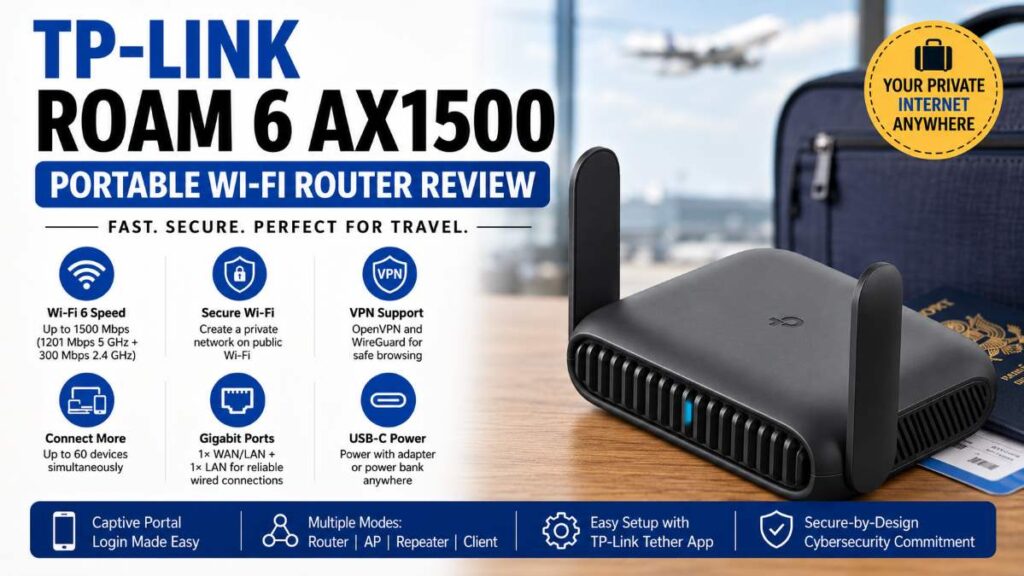
That’s exactly where the TP-Link Roam 6 AX1500 Portable Wi-Fi Router steps in.
This compact Wi-Fi 6 travel router promises faster wireless speeds, secure browsing on public networks, VPN support, and enough power for multiple devices — all in a pocket-sized design.
But is it actually worth buying in 2026?
After diving deep into its features, real-world use cases, and practical benefits, here’s everything you need to know before making a decision.

Quick Summary
| Feature | Verdict |
|---|---|
| Wi-Fi Standard | Wi-Fi 6 |
| Speed | Up to AX1500 |
| Best For | Travelers, remote workers, hotel Wi-Fi |
| VPN Support | OpenVPN & WireGuard |
| USB Tethering | Yes |
| Public Wi-Fi Login Support | Yes |
| Power Source | USB-C |
| Easy Setup | Very beginner-friendly |
| Worth Buying? | Yes, for portable secure internet |
Best Reasons to Buy
- Compact and easy to carry
- Creates secure private Wi-Fi from public networks
- Supports up to 60 devices
- Fast Wi-Fi 6 performance
- VPN encryption support
- Works with hotels, airports, and Airbnbs
- USB-C powered via adapter or power bank
Why Portable Wi-Fi Routers Are Becoming Essential
A few years ago, travel routers felt optional.
Today, they solve real problems.
Whether you’re:
- working remotely,
- traveling frequently,
- attending conferences,
- gaming on the go,
- or simply tired of unsafe public Wi-Fi,
a portable router can dramatically improve your internet experience.
The TP-Link Roam 6 AX1500 is designed specifically for these situations.
And unlike older travel routers that struggled with speed, this model uses Wi-Fi 6, which makes a noticeable difference in crowded environments like hotels and airports.
Must Read : How to Speed Up Old Android Phone (2026 Guide)
TP-Link Roam 6 AX1500 Specifications
| Specification | Details |
|---|---|
| Wi-Fi Standard | Wi-Fi 6 (802.11ax) |
| Max Speed | 1201 Mbps (5 GHz) + 300 Mbps (2.4 GHz) |
| Bands | Dual-Band |
| Ethernet Ports | 1× Gigabit WAN/LAN + 1× Gigabit LAN |
| VPN Support | OpenVPN, WireGuard |
| Power | USB-C |
| Modes | Router, AP, Repeater, Client |
| Device Capacity | Up to 60 devices |
| App Support | TP-Link Tether App |
Design and Build Quality
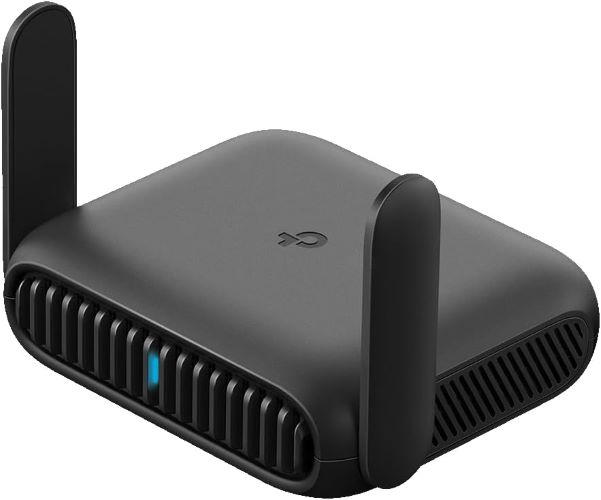
Small Enough for Any Backpack
One of the biggest selling points of the TP-Link Roam 6 AX1500 is portability.
The router is compact enough to:
- fit in a laptop bag,
- travel pouch,
- or even a jacket pocket.
That matters more than you might think.
Traditional routers are bulky and inconvenient for travel. This one feels purpose-built for people constantly moving between hotels, coworking spaces, and temporary setups.
Durable Travel-Friendly Construction
The body feels sturdy rather than cheap.
That’s important because travel gear gets tossed around frequently. The compact design also means fewer cables and less clutter in your setup.
Wi-Fi 6 Performance: Is It Actually Fast?
Faster Than Typical Travel Routers
Most older travel routers still rely on Wi-Fi 5.
The Roam 6 AX1500 upgrades to Wi-Fi 6, bringing:
- better speed,
- lower latency,
- improved efficiency,
- and stronger performance in crowded environments.
Must Read : DMDE Disk Editor & Data Recovery Software Review: Features, Pros & Recovery Performance
Speed Breakdown
| Band | Maximum Speed |
|---|---|
| 5 GHz | 1201 Mbps |
| 2.4 GHz | 300 Mbps |
Of course, real-world performance depends on:
- hotel internet quality,
- wall interference,
- ISP speed,
- and connected devices.
Still, for a portable router, these numbers are impressive.
Handles Multiple Devices Well
TP-Link claims support for up to 60 devices simultaneously.
Realistically, most users won’t connect that many devices. But the extra capacity helps maintain stable performance when multiple phones, laptops, tablets, and smart devices are active together.
This is especially useful for:
- families,
- business teams,
- digital nomads,
- and shared Airbnb setups.
One Feature Travelers Will Love
Captive Portal Authentication
If you’ve ever stayed at a hotel, you know the frustration:
- open browser,
- enter room number,
- accept terms,
- reconnect every device individually.
The TP-Link Roam 6 simplifies this process.
You log into the public Wi-Fi once through the Tether App, and the router creates a secure private network for all your devices.
That means:
- one login,
- one secure connection,
- zero repeated setup headaches.
This alone can save a surprising amount of time while traveling.
Security Features: More Important Than Most People Realize
Public Wi-Fi is convenient — but not always safe.
Airports, hotels, cafés, and shared networks can expose your data to security risks.
VPN Support Included
The TP-Link Roam 6 supports:
- OpenVPN
- WireGuard
This is a major advantage for:
- remote workers,
- freelancers,
- business travelers,
- and privacy-conscious users.
WireGuard support is particularly valuable because it offers:
- faster VPN speeds,
- modern encryption,
- and lower latency compared to older protocols.
Secure-by-Design Commitment
TP-Link also highlights its involvement with the CISA Secure-by-Design pledge, showing a stronger focus on cybersecurity and long-term firmware maintenance.
That’s reassuring because many low-cost travel routers receive poor security updates after launch.
Multiple Connectivity Modes Explained
This router is more flexible than it initially appears.
1. Router Mode
Connect the device to:
- hotel Wi-Fi,
- ISP internet,
- or USB tethering from your phone.
Then create your own secure wireless network.
2. Access Point Mode
Useful when you already have wired internet and want to create Wi-Fi access.
3. Repeater Mode
Extends existing Wi-Fi coverage.
Helpful in:
- large hotel rooms,
- apartments,
- or weak signal areas.
Must Read : How to Fix “iPhone Is Disabled, Connect to iTunes” (Step-by-Step Guide)
4. Client Mode
Allows wired devices to connect wirelessly.
A useful feature for:
- smart TVs,
- gaming consoles,
- or desktop PCs.
USB-C Power Makes Travel Easier
This may sound minor, but it matters in real-world use.
The router uses USB-C power input.
That means you can power it using:
- the included adapter,
- a power bank,
- laptop USB-C charging setups,
- or portable travel batteries.
For travelers trying to reduce cable clutter, this is a huge convenience.
TP-Link Tether App Experience
Beginner-Friendly Setup
The setup process is refreshingly simple.
Using the TP-Link Tether App, most users can configure the router within minutes.
You can:
- update firmware,
- manage devices,
- monitor connections,
- and switch modes easily.
Even non-technical users should feel comfortable using it.
Real-World Use Cases
1. Hotel Wi-Fi Security
Instead of connecting every device directly to public Wi-Fi, you create one encrypted private network.
Ideal for:
- banking,
- work files,
- video calls,
- and personal browsing.
2. Remote Work Setup
VPN support plus stable Wi-Fi 6 performance makes this router excellent for:
- Zoom meetings,
- cloud work,
- remote collaboration,
- and secure file access.
3. Family Travel
Families often travel with:
- phones,
- tablets,
- laptops,
- gaming devices,
- and streaming sticks.
Managing all those devices becomes much easier with a dedicated portable router.
4. Gaming While Traveling
Hotel Wi-Fi can be inconsistent for gaming.
The Roam 6 helps stabilize connections and reduce congestion compared to connecting directly to overloaded public networks.
Pros and Cons
Pros
| Pros |
|---|
| Fast Wi-Fi 6 speeds |
| Compact and portable |
| VPN support included |
| USB-C powered |
| Excellent for hotel Wi-Fi |
| Multiple operating modes |
| Easy app setup |
| Gigabit Ethernet ports |
Cons
| Cons |
|---|
| Performance depends on source internet |
| Advanced VPN setup may confuse beginners |
| No built-in battery |
| Premium price compared to basic travel routers |
TP-Link Roam 6 AX1500 vs Alternatives
TP-Link Roam 6 AX1500 vs GL.iNet Travel Routers
| Feature | TP-Link Roam 6 | Typical GL.iNet Models |
|---|---|---|
| Wi-Fi 6 | Yes | Some models only |
| App Experience | Beginner-friendly | More technical |
| VPN Support | Yes | Yes |
| USB-C Power | Yes | Usually yes |
| Ease of Use | Easier | Advanced-user focused |
Which Is Better?
- Choose TP-Link if you want simplicity and reliable everyday travel performance.
- Choose GL.iNet if you prefer highly customizable networking features.
Who Should Buy This Router?
Best For
Remote Workers
Secure public Wi-Fi access matters when handling work accounts and confidential data.
Frequent Travelers
Hotels and airports become much easier to manage.
Digital Nomads
Reliable internet matters when constantly changing locations.
Families
One secure network for everyone’s devices.
Students
Useful for dorms, temporary housing, and travel.
Who Should Skip It?
This router may not be ideal if:
- you only need home Wi-Fi,
- never travel,
- or already own a high-end mesh system.
In those cases, a traditional router may provide better overall value.
Buying Guide: What to Consider Before Buying a Travel Router
1. Wi-Fi Standard
Wi-Fi 6 is worth it for:
- faster speeds,
- lower congestion,
- and better battery efficiency on connected devices.
2. VPN Support
Essential for travelers using public networks regularly.
3. Portability
Look for compact designs with USB-C power support.
4. Ethernet Ports
Gigabit ports are useful for:
- gaming,
- hotel wired connections,
- and stable work setups.
5. Easy Setup
Travel routers should save time, not create technical headaches.
The TP-Link Roam 6 performs well in all these categories.
FAQs
Is the TP-Link Roam 6 AX1500 good for hotel Wi-Fi?
Yes. It’s specifically designed to connect to public Wi-Fi networks and create a secure private connection for your devices.
Does the TP-Link Roam 6 support VPNs?
Yes. It supports both OpenVPN and WireGuard VPN protocols.
Can I use a power bank with this router?
Yes. The router supports USB-C power input and can run from compatible power banks.
Is Wi-Fi 6 useful in a travel router?
Absolutely. Wi-Fi 6 improves speed, efficiency, and performance in crowded areas like hotels and airports.
How many devices can connect simultaneously?
TP-Link states support for up to 60 devices, depending on network conditions and bandwidth availability.
Can beginners set it up easily?
Yes. The TP-Link Tether App makes setup relatively simple even for first-time users.
Does it work with USB tethering?
Yes. You can connect internet through a smartphone USB tethering connection.
Final Verdict: Is the TP-Link Roam 6 AX1500 Worth It?
The TP-Link Roam 6 AX1500 solves several modern travel internet problems surprisingly well.
Instead of relying directly on unsecured hotel Wi-Fi, it creates a safer and more reliable personal network for all your devices.
The combination of:
- Wi-Fi 6,
- VPN support,
- USB-C power,
- captive portal login support,
- and beginner-friendly setup
makes it one of the more practical portable routers currently available.
It’s not designed to replace a powerful home gaming router. That’s not its purpose.
But for:
- travel,
- remote work,
- business trips,
- digital nomad setups,
- and secure browsing on the go,
it delivers excellent value.
If secure and stable internet matters during travel, this router is definitely worth considering.