


Ever feel busy all day… yet nothing truly gets done?
Messy cables, slow workflows, missing documents, and poor organization quietly drain focus. The fix isn’t working longer—it’s working smarter with the right home office essentials.
This guide cuts through the noise and shows you practical, proven tools that boost productivity and efficiency without overcomplicating your setup.

Quick Summary
- A productive home office = organization + speed + ergonomics
- Small tools (label makers, scanners, cable organizers) deliver outsized gains
- Best for: remote workers, creators, teachers, freelancers, and small teams
- Includes a buying guide, comparisons, FAQs, and real-world use cases
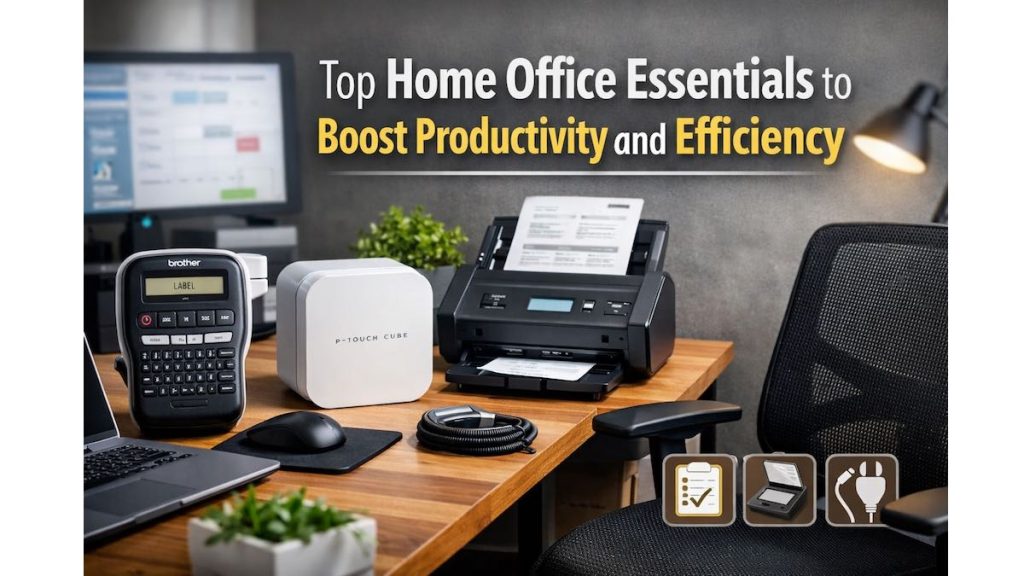
Top Home Office Essentials to Boost Productivity and Efficiency
Why the Right Tools Matter More Than Motivation
Motivation fades. Systems don’t.
A productive home office removes friction so tasks flow naturally. When everything has a place—and tools work fast—you stay focused longer and finish sooner.
Let’s break down the must-have essentials that deliver real results.
H2: Essential #1 – Smart Desk Organization Tools
The Hidden Cost of Clutter
Clutter increases decision fatigue. Even small distractions—like unlabeled cables or mixed storage—slow you down.
Desk organization tools solve this by:
- Reducing visual noise
- Speeding up task switching
- Preventing lost equipment
Pro Tip: Label Everything Once, Save Time Daily
A simple label system can save hours each month.
Great uses include:
- Power cables and chargers
- Storage bins and drawers
- External drives and SD cards
- Studio zones or desk sections
Recommended Tool: Portable Label Makers
Compact label makers are perfect for home offices. They’re fast, affordable, and surprisingly powerful.
Why they work well:
- One-touch operation
- No technical setup
- Durable labels that last
These tools are especially useful if you manage multiple devices or creative gear.
Essential #2 – Bluetooth Labeling for Flexible Workflows
When Mobile Labeling Makes Sense
If you work across rooms—or manage a hybrid desk—Bluetooth label printers shine.
They pair with phones or laptops so you can label on demand without returning to your desk.
Ideal for:
- Storage shelves
- Hard drives & backups
- Camera and streaming gear
- Teaching or presentation kits
Benefits You’ll Notice Fast
- Faster organization
- Cleaner storage
- Professional-looking setups
- Less mental clutter
Once everything is clearly labeled, your brain stops tracking details—and focuses on work.
Essential #3 – High-Speed Desktop Scanner (Paper to Digital)
Why Paper Is Still Slowing You Down
Even in 2026, paper hasn’t disappeared.
Invoices, lesson plans, contracts, handwritten notes—they pile up quickly.
A high-speed desktop scanner bridges the gap between paper and digital workflows.
How Scanners Boost Efficiency
- Instantly digitize documents
- Enable screen sharing for teaching
- Create searchable archives
- Reduce physical storage
For educators, presenters, and creators, scanners turn paper into reusable digital assets.
Best Use Cases
- Teachers sharing worksheets
- Freelancers archiving contracts
- Small businesses managing receipts
- Content creators digitizing notes
A compact scanner fits neatly beside your desk without taking over your workspace.
Essential #4 – Ergonomic Comfort Essentials
Productivity Starts With Comfort
Pain kills focus.
Ergonomic essentials help you work longer without fatigue.
Top comfort upgrades:
- Adjustable office chair
- Monitor riser or arm
- Wrist rests
- Foot support
Small Tweaks, Big Gains
You don’t need a full redesign. Even a monitor at eye level reduces neck strain and boosts concentration.
Essential #5 – Cable & Power Management
Why Power Chaos Wastes Time
Loose cables don’t just look messy—they slow troubleshooting and damage equipment.
Cable management tools help you:
- Identify connections instantly
- Avoid unplugging mistakes
- Protect gear from wear
Combine cable sleeves with labeled cords for a clean, professional setup.
Comparison Table – Organization Tools at a Glance
| Tool Type | Best For | Key Benefit | Space Needed |
|---|---|---|---|
| Portable Label Maker | Quick desk labeling | Speed & simplicity | Very low |
| Bluetooth Label Printer | Flexible labeling | Mobile control | Low |
| Desktop Scanner | Paper workflows | Digital efficiency | Medium |
| Cable Organizers | Power management | Visual clarity | Very low |
Pros & Cons – Label Makers & Scanners
Label Makers
Pros
- Affordable
- Easy to use
- Immediate organization
Cons
- Limited to text labels
- Requires refills
Desktop Scanners
Pros
- Massive time savings
- Paperless workflow
- Professional results
Cons
- Higher upfront cost
- Requires desk space
Real-World Scenarios
Scenario 1: Remote Worker
You start work faster because:
- Cables are labeled
- Files are digitized
- Desk is clutter-free
Scenario 2: Teacher or Trainer
You:
- Scan worksheets instantly
- Share documents live
- Reuse materials efficiently
Scenario 3: Content Creator
You:
- Label gear clearly
- Organize storage bins
- Spend less time searching, more creating
Buying Guide – What to Look For
When Choosing Label Makers
- Tape availability
- Print clarity
- Size and portability
When Choosing Scanners
- Scan speed
- File format support
- Compact footprint
Ask Yourself:
- How often will I use this?
- Will it save time weekly?
- Does it fit my space?
If the answer is yes—it’s worth it.
FAQs (Schema-Friendly)
1. What are the most important home office essentials for productivity?
Organization tools, ergonomic furniture, and time-saving devices like scanners and label makers make the biggest impact.
2. Do small tools really improve productivity?
Yes. Removing friction—like searching for cables or documents—adds up to hours saved each month.
3. Is a label maker useful for a home office?
Absolutely. Labeling improves organization, reduces errors, and keeps workspaces clean.
4. Who benefits most from a desktop scanner?
Teachers, freelancers, small businesses, and anyone transitioning to a paperless workflow.
5. How do I avoid overbuying office equipment?
Focus on tools that solve daily pain points and fit your space.
6. Are these tools beginner-friendly?
Yes. Most require little to no setup and are easy to maintain.
7. Can these essentials improve work-life balance?
Indirectly, yes—less frustration means finishing work faster.
Final Verdict & Recommendation
A productive home office isn’t about expensive upgrades—it’s about intentional tools that reduce friction.
Start with:
- Clear labeling
- Smart document digitization
- Clean cable management
These essentials create a workspace that supports focus instead of fighting it.
If you work from home regularly, these upgrades aren’t luxuries—they’re productivity multipliers. Small changes. Big efficiency gains.