


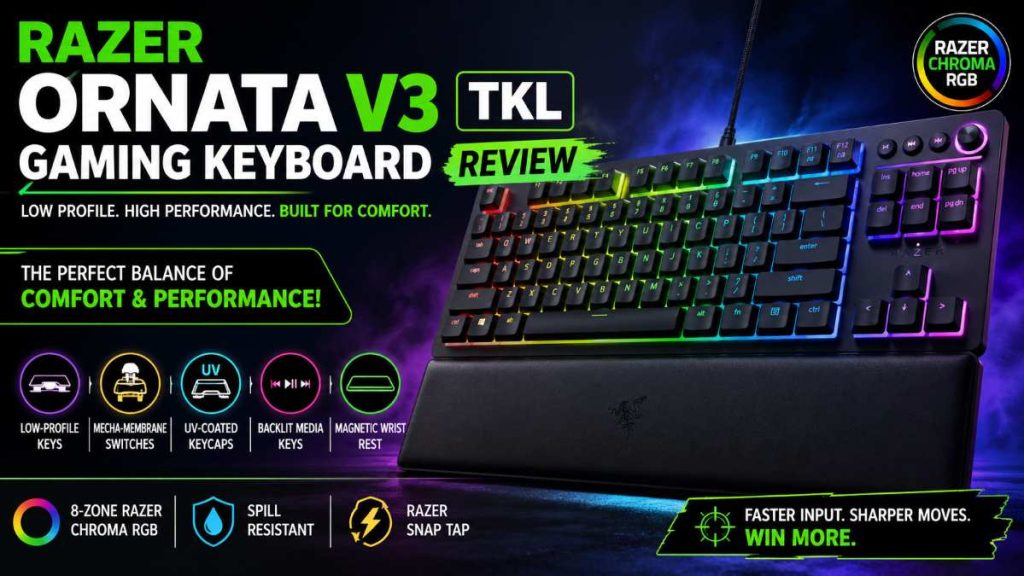
Finding a gaming keyboard that balances comfort, performance, and price isn’t easy. Mechanical keyboards can feel too loud or expensive, while membrane keyboards often lack that satisfying feedback gamers love.
So where does the Razer Ornata V3 TKL fit in?
It promises a hybrid typing experience, sleek low-profile design, and RGB lighting—all without breaking the bank. But does it actually deliver in real-world use?

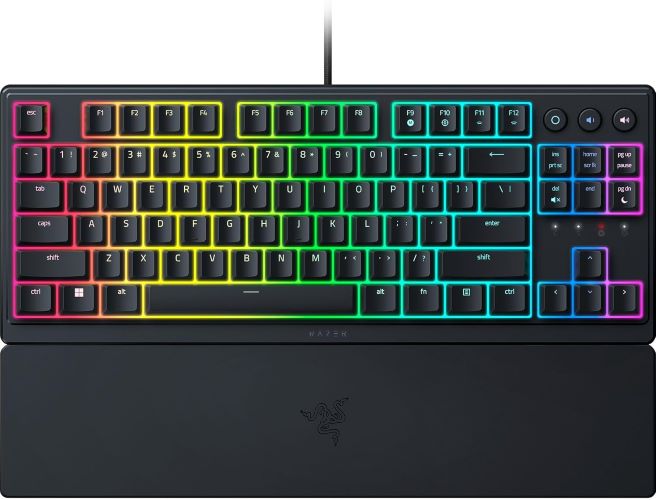
⚡ Quick Summary
- ✅ Best for: Budget gamers, casual users, and RGB lovers
- ❌ Not ideal for: Hardcore mechanical keyboard enthusiasts
- 💡 Standout feature: Mecha-membrane switches (hybrid feel)
- 🎯 Verdict: Great value for comfort + aesthetics
👉 Check price or see full features if you want a stylish, comfortable gaming keyboard under a mid-range budget.
🧩 Design & Build Quality
The first thing you’ll notice is how slim and modern this keyboard looks.
Key Highlights:
- Compact Tenkeyless (TKL) layout (no numpad)
- Ultra-slim profile for a cleaner desk setup
- Durable plastic body with solid construction
The TKL design is especially useful if you:
- Need more mouse space for FPS games
- Prefer a minimal desk setup
- Travel or move your keyboard often
👉 If you’re upgrading from a full-size keyboard, check our guide on “best TKL keyboards for gaming setups”.
Must Read : Best Philips 24 Inch Monitor in 2026 – Full HD, Affordable & Reliable
⌨️ Low-Profile Keys: Comfort for Long Sessions
One of the biggest selling points is its low-profile key design.
Why it matters:
- Reduces wrist strain
- Improves typing speed
- Feels natural for long hours
Unlike bulky mechanical keyboards, this one lets your hands rest more naturally.
💡 Perfect for:
- Students
- Office + gaming hybrid use
- Long coding or typing sessions
🔧 Mecha-Membrane Switches: Best of Both Worlds?
This is where things get interesting.
What are Mecha-Membrane Switches?
They combine:
- 🟢 Soft feel of membrane keyboards
- 🔵 Clicky feedback of mechanical switches
Real-World Experience:
- Not as loud as mechanical keyboards
- More satisfying than standard membrane
- Slightly “cushioned” typing feel
Who will love it:
- Casual gamers
- People who want quieter keyboards
- Users transitioning from laptop keyboards
Who might skip it:
- Hardcore mechanical keyboard fans
- Competitive esports players
Must Read : Best Android Apps for Productivity in 2026 (Work Smarter Daily)
🌈 8-Zone RGB Lighting (Razer Chroma)
RGB lighting is a big deal for gamers—and Razer delivers here.
Features:
- 16.8 million colors
- 8 customizable lighting zones
- Sync with supported games
What’s Good:
- Bright and vibrant
- Easy customization via software
- Adds serious aesthetic value
Limitation:
- Not per-key RGB (zone-based only)
👉 Still, for this price range, it’s a solid win.
🎵 Dedicated Media Keys (Backlit)
A small feature that makes a big difference.
You get:
- Play / Pause
- Volume control
- Brightness adjustment
All are backlit, so you can use them even in the dark.
💡 Great for:
- Streamers
- Music lovers
- Multitasking setups
🛋️ Magnetic Wrist Rest: Underrated Comfort
The included soft-touch magnetic wrist rest is surprisingly good.
Why it stands out:
- Snaps easily into place
- Comfortable for long sessions
- Reduces wrist fatigue
Many keyboards skip this or charge extra—so it’s a nice bonus.
💧 Spill Resistance & Durability
Accidental spills happen.
Luckily, this keyboard is spill-resistant, giving you peace of mind.
Plus:
- UV-coated keycaps resist fading
- Built for long-term use
🎯 Razer Snap Tap Feature (Advanced Input Control)
This feature works through Razer software.
What it does:
- Prioritizes the latest key input
- Improves movement precision in games
Example:
In FPS games, switching directions feels more responsive.
💡 Especially useful for:
- Competitive gaming
- Fast-paced titles like FPS or MOBA
📊 Pros and Cons
| Pros ✅ | Cons ❌ |
|---|---|
| Comfortable low-profile design | Not true mechanical switches |
| Quiet typing experience | No per-key RGB |
| Stylish RGB lighting | Limited customization zones |
| Includes wrist rest | Not ideal for hardcore gamers |
| Dedicated media keys | Software required for full features |
⚖️ Comparison: Ornata V3 TKL vs Alternatives
| Feature | Ornata V3 TKL | Mechanical Keyboard | Basic Membrane |
|---|---|---|---|
| Typing Feel | Hybrid | Clicky | Soft |
| Noise Level | Medium-Low | Loud | Quiet |
| RGB | 8-Zone | Per-key | Limited |
| Comfort | High | Medium | Medium |
| Price | Mid-range | High | Low |
Must Read : I Tried Mondly for 30 Days — Honest Review & Results
🎮 Real-World Use Cases
1. Casual Gaming
Perfect balance of performance and comfort.
2. Work + Gaming Setup
Low-profile keys reduce fatigue during long work hours.
3. Budget RGB Setup
Adds a premium look without overspending.
4. Students & Beginners
Easy to use, comfortable, and stylish.
🛒 Buying Guide: Should You Buy It?
Buy This If:
- You want a budget-friendly RGB gaming keyboard
- You prefer quiet typing
- You need comfort for long sessions
Skip This If:
- You want true mechanical switches
- You need pro-level gaming performance
- You prefer full-size keyboards with numpad
❓ FAQs (People Also Ask)
1. Is Razer Ornata V3 TKL good for gaming?
Yes, it’s great for casual and mid-level gaming, especially if you prefer quieter keyboards.
2. Are mecha-membrane switches good?
They offer a balanced experience—better than membrane, but not as sharp as mechanical switches.
3. Does it have per-key RGB?
No, it uses 8-zone RGB lighting instead of per-key customization.
4. Is it good for typing?
Yes, the low-profile keys make it comfortable for long typing sessions.
5. Is the wrist rest detachable?
Yes, it’s magnetic and can be easily attached or removed.
6. Does it work without software?
Yes, but advanced features like RGB customization require software.
7. Is it worth the price?
For its features and comfort, it offers excellent value in its price range.
🏁 Final Verdict: Should You Buy It?
The Razer Ornata V3 TKL hits a sweet spot.
It’s not trying to compete with premium mechanical keyboards—and that’s a good thing.
Instead, it focuses on:
- Comfort
- Style
- Practical features
And it delivers well on all three.
⭐ Final Rating: 8.5/10
👉 Recommended for:
- Budget gamers
- Students
- Everyday users who want RGB + comfort
👉 Not ideal for:
- Competitive esports players
🔗 Final CTA
If you’re looking for a comfortable, stylish, and affordable gaming keyboard, this one is definitely worth considering.