


If you enjoy FPS games like Valorant, CS2, or Call of Duty—or simply play casual games after work—you’ve probably asked yourself:
Is a budget gaming mouse actually good enough for competitive play?
The good news is yes.
Modern budget gaming mice have improved dramatically, and some now offer precision, comfort, and durability that rival much more expensive models.
In this guide, we’ll explore the best budget gaming mouse for FPS and casual gamers, focusing on real performance, comfort, and value—not marketing hype.

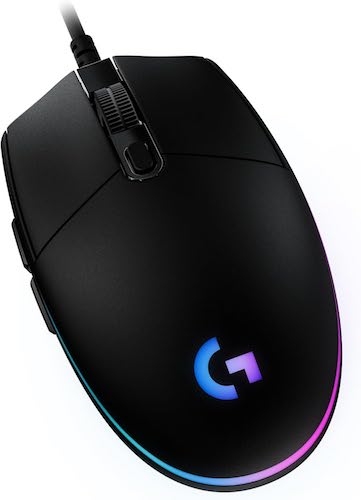
⚡ Quick Summary
- Best Overall Budget Gaming Mouse: Logitech G203 Lightsync
- Best For: FPS gaming, casual gaming, students, and budget setups
- Key Features:
- Accurate 8,000 DPI optical sensor
- Lightweight and comfortable design
- Reliable mechanical clicks
- Customizable RGB and DPI profiles
- Value Verdict: Excellent performance for the price
If you want a dependable gaming mouse without overspending, this is one of the safest choices available.
Must Read : Tablet For Students – Samsung Galaxy Tab A9+ Plus Review
🖱️ What Makes a Good Budget Gaming Mouse for FPS?
FPS games demand precision. A flashy design means nothing if your mouse can’t track properly.
Key Features to Look For
- Accurate optical sensor for consistent aim
- No acceleration or smoothing for true movement tracking
- Comfortable shape for long gaming sessions
- Responsive buttons with good tactile feedback
- Custom DPI settings for different play styles
Many cheap gaming mice cut corners in these areas. That’s why choosing a proven model matters.
🏆 Best Budget Gaming Mouse Overall: Logitech G203 Lightsync
The Logitech G203 Lightsync consistently ranks as one of the best budget gaming mice for FPS and casual gamers—and for good reason.
It focuses on what actually improves gameplay: accuracy, comfort, and reliability.
🔍 Logitech G203 Lightsync Specifications
| Feature | Details |
|---|---|
| Sensor | 8,000 DPI Optical |
| Buttons | 6 Programmable Buttons |
| RGB | LIGHTSYNC RGB (16.8 million colors) |
| Weight | Lightweight design |
| Connectivity | Wired USB Type-A |
| Compatibility | Windows, macOS, PC, Laptop |
| Cable Length | 6.89 ft (2.1 m) |
🎮 Performance in FPS and Casual Games
🎯 Sensor Accuracy and DPI Control
The G203 uses an 8,000 DPI optical sensor designed for gaming-grade precision.
There’s no artificial smoothing or acceleration, which means:
- More accurate flick shots
- Better tracking in fast-paced FPS games
- Consistent aim during intense moments
Most FPS players use DPI between 400 and 1600, and the G203 performs flawlessly in that range.
🖱️ Click Feel and Button Responsiveness
Logitech equips the G203 with metal spring–tensioned mechanical buttons.
In real-world use, this results in:
- Crisp, satisfying clicks
- Fast response time
- Long-lasting durability
For FPS games, where reaction time matters, this makes a noticeable difference.
Must Read : Best WhatsApp Privacy Settings to Hide Online Status
🌈 LIGHTSYNC RGB That Actually Adds Value
RGB lighting is often overdone on budget mice, but the G203 keeps it tasteful and functional.
Using Logitech G HUB, you can:
- Choose from 16.8 million colors
- Create subtle lighting effects
- Sync RGB with other Logitech devices
- Save profiles to the mouse’s on-board memory
It looks clean, not cheap—and you can turn it off completely if you prefer a minimal setup.
✋ Comfort and Design for Long Sessions
The G203 features a classic symmetrical shape, making it comfortable for many users.
Best Grip Styles
- Claw grip
- Fingertip grip
- Small to medium hand sizes
Its lightweight build helps reduce wrist fatigue, which is especially important during long FPS sessions or extended casual play.
🔧 Customization and Software Experience
Logitech G HUB is beginner-friendly yet powerful.
Customization Options
- DPI levels (up to 5 profiles)
- Button remapping
- RGB lighting effects
- Sensitivity switching via DPI button
Once configured, your settings are stored directly on the mouse, so you don’t need to reconfigure on another PC.
✅ Pros and ❌ Cons
Pros
- Excellent sensor accuracy for FPS games
- Affordable price with premium feel
- Lightweight and comfortable design
- Customizable RGB and DPI profiles
- Reliable Logitech build quality
Cons
- Cable is not braided
- Not ideal for very large hands
- No wireless option at this price point
Must Read : How to Recover Deleted WhatsApp Messages Without Backup
🆚 Logitech G203 vs Typical Budget Gaming Mouse
| Feature | Logitech G203 | Typical Cheap Gaming Mouse |
|---|---|---|
| Sensor Accuracy | Excellent | Inconsistent |
| DPI Customization | Yes | Limited |
| Build Quality | High | Average |
| Software Support | Strong | Weak or none |
| RGB Control | Fully customizable | Basic |
This comparison shows why the G203 remains a top recommendation in the budget category.
👥 Who Should Buy the Logitech G203?
This mouse is ideal if you are:
- An FPS gamer on a budget
- A casual gamer upgrading from a standard mouse
- A student building a low-cost gaming setup
- Someone who prefers performance over gimmicks
If you want wireless or ultra-light esports gear, you’ll need a higher budget. For most gamers, this mouse delivers everything needed.
🛒 Buying Guide: Things to Consider Before Buying
Before choosing a budget gaming mouse, consider:
1. Game Type
FPS games benefit most from accurate sensors and low latency.
2. Wired vs Wireless
Wired mice usually offer better value and consistent performance.
3. Hand Size and Grip
Comfort plays a huge role in long gaming sessions.
4. Software Support
Good software adds long-term value and customization.
🔗 Internal Linking Suggestions
- Best budget gaming keyboard for FPS
- How to choose the right mouse DPI for gaming
- Best gaming accessories for low-end PCs
(Use these as internal links to boost SEO and engagement.)
❓ Frequently Asked Questions
Is the Logitech G203 good for FPS games?
Yes, its accurate sensor and low latency make it ideal for FPS gaming.
What DPI should I use for FPS?
Most players prefer 400–1600 DPI for better control and consistency.
Is this mouse good for casual gaming?
Absolutely. It works well for both casual and competitive gaming.
Does it work on Mac?
Yes, it supports both Windows and macOS.
Can I customize RGB lighting?
Yes, via Logitech G HUB software.
Does it have on-board memory?
Yes, you can save settings directly on the mouse.
Is the Logitech G203 durable?
Yes, it’s built for long-term use with high-quality components.
🏁 Final Verdict: Best Budget Gaming Mouse?
If you’re searching for the best budget gaming mouse for FPS and casual gamers, the Logitech G203 Lightsync is an excellent choice.
It offers:
- Reliable FPS performance
- Comfortable and lightweight design
- Customization usually found in more expensive mice
Without unnecessary hype or inflated pricing, it delivers real value.