


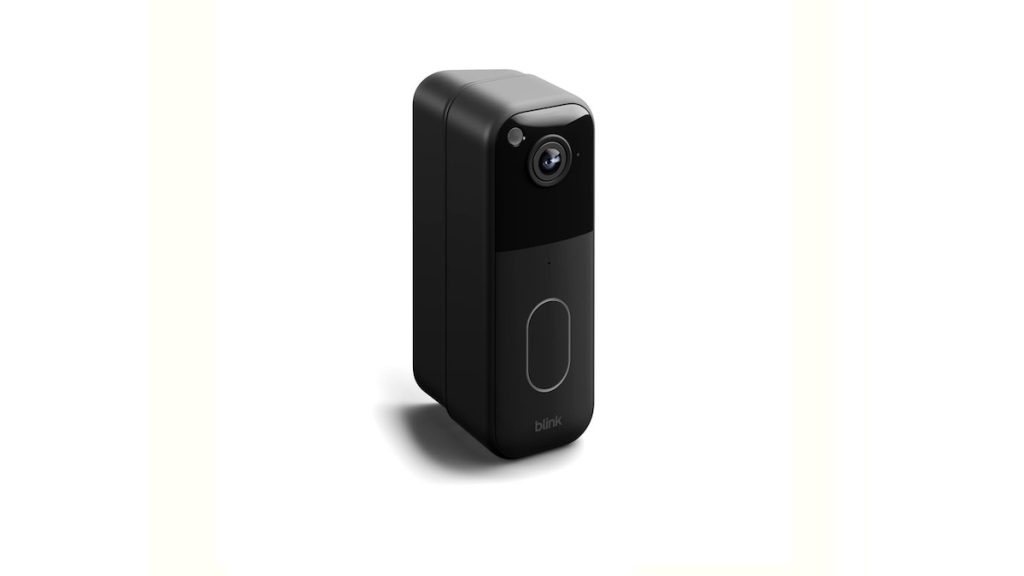
Homeowners want more than just convenience—they want security, visibility, and control. Video doorbells have become a key part of that, allowing people to monitor who’s at the door, speak to visitors remotely, and record motion events. But even the best video doorbell can underperform if it isn’t installed at the right angle. That’s where the All-New Blink Video Doorbell Wedge Mount – Black steps in.

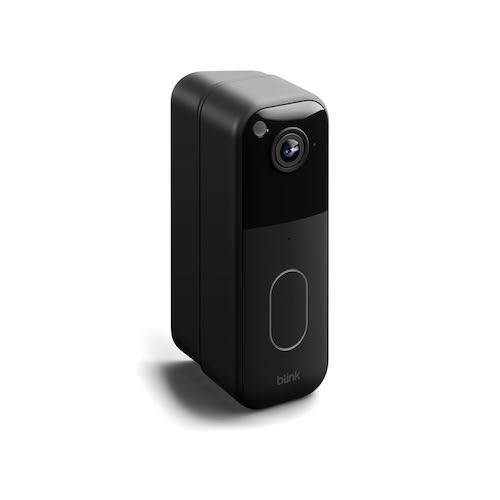
This simple yet ingenious accessory lets you fine-tune your camera’s view—either by tilting it up or down or turning it slightly left or right. The result? A better view of what really matters: faces, packages, and activity at your doorstep.
Why the Viewing Angle Matters
Mounting your doorbell camera sounds simple, but in practice, it’s often tricky. You might mount it perfectly centered, only to discover that it’s pointing too high and missing people’s faces, or too low, capturing mostly your welcome mat.
The right angle matters because it determines what your camera actually sees. Even a small misalignment can make the difference between clear footage and a missed detail.
Here’s why adjusting the angle is so important:
- Better Facial Recognition – You want your camera to focus on a visitor’s face, not their feet or the sky.
- Clear Package Monitoring – A downward tilt helps you see parcels and deliveries placed on the ground.
- Fewer Blind Spots – Adjusting vertically or horizontally ensures you’re not missing the edges of your porch or pathway.
- Reduced Glare and Sunlight Interference – Tilting can help minimize bright spots or shadows that distort your footage.
- Improved Motion Detection – Blink’s motion sensors work best when angled correctly toward the path of movement.
With the right accessories, you can achieve a balanced and complete view without having to re-drill holes or reposition your entire setup.
Meet the All-New Blink Wedge Mount – Black
The Blink Video Doorbell Wedge Mount – Black is designed specifically to enhance your doorbell’s field of vision. It’s a sleek, sturdy, and easy-to-install mounting accessory that lets you adjust your Blink Video Doorbell vertically—either upward or downward—to achieve the perfect viewing angle.
Key Features
- Vertical Adjustment: Tilts your Blink doorbell up or down, letting you correct high or low mounting positions.
- Perfect Fit: Compatible only with the second-generation Blink Video Doorbell, ensuring a secure, snug fit.
- All-Black Finish: Blends seamlessly with most doorbell units and dark-colored exteriors for a polished look.
- Complete Package: Comes with one wedge mount and four mounting screws—everything you need for installation.
- Durable Build: Designed to withstand outdoor conditions and maintain stability over time.
The wedge mount’s goal is simple: to make your Blink doorbell’s camera view exactly what you want it to see.
Must Read : Jackery HomePower 3000 Portable Power Station Review
The Perfect Companion: The Blink Corner Mount
While the wedge mount handles vertical tilt (up and down), the Blink Corner Mount helps you adjust the doorbell horizontally—left or right. It’s perfect for houses where the door is recessed or located at an angle that doesn’t face directly outward.
Corner Mount Highlights
- Horizontal Adjustment: Allows your doorbell to angle left or right, helping you cover entryways that aren’t straight-on.
- Tailored for Blink Video Doorbell (2nd Gen): Like the wedge, it’s designed specifically for compatibility and secure fitting.
- Sleek Black Design: Matches the doorbell and other Blink accessories for a uniform appearance.
- Box Contents: Includes one corner mount and two mounting screws for easy installation.
Together, the wedge and corner mounts offer complete control over your doorbell’s field of vision—both vertically and horizontally.
When to Use the Wedge Mount
The wedge mount is most useful when your doorbell needs a vertical adjustment. Common scenarios include:
- Your doorbell is mounted too high – You only see the tops of people’s heads or the background sky. Tilting downward fixes this.
- Your doorbell is mounted too low – You mostly see people’s torsos or packages, but not their faces. Tilting upward helps.
- Uneven surfaces – Some walls or trims tilt slightly. The wedge mount helps compensate for those irregularities.
- Glare issues – Adjusting vertically can help manage reflections from sunlight or porch lights.
The wedge mount’s subtle angle is usually all you need to transform your video quality from “average” to “excellent.”
When to Use the Corner Mount
The corner mount, on the other hand, is for horizontal adjustments. Use it if your front door is at an angle, or if your doorbell’s position makes it difficult to capture your main entryway.
Typical examples:
- Your door is set back in an alcove – A side tilt helps the camera see out toward the street or pathway.
- Your doorbell is on the frame or side wall – Turning it inward provides a clearer shot of visitors.
- You want a wider security view – Angling to one side can help monitor deliveries or foot traffic more effectively.
You can also combine both mounts—one wedge and one corner—for ultimate customization if your setup requires it.
What’s in the Box?
Blink keeps things simple. Each accessory comes with exactly what you need:
For the Wedge Mount:
- 1 × Wedge Mount (Black)
- 4 × Mounting Screws
For the Corner Mount:
- 1 × Corner Mount (Black)
- 2 × Mounting Screws
No complicated tools or additional parts required—just basic hand tools and a few minutes of your time.
Must Read : INSIGNIA 24” F20 Series Smart Fire TV Review
Step-by-Step Installation Guide
Installing the Blink Wedge or Corner Mount is easy, even for beginners. Here’s how to do it:
Step 1: Choose Your Mount Type
Decide whether you need vertical (wedge) or horizontal (corner) adjustment—or both.
Step 2: Select the Mounting Location
Position your doorbell roughly 40 to 48 inches above the ground. This height gives you the best view of both faces and packages.
Step 3: Mark the Drill Points
Use a pencil to mark where the screws will go. Many Blink packages include a paper template that makes this process foolproof.
Step 4: Drill Holes and Add Anchors (if needed)
For brick, stucco, or concrete walls, use wall anchors to ensure a solid hold.
Step 5: Attach the Mount
Align the wedge or corner mount with your markings and secure it with the provided screws.
Step 6: Add the Doorbell Back Plate
Attach the Blink Video Doorbell back plate onto the mount, making sure it’s firmly connected.
Step 7: Connect Wires (Optional)
If you’re wiring your doorbell to an existing chime, thread the wires through the mount opening and connect them securely.
Step 8: Mount the Doorbell
Snap your Blink Video Doorbell into the bracket until it clicks into place.
Step 9: Test and Adjust
Open the Blink app and check the live view. If your angle isn’t perfect, loosen the screws slightly, adjust the mount, and retighten.
Pro Tips for the Best Results
Getting your angle perfect can take a few tries. Here are some expert tips to help you along:
- Test Before Tightening: Temporarily hold the doorbell in place and use the app’s live view to preview the camera angle.
- Avoid Over-Tightening Screws: Tightening too much can warp the mount or cause gaps.
- Check for Gaps or Tilt Issues: Small gaps between the doorbell and mount are fine as long as the unit sits securely.
- Use Anchors for Weak Walls: For drywall or siding, anchors prevent the screws from loosening over time.
- Combine Mounts if Needed: Stacking wedge and corner mounts gives you both vertical and horizontal correction.
- Account for Lighting: Aim the doorbell slightly downward if sunlight or porch lights are causing glare.
Real-World Benefits
The difference a few degrees can make is remarkable. Here’s how users benefit after installing the Blink Wedge Mount:
- Sharper Video Footage – The camera captures faces at eye level instead of from awkward angles.
- Clear Package View – Deliveries left at the door are fully visible.
- Improved Motion Alerts – Sensors detect movement more accurately when aimed properly.
- Aesthetic Integration – The black mount looks professional and complements most door frames.
- Quick Adjustments – If you move houses or repaint, reinstalling or readjusting takes only minutes.
For a modest investment, this accessory adds precision and performance to your home security system.
Durability and Design
Blink designed the Wedge Mount with durability and simplicity in mind. The black finish resists fading and blends in well with most exteriors, while the high-quality materials ensure it can withstand daily weather exposure.
The mount’s compact profile keeps your doorbell close to the wall, preserving a sleek, low-profile look. It’s engineered to hold securely even with frequent button presses or environmental vibrations.
Common Mistakes to Avoid
Even though installation is straightforward, here are some mistakes to watch out for:
- Mounting Too High: A doorbell placed above eye level often captures the top of heads instead of faces.
- Ignoring Sunlight Direction: Direct sun glare can wash out your video; adjust tilt accordingly.
- Not Testing Before Final Install: Always check live view in the Blink app before tightening everything down.
- Using Wrong Screws: Stick with the provided hardware—improper screws can strip or damage the mount.
- Skipping Anchors on Soft Walls: Without anchors, your doorbell might loosen over time.
Avoiding these pitfalls ensures a cleaner, more effective setup.
Wedge vs. Corner: Choosing the Right One
Here’s a quick comparison to help you decide which mount to use:
| Feature | Wedge Mount | Corner Mount |
|---|---|---|
| Adjustment Type | Vertical (Up/Down) | Horizontal (Left/Right) |
| Included Screws | 4 | 2 |
| Use Case | Doorbell mounted too high or low | Doorbell facing sideways or off-center |
| Best For | Adjusting camera tilt | Adjusting camera rotation |
| Compatibility | Blink Video Doorbell (2nd Gen) | Blink Video Doorbell (2nd Gen) |
If your doorbell’s view looks “too high,” go with the wedge.
If it looks “too far to one side,” choose the corner.
And if both apply, consider using both together for total angle control.
Maintenance and Longevity
Once installed, the wedge mount requires virtually no maintenance. Still, a few simple practices can keep it looking and working great:
- Clean Occasionally: Wipe off dust, cobwebs, or pollen that may collect.
- Check Tightness: Every few months, ensure screws are still snug.
- Inspect After Storms: After heavy weather, confirm the mount hasn’t shifted.
- Avoid Harsh Chemicals: Clean with mild soap and water to protect the finish.
With minimal care, your mount should last as long as your Blink Video Doorbell itself.
Enhancing Home Security with Proper Mounting
A well-mounted doorbell isn’t just about aesthetics—it’s about security. A misaligned camera can miss vital details like faces, license plates, or package thefts. Adjusting your Blink Video Doorbell with the wedge or corner mount ensures the footage you capture is useful, accurate, and detailed.
Moreover, by improving your camera’s angle, you can:
- Reduce false motion alerts
- Capture more reliable video evidence
- Maintain privacy by limiting unnecessary background views
- Improve night vision performance by reducing glare from porch lights
The wedge mount may be small, but it plays a huge role in maximizing your home’s security system.
Final Thoughts
The All-New Blink Video Doorbell Wedge Mount – Black is a small accessory with a big impact. Whether you’re fine-tuning your doorbell’s vertical alignment or pairing it with the corner mount for horizontal adjustment, these mounts let you capture exactly what you want—nothing more, nothing less.
Its easy installation, sleek look, and compatibility with the second-generation Blink Video Doorbell make it a must-have addition for anyone serious about home security and clear footage.
With just a few minutes of setup, you can transform your camera’s perspective, eliminate blind spots, and enjoy peace of mind knowing that your Blink doorbell is always watching the right spot.
In short:
The All-New Blink Video Doorbell Wedge Mount – Black helps you angle your doorbell vertically (up or down), while the optional corner mount lets you adjust it horizontally (left or right). Both are compatible with the second-generation Blink Video Doorbell, and each box includes the mount and its necessary screws.
A simple, elegant, and powerful way to get a better view—and a safer home.